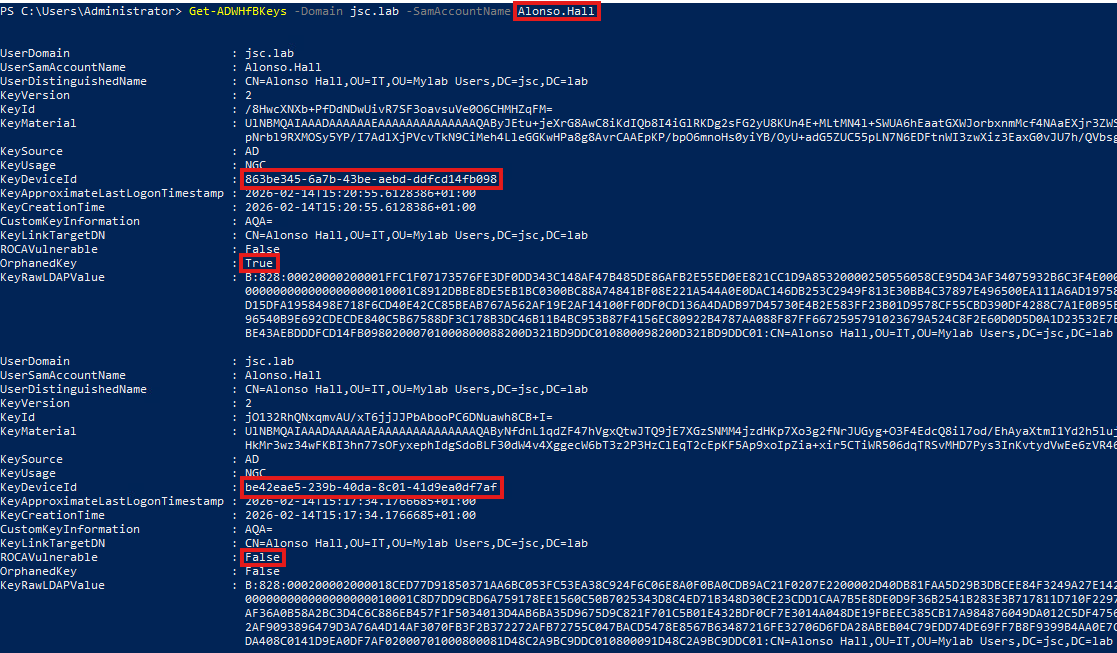
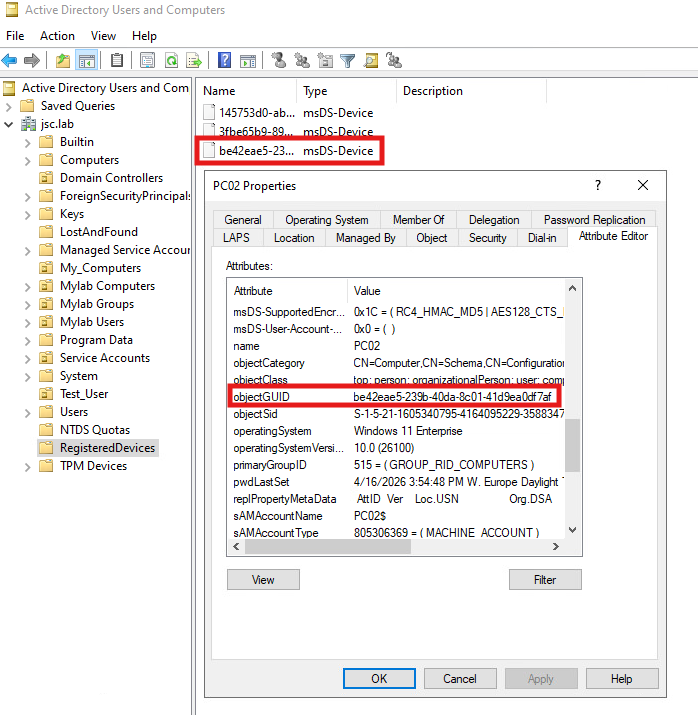
Unfortunately, WHfBTools can only be used to view the KCL attribute for user objects. For computer objects the DSInternals PowerShell module can be used. Note that DSInternals can be flagged as malicious as it also can be used in an abusive way. The following snippet can be used to find all computer objects in Active Directory that have NGC in the “Usage” field and a “DeviceId” field that is not empty:
Get-ADComputer -Filter 'msDS-KeyCredentialLink -like "*"' -Properties msDS-KeyCredentialLink | Select-Object -ExpandProperty msDS-KeyCredentialLink | Get-ADKeyCredential | Where-Object Usage -eq ‘NGC’ -and -not [string]::IsNullOrWhiteSpace($_.DeviceId)
Pass the cert
For detecting pass-the-cert attacks, different kinds of Windows security events can be monitored. ADCS-related events for issuing certificates, Kerberos authentication using PKINIT and modification of the key credential link attribute should be monitored and corelated.
Pass the cert after shadow-credential attack
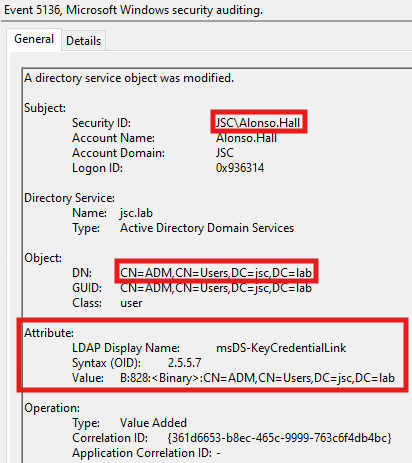
When PKINIT is used to authenticate, the Windows security event 4678 (“A Kerberos authentication ticket (TGT) was requested”) can be seen, indicating that a certificate was used to authenticate. This can be corelated with the event 5136 (“A directory service object was modified”), when the KCL attribute of the entity, was modified. For parsing the information about the KCL attribute, the discussed tools WHfBTools and DSInternals can be used. If the parsing of the KCL attribute indicates that a shadow credential was set, the authentication using Kerberos PKINIT should be considered suspicious, too.
General signs for pass the cert
Activities related to certificate issuing when using AD CS in the environment should also be monitored. For the CA the relevant event is 4887 (“Certificate Services approved a certificate request and issued a certificate”), which appears on the CA and must be logged there. It can be looked for authentications via PKINIT for users and machines that never use PKINIT and especially if that request is made from a new or unexpected host. Additional signs are when WHfB is not used in the environment or no certificate service is used.
Alternative handling of NNR-based alerts
In the first blogpost, three alerts were discussed that can be evaded when tampering with NNR. These alerts belong to the attack techniques DCSync, ESC8 and the special case of pass the cert when it’s about domain controller machine accounts trying to receive a TGT.
All of these attacks had the same detection logic: Identifying if the source IP address from which the potential attack occurred is a domain controller in the case of DCSync or, in the case of ESC8 and pass the cert, the specific domain controller in whose context the request was made.
While showing that the primary methods using the three protocols (NetBIOS, DCE/RPC and RDP) used by DfI in version 2.2 can be evaded, a better approach would be to use something that’s out of the control of the attacker.
As explained, the secondary option in DfI uses the domain name service to resolve IP addresses to hostnames, but only as a fallback if the primary methods give unclear or no responses.
One approach would be to use this secondary option yourself. This would be possible when thinking of manual monitoring or searching for IoCs. The corresponding events to search for in the Windows events logs are:
- Pass the cert (domain controller): 4678
- ESC8: 4887
- DCSync: 4661 and 4662
The information obtained from these events can be used to tell from which source IP address the request originated and under which identity the operation was performed. Using DNS to do a reverse lookup from the IP address to the DNS name can reveal if the source IP address belongs to the machine under which identity the request for the resources was made.
Inspecting Defender for Identity combined with Defender for Endpoint
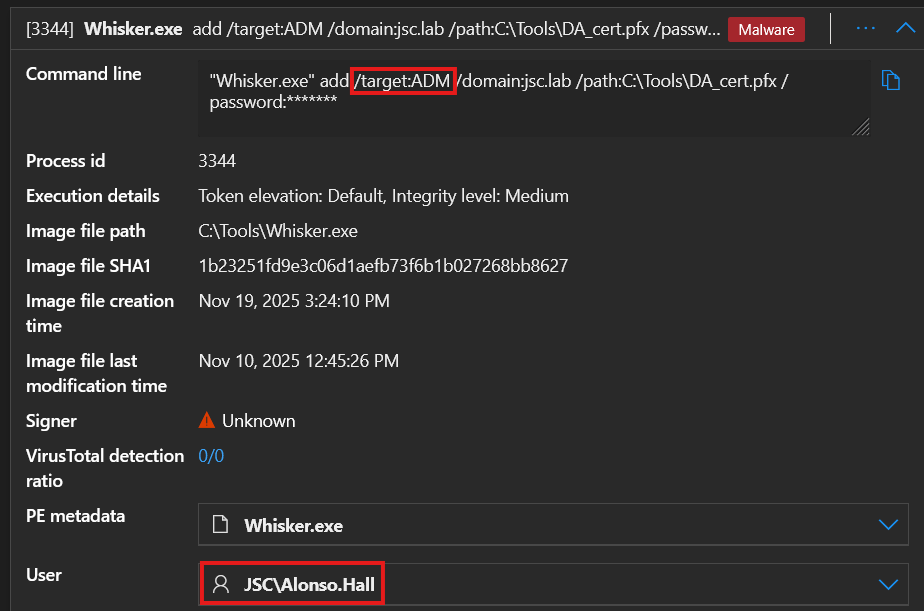
A detection weakness already discussed was about shadow credentials set to user objects, where the detection only happened when setting a shadow credential to the AD built-in administrator (S-1-5-<domain>-500), but not for other user objects. When combining Defender for Endpoint (DfE) with DfI, it’s possible to detect the setting of shadow credentials for user objects, which is not detected by using DfI only. But this is only possible if the attacker is caught at one endpoint, when DfE notices that a tool like Whisker or Pywhisker was used. Even though an advanced attack will most likely not be detected by DfE using an offensive tool, the behavior when combining the indicators from DfE with those from DfI is interesting.
When DfE notices the usage of Whisker, it raises the alert “An active ‘Whisz’ malware process was detected while executing”, showing the information about the execution on the command line and the user under whose identity this was done: