
Search

Version-Trouble in Mimikatz-Town

July 7, 2026

Version-Trouble in Mimikatz-Town

Introduction

It is common knowledge that for a long time there were issues when trying to use Mimikatz to dump credentials on newer Windows versions like 24H2. Recently, researchers have updated Mimikatz to make its credential dumping compatible with Windows 11 24H2 and 25H2. However, although this seems to be working fine most of the time, there are some cases in which even this updated version will crash. In this blog post, we will investigate the cause of this issue and present a way to fix it.

The issue

As mentioned in the introduction, Mimikatz’ credential dumping functionality will not work in certain cases. To be more specific, the problem occurs on earlier versions of Windows 11 24H2. In our case, the specific version of our Lab-VM was 26100.4061. You quickly get an idea of why that might be the case by looking at the source code of Pypykatz, a python-based reimplementation of Mimikatz. Pypykatz is a great project, as it has been maintained much more actively than Mimikatz and can therefore still be used for credential dumping, even on newer Windows systems where Mimikatz failed. Before going into details, however, we need to have a basic understanding of how Mimikatz dumps credentials.

Let’s say you have a logon session that is stored somewhere in the lsass.exe process and you want to find it. How Mimikatz accomplishes this is by searching LSASS’ virtual address space for a specific pattern. By doing so, it gets the address of that pattern, to which some offsets are then added and by that, you get the address of the LogonSessionList. This is an oversimplified and incomplete description, but for our purposes, it should give you enough of an idea of the general concept. If you’d like to read about this process in more depth, consider reading more details here and there.
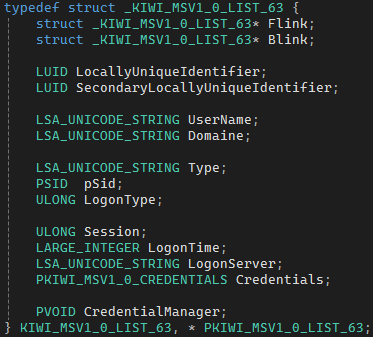
Now that Mimikatz can access the logon sessions, the question is how to interpret the data that is stored at the locations of those logon sessions. This is where Mimikatz’ KIWI_MSV1_0_LIST_XX structs come into play, as they define where each member of a logon session is stored, including the pointer to another struct that contains the user’s credentials. Figure 1 shows an example of such a struct.

Figure 1: KIWI_MSV1_0_LIST_65 struct, some members omitted for clarity [4]
Timm Weber

Consultant

Category
Date
Navigation

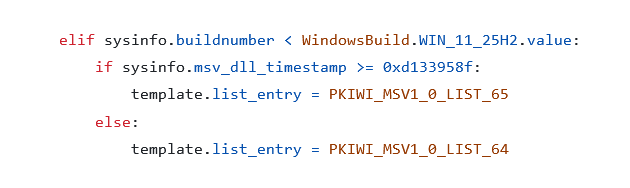
There are multiple things that may change between different Windows versions, like the pattern and the offsets that are added to the address where the pattern is found. Additionally, the layout of the struct may also change between Windows versions, which is one of the reasons that Mimikatz’ credential dumping has not been working on newer versions. Figure 2 shows how Pypykatz selects which KIWI_MSV-Struct it uses based on the Windows build, this specific case shows the branch for Windows 11 24H2. Mimikatz also selects different structs based on the Windows build, but was lacking the correct structs for newer versions until it was updated recently.

Figure 2: Selection of the logon session struct in Pypykatz [1]

In addition to the Windows build, Pypykatz uses the timestamp of the msv1_0.dll, the DLL for the MSV1_0authentication package that handles both local and domain logins, for all 24H2 builds to decide which struct-version it is going to use. This is because on older 24H2 systems, like our Lab-VM, the MSV1_0 DLL uses an older version of the struct, while newer 24H2 versions have an updated DLL that uses a new struct version.

So just copy that timestamp-selection part over to Mimikatz and the problem is solved? Not quite. If we take Pypykatz and try to use its credential dumping functionality on a newer 24H2 version, in our case 26100.4652, we see that we see nothing. Okay, not nothing, at least we can see an error message. Pypykatz fails in this specific case, even though Mimikatz does not. One might assume that this is because the timestamp Pypykatz uses in its check (0xd133958f) needs to be adjusted, since we do not know the exact timestamp after which MSV1_0 DLLs use the new struct version. The currently used value is simply an estimate, based on the timestamp of a DLL that is known to use the new struct version. But m. If we take the timestamp from the MSV1_0 DLL on our 26100.4652 system, which is 0x49b48d9c, and use it to replace the current value in Pypykatz, Pypykatz works again.

This is something that needs to be done repeatedly in the future: If there is a Windows system where Pypykatz crashes due to a wrong struct being selected because of the timestamp, this timestamp has to be adjusted so that for it and all timestamps above, the correct struct for that specific system will be chosen. But now at least all versions starting from revision 4652 (of a Windows version string, the last part is the revision: 10.0.19045.8037) should be working correctly, right?

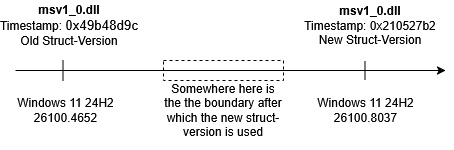
No, because that would be way too easy. Take revision 8037, for example. Its MSV1_0 DLL also uses the new struct, but its timestamp is and therefore smaller than the one of the DLL on the older revision. Figure 3 visualizes this problem.

Figure 3: Timeline of msv1_0.dll timestamps

But shouldn’t the DLL on the newer Windows version also be… well, newer? Yes, and it is, but the timestamp field in the DLL that Pypykatz uses for deciding which DLL is newer cannot be used for this purpose. The field that Pypykatz uses is the TimeDateStamp field in the COFF File Header of the PE file, which is a reasonable choice. But it seems like the MSV1_0 DLLs all get compiled using the /Brepro Linker flag, indicated by the presence of the debug type IMAGE_DEBUG_TYPE_REPRO in the PE’s debug directory. As Microsoft explains it, this guarantees reproducibility by setting all timestamp fields in the PE to a value based on the hash of the PE file content. This includes the TimeDateStamp field. Therefore, compiling the same code will always yield the exact same executable. If an actual timestamp was used, the executable would be different when compiled at a different time. But if there are no usable timestamps in the file anymore, how else could we differentiate between file versions?

The fix

Let‘s start by quickly going over things that we thought about but that were either impractical or simply did not work.

First of all, instead of using the specific file version or timestamp, we could also use the revision of the OS. That would work if we could be sure that the MSV1_0 DLL is not updated without the OS revision increasing. However, we would then face an issue with Mimikatz’ and Pypykatz’ ability to extract credentials from a memory dump of LSASS. Such a memory dump could be created via Task Manager, which results in a Minidump file. You can then take this file to another system and run Mimikatz or Pypykatz there instead of using them on the target system. But the SystemInfo stream of a Minidump only contains Windows’ major version, minor version and build, the revision is not included. Of course, you could simply look up the revision manually if you’re on the target machine creating a memory dump anyway, but we wanted our solution to work without any additional effort for the user.

Another solution we explored for that purpose was using similarity hashes, for example TLSH. The idea was that if we have a reference file of an MSV1_0 DLL that uses the new struct, other DLLs that are also using the new struct would have a lower distance to this file (or at least to one of its sections), while DLLs using the old struct would have a greater distance to it. However, this approach simply did not work. The distances between the DLLs as well as between their different sections did not correlate with whether or not the DLL was using a different struct version.

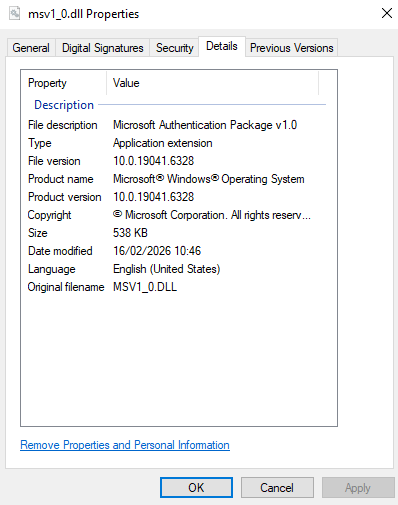
The solution that ultimately worked caught our eye when we were looking at a DLL’s properties in File Explorer, specifically the Details section.

Figure 4: Details section in the properties of msv1_0.dll

In Figure 4, you can see that there is the “File version” line, which contains the DLL’s major version, minor version, build and revision. The revision is what we want to use, because it allows us to clearly distinguish between DLL versions without relying on any timestamp. Although Microsoft could theoretically update the DLL without updating the file version, we think that it’s safe to assume that they have an interest in properly managing their file versions and will therefore increment the file version when they update the DLL.

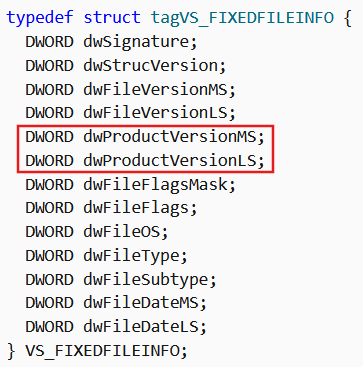
The last question remaining is where the information that is displayed in the properties window is stored. It is stored within the resource section of a PE-file (although not all PE-files necessarily contain this information). This is great news, as it allows us to also read this data if a Minidump file is used. Ultimately, this is how we get to the file version: We iterate over the Resource Directory Entries until we find an entry with ID 0x10, which is the ID for a version resource. From this entry, we can get to a VS_FIXEDFILEINFO struct, which contains major version, minor version, build and revision. We can then use the revision for file-version comparisons and to decide which struct we want to use.

Figure 5: Definition of the VS_FIXEDFILEINFO struct [2]. Marked in red are the fields that contain the file version.

We have submitted PRs that implement this fix to both Mimikatz and Pypykatz.

Defences against credential dumping

When trying to dump credentials on a new Windows 11 machine using a fully up-to-date Mimikatz, you may notice that it still does not work. The reason for this is that there are countermeasures in place that protect LSASS credentials from getting dumped: LSA protection and Credential Guard.

LSA protection

In Windows, there is a concept called “Protected Process Light” (PPL). The idea here is to protect sensitive processes from other processes that are not protected, even if they run with administrator privileges and SeDebugPrivilege. For example, normal processes cannot read the memory of protected processes. When set, the registry value RunAsPPL makes LSASS run as a PPL and therefore protects its memory from being read by processes that are not protected, like Mimikatz. It is not possible for Mimikatz to simply become a protected process in order to be able to read from LSASS again. That does not mean that there are no other ways of bypassing this countermeasure, though.

What you should consider first is making sure to enable RunAsPPL with UEFI Lock, which is done by setting the value in the registry to 2 instead of 1. This creates a UEFI variable for this setting so that it cannot be deactivated by simply changing the value in the registry. If you do not do this, an attacker could simply disable the feature in the registry, restart the machine and then run Mimikatz.

But even if you use UEFI Lock, you cannot fully rely on this countermeasure. There are multiple bypasses for it, with the main ones being “Bring Your Own Vulnerable Driver”(BYOVD) attacks. What this means is that an attacker loads a legitimate, signed driver into the kernel. That driver, however, has a vulnerability that the attacker can exploit in order to be able to execute code in the kernel. Once that is achieved, the attacker can take the EPROCESS structure of the LSASS process and remove the protection flag that makes the process a PPL. Afterwards, Mimikatz can read LSASS’ memory again.

Credential Guard

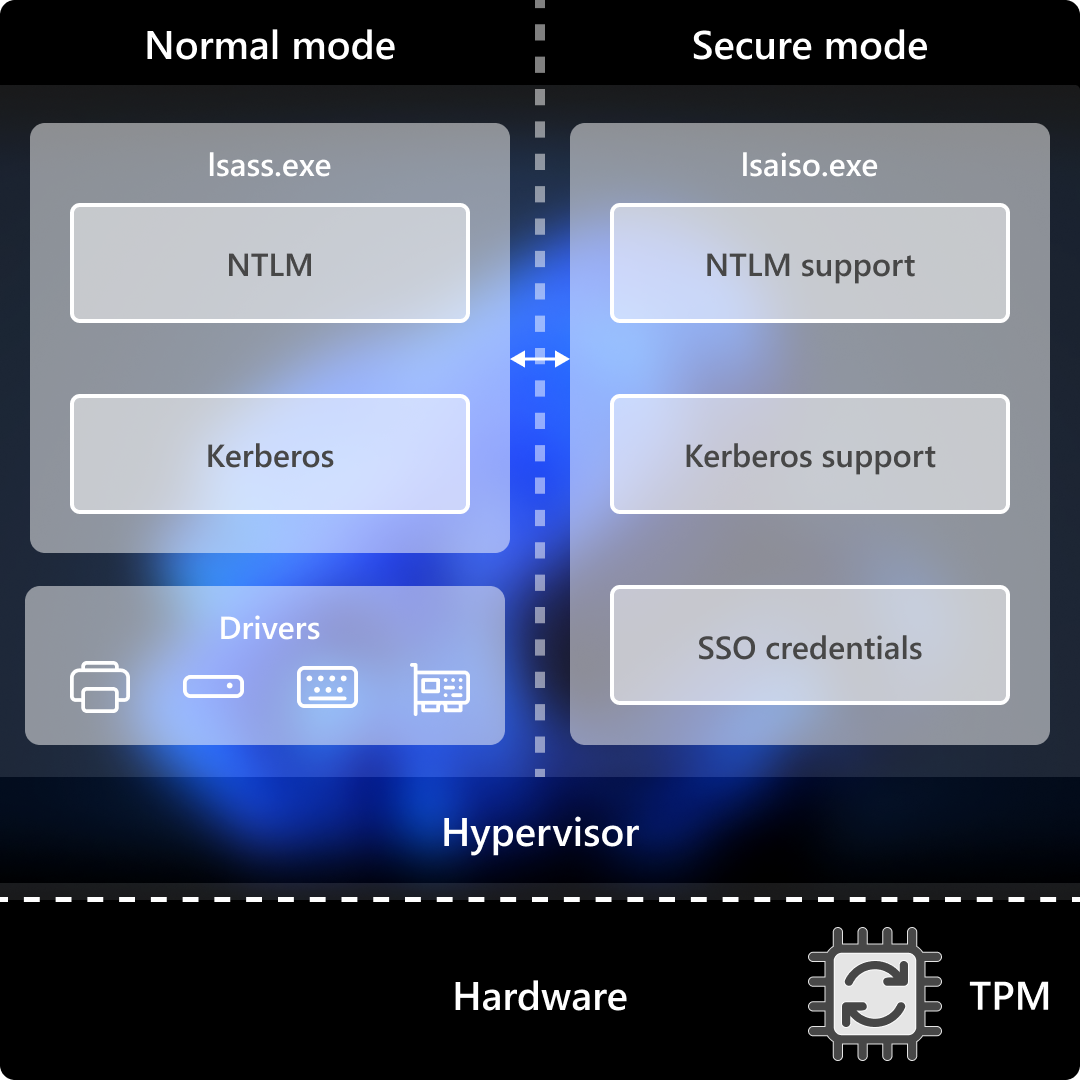
Credential Guard is a mechanism to prevent credential dumping by simply not storing the credentials in the lsass.exe process anymore. Instead, they are stored in lsaiso.exe, the isolated LSA process. Virtualization-Based Security (VBS) is used to protect that process not only from normal processes, but also from the whole operating system, including the kernel. Figure 6 shows that lsaiso.exe is running inside a “Secure Mode”. lsass.exe then only communicates to lsaiso.exe via remote procedure calls.

Figure 6: Architecture of Credential Guard [3].

But Credential Guard is not perfect either. First of all, as Microsoft documents, Credential Guard does not protect all credentials. Furthermore, when LSA Protection is not enabled, other bypasses may be possible. For example, there is a method in which the global variables g_IsCredGuardEnabled and g_fParameter_UseLogonCredential in the wdigest.dll are patched inside the LSASS process. This causes it to behave as if Credential Guard were not enabled, so that it stores the credentials of future authentications in plaintext. The credentials of previous authentications are still secure, though.

There is also the same issue that I already explained in the LSA Protection section: If you do not enable Credential Guard with UEFI Lock, an attacker is able to easily deactivate it. Also note that you need to enable Nested Virtualization for Credential Guard to run in Virtual Machines.

Conclusion

In my opinion, the main takeaway here is that “Mimikatz is not working” does not mean credential dumping is not possible anymore. The code can always be updated and adjusted to work on all Windows versions.

You should also not rely on any of the countermeasures alone, as they can be bypassed. There is not the one perfect solution to fixing the credential dumping problem. Make sure to enable both LSA Protection and Credential Guard with UEFI Lock, so that attackers cannot turn them off.

Finally, also keep in mind that even with both countermeasures, a good EDR is still necessary to fully protect your machine. It can not only detect the Mimikatz binary, but also, for example, the process of dumping credentials itself.

References

[1] https://github.com/skelsec/pypykatz/blob/main/pypykatz/lsadecryptor/packages/msv/templates.py#L65

[2] https://learn.microsoft.com/en-us/windows/win32/api/verrsrc/ns-verrsrc-vs_fixedfileinfo

[3] https://learn.microsoft.com/en-us/windows/security/identity-protection/credential-guard/how-it-works

 [4] https://github.com/gentilkiwi/mimikatz/blob/master/mimikatz/modules/sekurlsa/kuhl_m_sekurlsa_utils.h#L231

Further blog articles

AD Security

Microsoft Defender for Identity evasions in 2026 – Part II

June 17, 2026 – The first blogpost highlighted the detection capabilities and the resulting evasion options for Microsoft Defender for Identity (DfI). To complement the first part, the second part will present some alternative detection possibilities for the defensive side to improve visibility and security, as well as the upgrade from DfI version 2.2 to DfI version 3.0.

Author: Jakob Scholz

Mehr Infos »
Red Teaming

Windows Instrumen­tation Call­backs – Part 4

February 10, 2026 – In this blog post we will cover ICs from a more theoretical standpoint. Mainly restrictions on unsetting them, how set ICs can be detected and how new ones can be prevented from being set. Spoiler: this is not entirely possible.

Author: Lino Facco

Mehr Infos »
Reverse Engineering

Windows Instrumen­tation Call­backs – Part 3

January 28, 2026 – In this third part of the blog series, you will learn how to inject shellcode into processes with ICs as an execution mechanism without creating any new threads for your payload and without installing a vectored exception handler.

Author: Lino Facco

Mehr Infos »
Do you want to protect your systems? Feel free to get in touch with us.
Search
Search