We tested the behavior in our lab on NetScaler CPX 13.0-90.7 and 14.1-73.30:
| Client sends | Default NetScaler |
| No SNI (connect to the IP) | Handshake OK, certificate served, HTTP 200 |
| Wrong SNI (wrong.example) | Handshake OK, certificate served, HTTP 200 |
| Correct SNI, different Host header | HTTP 200 |
Table 1: Behavior of a default NetScaler SSL vserver
Step 0: Switch to SSL profiles
NetScaler configures SSL in one of two modes. In legacy mode, every setting lives on the vserver. In default SSL profile mode, the settings move into profiles that vservers reference, while certificate bindings and SSL policies stay on the vserver. The NetScaler documentation describes profiles as a single point of SSL configuration for all related endpoints, so we use profile mode throughout. We verified the full setup on 14.1-73.30.
The switch affects every SSL vserver and service on the appliance. Switching back can also be tricky, as there is no simple command to disable profile mode again. Back up your configuration, schedule a maintenance window and check the documentation for your release:
set ssl parameter -defaultProfile ENABLED
Until you assign a custom profile, every SSL vserver falls back to the built-in
ns_default_ssl_profile_frontend,
which still enables TLS 1.0/1.1 and disables TLS 1.3.
Step 1: Bind certificates as SNI certificates only
The idea, as described by Johannes Norz [6], is simple: if the vserver has no default certificate, a client without a matching SNI gets nothing. The default certificate is any certificate bound to the vserver without -SNICert. In production, that is usually your gateway certificate, such as gw-rsa and gw-ec in our lab. If someone bound the self-signed ns-server-certificate for testing, it counts as well, so unbind every non-SNI certificate, not just the ones in our example. The files are located in /nsconfig/ssl/; the vserver binding decides which one is served.
All commands in this post use placeholder values: replace gateway.example.com, X.X.X.X, vs_tls and the certificate names gw-rsa/gw-ec with your own.
Create a front-end profile with SNI enforcement, assign it to the vserver and rebind the certificates with -SNICert:
# Frontend profile: SNI on, unknown SNI refused, Host header must match the SNI
add ssl profile sslp_fe_hardened -sslProfileType FrontEnd
set ssl profile sslp_fe_hardened -SNIEnable ENABLED -allowUnknownSNI DISABLED
set ssl profile sslp_fe_hardened -SNIHTTPHostMatch STRICT
set ssl profile sslp_fe_hardened -dropReqWithNoHostHeader YES

# Vserver: reference the profile, bind certificates as SNI certificates only
set    ssl vserver vs_tls -sslProfile sslp_fe_hardened
unbind ssl vserver vs_tls -certkeyName gw-rsa
unbind ssl vserver vs_tls -certkeyName gw-ec
bind   ssl vserver vs_tls -certkeyName gw-rsa -SNICert
bind   ssl vserver vs_tls -certkeyName gw-ec  -SNICert
RSA and ECDSA certificates can be bound side by side; NetScaler picks one per negotiated cipher.
The certificate binding is the control that does the SNI magic. But be aware: in our tests, a single non-SNI certificate bound next to the SNI certificates was sufficient: clients without SNI received it and got an HTTP 200 response, regardless of –allowUnknownSNI DISABLED or –defaultSni. We still set -allowUnknownSNI DISABLED as defense in depth. Check every Internet-facing vserver with show ssl vserver vs_tls: each certificate line must read Server Certificate for SNI.
-SNIHTTPHostMatch STRICT rejects requests whose Host header differs from the SNI with HTTP 400, even for another name on the same certificate (the default, CERT, allows other SANs). -dropReqWithNoHostHeader YES rejects HTTP/1.0 requests without a Host header.
With Step 1 alone, a connection without SNI fails with TLS alert 40 (handshake_failure) and a wrong SNI with alert 112 (unrecognized_name). No certificate leaves the appliance, so the hostname stays hidden and direct connections to the IP address are refused. For most setups, that already does the job.
Side note: legacy SSL mode. Can’t switch to profile mode yet? The same protection works in legacy mode, with SNI enabled directly on the vserver. Certificate bindings and the ClientHello policy are identical, and in our tests a Host header that did not match the SNI was still rejected with HTTP 400.
set    ssl vserver vs_tls -SNIEnable ENABLED
unbind ssl vserver vs_tls -certkeyName gw-rsa
unbind ssl vserver vs_tls -certkeyName gw-ec
bind   ssl vserver vs_tls -certkeyName gw-rsa -SNICert
bind   ssl vserver vs_tls -certkeyName gw-ec  -SNICert
Once profile mode is enabled, these vserver commands are refused (“Use set ssl profile”).
Step 2: Reset everything else at the ClientHello (optional)
Step 1 hides the hostname, but the TLS alerts still tell a scanner “TLS service with SNI enforcement here”. That is a fingerprint, and automated tooling may start guessing hostnames. We can remove it.
An SSL policy evaluated at the ClientHello can answer with a plain TCP reset instead. A port scanner still sees the port as open, but no TLS handshake ever completes, so there is nothing to identify it as a NetScaler. In profile mode, SSL policies are still bound to the vserver:
add ssl policy pol_sni_reset -rule "CLIENT.SSL.CLIENT_HELLO.SNI.SET_TEXT_MODE(IGNORECASE).EQ(\"gateway.example.com\").NOT" -action RESET
bind ssl vserver vs_tls -policyName pol_sni_reset -priority 10 -type CLIENTHELLO_REQ
To allow more than one hostname, chain them with .OR(…) or use a pattern set instead of the single-host rule:
add policy patset ps_allowed_sni
bind policy patset ps_allowed_sni gateway.example.com
bind policy patset ps_allowed_sni gateway2.example.com
add ssl policy pol_sni_reset -rule "CLIENT.SSL.CLIENT_HELLO.SNI.SET_TEXT_MODE(IGNORECASE).EQUALS_ANY(\"ps_allowed_sni\").NOT" -action RESET
Each new hostname needs two changes: bind its certificate with -SNICert and add the name to the pol_sni_reset rule or pattern set. Otherwise, clients get a TCP reset. Keep Step 1 in place, too. In our lab, an IP address sent as SNI slipped past the second policy, but the SNI-only certificate binding still rejected it.
| Client sends | Default | Step 1 | Step 1 + 2 |
| No SNI (connect to IP) | cert + 200 | alert 40, no cert | TCP RST |
| Correct SNI | 200 | 200 | 200 |
| Correct SNI, uppercase | 200 | 200 | 200 |
| Wrong SNI | cert + 200 | alert 112 | TCP RST |
| Subdomain (sub.gateway.example.com) | cert + 200 | alert 112 | TCP RST |
| IP literal as SNI | cert + 200 | alert 112 | alert 112 |
| Correct SNI, other Host header | 200 | 400 | 400 |
Table 2: SNI test matrix, identical on CPX 13.0 and 14.1 and in profile mode on 14.1, plain numbers in cells mean HTTP status codes. Alert + <number> mean TLS errors, which in this case are good.
Putting it all together
The SNI hardening is meant as an addition to your existing TLS configuration, not a replacement for it. For protocols, ciphers and renegotiation, we recommend following Citrix’s official guide Networking SSL/TLS Best Practices [8]. That guide does not configure SNI enforcement, so add Steps 1 and 2 on top of it.
The block below combines both: TLS settings aligned with Citrix’s guide, plus the SNI hardening from this post. Replace vs_tls, gw-rsa/gw-ec and gateway.example.com with your own names:
# Global: switch to default SSL profile mode (one-way, affects all SSL vservers, see Step 0)
set ssl parameter -defaultProfile ENABLED
# Cipher group: TLS 1.3 + ECDHE/AEAD only
add ssl cipher CG_MODERN
bind ssl cipher CG_MODERN -cipherName TLS1.3-AES256-GCM-SHA384
bind ssl cipher CG_MODERN -cipherName TLS1.3-CHACHA20-POLY1305-SHA256
bind ssl cipher CG_MODERN -cipherName TLS1.3-AES128-GCM-SHA256
bind ssl cipher CG_MODERN -cipherName TLS1.2-ECDHE-ECDSA-AES256-GCM-SHA384
bind ssl cipher CG_MODERN -cipherName TLS1.2-ECDHE-RSA-AES256-GCM-SHA384
bind ssl cipher CG_MODERN -cipherName TLS1.2-ECDHE-ECDSA-CHACHA20-POLY1305
bind ssl cipher CG_MODERN -cipherName TLS1.2-ECDHE-RSA-CHACHA20-POLY1305
bind ssl cipher CG_MODERN -cipherName TLS1.2-ECDHE-ECDSA-AES128-GCM-SHA256
bind ssl cipher CG_MODERN -cipherName TLS1.2-ECDHE-RSA-AES128-GCM-SHA256

# Frontend profile: SNI enforcement (Step 1) + TLS hardening
add ssl profile sslp_fe_hardened -sslProfileType FrontEnd
set ssl profile sslp_fe_hardened -SNIEnable ENABLED
set ssl profile sslp_fe_hardened -SNIEnable ENABLED -allowUnknownSNI DISABLED
set ssl profile sslp_fe_hardened -SNIHTTPHostMatch STRICT -dropReqWithNoHostHeader YES
set ssl profile sslp_fe_hardened -ssl3 DISABLED -tls1 DISABLED -tls11 DISABLED -tls12 ENABLED -tls13 ENABLED
set ssl profile sslp_fe_hardened -denySSLReneg FRONTEND_CLIENT
set ssl profile sslp_fe_hardened -HSTS ENABLED -maxage 31536000

unbind ssl profile sslp_fe_hardened -cipherName DEFAULT

bind ssl profile sslp_fe_hardened -cipherName CG_MODERN

# Vserver: profile reference, SNI-only certificates (Step 1)
set ssl vserver vs_tls -sslProfile sslp_fe_hardened
unbind ssl vserver vs_tls -certkeyName gw-rsa
unbind ssl vserver vs_tls -certkeyName gw-ec
bind ssl vserver vs_tls -certkeyName gw-rsa -SNICert
bind ssl vserver vs_tls -certkeyName gw-ec -SNICert

# ClientHello reset for wrong or missing SNI (Step 2)

add ssl policy pol_sni_reset -rule "CLIENT.SSL.CLIENT_HELLO.SNI.SET_TEXT_MODE(IGNORECASE).EQ(\"gateway.example.com\").NOT" -action RESET
bind ssl vserver vs_tls -policyName pol_sni_reset -priority 10 -type CLIENTHELLO_REQ
save ns config

# Tested on NetScaler CPX 14.1-73.30 (NS14.1: Build 73.30.nc) and 13.1-63.19 (NS13.1: Build 63.19.nc), in default SSL profile mode.
Before saving, run show ssl vserver vs_tls: every certificate line must read Server Certificate for SNI. If other vservers share the profile, show ssl profile sslp_fe_hardened lists them.
Do a small test with your gateway: if curl https://X.X.X.X/ -v returns a TLS error or connection reset while curl https://your-citrix-jde4.example.com -v works fine, your changes were successful.
Side effects and limitations
- Anything that connects by IP address only breaks. Health monitors, upstream load balancers, scripts and monitoring checks without SNI now fail (TLS alert, or TCP reset with Step 2). Use the proper hostname instead.
- Switching to profile mode is global. Every vserver without a custom profile falls back to ns_default_ssl_profile_frontend. Assign profiles to all vservers, not just the gateway.
- We tested NetScaler CPX. VPX and MPX share the SSL configuration model, but test on your own appliance first.
- This is not a security patch. It takes you out of the opportunistic first wave. It does nothing against a targeted attacker who knows (or has looked up) your hostname.
- DTLS (UDP/443) is not covered. We tested TLS over TCP only. CVE-2026-88772 is exploited via DTLS, which is enabled by default on gateway vservers [10], and whether SNI enforcement applies to DTLS handshakes is untested. Check it yourself or disable DTLS if you don’t need it. The hardening still helps: mass scanners mostly identify NetScaler appliances via HTTPS on TCP/443 before they fire the exploit.
- Other listeners on the same IP address can still leak the hostname. A port-80 vserver that redirects to https://gateway.example.com/ hands out the name in its Location Other SSL vservers with a default certificate on the same IP address, or a management interface reachable from the Internet, do the same. Check every listener on that IP address, not just the gateway.
Verifying it with SNItch and Censys
SNItch [7] is our open-source tool for SNI-based host discovery and testing. It runs a fresh TLS handshake per candidate hostname, tries empty, wrong and IP-literal SNI values and reports how the server responds. That makes it a good way to check how well your NetScaler hides from attackers who don’t know its hostname.
git clone https://github.com/cirosec/SNItch.git
cd SNItch
go build -o SNItch .
Check 1: the mass scanner’s view. Scan only the NetScaler’s IP address:
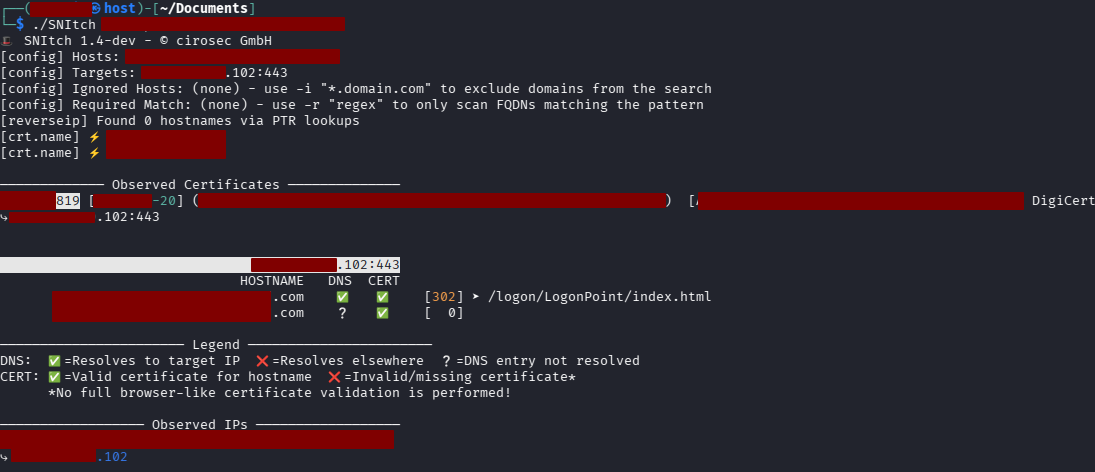
SNItch -t X.X.X.X:443
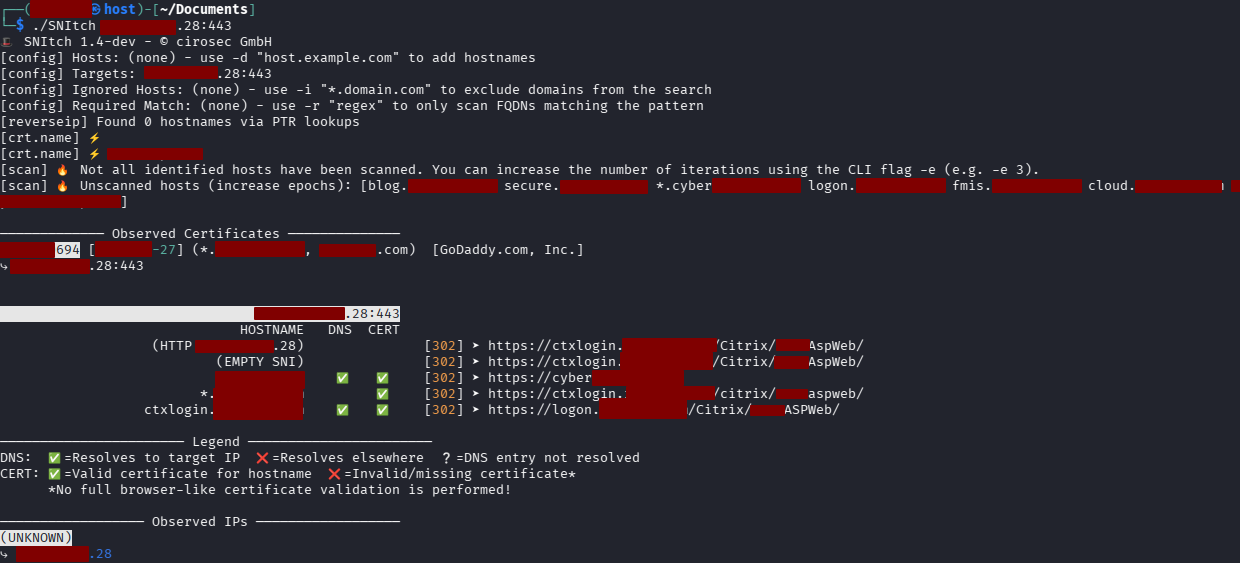
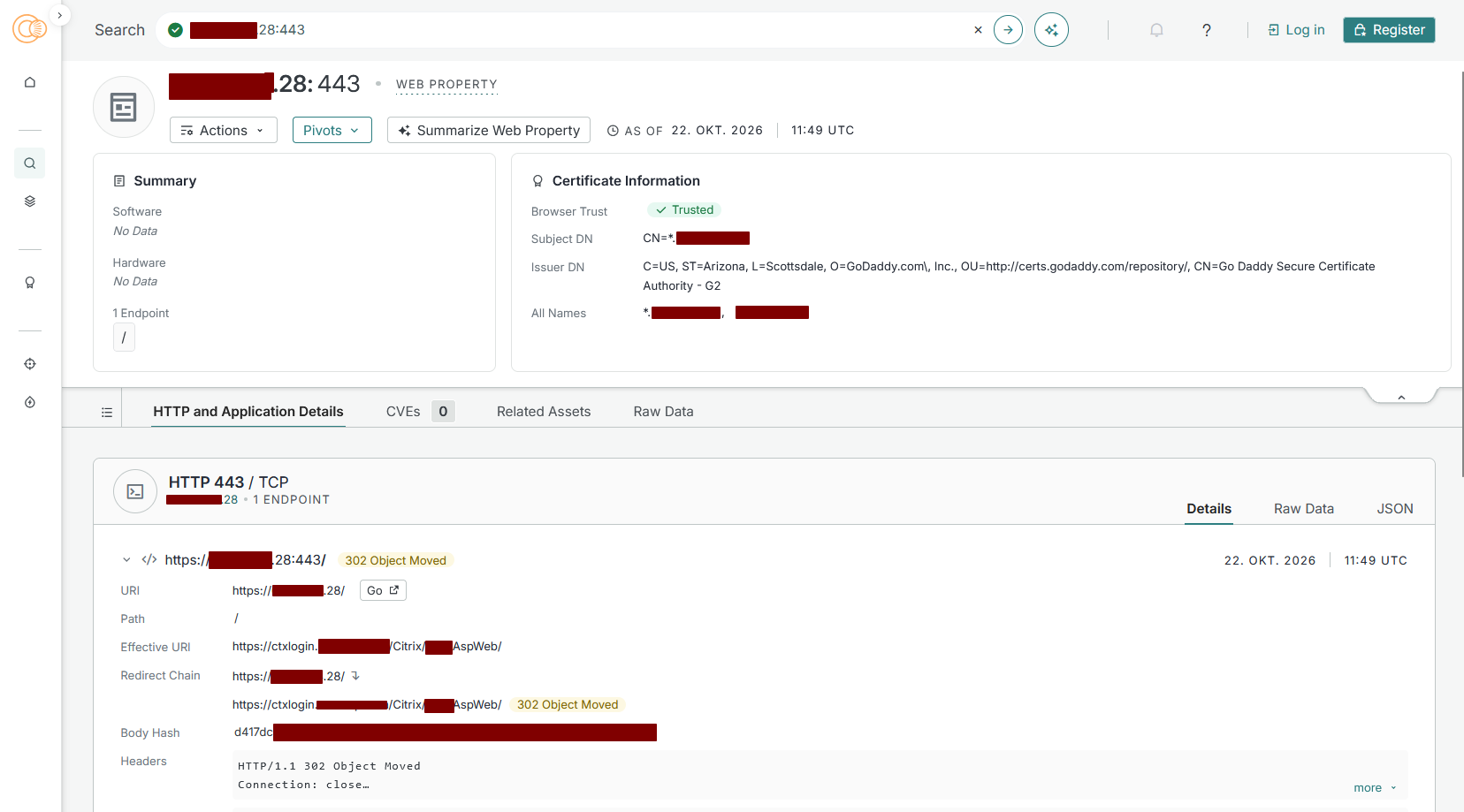
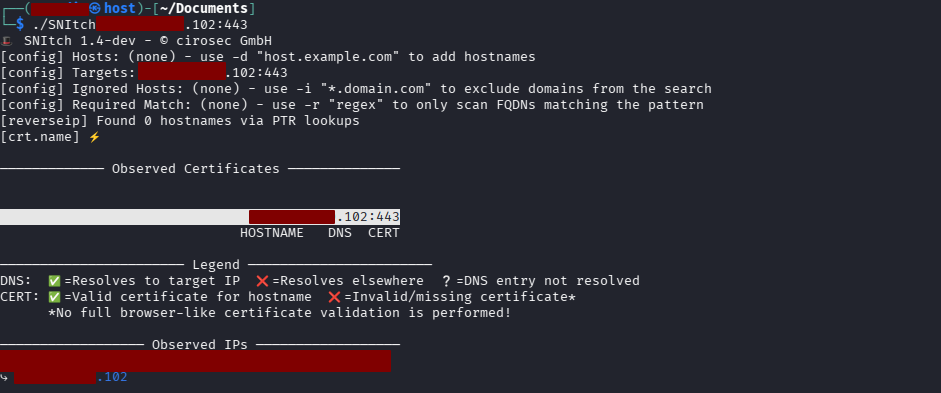
On a default NetScaler, the (EMPTY SNI) probe returns a certificate, and SNItch reads your gateway’s hostname straight from it (see Figure 1). On a hardened one, the empty-SNI and IP-as-SNI probes get nothing back: no certificate, no hostname. If SNItch still finds the hostname, it leaked through another channel, such as a PTR record, CT logs or a redirect (see the next section).