Search

Microsoft Tiering Model – Part 3/3

Search

Microsoft Tiering Model – Part 3/3

This is the third part of a three-part blog post series that looks at different design decisions, considerations and options an organization should bear in mind when planning, implementing and maintaining a tiering model in order to administrate the IT infrastructure securely. It describes the various options for implementation, explains trade-offs that must be made and their residual risks, and outlines the technical measures that need to be taken.

Due to the amount of material necessary to cover the topic, the blog post was split into three different parts:

Part 1

  • Introduction
  • Design phase
  • Different ways of implementing the tiering model
  • Classification of systems in (three) tiers

Part 2

  • PAW basics
  • Possible PAW implementations
  • Securing the PAW
  • Administrative access and tools

Part 3 (this blog post)

  • Privileged account/access management (PAM)
  • Changes to AD structure and delegation
  • Network segmentation and restriction of administrative access
  • Practical benefits of the tiering model

Privileged account/access management (PAM)

Integrating a PAM solution into the tiering model can solve several problems.

Due to the separation of administrative rights on the tiers, the administrators need additional user accounts, depending on the distribution of roles, in order to be able to perform their various tasks after the administration has been switched to the tiering model. This could include up to five user accounts in total if the administrator is active in all three tiers and has a local administrator account on his regular client in addition to his regular user account.

The requirement that these user accounts have very strong (and therefore long), unique and unrelated passwords does not make it easier to remember the many passwords and also to change them regularly (for example once a year). This is where implementing a PAM solution can help manage the high number of accounts. The administrator may then only need to remember two of the five passwords, depending on the implementation, namely that of the regular user account, which he uses to log on to the regular client, and that of the Tier 0 admin account, which he uses to log on to the PAW and PAM. From there, he can access the PAM solution and the other accounts it contains.
In addition, the PAM solution can automate the regular password change of the highly privileged accounts using particularly long and cryptic passwords, which further increases security.

In general, a good PAM solution can solve many other security-related problems.

For example, it can help replace default or predictable passwords. Unique passwords for each individual service and account can hardly be realized without special tools, since even in a small company hundreds of accounts quickly accumulate when all systems are considered, e.g., components of the network infrastructure, printers, IP cameras, time recording terminals, locking systems, web applications, service users on servers and other services in the network. All of these passwords need to be securely encrypted as well as stored and secured (in terms of a backup) in an access-protected manner. In particular, changing these passwords on a regular basis is not something that can be done manually, but it is an important administrative security measure. Just think of former employees, for instance, who still know an important password after having left the company years ago, or of script files in which the plain text password of a highly privileged service account was left long ago in order to test something.
This can typically be well automated in PAM solutions. It also solves many problems, especially if the administration of various systems that are not domain-integrated or not connected to the domain for authentication is also included in the tiering concept.

Using the PAM solution in the regular administration of these systems can then, for example, look like this: The administrator logs on to the PAW and accesses the PAM solution with a tier admin account. There he sees an entry, e.g., for a particularly important DMZ web server that is not a member of the domain. Depending on the configuration and the PAM solution, he can now either transfer the current password of the DMZ server’s administrator to his PAW with a single click and access the system, or ideally the desktop of a jump server belonging to the PAM solution opens along with the tools required for administration, which are already pre-equipped with the correct login credentials. After the administrator has finished working on the system, the PAM solution then automatically changes the password on the DMZ server and saves the new value.

Changes to AD structure and delegation

This section presents the changes required in the existing domain in order to implement the assignment of rights according to tiers as efficiently and securely as possible.

In order to separate the assignment of permissions to the objects in AD according to tiers, it is very likely that the existing OU structure must be adapted. Typically, the OU structure of a domain that has not previously been administered according to the tiering model tends to reflect the organizational structure of the company, such as the geographical subdivision from continent to location, or it represents a construct that has grown historically (the author is also a penetrationtester and therefore loves and hates this phrase at the same time).

An appropriate new structure depends heavily on how the company is set up. For example, answers to the following questions must be incorporated into the new design: How many tiers does the tiering concept encompass? Is the IT infrastructure distributed globally, in multiple countries or at multiple locations? Is there a central IT for the entire company or are there also self-sufficient IT departments in the countries? What does the existing OU and GPO structure look like? How are rights delegated in AD to date?

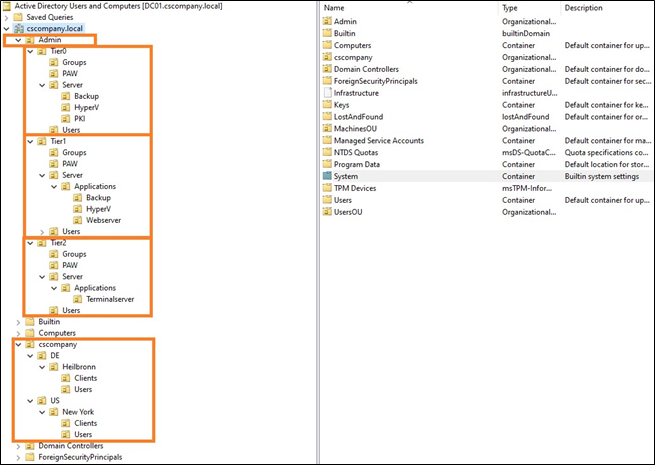
A possible new OU structure is shown below:

Hagen Molzer

Managing Consultant

Category

Date

Navigation

Possible new OU structure

The exact structure is not important, as long as it efficiently allows for the delegation of rights or linking of GPOs separated by tier.

The domain controllers should not be moved from their default “Domain Controllers” OU to the Tier 0 OU, as this is not intended by Microsoft and can lead to problems.

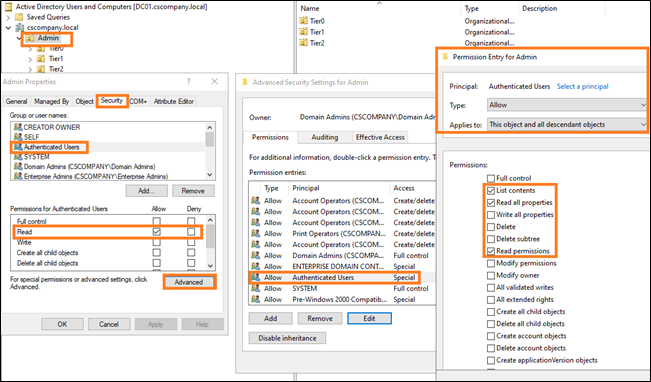
In Active Directory, all authenticated users have very extensive read permissions for a large part of the objects present in the domain. This is also the reason why it is possible to read so much information with regular user permissions and the BloodHound tool and then visualize corresponding attack paths. However, this generous permission assignment in AD can also be adjusted by administrators. To conceal the existence and structure of the tier accounts, read access to the corresponding OUs could be revoked from authenticated users. This makes them invisible, e.g., in BloodHound, unless the attacker has performed the data collection with a user who has other group memberships that allow him to read information on those OUs again. The following figure shows the described permission assignment for the authenticated users and how it can be changed:

Permission assignment for the authenticated users

Revoking these permissions should be tested first, e.g., on a sub-OU containing only a few principals, to avoid problems. Also, in the exemplary OU structure shown in the figure above, permissions should not be revoked on the entire Admin OU, since most of the regular computer accounts such as terminal, file, PKI or web servers are also included, and applications or services may rely on being able to read certain information on those computer accounts.

It is therefore worth starting with the OUs where the tier admin accounts and PAWs are located. These are particularly valuable targets for an attacker and the customization is less likely to cause problems.

After restructuring the Active Directory structure and adapting the permission assignment separately according to tiers, it must still be ensured that administrators have full control over their environment at all times, which ensures that in the event of technical problems and failures, the systems of all tiers can still be administered despite the restrictions imposed by the tiering model. For this purpose, it is recommended to store break-glass accounts with full administrative rights per tier, e.g., in a safe and/or an encrypted off-premises password database (e.g. KeePass).

It should be ensured that the safe is accessible and can be opened even if the IT systems fail (building locking system, available physical keys, number combination of the safe, available backup batteries in case of an electronic pin pad, etc.). The off-premises password database should be stored in several places, be securely encrypted, and several people should have access to it. Furthermore, it must be ensured that the password is not forgotten.

Network segmentation and restriction of administrative access

After the implementation of the tiering model, administrative access is strongly regulated and defined. This means that it is clearly regulated which administrators administer which systems from where via which method.
This makes it much easier to restrict administrative access on a large scale at the network level than was previously the case. This means, administrative access such as RDP, PowerShell Remoting, other administrative interfaces (HTTPS, SSH), NetBIOS over TCP/IP (NBT) and SMB should now only be allowed from where they are really needed.

The NetBIOS over TCP/IP (NBT) and SMB protocols are a special case here. Administrative access to these protocols/ports is potentially required for administrators, but the ports are also needed (e.g. for SMB) by regular users to access file shares on file servers or the domain controllers (e.g. for the SYSVOL share). Access to these ports for regular users should therefore also only be allowed where it is actually needed (e.g. on file servers and not the PKI servers). The same is true for HTTPS access to a web application for a regular user versus HTTPS access to an admin interface of an infrastructure component for a tier administrator.

Examples of necessary administrative access and the respective source include:

  • from PAWs from PAW networks
  • from the PAM solution from the PAM network
  • from the monitoring solution
  • from the software distribution
  • possibly from the IT infrastructure network
  • possibly from the client help desk network (Tier 2)

Restricting network access and eliminating flat networks has been recommended for a very long time as an effective means of containing attacks and reducing the attack surface but often not implemented due to the large amount of effort involved. So, the question now is: What is the best way to do this?

Basically, a distinction can be made between two approaches. The classic method is to use network firewalls to filter traffic at the network/VLAN boundaries. The disadvantage of this method is that it is not possible to restrict network traffic within a network segment (VLAN). Two systems located in the same network can therefore still communicate with each other unfiltered.

The alternative method is to introduce some form of micro-segmentation. In this approach, the firewall ruleset is brought to the operating system. The client or server operating system thus filters the network traffic itself.

Again, there are two options for implementing this, using either the Windows Firewall already included in the Windows operating system or a dedicated solution for micro-segmentation. The Windows Firewall is “free of charge” and much more powerful than many administrators believe. Once you have understood the functionality and individual configuration options of the Windows Firewall, it can be surprisingly flexible and versatile. The lecture “Demystifying the Windows Firewall” by a Microsoft employee, which is available as a YouTube video (https://www.youtube.com/watch?v=InPiE0EOArs), offers an excellent one-hour crash course on the Windows Firewall.

In small to medium-sized environments, the functional scope of the Windows Firewall may be sufficient, but in medium to large environments, the Windows Firewall quickly reaches its limits. Especially in complex scenarios with different requirements, the Windows Firewall becomes uncomfortable to configure, operate and monitor. Dedicated solutions for micro-segmentation, for example from the manufacturers Guardicore or Illumio, can help here.

These bring the firewall functionality into the operating system through agents, either in the form of their own software firewall or by managing the already integrated firewall. The solutions offer a convenient management interface, support in creating the ruleset, and are easier to manage and monitor than the Windows Firewall – but they are not free of charge.

The Windows Firewall and dedicated micro-segmentation solutions have in common that they cannot be deployed everywhere. By its nature, the Windows Firewall is only present on Windows systems. Third-party micro-segmentation solutions typically support other operating systems as well, such as Linux or Mac.
However, a network firewall must still be used to isolate printers, for example, and other systems.

Regardless of whether a company uses classic network firewalls, the Windows Firewall, or a third-party micro-segmentation solution, the following network segmentation requirements should be considered during the implementation of the tiering model.
The PAWs and the systems belonging to the PAM solution should be located in specially isolated network segments. Access to the administrative interfaces of the Tier 0 systems should be possible only from the Tier 0 PAWs or other Tier 0 systems. Systems of different tiers should not be located in the same network segment, and the network traffic allowed between segments should be minimized. This means, for example, that access from Tier 2 systems to Tier 1 systems and from Tier 2 and Tier 1 systems to Tier 0 systems is generally restricted at the IP address/port level, if possible, and only what is really necessary is allowed.

The very limited network access for non-admin principals reduces the attack surface enormously and makes it more difficult for an attacker to spread. What is not reachable of the network can hardly be attacked …
To a similar extent, however, the administrators are also restricted in their work.

Therefore, due to the limitation of systems and access possibilities, an alternative must be created for file and data exchange. For instance, despite all the security precautions, it is necessary from time to time to download files from the Internet and transfer them to Tier 0 or to the PAWs – or data must be transferred between systems in different tiers or exchanged with external service providers.

The requirements for such a central system for data exchange (also called data hub) may be, for example:

  • Scanning the files with different antivirus scanner engines
  • Dynamic analysis of files (sandbox analysis)
  • Granular rights system for restricting access
  • MFA

What are the practical benefits of all this?

Finally, the question arises as to what added value all the changes, all the effort and all the additional complexity actually brings.

Specifically, if attackers have already gained access to a regular domain user or a domain-integrated system, the measures significantly hinder the attackers’ attempts to expand their privileges and spread further in the network. In the best case, the attackers will abandon this infrastructure and look for an easier victim. But if the attackers are motivated and competent, the measures will buy defenders valuable time to detect and stop attackers before they reach their target. In addition to implementing the tiering model, however, this requires the presence of appropriate attack detection solutions, such as antivirus protection and an EDR solution on the clients and servers, an AD monitoring solution that can detect attacks, and also good visibility of what is happening at the network level.

If the solutions raise an alarm, the appropriate incident response processes must be started promptly so that no valuable time is wasted and the attackers, along with their initial entry vector, can be thrown out of the network before they reach their goal.

From a penetration tester’s perspective, pentesting a domain with an implemented and “mature” tiering concept often stops being fun quickly. Even in very large environments, the BloodHound graphs “Shortest Path to Domain Admins” and “Shortest Path to High Value Targets”, which represent possible attack paths to high-value targets in an environment, are then very limited. It is virtually impossible that any regular user account will serve as an entry point to such an attack path. This means, the penetration tester must make a much greater effort and first compromise other admin accounts or systems to find an entry point.

Even if a real attacker – starting from his initial entry point – manages to compromise a user who has, for example, (administrative) access rights for an interesting system, he will probably not be able to reach either the remote administration ports or the system itself, because of the restricted network access and micro segmentation. And what you cannot reach, you typically cannot easily attack either.

For attackers, this means they have to get creative if there are no easy ways to reach their goals. Which is exactly what often triggers alarms in security solutions since it deviates from regular user or administrator behavior.

But there are still opportunities for us penetration testers, too. The most promising way is to look for violations of the tiering model in day-to-day administration or the compromises a company has made on the conceptual level. 
SharpHound (the data collection component of BloodHound), for example, can be started with the parameters “-c session –loop –loopinterval 00:15:00 –loopduration 12:00:00” to collect new session data every 15 minutes for the next 12 hours, hoping to catch the login of a tier admin account of a higher tier on a system in a lower tier that can already be accessed. Perhaps a tier admin’s session is “reachable”, which helps to move along within a tier. But obviously, this session enumeration is very noisy and typically detected by EDR or Active Directory security solutions if present.

Another approach is to mark additional objects as high-value targets in BloodHound. In the default configuration, BloodHound already knows that, for example, members of the Domain Admins or Domain Controllers group are of high value and marks them as “High Value”. For many other systems or AD groups that could be used to compromise other tiers, manual work, experience and the creativity of the penetration tester is required. For example, the penetration tester can analyze the configuration of already compromised systems and link these findings with the BloodHound data to identify the WSUS server, for instance, which may also distribute updates to domain controllers, or to identify an AD group whose members have administrative rights in the VMware environment. If these objects are additionally marked as “High Value”, the attack paths to high-value targets identified by BloodHound may already look more promising.

You may also be lucky as a penetration tester and find “relics” on lower tier systems from before the tiering model was introduced, e.g., in the form of passwords in scripts, cached credentials, or backups of systems that now belong to higher tiers. If you are very lucky, you compromise a Tier 2 admin account, for example, and then find out that the administrator is using the same password, or a predictable variation of it, for his Tier 1 or Tier 0 account as well.

To add weight to the concepts and measures addressed in this series of blog posts and to illustrate the need for their implementation, it is worth reading Gavin Ashton’s personal account of the devastating attack on Maersk’s IT infrastructure. Gavin Ashton witnessed the attack on the maritime logistics giant first-hand as an administrator. The article is available at the following URL: https://gvnshtn.com/posts/maersk-me-notpetya/

Some lessons learned by Ashton from this event and other quotes from his report related to the tiering model are listed below:

  • Basics #1 Stop talking. Start doing
    You can accept risks forever and a day but at some point, it WILL bite you and someone WILL end up doing the work in the end. Call this technology debt or whatever you like. But please, for your own sake, get on with the basics.
  • Basics #6 Get your privileged access baseline in order
    If your administrators are used to having access to all things, at all times, it’s high time for them to change.
  • No amount of risk acceptance can really get you around this. Whether this is by strictly adhering to the Microsoft Tiered Access Model or going for something a little lighter, at the very least you should:
  • Now I can just hear a hundred people all saying (because I’ve heard these voices before):
    Yes but, that sounds difficult. Yes but, that sounds expensive. Yes but, that will take a long time. Yes but, we ‘need’ (like) having access all the time.
  • Losing everything will be much more difficult, will be a lot more expensive, and will take a much greater length of time, and will cost peoples jobs, relationships, or worse. These are basics. Like locking your front door. Or having a PIN on your bank card. It’s a shame Microsoft didn’t bake these controls in deeper out of the box back in 2000, but here we are. Get to it.

Note: Parts of this blog post series have already been published in the German IT magazine called “iX” https://www.heise.de/ix

Further blog articles

AD Security

Microsoft Tiering Model – Part 3/3

January 10, 2024 – This is the third part of a three-part blog post series that looks at different design decisions, considerations and options an organization should bear in mind when planning, implementing and maintaining a tiering model in order to administrate the IT infrastructure securely. It describes the various options for implementation, explains trade-offs that must be made and their residual risks, and outlines the technical measures that need to be taken.


Author: Hagen Molzer

Mehr Infos »
AD Security

Microsoft Tiering Model – Part 2/3

December 10, 2023 – This is the second part of a three-part blog post series that looks at different design decisions, considerations and options an organization should bear in mind when planning, implementing and maintaining a tiering model in order to administrate the IT infrastructure securely. It describes the various options for implementation, explains trade-offs that must be made and their residual risks, and outlines the technical measures that need to be taken.

Author: Hagen Molzer

Mehr Infos »
Do you want to protect your systems? Feel free to get in touch with us.

Microsoft Tiering Model – Part 2/3

Search

Microsoft Tiering Model – Part 2/3

Survival guide for planning and implementing a concept for secure administration

This is the second part of a three-part blog post series that looks at different design decisions, considerations and options an organization should bear in mind when planning, implementing and maintaining a tiering model in order to administrate the IT infrastructure securely. It describes the various options for implementation, explains trade-offs that must be made and their residual risks, and outlines the technical measures that need to be taken.

Due to the amount of material necessary to cover the topic, the blog post was split into three different parts:

Part 1

  • Introduction
  • Design phase
  • Different ways of implementing the tiering model
  • Classification of systems in (three) tiers

Part 2 (this blog post)

  • PAW basics
  • Possible PAW implementations
  • Securing the PAW
  • Administrative access and tools

Part 3

  • Privileged account/access management (PAM)
  • Changes to AD structure and delegation
  • Network segmentation and restriction of administrative access
  • Practical benefits of the tiering model

PAW basics

The Microsoft documentation describes PAWs and their tasks very aptly:
Privileged Access Workstations (PAWs) provide a dedicated operating system for sensitive tasks that is protected from Internet attacks and threat vectors.
Source: https://learn.microsoft.com/en-us/azure/active-directory/roles/security-planning

The very specific purpose of a PAW and the strict restrictions significantly reduce the attack surface of these devices. For instance, PAWs should not be able to access the Internet or receive emails, and they should not be able to open PDF or Office files from untrusted sources.

In addition, the clean-source principle should be observed for the software used. For example, the operating system image should be downloaded directly from the manufacturer and then the hash checksum of the downloaded file should be compared with the value specified by the manufacturer. The same also applies to third-party tools such as Notepad++ or 7Zip.

Furthermore, when procuring new PAW hardware, care must be taken to ensure that it meets all the important safety-related requirements wherever possible:

  • 64-bit CPU
    (possibly already based on Pluton architecture when available[1])
  • CPU with Intel VT-x or AMD-V
  • CPU instruction set for DMA protection (IOMMU)
  • SLAT/EPT
  • TPM 2.0
    (preferably integrated into the CPU and not as a separate component on the mainboard)
  • UEFI Secure Boot
  • Memory soldered to the mainboard

When it comes to the physical security of the PAW, the companies must again find the compromise that suits them best. For companies with particularly high security requirements, a PAW can, for example, be a workstation housed in a metal cage in a specially secured “PAW room” with an access control system based on more than one factor (such as a key and a biometric authentication mechanism). Other companies use a mobile notebook as a PAW and specify via organizational rules that administrators may use the PAW when working from home, but not in a hotel Wi-Fi or on the train.

Possible PAW implementations

Depending on which implementation type of the tiering model has been chosen in the section “Different ways of implementing the tiering model” in part one of the blog post series (i.e. which tiers may be administered exclusively from PAWs), and depending on the number of administrators of the affected tiers, the number of PAWs to be procured and operated in the future can quickly become quite large. Therefore, once again, a compromise must be found.

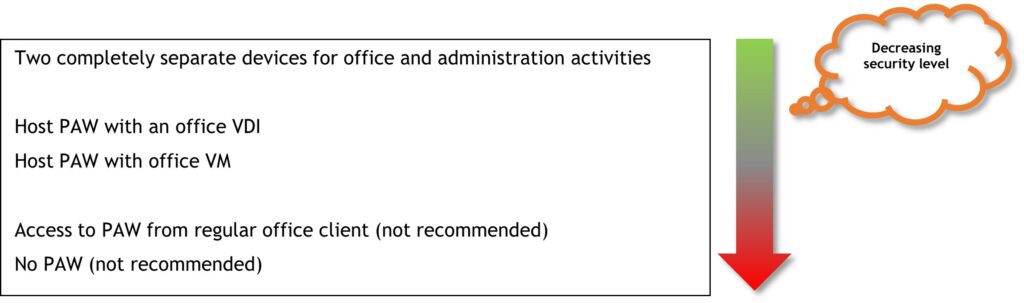
PAW implementation with two separate devices

The safest solution is to purchase a second physical device that is used exclusively for administration. The first device, which may already exist, is then used for regular work (including Internet and email use). This allows a strict separation between administrative and regular work, and there is no attack surface of the PAW through Office software, for example, or through websites. In addition, the clean-keyboard principle is adhered to for administration, which dictates that the first computer in the possibly longer access chain for administration (i.e. the computer to which the physical keyboard is connected that the administrator operates) is a particularly secure system. Why this principle is especially important will be discussed in more detail in the following scenarios.
Due to the very specific purpose of the PAW, particularly strict hardening measures can be implemented without causing major technical problems.

The disadvantages of this solution are that the additional computers incur costs for hardware, software and the administrative effort. It is also more cumbersome for administrators to work with, as they now have to use and possibly transport two devices. Depending on how strictly PAW security is implemented, administrators’ collaboration options may be limited because there is no Teams on the PAW and no Internet access.

Host PAW with office VM

A possible alternative, which does not require procurement of new PAW computers, is to format the regular computer already used by the administrators and install it as a PAW after reinstallation. Then a hypervisor is installed on the PAW (e.g. VirtualBox, VMware Workstation or Hyper-V), and the regular computer is virtualized in the form of a VM. Logging in with the tier admin account and all administrative activities are then done directly from the host PAW, and email processing and web browsing are done in the office VM.

This saves the purchase of a second computer, and the administrator always has the PAW and his regular workstation system with him, which makes work more comfortable and flexible.
However, the last point also represents a disadvantage. The administrator then no longer has the option of not taking the PAW into possibly insecure environments. In larger meetings, for example, the PAW might even remain in the meeting room at lunchtime while being switched on, or it requires the discipline of the administrator not to let his computer out of his sight in dangerous situations and to always lock the screen.

Another major drawback of this solution is that there is no strict separation of the two devices, which means that the PAW and the office VM may share a network interface, making isolation of the PAW in a PAW network more difficult or impossible to implement.
Furthermore, the PAW can potentially be attacked via the hypervisor. Using a VM guest-to-host exploit, it may be possible for an advanced attacker to break out of the office VM and compromise the underlying hypervisor and thus the PAW. Other potential problems exist for the regular work on the office VM. For example, there can be performance issues when playing videos or graphically demanding applications because often the GPU cannot be used within VMs or problems occur in general due to the additional virtualization layer. There can also be problems with Bluetooth headsets or other peripherals, e.g., in Teams or Zoom.

Host PAW with an office VDI (Virtual Desktop Infrastructure)

A further development of the latter implementation is to run the office VM not on the PAW itself, but in the company network, e.g., as a Citrix VM. This has further advantages: Due to the stronger separation of the two systems than in the previous scenario, there is no attack surface through guest-to-host exploits, and isolating the PAW in a PAW network becomes much easier to implement. However, the potential performance and peripheral issues still exist. One disadvantage is that “offline work”, i.e., working in the office VM without a connection to the company network, is no longer an option.

Access to PAW from regular office client (not recommended)

An often-discussed approach is to virtualize the PAW on the regular work notebook and perform administration from the PAW VM. This, however, contradicts the clean-keyboard principle, since an attacker who was able to compromise the regular notebook has many opportunities to compromise the PAW as well. For example, he could install keylogger or screen monitoring software or simply copy the PAW VM away.

Summary of possible implementations of the PAW:

Hagen Molzer

Managing Consultant

Category

Date

Navigation

Securing the PAW

The measures for securing and hardening the PAW are manifold. Most of them are often already known from the normal catalogs of measures for hardening Windows operating systems. However, due to the higher security requirements of the PAW, the focus here should be on the stricter implementation of hardening measures and not on laxer settings to solve compatibility problems or making compromises in terms of conveniences in administration that entail greater risks. Due to the very specific purpose of the PAW, the implementation of hardening recommendations should be more straightforward than on regular clients, which have to meet very different requirements.

The following list contains the most important measures from the world of client hardening but does not claim to be exhaustive:

  • Clean source principle for any hardware and software
    • But also for basic installation
      • For example, PAWs should not be installed via RDP from an already potentially compromised machine but from a secure and “clean” environment
    • Basic hardening of the operating system, e.g., according to
      • Microsoft Security Baseline
      • CIS (Center for Internet Security) Benchmark
    • Special focus on minimal installations
      • Limitation and standardization of installed software
    • Hard disk encryption (e.g. BitLocker with pre-boot authentication)
      • TPM 2.0
    • Principle of least privilege
      • Regular tier administrators do not have local administrator rights on the PAW
    • System-specific password of the local administrator (e.g. via LAPS)
    • Timely and regular installation of security updates
      • Operating system
      • Third-party software
    • UEFI Secure Boot
    • Antivirus software
    • EDR software
    • Windows Defender
      • Credential Guard
      • Exploit Guard – Exploit Protection
      • Exploit Guard – attack surface reduction rules
      • Windows Defender Advanced Firewall (Windows Firewall – more details will follow in Blog post part three)
        • Possibly with IPSec encryption of particularly sensitive network traffic
      • Application whitelisting (e.g. via AppLocker)
      • Kernel DMA Protection (IOMMU)
      • Explicitly prohibit logins from non-tier admins (and admins of other tiers)
        • Deny logon restrictions

Administrative access and tools

By using the tier admin accounts, an important measure to protect the highly privileged identities has been implemented. But these accounts must now be protected on the managed systems or in the network as well. Since the user accounts are used to manage other systems, they must be able to be used on systems in their respective tiers. An attacker who has already compromised a system (e.g. client, terminal server or web application server) can compromise a tier admin account under certain conditions after the administrator connects to that system for administration. For example, depending on the administrator’s logon type used, the attacker may be able to read password hashes or Kerberos tickets of the privileged accounts on the managed systems if they are located there. 
In a scenario where an attacker has compromised a Tier 1 web server by exploiting a vulnerability in the web application, the attacker initially has privileges only on that one server. If the attacker is then able to read the NTLM hash of a Tier 1 admin account because the administrator connected to the server via RDP for administration, the number of servers over which the attacker gains administrative control potentially increases dramatically. In the worst case, the Tier 1 admin account has administrative privileges on all servers, causing the entire Tier 1 to fall.

To reduce this risk, it is necessary to know the different logon types in a Windows system. The following information on logon types is an excerpt from Microsoft’s “Mitigating Pass-the-Hash (PtH) Attacks and Other Credential Theft” articles. Source: https://www.microsoft.com/en-us/download/details.aspx?id=36036

The articles are almost ten years old but have hardly lost any of their relevance, which is why reading the two documents is strongly recommended.

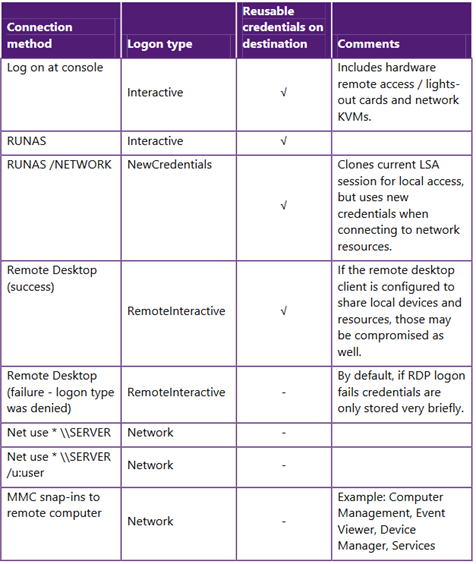
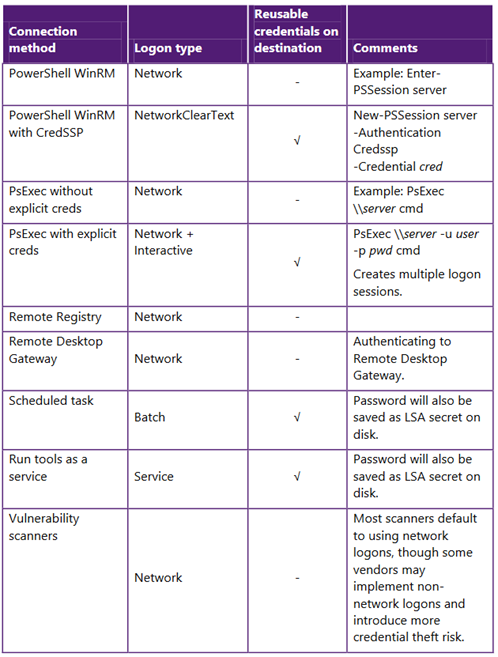
For remote administration of a system, Windows roughly distinguishes between the following two logon types:

  • Interactive Logon and Remote Interactive
  • Network Logon and Network Cleartext

Access types with interactive logon type include:

  • Remote Desktop (RDP)
  • Log on at console (also remote lights-out hardware), (network) KVM, VM console at hypervisor
  • RUNAS
  • RUNAS /NETWORK
    • (access to network resources)
  • PsExec \\MyServer -u Admin -p Secret123! Cmd.exe
    • (PsExec with explicit credentials)

The problem when access types with interactive logon type are used is that reusable credentials of the administrator are transferred to the target system and then reside in the system’s memory. An attacker can then extract and reuse, for example, the NTLM hash or Kerberos tickets of the tier admin account.

Examples of network logins are:

  • Connection to the target server via MMC snap-in
  • net use \\server\share /u Admin
  • PowerShell Remoting: Enter-PSSession MyServer
  • Remote Registry
  • Remote Desktop Gateway (authentication takes place at the RDP gateway)
  • PSExec \MyServer exe
    • (without explicit login credentials)

The advantage of this logon type is that no reusable administrator credentials are left behind on the system that was accessed. However, single sign-on (SSO), to which users in the Windows environment have become accustomed, is not possible on principle. The SSO functionality is also the reason why the login credentials are transferred to the target system at all with interactive logon types. If this were not implemented, it would not be possible, for example, to access a terminal server via RDP and from there to access a file server in the internal network without having to enter one’s login credentials again at the file server. Authentication can be taken over by the terminal server at this point because the terminal server has received the login credentials when logging in via RDP. Further details on the different logon methods can be found in the tables in the document “Mitigating Pass-the-Hash (PtH) Attacks and Other Credential Theft Techniques_English-2.pdf”:

Source: https://www.microsoft.com/en-us/download/details.aspx?id=36036 - Mitigating Pass-the-Hash (PtH) Attacks and Other Credential Theft Techniques_English-2.pdf (not available anymore)

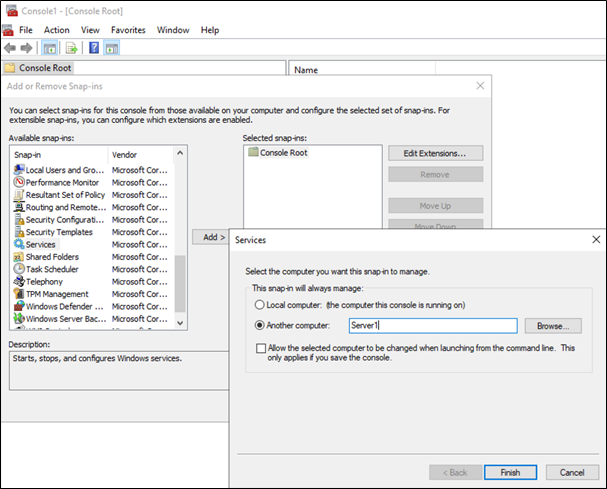
Accordingly, the administrator should, wherever possible, refrain from using interactive logons (meaning, for instance, RDP) for administration and use access possibilities based on network logons. Although this often requires administrators to get used to a new way of working, it can also speed up administration in the end, since the “more time-consuming” interactive logon via RDP is no longer required with the corresponding mmc.exe tools, with the remote server administration tools (RSAT) or with PowerShell Remoting.

Remote administration of a server via mmc.exe with network logon

Microsoft never planned to use RDP for the regular administration of a server anyway. This can also be seen in the fact that only two RDP sessions are possible on a server at the same time by default. Especially in larger companies, administrators would hardly be able to get any work done if RDP was indispensable for regular administration. The administrators’ main activity would then be to call other administrators and beg for one of the two RDP slots.

Nevertheless, there are cases where the graphical user interface of the operating system is required, for instance, when a wizard has to be operated for a software installation or when interaction with installed software that can only be accessed locally is necessary. In these cases, RDP is still an effective means, but the RDP connection should be additionally secured. Microsoft has created two mechanisms for this in the form of Remote Credential Guard and Restricted Admin Mode. With both mechanisms, the accessing user’s credentials are not transferred to the target system.

To ensure that SSO to third-party systems (e.g. file servers) is still possible from the RDP target when using Remote Credential Guard, corresponding Kerberos requests are forwarded to the RDP source.

When using Restricted Admin Mode, a context switch occurs automatically during logon. The accessing user is switched to a local virtual account that has local administrative rights on the RDP target, but access to third-party resources on the network occurs in the context of the Active Directory computer account of the RDP target.

Microsoft recommends using Restricted Admin Mode instead of Remote Credential Guard for scenarios where an RDP target may already be compromised. This is because while the RDP connection exists using Remote Credential Guard, the attacker has the ability to start new sessions in the context of the accessing user for a limited time window.

Source: https://learn.microsoft.com/en-us/windows/security/identity-protection/remote-credential-guard (not available anymore)

Configuring RDP security can be implemented via group policies. Under “Computer Configuration → Administrative Templates  → System  → Credentials Delegation”, the policy “Restrict delegation of credentials to remote servers” can be found. This policy offers the following three settings:

  • Restrict Credential Delegation
    • Preferred: Remote Credential Guard
    • Fallback: Restricted Admin Mode
  • Require Remote Credential Guard
  • Require Restricted Admin Mode

Another important measure to protect tier admin accounts is to include them in the Active Directory “Protected Users” group. This automatically implements several hardening measures for these particularly highly privileged users. However, this measure should be tested in detail before productive use, as it can have an impact on the way administrators work. Inclusion in the group enables different protections on the Windows devices in the domain and on the domain controllers. 

On the Windows devices, for example, the plaintext password is no longer cached if Windows Digest is enabled, even if it was manually enabled by the attacker, and Kerberos also no longer caches the plaintext password after having received the initial TGT (Ticket Granting Ticket).

Regarding domain controllers, among other things, NTLM authentication is disabled for members of the “Protected Users” group, and renewing TGTs after the initial four-hour validity period is no longer possible.

Note: Parts of this blog post series have already been published in the German IT magazine called “iX” https://www.heise.de/ix.

Further blog articles

AD Security

Microsoft Tiering Model – Part 3/3

January 10, 2024 – This is the third part of a three-part blog post series that looks at different design decisions, considerations and options an organization should bear in mind when planning, implementing and maintaining a tiering model in order to administrate the IT infrastructure securely. It describes the various options for implementation, explains trade-offs that must be made and their residual risks, and outlines the technical measures that need to be taken.


Author: Hagen Molzer

Mehr Infos »
AD Security

Microsoft Tiering Model – Part 2/3

December 10, 2023 – This is the second part of a three-part blog post series that looks at different design decisions, considerations and options an organization should bear in mind when planning, implementing and maintaining a tiering model in order to administrate the IT infrastructure securely. It describes the various options for implementation, explains trade-offs that must be made and their residual risks, and outlines the technical measures that need to be taken.

Author: Hagen Molzer

Mehr Infos »
Do you want to protect your systems? Feel free to get in touch with us.

Microsoft Tiering Model – Part 1/3

Search

Microsoft Tiering Model – Part 1/3

Survival guide for planning and implementing a concept for secure administration

Introduction

Securing the internal IT infrastructure against attacks is getting more and more important in the “assume breach” world we are living in right now. Once attackers get “in”, meaning getting past the perimeter defenses, as they usually do nowadays via phishing, other social engineering attacks or through exploiting not yet patched vulnerabilities in Internet-facing services, the attackers are able to interact with the internal IT infrastructure in the same way as regular users can in most cases.

In most environments, the internal IT infrastructure presents a vast attack surface to such an attacker because often a lot of time and money was spent in the past to secure the hardened perimeter but not so much on the soft internal core of the internal network.

To make this soft core of the internal network harder, different typical hardening activities and measures come to mind, such as:

  • Contemporary patching of systems and servers
  • Hardening services
  • Disabling services that are not needed
  • Disabling legacy protocols
  • Segmenting the internal network
  • Following all the password good practices
  • Yada, yada, yada, …

All those things are still important. However, the supreme discipline to thwart lateral movement and privilege escalation attacks is probably the development and introduction of a concept for the secure administration of the IT infrastructure. For this purpose, Microsoft proposes the tiering model or “Enterprise Access Model”( https://learn.microsoft.com/en-us/security/compass/privileged-access-access-model) a basic concept for protecting the Active Directory environment and, if necessary, other parts of the infrastructure from various classic vulnerabilities that can arise during administration.

This blog post series looks at different design decisions, considerations and options an organization should bear in mind when planning, implementing and maintaining a tiering model in order to administrate the IT infrastructure securely. It describes the various options for implementation, explains trade-offs that must be made and their residual risks, and outlines the technical measures that need to be taken.

Due to the amount of material necessary to cover the topic, the blog post was split into three different parts:

Part 1 (this blog post)

  • Introduction
  • Design phase
  • Different ways of implementing the tiering model
  • Classification of systems in (three) tiers

Part 2

  • PAW basics
  • Possible PAW implementations
  • Securing the PAW
  • Administrative access and tools

Part 3

  • Privileged account/access management (PAM)
  • Changes to AD structure and delegation
  • Network segmentation and restriction of administrative access
  • Practical benefits of the tiering model

The basic idea behind the tiering-model is that the strict separation of the rights and access of administrators makes it more difficult for attackers to extend their privileges in AD and to spread in AD. Compromising a client administrator, for example, then does not significantly help attackers to compromise regular servers or domain administrators.

If an attacker gains access to a Windows system, he can usually compromise other users logged on to that system. For example, if an attacker gains local administrative privileges on a terminal server after exploiting a privilege escalation vulnerability, he could compromise a server administrator (who has administrative privileges on many other servers) logging onto this terminal server.

The attacker may then be able to use a tool such as Mimikatz to read the server administrator’s credentials from the lsass.exe process or create a scheduled task to run in the context of any user who logs into the terminal server. There are almost no limits to the attacker’s creativity, as he can perform arbitrary manipulations on the terminal server with the local administrative privileges. After compromising the server administrator, the attacker is already one step closer to the crown jewels of his victim, for example, the domain controller.
If the server administrator also has administrative control over the hypervisor environment where the domain controllers are virtualized, the backup server where the backups of the domain controllers or PKI servers are stored, or the WSUS server that distributes updates to the domain controllers, then the attacker is only one step away from completely compromising the domain.

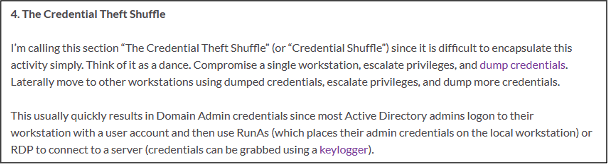
The “Credential Theft Shuffle” would also be a possibility, which allows attackers to gradually expand their privileges in AD until they have achieved their goal. The term Credential Theft Shuffle was coined by Sean Metcalf, operator of the website adsecurity.org and luminary in the area of AD security, in his blog entry “Attack Methods for Gaining Domain Admin Rights in Active Directory”:

Hagen Molzer

Managing Consultant

Category

Date

Navigation

Source: https://adsecurity.org/?p=2362

Once an attacker has completely compromised a domain, in most cases the domain can never be fully trusted again. The only chance of recovering the existing domain and not having to completely rebuild it is if you notice the compromise very quickly, can determine the time and path of the compromise beyond doubt, and have backups and can restore the compromised systems and the domain.
This makes it all the more important to protect your domain from compromise. Implementing a tiering model is a very powerful tool for this.

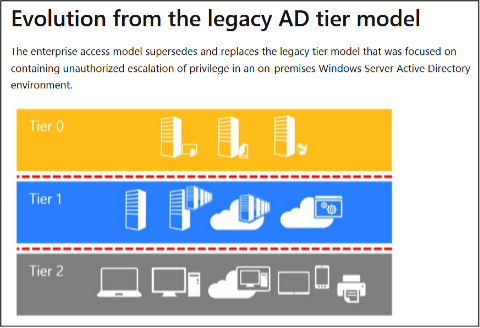
The basic idea of the tiering model is to divide all systems in the domain into (typically) three levels, called tiers:

  • Tier 0: Domain controllers, PKI and other security-critical systems
  • Tier 1: Servers
  • Tier 2: Clients

Then the administration of the systems is adjusted so that the compromise of a higher tier does not facilitate the compromise of a lower tier.

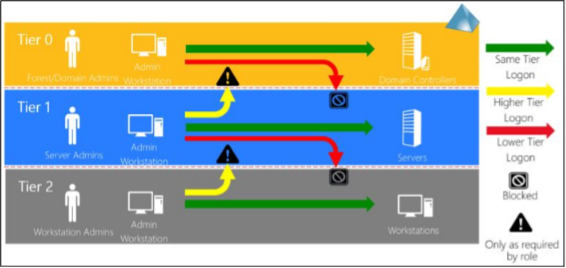
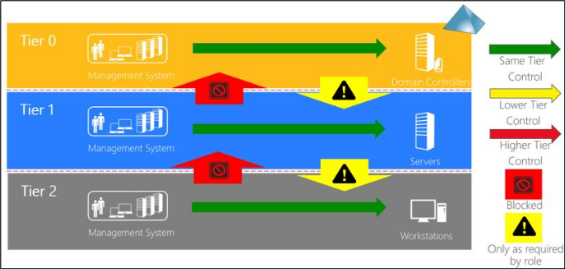
The tiering model has long been illustrated by Microsoft with the following graphic:

Source: https://docs.microsoft.com/en-us/security/compass/privileged-access-access-model

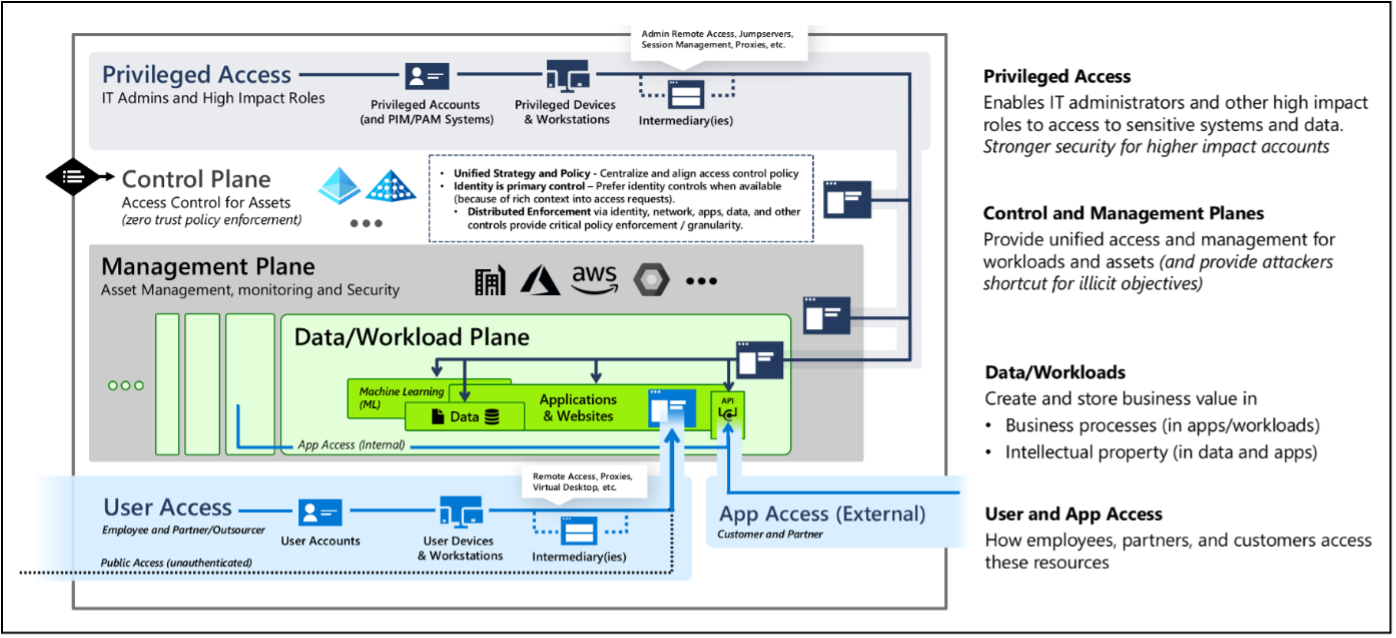
Some time ago, Microsoft’s tiering model was further developed and renamed. It is now called “Enterprise Access Model” and is described with the following representation:

Source: https://learn.microsoft.com/en-us/security/compass/privileged-access-access-model

The underlying principle has remained the same; the various systems continue to be divided into categories and their administration is safeguarded. In these blog posts, the original designation of the system categories and measures is used, as these are cleaner, easier to understand and because the principle has hardly changed.

The introduction of a tiering model has a major impact on the way administrators work and on their access rights. It determines how and from where administration can be carried out in the future, and it generates costs through additional hardware and software licenses, if required, as well as through greater complexity of administration.

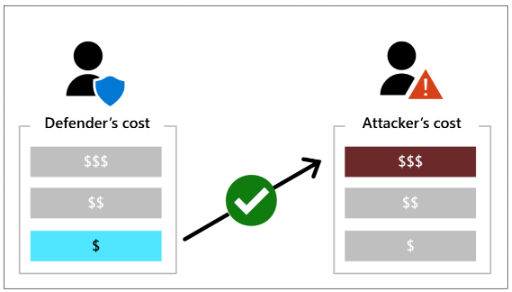
This is why there is not “the one” tiering model that “fits” all environments, but typically various trade-offs have to be made. In the design phase, for example, the security requirements for the environment, the budget and the company’s willingness to expend effort should be taken into account. The goal is to disproportionately increase the effort required by attackers with little investment of the company itself so that, in the best case, the attackers find an easier victim. Microsoft illustrates this principle in the following figure:

Source: https://learn.microsoft.com/en-us/security/compass/privileged-access-success-criteria

Design phase

The design phase begins with the consideration of how many tiers the systems of the IT infrastructure or the domain should be divided into. Microsoft provides for three tiers, but this can be adapted to the actual circumstances.

For example, in a DMZ domain, Tier 2 may not make sense because there may be no clients here. Tier 1 could also be split into Tier 1.1 (central infrastructure servers) and Tier 1.2 (servers for development/special applications) if a larger number of developers or external service providers are given administrative rights on one part of the servers and this is to be separated for security reasons.

Then the systems of the IT infrastructure or domain are assigned to the tiers. The following list contains typical systems of an IT landscape:

  • Domain controllers
  • ADFS servers, Entra ID Connect server
  • Virtualization hardware/software
  • Privileged access workstations (PAW)
  • Central password management
  • Monitoring system (e.g. SCOM)
  • Software distribution (e.g. SCCM, WSUS)
  • Backup system/storage
  • Antivirus solution, EDR
  • PKI
  • Terminal servers
  • Application servers
  • Clients
  • Infrastructure in the cloud, if applicable

During the design phase, it is also important to decide whether additional systems should be included in the tiering concept besides the domain-integrated systems, such as:

  • Linux systems
  • Infrastructure hardware (e.g. network hardware)
  • Cameras
  • Locking systems
  • Cloud users (e.g. Global Admin in Entra ID)
  • Other cloud providers, e.g.
    • Cloud proxy
    • Mail security

Among other things, this decision should take into account how the logon to these systems is authenticated, whether they are already connected to Active Directory, and how high the protection requirement is for these systems or users. The higher the importance of the systems from a security perspective, the more important their inclusion in the tiering concept.

Then comes the next step. The concept must provide for the strict separation of roles and accounts for the administrative tier users, i.e., there must be no cross-tier permission assignment for the administrative users. As a result, an administrator who administers systems in all three tiers, for example, will need at least four different user accounts in the future:

  • Regular user account: michael.mueller
    (used, e.g., to read emails and surf the Internet; no administrative rights whatsoever)
  • Tier 0 administrator: T0-michael.mueller
  • Tier 1 administrator: T1-michael.mueller
  • Tier 2 administrator: T2-michael.mueller

The naming of future administrative accounts should reflect the tier affiliation. This greatly facilitates the detection of violations of the tiering model and simplifies its implementation.

In addition, it is also important in this context to deactivate the previous admin accounts and delete them as soon as the new tier admin accounts are used, so that no relics are left behind that undermine the tiering model again.

The separation of the tier admin accounts is intended to accomplish the following two goals.

1. Prevent cross-tier user logins:

Source: https://social.technet.microsoft.com/Forums/lync/en-US/93471c7a-c2c1-4dee-9571-35944344abb7/paw-theory-questions-2?forum=winserversecurity (not available anymore)

2. Prevent cross-tier permission assignment:

Source: https://social.technet.microsoft.com/Forums/lync/en-US/93471c7a-c2c1-4dee-9571-35944344abb7/paw-theory-questions-2?forum=winserversecurity (not available anymore)

Then it must be determined how much effort will be put into protecting these new highly privileged identities. Assuming that administrators use their new tier admin accounts on their regular clients – in addition to their regular user account – not much is gained. If an attacker succeeds in compromising an administrator’s regular client, there are quite a few ways to compromise the tier admin account used on it as well. For example, software keyloggers, screen monitoring software or, again, the lsass.exe process and the Mimikatz tool can be mentioned here.

The most secure option is to use specially protected privileged access workstations (PAWs) for users with tier admin accounts. PAWs are separate devices (workstations or notebooks) that are used exclusively for administration and to which only tier admin accounts can log on. PAWs will be discussed in detail in part two of the series.

For cost reasons, it seems obvious to combine the regular client and the PAW on one computer, e.g., using virtualization. However, a number of pitfalls must be taken into account here, so that you do not unknowingly tear larger security holes in your administrative concept. This will also be discussed in detail later in part two of the series.

Another option is to integrate a privileged access management (PAM) solution into the administrative concept. This can help to reduce the number of PAWs that have to be procured separately in the future, for example, and helps to ensure that administrators do not have to remember the many passwords for the new tier admin accounts. In addition, security can be enhanced through multi-factor authentication and frequent, automated password changes. This topic will be revisited in detail in part three of the series.

The future clear separation of systems achieved by means of the tiering model and the definition of which person has administrative access to which systems makes it easier to set up a strict filtering network segmentation and to allow access to the management ports of the systems only from where they are really needed. More on this will be explained later when network segmentation and restricting administrative access is discussed in detail in part three of the series.

Now that all the important core components of the tiering model have been presented, the inclined administrator may be intimidated by the potential effort of the overall project and wonder how all this is to be implemented alongside the day-to-day business. Depending on the size of the company’s IT landscape and the state of the previous administrative concept, this project is certainly one of the larger and more costly ones, but even this elephant can be eaten one bite at a time.

The first step should be to start with securing Tier 0. This has the advantage that relatively few systems and administrators are affected at first, namely only those that are particularly highly privileged. At the same time, the measures lead directly to a very high security benefit, since the particularly critical systems are secured first. The number of technical adjustments and the administrators’ working methods that need to be changed are therefore manageable compared to Tier 1 and Tier 2, and the team of administrators can gain valuable experience of what it means to change the administrative concept and administer according to the tiering model. These insights are worth a lot for the transition of the administration of Tier 1 and Tier 2.

Different ways of implementing the tiering model

As already mentioned, there is no universal tiering model; instead, each company must come up with the variant that suits them best and find appropriate compromises. Implementing tiering with maximum security benefit entails very high expenses, e.g., due to:

  • Higher administrative expenses
  • More complex (inefficient) ways of administrating
  • Additional hardware/software

On the other hand, a very pragmatic implementation of the tiering model reduces the security benefit:

  • Too many compromises on security increase the attack surface
  • Risk increases because easily exploitable vulnerabilities arise

Before we get to the different implementation types, we first need to shed light on the “Assume Breach” scenario. Assuming that AD has already been unknowingly compromised, it does little good to create and use the new admin tier accounts in the existing productive domain. The attacker has various ways to compromise the new identities and join the new way of administration undetected. This becomes more difficult if the tier admin accounts and the PAWs are not created in the productive (already potentially compromised) domain but in a newly created, separate administrative forest (red or bastion forest) and administration of the productive domain then takes place exclusively from this red forest.

There is or was also a design proposal from Microsoft for this principle, namely the Enhanced Security Admin Environment (ESAE), including detailed technical features. According to the Microsoft website (https://learn.microsoft.com/en-us/security/compass/esae-retirement), however, this proposal has been retired and replaced by the new and modern approaches “Privileged Access: Strategy” and “Rapid Modernization Plan (RAMP)” as the new standard recommendation. Nonetheless, Microsoft points out that ESAE is still a valid approach, e.g.

  • for isolated on-premises environments or when the use of cloud technologies is not possible or desired,
  • in highly regulated environments, or
  • if the security requirements are particularly high or the risk tolerance particularly low.

Implementing the tiering model according to ESAE is the most secure, but also the most complex variant. This is why it is typically used when the security requirements are particularly high or the company is particularly large.
This model is especially interesting for companies that operate a large number of internal domains or forests or for managed service providers (MSSPs) that manage many domains for their customers. If a large number of domains are managed from one red forest, this can even reduce the effort, as the administrators only need accounts in this one red forest domain instead of requiring an account in every managed domain.

The ESAE or red forest concept is already a complex topic in itself, which would go beyond the scope here.

Tiering model within the managed domain

By far the most common variant is the implementation of the tiering model in the existing domain, i.e., the tier admin accounts and the PAWs or the PAM solution are located in the productive domain to be administered. But even here, there are different variants that offer a higher or lower level of security.

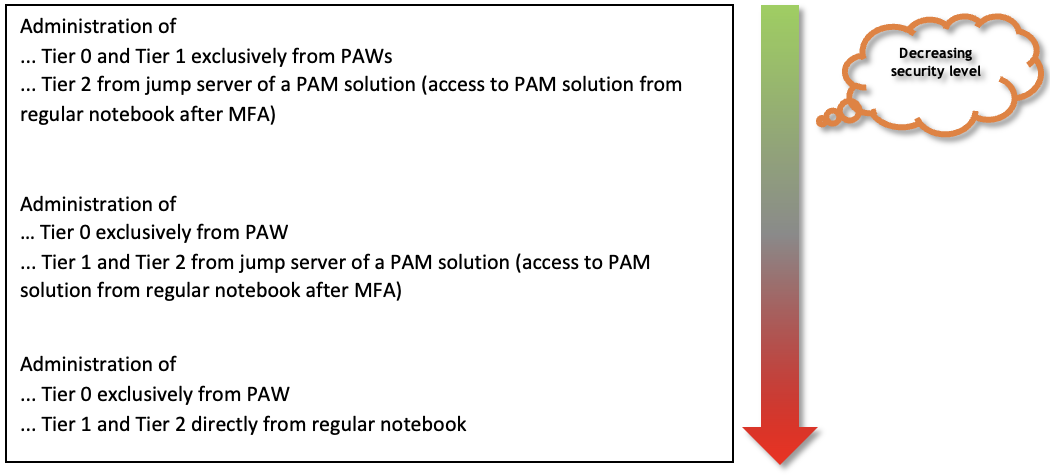
All variants have in common that the objects within AD are divided into the already mentioned (three) tiers. Then it has to be decided how much effort the organization is willing to put into protecting the tier admin accounts. The safest way is to use all the tier admin accounts of all three tiers exclusively on PAWs.

Many weaker, but less expensive or more easily implemented compromises are imaginable. The following list shows some examples:

The following is an example of an overly pragmatic implementation, which was more common in the past in enterprises but does not address many risks:
All administrators are given, in addition to the regular user account, an additional administrator account that is used from the regular notebook to administer all tiers (including domain administrator accounts).
These are the penetration tests that are easy and in which it is often possible to compromise the domain the first time before lunch.

Classification of systems in (three) tiers

There is also a lot to consider when classifying systems into the individual tiers to ensure that the new construct provides the desired security benefit. The basic rule is:

A system that has control over another system must be at the same level or higher.

The reverse numerical order must be observed: Tier 0 is “highest tier” despite lowest number.

It is recommended to take the top-down approach to classification and start with Tier 0. The systems typically to be classified have already been listed at the beginning. On closer inspection, the classification is only obvious and indisputable for a few of these systems.

Thus, the following systems appear to be Tier 0:

  • Domain controllers
  • ADFS servers
  • Entra ID Connect server
  • PKI

Obviously, application servers belong to Tier 1, while clients obviously belong to Tier 2.

With the other central systems in the list, it becomes more difficult, and various questions arise:

  • Virtualization hardware/software
    • Are Tier 0 systems being virtualized here
  • Privileged access workstations
    • Are multiple tiers managed by one category of PAWs or are there separate PAWs by tier?
  • Central password management
    • The passwords of which tiers are stored here and who needs access?
  • Monitoring system (e.g. SCOM)
    • Are Tier 0 systems also monitored and is control over these systems possible from the monitoring system?
  • Software distribution (e.g. SCCM, WSUS)
    • Are software or Windows updates also distributed to Tier 0 systems?
  • Backup system/storage
    • Are Tier 0 systems or their data stored here?
  • Antivirus solution, EDR
    • Is administrative control over Tier 0 systems possible via this?

When a company first thinks about this topic, it typically comes to the conclusion very quickly that many central systems must be counted as Tier 0. This shows that until now, many administrators have been unknowingly overprivileged. An example frequently encountered at companies illustrates this:

A company operates a central WSUS server that provides updates for all clients, servers and domain controllers. The release of updates and the administration of WSUS are performed by the regular help desk/server administrators. An attacker only needs to compromise one of these administrators to be able to inject a malicious WSUS update to compromise a domain controller. Compromising such an administrator (Tier 1 or 2) is often significantly easier than compromising a domain administrator (Tier 0) because these user accounts are used on a variety of easily compromised systems (such as regular clients or servers).

To create a malicious WSUS update, an attacker can use ready-made open-source tools such as SharpWSUS (https://github.com/nettitude/SharpWSUS), which are freely available on the Internet. With a few command line calls, the update is created, approved and the attacker only has to wait for the update process. However, the payload must be signed by Microsoft. But this is not a problem either, because programs like psexec.exe, msiexec.exe or msbuild.exe from Microsoft itself can be used for this purpose.

Comparable attack paths can often be developed for other systems on the aforementioned list with little effort.

There are three ways to solve this problem in the context of the tiering model:

Possibility 1

The central system gets the highest classification of systems it can control (e.g. Tier 0). All administrators who need access are given a Tier 0 admin account and use it to work according to Tier 0 standards (e.g. from PAWs). This is a secure solution because strict separation of administration of systems by tiers is implemented and administrative access to the central system over the network can be easily restricted.

The disadvantage is that the number of admin accounts belonging to Tier 0 can become very large, which may not be desirable in itself and can be expensive (e.g. because of the acquisition of many PAWs).

Possibility 2

Multiple instances of the central system are implemented, separated by tiers, e.g., a separate software administration per tier. This is also a secure solution, as there is again strict separation of the central systems by tiers and network access to the remote management interfaces can be easily restricted via the network.

But here, too, the disadvantage is that this solution can quickly become expensive, as additional hardware and software may have to be purchased and the administrative effort increases.

Possibility 3

This solution tries to find a compromise between security requirements and additional costs. Also, it is only suitable for systems that have extensive RBAC (role-based access control). It must therefore be possible to regulate the assignment of permissions within the central system on a granular basis.
Consideration can then be given to classifying the central system as a Tier 0 system but authorizing Tier 1 and Tier 2 admin accounts for the systems at their respective tiers via permission assignment.

A classic example of this is the assignment of permissions within VMware’s vCenter for the VMs of different tiers for the various tier users. Scrupulous care must be taken to ensure that, for example, no Tier 1 or Tier 2 admin accounts are given rights on Tier 0 systems. The advantages here are that there are fewer costs for hardware/software licenses and for the increased administrative overhead than with the previously mentioned options.

However, one of the big disadvantages of this option is that, for example, vulnerabilities in the system itself or in RBAC can endanger the systems of a higher tier starting from lower tiers or tier users. There have been vulnerabilities of this type in various solutions in the past, allowing exactly this attack.
Furthermore, the system is more difficult to isolate on the network side, since a larger number of lower-tier administrators need access to the remote management interfaces.
In addition, this is not a universal solution, as not all systems offer the possibility of granular rights restriction.

On the subject of terminal servers, it should be noted that even though systems in the terminal server category have the word “server” in their name, it is still imperative that they be counted as Tier 2 and treated as clients when used by regular users.

Typically, a large number of users have access to the servers, many different programs are often installed on the terminal servers, and the terminal servers are also often in use for a long time, so many vulnerabilities can accumulate over time. An attacker who manages to gain local administrative rights on a terminal server can compromise a large number of logged-in users at once. Consequently, administrators from higher Tier 1 and, of course, from Tier 0 should never log in here. To the author, privilege escalation vulnerabilities in typical terminal server or Citrix environments have served countless times as starting points for attack paths to compromise the domain.

Note: Parts of this blog post series have already been published in the German IT magazine called “iX” https://www.heise.de/ix

Further blog articles

AD Security

Microsoft Tiering Model – Part 3/3

January 10, 2024 – This is the third part of a three-part blog post series that looks at different design decisions, considerations and options an organization should bear in mind when planning, implementing and maintaining a tiering model in order to administrate the IT infrastructure securely. It describes the various options for implementation, explains trade-offs that must be made and their residual risks, and outlines the technical measures that need to be taken.


Author: Hagen Molzer

Mehr Infos »
AD Security

Microsoft Tiering Model – Part 2/3

December 10, 2023 – This is the second part of a three-part blog post series that looks at different design decisions, considerations and options an organization should bear in mind when planning, implementing and maintaining a tiering model in order to administrate the IT infrastructure securely. It describes the various options for implementation, explains trade-offs that must be made and their residual risks, and outlines the technical measures that need to be taken.

Author: Hagen Molzer

Mehr Infos »
Do you want to protect your systems? Feel free to get in touch with us.
Search
Search