Search

Hiding your NetScaler from mass exploitation with SNI

Search

Hiding your NetScaler from mass exploitation with SNI

October 27, 2026

SNI or it didn't happen: Hiding your NetScaler from mass exploitation

TL;DR

  • CVE-2026-88771 and CVE-2026-88772 were exploited for up to three weeks before Citrix’s bulletin was released on September 27, 2026. CVE-2026-88779 followed a week later, also exploited before disclosure. When Citrix issued its warning, many appliances had already been compromised.
  • In cirosec’s incident response cases, attackers mass-scanned IP addresses and fired the exploits at every NetScaler that answered.
  • By default, a NetScaler SSL vserver answers anyone who connects to its IP address. It returns its certificate, and with it the hostname, and serves content for any SNI or Host
  • SNI-only certificate bindings with SNI enforcement in a custom SSL profile close this gap, optionally plus an SSL policy that resets every ClientHello without the correct hostname. An IP-based scanner then gets no certificate and nothing that looks like a NetScaler and moves on.
  • Verify the result with our open-source tool SNItch.
  • Caveat: Certificate Transparency logs publish your hostname. A new, non-obvious hostname with a wildcard certificate keeps it out.

Introduction

For up to three weeks this September, attackers exploited NetScaler appliances that no patch, no CVE and no detection rule could protect. When Citrix published bulletin CTX697096 [11] on September 27, 2026, its two critical remote code execution flaws were already in use as zero-days: CVE-2026-88771 (unauthenticated command injection [9]) and CVE-2026-88772 (pre-auth memory overflow in DTLS [10]) [1][13]. A week later, CVE-2026-88779 followed with bulletin CTX697174 [12]: a SAML memory overflow that crashed even freshly patched appliances, again exploited before disclosure [2].

eSentire saw CVE-2026-88771 exploited from September 5, Google GTIG and Mandiant date CVE-2026-88772 exploitation to early September [5]. Rapid7, GreyNoise and CrowdSec recorded attempts between September 20 and 24 [3][4][5]. Any NetScaler that was reachable from the Internet in that window had to be treated as potentially compromised. Where logging was left in the default state, the logs got rotated out before the investigation even started.

In incident response cases where cirosec was involved, the attackers swept entire address ranges and attacked anything around September 20 that looked like a NetScaler by directly contacting the IP address.

That, oddly, is good news, because you can do something about it. A NetScaler that only talks to clients who know its hostname gives an IP-based mass scan nothing to work with.

In this blog post, we show how to make a NetScaler reject every TLS connection without the correct hostname, how to verify this with SNItch and where the approach reaches its limits.

Your NetScaler talks to strangers

When a browser connects to gateway.example.com, it puts the hostname into the TLS ClientHello as the Server Name Indication (SNI, RFC 6066), and the server uses it to pick the certificate. A mass scanner connecting to X.X.X.X:443 sends no SNI or a random one.

A default NetScaler SSL vserver does not care. It completes the handshake, presents its default certificate and serves content, whatever SNI or Host header arrives. The certificate’s CN/SAN tells the scanner exactly what host it found. Shodan and Censys index this. So do attackers’ scanners. This is a common problem with many improperly configured Internet-facing servers.

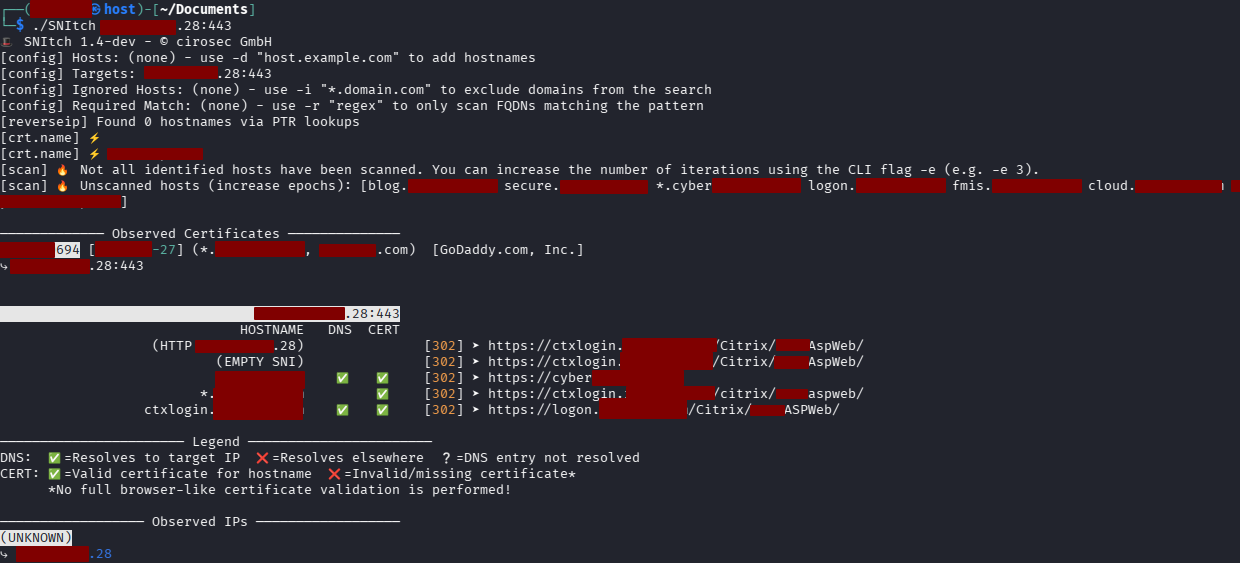
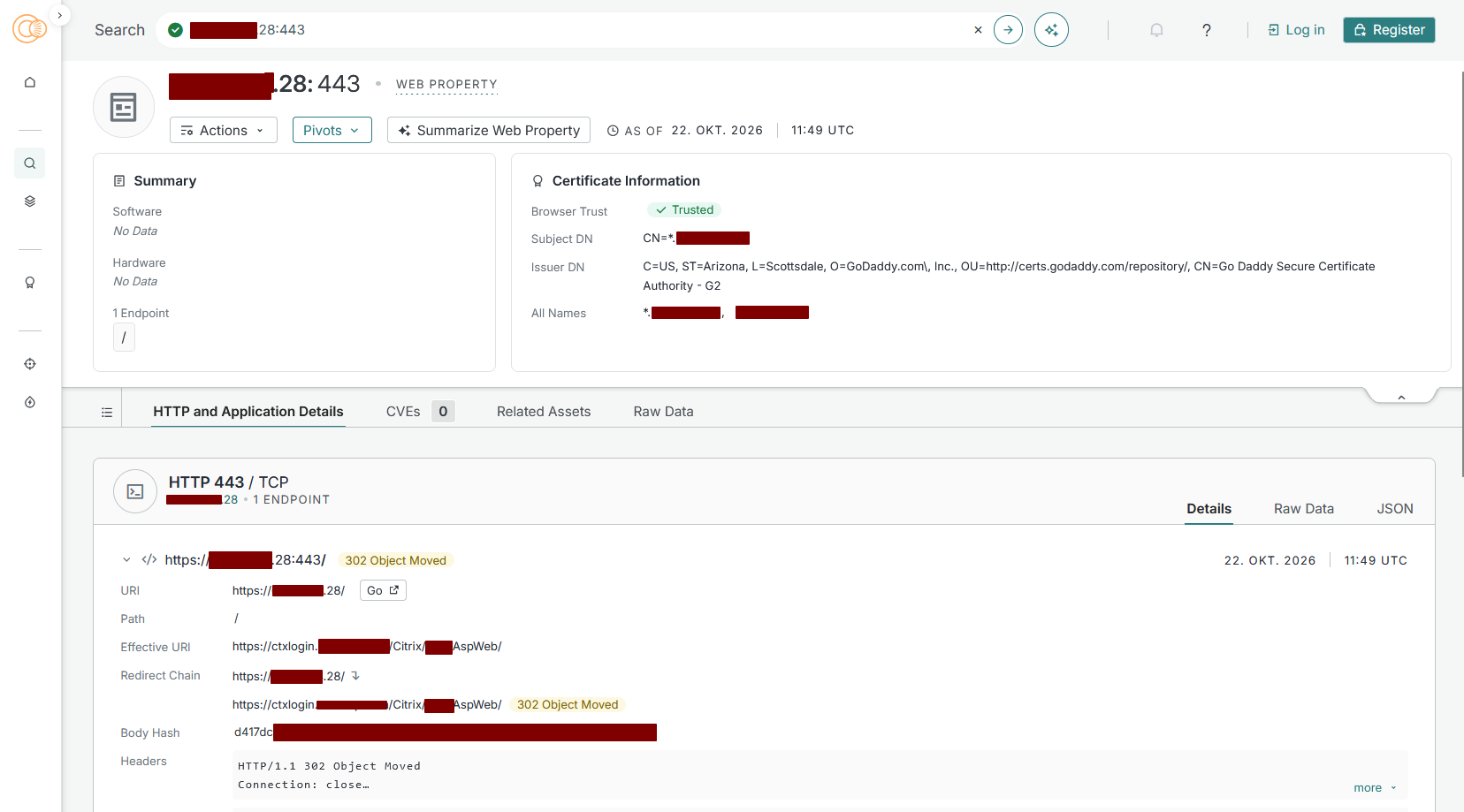
You can see how an attacker sees an unhardened Citrix NetScaler host (X.X.X.28:443) in SNItch and Censys:

Category
Date
Navigation
Figure 1: In both cases, using just the IP as input, an attacker gets a valid response from the server. Hence the attacker can clearly see that the system is a Citrix NetScaler and on what domain it is located.

We tested the behavior in our lab on NetScaler CPX 13.0-90.7 and 14.1-73.30:

Client sendsDefault NetScaler
No SNI (connect to the IP)Handshake OK, certificate served, HTTP 200
Wrong SNI (wrong.example)Handshake OK, certificate served, HTTP 200
Correct SNI, different Host headerHTTP 200

Table 1: Behavior of a default NetScaler SSL vserver

Step 0: Switch to SSL profiles

NetScaler configures SSL in one of two modes. In legacy mode, every setting lives on the vserver. In default SSL profile mode, the settings move into profiles that vservers reference, while certificate bindings and SSL policies stay on the vserver. The NetScaler documentation describes profiles as a single point of SSL configuration for all related endpoints, so we use profile mode throughout. We verified the full setup on 14.1-73.30.

The switch affects every SSL vserver and service on the appliance. Switching back can also be tricky, as there is no simple command to disable profile mode again. Back up your configuration, schedule a maintenance window and check the documentation for your release:

set ssl parameter -defaultProfile ENABLED

Until you assign a custom profile, every SSL vserver falls back to the built-in

 ns_default_ssl_profile_frontend, 

which still enables TLS 1.0/1.1 and disables TLS 1.3.

Step 1: Bind certificates as SNI certificates only

The idea, as described by Johannes Norz [6], is simple: if the vserver has no default certificate, a client without a matching SNI gets nothing. The default certificate is any certificate bound to the vserver without -SNICert. In production, that is usually your gateway certificate, such as gw-rsa and gw-ec in our lab. If someone bound the self-signed ns-server-certificate for testing, it counts as well, so unbind every non-SNI certificate, not just the ones in our example. The files are located in /nsconfig/ssl/; the vserver binding decides which one is served.

All commands in this post use placeholder values: replace gateway.example.com, X.X.X.X, vs_tls and the certificate names gw-rsa/gw-ec with your own.

Create a front-end profile with SNI enforcement, assign it to the vserver and rebind the certificates with -SNICert:

# Frontend profile: SNI on, unknown SNI refused, Host header must match the SNI
add ssl profile sslp_fe_hardened -sslProfileType FrontEnd
set ssl profile sslp_fe_hardened -SNIEnable ENABLED -allowUnknownSNI DISABLED
set ssl profile sslp_fe_hardened -SNIHTTPHostMatch STRICT
set ssl profile sslp_fe_hardened -dropReqWithNoHostHeader YES

# Vserver: reference the profile, bind certificates as SNI certificates only
set    ssl vserver vs_tls -sslProfile sslp_fe_hardened
unbind ssl vserver vs_tls -certkeyName gw-rsa
unbind ssl vserver vs_tls -certkeyName gw-ec
bind   ssl vserver vs_tls -certkeyName gw-rsa -SNICert
bind   ssl vserver vs_tls -certkeyName gw-ec  -SNICert

RSA and ECDSA certificates can be bound side by side; NetScaler picks one per negotiated cipher.

The certificate binding is the control that does the SNI magic. But be aware: in our tests, a single non-SNI certificate bound next to the SNI certificates was sufficient: clients without SNI received it and got an HTTP 200 response, regardless of –allowUnknownSNI DISABLED or –defaultSni. We still set -allowUnknownSNI DISABLED as defense in depth. Check every Internet-facing vserver with show ssl vserver vs_tls: each certificate line must read Server Certificate for SNI.

-SNIHTTPHostMatch STRICT rejects requests whose Host header differs from the SNI with HTTP 400, even for another name on the same certificate (the default, CERT, allows other SANs). -dropReqWithNoHostHeader YES rejects HTTP/1.0 requests without a Host header.

With Step 1 alone, a connection without SNI fails with TLS alert 40 (handshake_failure) and a wrong SNI with alert 112 (unrecognized_name). No certificate leaves the appliance, so the hostname stays hidden and direct connections to the IP address are refused. For most setups, that already does the job.

Side note: legacy SSL mode. Can’t switch to profile mode yet? The same protection works in legacy mode, with SNI enabled directly on the vserver. Certificate bindings and the ClientHello policy are identical, and in our tests a Host header that did not match the SNI was still rejected with HTTP 400.

set    ssl vserver vs_tls -SNIEnable ENABLED
unbind ssl vserver vs_tls -certkeyName gw-rsa
unbind ssl vserver vs_tls -certkeyName gw-ec
bind   ssl vserver vs_tls -certkeyName gw-rsa -SNICert
bind   ssl vserver vs_tls -certkeyName gw-ec  -SNICert

Once profile mode is enabled, these vserver commands are refused (“Use set ssl profile”).

Step 2: Reset everything else at the ClientHello (optional)

Step 1 hides the hostname, but the TLS alerts still tell a scanner “TLS service with SNI enforcement here”. That is a fingerprint, and automated tooling may start guessing hostnames. We can remove it.

An SSL policy evaluated at the ClientHello can answer with a plain TCP reset instead. A port scanner still sees the port as open, but no TLS handshake ever completes, so there is nothing to identify it as a NetScaler. In profile mode, SSL policies are still bound to the vserver:

add ssl policy pol_sni_reset -rule "CLIENT.SSL.CLIENT_HELLO.SNI.SET_TEXT_MODE(IGNORECASE).EQ(\"gateway.example.com\").NOT" -action RESET
bind ssl vserver vs_tls -policyName pol_sni_reset -priority 10 -type CLIENTHELLO_REQ

To allow more than one hostname, chain them with .OR(…) or use a pattern set instead of the single-host rule:

add policy patset ps_allowed_sni
bind policy patset ps_allowed_sni gateway.example.com
bind policy patset ps_allowed_sni gateway2.example.com
add ssl policy pol_sni_reset -rule "CLIENT.SSL.CLIENT_HELLO.SNI.SET_TEXT_MODE(IGNORECASE).EQUALS_ANY(\"ps_allowed_sni\").NOT" -action RESET

Each new hostname needs two changes: bind its certificate with -SNICert and add the name to the pol_sni_reset rule or pattern set. Otherwise, clients get a TCP reset. Keep Step 1 in place, too. In our lab, an IP address sent as SNI slipped past the second policy, but the SNI-only certificate binding still rejected it.

Client sendsDefaultStep 1Step 1 + 2
No SNI (connect to IP)cert + 200alert 40, no certTCP RST
Correct SNI200200200
Correct SNI, uppercase200200200
Wrong SNIcert + 200alert 112TCP RST
Subdomain (sub.gateway.example.com)cert + 200alert 112TCP RST
IP literal as SNIcert + 200alert 112alert 112
Correct SNI, other Host header200400400

Table 2: SNI test matrix, identical on CPX 13.0 and 14.1 and in profile mode on 14.1, plain numbers in cells mean HTTP status codes. Alert + <number> mean TLS errors, which in this case are good.

Putting it all together

The SNI hardening is meant as an addition to your existing TLS configuration, not a replacement for it. For protocols, ciphers and renegotiation, we recommend following Citrix’s official guide Networking SSL/TLS Best Practices [8]. That guide does not configure SNI enforcement, so add Steps 1 and 2 on top of it.

The block below combines both: TLS settings aligned with Citrix’s guide, plus the SNI hardening from this post. Replace vs_tls, gw-rsa/gw-ec and gateway.example.com with your own names:

# Global: switch to default SSL profile mode (one-way, affects all SSL vservers, see Step 0)
set ssl parameter -defaultProfile ENABLED
# Cipher group: TLS 1.3 + ECDHE/AEAD only
add ssl cipher CG_MODERN
bind ssl cipher CG_MODERN -cipherName TLS1.3-AES256-GCM-SHA384
bind ssl cipher CG_MODERN -cipherName TLS1.3-CHACHA20-POLY1305-SHA256
bind ssl cipher CG_MODERN -cipherName TLS1.3-AES128-GCM-SHA256
bind ssl cipher CG_MODERN -cipherName TLS1.2-ECDHE-ECDSA-AES256-GCM-SHA384
bind ssl cipher CG_MODERN -cipherName TLS1.2-ECDHE-RSA-AES256-GCM-SHA384
bind ssl cipher CG_MODERN -cipherName TLS1.2-ECDHE-ECDSA-CHACHA20-POLY1305
bind ssl cipher CG_MODERN -cipherName TLS1.2-ECDHE-RSA-CHACHA20-POLY1305
bind ssl cipher CG_MODERN -cipherName TLS1.2-ECDHE-ECDSA-AES128-GCM-SHA256
bind ssl cipher CG_MODERN -cipherName TLS1.2-ECDHE-RSA-AES128-GCM-SHA256

# Frontend profile: SNI enforcement (Step 1) + TLS hardening
add ssl profile sslp_fe_hardened -sslProfileType FrontEnd
set ssl profile sslp_fe_hardened -SNIEnable ENABLED
set ssl profile sslp_fe_hardened -SNIEnable ENABLED -allowUnknownSNI DISABLED
set ssl profile sslp_fe_hardened -SNIHTTPHostMatch STRICT -dropReqWithNoHostHeader YES
set ssl profile sslp_fe_hardened -ssl3 DISABLED -tls1 DISABLED -tls11 DISABLED -tls12 ENABLED -tls13 ENABLED
set ssl profile sslp_fe_hardened -denySSLReneg FRONTEND_CLIENT
set ssl profile sslp_fe_hardened -HSTS ENABLED -maxage 31536000

unbind ssl profile sslp_fe_hardened -cipherName DEFAULT

bind ssl profile sslp_fe_hardened -cipherName CG_MODERN

# Vserver: profile reference, SNI-only certificates (Step 1)
set ssl vserver vs_tls -sslProfile sslp_fe_hardened
unbind ssl vserver vs_tls -certkeyName gw-rsa
unbind ssl vserver vs_tls -certkeyName gw-ec
bind ssl vserver vs_tls -certkeyName gw-rsa -SNICert
bind ssl vserver vs_tls -certkeyName gw-ec -SNICert

# ClientHello reset for wrong or missing SNI (Step 2)

add ssl policy pol_sni_reset -rule "CLIENT.SSL.CLIENT_HELLO.SNI.SET_TEXT_MODE(IGNORECASE).EQ(\"gateway.example.com\").NOT" -action RESET
bind ssl vserver vs_tls -policyName pol_sni_reset -priority 10 -type CLIENTHELLO_REQ
save ns config

# Tested on NetScaler CPX 14.1-73.30 (NS14.1: Build 73.30.nc) and 13.1-63.19 (NS13.1: Build 63.19.nc), in default SSL profile mode.

Before saving, run show ssl vserver vs_tls: every certificate line must read Server Certificate for SNI. If other vservers share the profile, show ssl profile sslp_fe_hardened lists them.

Do a small test with your gateway: if curl https://X.X.X.X/ -v returns a TLS error or connection reset while curl https://your-citrix-jde4.example.com -v works fine, your changes were successful.

Side effects and limitations

  • Anything that connects by IP address only breaks. Health monitors, upstream load balancers, scripts and monitoring checks without SNI now fail (TLS alert, or TCP reset with Step 2). Use the proper hostname instead.
  • Switching to profile mode is global. Every vserver without a custom profile falls back to ns_default_ssl_profile_frontend. Assign profiles to all vservers, not just the gateway.
  • We tested NetScaler CPX. VPX and MPX share the SSL configuration model, but test on your own appliance first.
  • This is not a security patch. It takes you out of the opportunistic first wave. It does nothing against a targeted attacker who knows (or has looked up) your hostname.
  • DTLS (UDP/443) is not covered. We tested TLS over TCP only. CVE-2026-88772 is exploited via DTLS, which is enabled by default on gateway vservers [10], and whether SNI enforcement applies to DTLS handshakes is untested. Check it yourself or disable DTLS if you don’t need it. The hardening still helps: mass scanners mostly identify NetScaler appliances via HTTPS on TCP/443 before they fire the exploit.
  • Other listeners on the same IP address can still leak the hostname. A port-80 vserver that redirects to https://gateway.example.com/ hands out the name in its Location Other SSL vservers with a default certificate on the same IP address, or a management interface reachable from the Internet, do the same. Check every listener on that IP address, not just the gateway.

Verifying it with SNItch and Censys

SNItch [7] is our open-source tool for SNI-based host discovery and testing. It runs a fresh TLS handshake per candidate hostname, tries empty, wrong and IP-literal SNI values and reports how the server responds. That makes it a good way to check how well your NetScaler hides from attackers who don’t know its hostname.

git clone https://github.com/cirosec/SNItch.git
cd SNItch
go build -o SNItch .

Check 1: the mass scanner’s view. Scan only the NetScaler’s IP address:

SNItch -t X.X.X.X:443

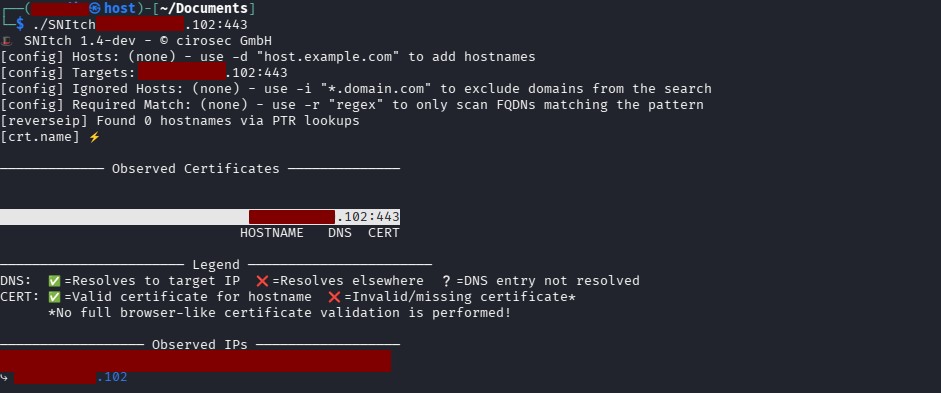
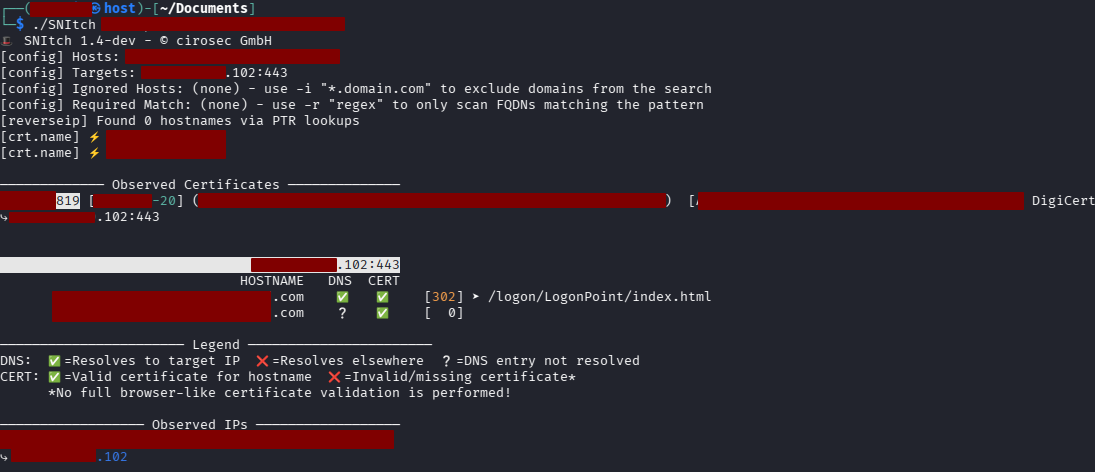
On a default NetScaler, the (EMPTY SNI) probe returns a certificate, and SNItch reads your gateway’s hostname straight from it (see Figure 1). On a hardened one, the empty-SNI and IP-as-SNI probes get nothing back: no certificate, no hostname. If SNItch still finds the hostname, it leaked through another channel, such as a PTR record, CT logs or a redirect (see the next section).

Figure 2: Properly hardened NetScaler instance that does not reveal its hostname when scanned with SNItch.

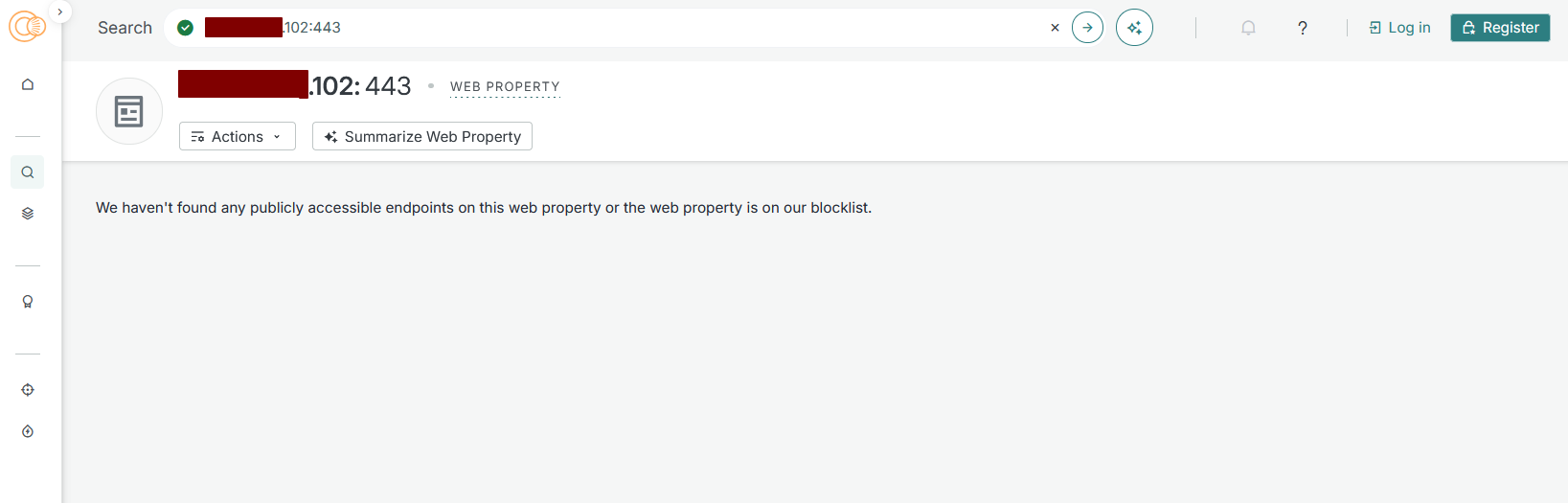
If you search for the same IP on Censys you get the following empty result on the properly hardened NetScaler system (note the .102 IP-Address again):

Figure 3: Properly hardened NetScaler on Censys.

Check 2: legitimate users still get in. Supply the real hostname as a positive control:

SNItch gateway.example.com --no-recon

The hostname should show a valid certificate and an HTTP status, typically 200, or a redirect to the login page. If it doesn’t, recheck the SNI certificate binding.

Scanning the same IP address using the hostname reveals the NetScaler, so the hardening works (see the .102 IP address as above) and users can use it as usual:

Figure 4: Using the hostname as entry point for SNItch reveals the NetScaler again

Your hostname is probably already public

SNI enforcement only helps while the attacker doesn’t know the hostname, and most gateway hostnames are far from secret. Every publicly trusted certificate is registered in the Certificate Transparency (CT) logs, which anyone can search, for example on crt.sh or, if crt.sh is down, on the subdomain index crt.name. A query on crt.sh for %.example.com returns citrix.example.com, vpn.example.com and gateway.example.com. Finding the one that resolves to a NetScaler requires a short script.

An attacker willing to invest a little more effort can build a target list from CT logs instead of scanning IP addresses. We did not see this in the September wave, but it is the obvious next step once SNI enforcement becomes common.

The countermeasure: keep the gateway’s hostname out of CT logs.

  1. Use a new, non-obvious hostname. Not , vpn., remote. or gateway., but something like gateway-k7q2.example.com. A short random suffix is enough: the bare word is on every wordlist, while the suffixed name is not. Users usually rely on bookmarks or direct links in their browser history and rarely type it out once visited.
  2. Use a wildcard certificate (*.example.com). CT then shows only the wildcard, not the hostname. Ideally, use a dedicated wildcard on a subdomain (e.g. *.r.example.com) that is located only on the NetScaler, so a compromised appliance doesn’t leak a key used elsewhere.
  3. Step 2 becomes mandatory. With a wildcard certificate, Step 1’s SNI-only binding accepts any matching subdomain. Only the exact-match ClientHello policy restricts access to the real hostname.
  4. Retire the old name. As long as example.com points to the same IP address with its old certificate, nothing is gained.

One risk remains: the hostname is still in public DNS, and passive DNS databases may pick it up over time. This raises the bar; it does not hide the gateway from a determined, targeted attacker. If the zone is signed with DNSSEC using NSEC instead of NSEC3, the hostname could also be found by walking the zone.

Setting up a new NetScaler? Then start with the stealthiest setup:

  • A dedicated zone: a subdomain of your main domain, e.g. *.gateway.example.com, or a new domain with no link to your company.
  • A wildcard certificate for that zone (*.gateway.example.com), so CT logs never show the real hostname.
  • No A record on the zone itself. Only a hard-to-guess hostname, e.g. workplace-gateway-8b4e.gateway.example.com, resolves to the NetScaler.
  • The ClientHello policy matches only that exact hostname. Everything else gets a TCP reset.

With this setup, bots, mass scanners and opportunistic attackers have very little to go on: no IP response, no hostname in CT logs, nothing to guess from the domain.

Conclusion

The 2026 NetScaler zero-days were exploited for weeks before a patch existed. In our cases, the first wave didn’t need to know its victims. It sprayed IP addresses. A NetScaler that only answers to its hostname was never on that list.

We think that the main takeaway is how cheap this protection is: about ten lines for the SNI part and a one-off change, to significantly reduce the attack surface of a NetScaler:

  1. Use SSL profile mode, enable SNI in a custom front-end profile and bind certificates only with -SNICert.
  2. Optionally, add the ClientHello reset policy (-type CLIENTHELLO_REQ, case-insensitive). With a wildcard certificate, it becomes mandatory.
  3. Verify with SNItch that an IP-address-only scan finds nothing.
  4. Move the gateway to a new, non-obvious hostname behind a wildcard certificate, so CT logs do not give it away.

It won’t stop a targeted attacker, and it doesn’t replace patching. But it can buy you the days between “exploited in the wild” and “patch available”.

References

  1. BleepingComputer: Citrix confirms two NetScaler RCE zero-days exploited in attacks
  2. SecurityWeek: Exploitation of Citrix NetScaler Zero-Day Hits Appliances Patched Days Earlier
  3. Rapid7: Zero-Day Exploitation of Citrix NetScaler ADC and Gateway
  4. GreyNoise: Swarming Against Citrix 0-Day Exploitation
  5. CrowdSec: CVE-2026-88771: Citrix NetScaler Command Injection; timeline incl. eSentire: Ongoing Exploitation of Citrix NetScaler ADC and NetScaler Gateway Vulnerabilities; GTIG and Mandiant findings: Defending Against Active Exploitation of Citrix NetScaler ADC and Gateway Appliances
  6. Johannes Norz: Blocking requests to the IP address in SSL vServers on Citrix NetScaler ADC
  7. cirosec: SNItch on GitHub and Fuzzing vhosts with SNItch
  8. Citrix Tech Zone: Networking SSL/TLS Best Practices (Q3 2026 Edition)
  9. watchTowr Labs: Oh Look, The Foot Gun Went Off Again (Citrix NetScaler PreAuth Command Injection CVE-2026-88771)
  10. watchTowr Labs: Here We Go Again (Citrix NetScaler DTLS Preauth Memory Overflow CVE-2026-88772)
  11. NetScaler security bulletin: CTX697096 (CVE-2026-88771 to CVE-2026-88778)
  12. NetScaler security bulletin: CTX697174 (CVE-2026-88779)
  13. MITRE CVE records: CVE-2026-88771, CVE-2026-88772, CVE-2026-88779

Further blog articles

Incident Response

Hiding your NetScaler from mass exploitation with SNI

October 27, 2026 – A default NetScaler answers anyone who connects to its IP and reveals its hostname in the certificate. During the CVE-2026-88771/-88772 zero-day wave, that made it an easy target for IP-based mass scans. Our new blog post shows how to enforce SNI in a few lines of config, so the next wave passes you by and you gain time until a patch arrives.

Author: Felix Friedberger

Mehr Infos »
Pentesting

Fuzzing vhosts with SNI(tch)

June 10, 2026 – Host header fuzzing stops at the HTTP layer and can’t find services hardened at the TLS handshake via SNI validation. SNItch fills that gap by fuzzing the SNI field directly – and doubles as a tool to verify your own servers don’t leak hostnames to IP-based reconnaissance.

Author: Felix Friedberger

Mehr Infos »
Forensic

A collection of Shai-Hulud 2.0 IoCs

November 26, 2025 – Regarding the Node Package Manager (npm) supply chain attack that started November 21, 2025, and affected thousands of packages, we have collected and identified corresponding hashes to make them publicly available in one single place for easier access.

Author: Niklas Vömel, Felix Friedberger

Mehr Infos »
Forensic

IOCs of the npm crypto stealer supply chain incident

September 25, 2025 – Regarding the Node Package Manager (npm) supply chain attack that started September 8, 2025, and affected 27 packages, we have collected and identified corresponding hashes to make them publicly available in one single place for easier access.

Author: Niklas Vömel

Mehr Infos »
Pentesting

TLPT: Bedroh­ungs­­­orientierte Penetra­tions­tests nach DORA

January 24, 2025 – Since January 17, 2025, the Digital Operational Resilience Act (DORA) has been put into practice. One important aspect of DORA is the requirement of regularly performing threat-led penetration tests (TLPT). Only selected entities within the financial sector are required to conduct TLPTs. Even though TLPTs sound like a new concept, they have actually existed in Germany since 2020 in form of TIBER tests. This blog post describes the concepts behind TLPTs and how they are conducted. Furthermore, alternatives for targeted and budget-oriented red team assessments are given.

Author: Michael Brügge

Mehr Infos »
Do you want to protect your systems? Feel free to get in touch with us.

A collection of Shai-Hulud 2.0 IoCs

Search

A collection of Shai-Hulud 2.0 IoCs

November 26, 2025

A collection of IoCs regarding the Shai-Hulud 2.0 npm supply chain incident

Regarding the Node Package Manager (npm) supply chain attack that started November 21, 2025, and affected over a thousands of packages, we have collected and identified corresponding hashes to make them publicly available in one single place for easier access.

To achieve the greatest possible coverage, we compared the file hashes of the package versions mentioned by Helixguard with those of the predecessor versions to identify the files containing malicious payloads. We determined the bun_environment.js and the setup_bun.js files to be the most relevant. Two different versions of the bun_environment.js file were encountered.
We have uploaded the relevant files to Malware Bazaar.

Analysis of the two different bun_environment.js files

After processing the two bun_environment.js files, we identified the following differences:
– Some single quotes were changed to double quotes and vice versa
– All variables were renamed
– The file with the hash prefix f099 contains a single line more than the other file

The additional code line of the file with the hash prefix f099 is as follows:

        let _44494 = '';
       let _44495 = '';
       return new Promise((_44496, _44497) => {
           let _44498 = Bun.spawn([this.binaryPath, ..._44492], {
               'cwd': this.config.workingDirectory,
               'stdout': "pipe",
               'stderr': "pipe"
           });
           let _44499 = setTimeout(() => {
               _44498.kill();
               _44497(Error("Trufflehog execution timed out after " + this.config.timeout + 'ms'));
           }, this.config.timeout);
           if (_44498.stdout) {
               _44498.stdout.pipeTo(new WritableStream({
                   'write'(_44500) {
                       _44494 += new TextDecoder().decode(_44500);
                   }
               }));
           }
           if (_44498.stderr) {
               _44498.stderr.pipeTo(new WritableStream({

Niklas Vömel

Consultant

Category
Date
Navigation

IoCs

SHA256 hashPackage
a3894003ad1d293ba96d77881ccd2071446dc3f65f434669b49b3da92421901aSetup_bun.js
f099c5d9ec417d4445a0328ac0ada9cde79fc37410914103ae9c609cbc0ee068bun_environment.js
62ee164b9b306250c1172583f138c9614139264f889fa99614903c12755468d0bun_environment.js

Additional resources

We used the following three resources for reference:
https://www.wiz.io/blog/shai-hulud-2-0-ongoing-supply-chain-attack
https://helixguard.ai/blog/malicious-sha1hulud-2025-11-24
https://about.gitlab.com/blog/gitlab-discovers-widespread-npm-supply-chain-attack/

Further blog articles

Forensic

Analysis of a credential stealer malware campaign – Part II

June 23, 2026 – Researchers have uncovered an evolved credential-stealing malware campaign that lures Windows users through fake software download pages appearing in Bing search results. The updated malware deploys a malicious Chrome extension disguised as “Microsoft Teams Helper,” capable of keystroke logging, real-time screen recording, cryptocurrency clipboard hijacking, and full remote code execution on the victim’s machine.

Author: Colin Glätzer, Konrad Weyhing

Mehr Infos »
AD Security

Microsoft Defender for Identity evasions in 2026 – Part II

June 17, 2026 – The first blogpost highlighted the detection capabilities and the resulting evasion options for Microsoft Defender for Identity (DfI). To complement the first part, the second part will present some alternative detection possibilities for the defensive side to improve visibility and security, as well as the upgrade from DfI version 2.2 to DfI version 3.0.

Author: Jakob Scholz

Mehr Infos »
Forensic

Analysis of a credential-stealer malware campaign – Part I

May 20, 2026 – In March 2026, cirosec identified an ongoing malware campaign targeting developers, IT professionals, and power users who rely on popular open-source and productivity tools. The campaign is only accessible using the Bing search engine. Once executed, the malware exfiltrates browser credential stores, cryptocurrency wallet data, authentication tokens, VPN and SSH configurations, and sensitive documents.

Author: Colin Glätzer, Konrad Weyhing, Felix Friedberger

Mehr Infos »
Red Teaming

Windows Instrumen­tation Call­backs – Part 4

February 10, 2026 – In this blog post we will cover ICs from a more theoretical standpoint. Mainly restrictions on unsetting them, how set ICs can be detected and how new ones can be prevented from being set. Spoiler: this is not entirely possible.

Author: Lino Facco

Mehr Infos »
Reverse Engineering

Windows Instrumen­tation Call­backs – Part 3

January 28, 2026 – In this third part of the blog series, you will learn how to inject shellcode into processes with ICs as an execution mechanism without creating any new threads for your payload and without installing a vectored exception handler.

Author: Lino Facco

Mehr Infos »
Command-and-Control

Beacon Object Files for Mythic – Part 3

December 4, 2025 – This is the third post in a series of blog posts on how we implemented support for Beacon Object Files (BOFs) into our own command and control (C2) beacon using the Mythic framework. In this final post, we will provide insights into the development of our BOF loader as implemented in our Mythic beacon. We will demonstrate how we used the experimental Mythic Forge to circumvent the dependency on Aggressor Script – a challenge that other C2 frameworks were unable to resolve this easily.

Author: Leon Schmidt

Mehr Infos »
Command-and-Control

Beacon Object Files for Mythic – Part 2

November 27, 2025 – This is the second post in a series of blog posts on how we implemented support for Beacon Object Files (BOFs) into our own command and control (C2) beacon using the Mythic framework. In this second post, we will present some concrete BOF implementations to show how they are used in the wild and how powerful they can be.

Author: Leon Schmidt

Mehr Infos »
Forensic

A collection of Shai-Hulud 2.0 IoCs

November 26, 2025 – Regarding the Node Package Manager (npm) supply chain attack that started November 21, 2025, and affected thousands of packages, we have collected and identified corresponding hashes to make them publicly available in one single place for easier access.

Author: Niklas Vömel, Felix Friedberger

Mehr Infos »
Command-and-Control

Beacon Object Files for Mythic – Part 1

November 19, 2025 – This is the first post in a series of blog posts on how we implemented support for Beacon Object Files into our own command and control (C2) beacon using the Mythic framework. In this first post, we will take a look at what Beacon Object Files are, how they work and why they are valuable to us.

Author: Leon Schmidt

Mehr Infos »
Do you want to protect your systems? Feel free to get in touch with us.

IOCs of the npm crypto stealer supply chain incident

Search

IOCs of the npm crypto stealer supply chain incident

September 25, 2025

A collection of IOCs regarding the npm crypto stealer supply chain incident

Regarding the Node Package Manager (npm) supply chain attack that started September 8, 2025, and affected 27 packages, we have collected and identified corresponding hashes to make them publicly available in one single place for easier access.

This blogpost exclusively relates to the Qix npm account compromise and the following compromise of multiple npm packets with a crypto stealer. It does explicitly not cover the more recent incident with an “npm worm” referred to as “Shai-Hulud”.

The following packages and versions were affected by the crypto stealer:

Niklas Vömel

Consultant

Category
Date
Package namePackage versionVulnerability identifier
@coveops/abi2.0.1MAL-2025-47025
@duckdb/duckdb-wasm1.29.2CVE-2025-59037
@duckdb/node-api1.3.3CVE-2025-59037
@duckdb/node-bindings1.3.3CVE-2025-59037
ansi-regex6.2.1GHSA-jvhh-2m83-6w29
ansi-styles6.2.2GHSA-p5rr-crjh-x7gr
backslash0.2.1GHSA-m2xf-jp99-f298
chalk5.6.1GHSA-2v46-p5h4-248w
chalk-template1.1.1GHSA-3jjr-pvq7-4jq5
color5.0.1GHSA-j8fv-6x8p-p766
color-convert3.1.1GHSA-ch7m-m9rf-8gvv
color-name2.0.1GHSA-m99c-cfww-cxqx
color-string2.1.1GHSA-3q87-f72r-3gm6
debug4.4.2GHSA-8mgj-vmr8-frr6
duckdb1.3.3CVE-2025-59037
error-ex1.3.3GHSA-5g7q-qh7p-jjvm
has-ansi6.0.1GHSA-jff9-gjh4-j359
is-arrayish0.3.3GHSA-hfm8-9jrf-7g9w
prebid-universal-creative1.17.3CVE-2025-59039
prebid.js10.9.2CVE-2025-59038
proto-tinker-wc0.1.87GHSA-h9m7-rmhq-pfgr
simple-swizzle0.2.3GHSA-wwpx-h6g5-c7x6
slice-ansi7.1.1GHSA-9xjj-cmqc-578p
strip-ansi7.1.1GHSA-vfjc-p7x3-q864
supports-color10.2.1GHSA-pj3j-3w3f-j752
supports-hyperlinks4.1.1GHSA-hggr-35mp-qcxg
wrap-ansi9.0.1GHSA-2rv4-jp6r-xgq7

While there are different writeups available, e.g. from Socket.dev, Aikido and Yara rules by Nextron Systems (Florian Roth), our experience shows that in most enterprise environments the easiest IoCs to hunt for are file hashes.
The few file hashes we were able to find online were spread across multiple platforms and didn’t include some of the file hashes we observed ourselves.

To achieve the greatest possible coverage, we compared the file hashes of the affected package versions with those of the predecessor versions to identify the files containing malicious payloads. After processing the files by actual relevance, we were left with the following list. We have uploaded the relevant files to Malware Bazaar.

We were unable to acquire the relevant files or their hashes of the packages color and @duckdb/duckdb-wasm.

IoCs

SHA256 hash Package
18c89177e52fa9b220d2a31d8b6cc600fc33c04ff6226d33baf2ef44abb0b958 @coveops/abi 2.0.1
cebbe1b84b450d66a10d9371273f4367a895d26be47e23b762647752e670b2a0 @coveops/abi 2.0.1
40efffba1cb3f5ca47e583f8f9a91d0684f11926b776bfbce1125d19c7b7e7d4 @duckdb/node-api 1.3.3
e54bae5d609ecfb6a9a3058bd4ac5553e672c054cca9dff50c24085ea911cf75 @duckdb/node-bindings 1.3.3
5da2e940ce5288dfe73deca2723544c19ce4e3dc8fe32880801c6675de12db0a ansi-regex 6.2.1
754722fa3fd7f8cd1ae5196656aa6d71d59e0915321f3da949652988f6920730 ansi-styles 6.2.2
30700331b6b08d5b6d8988af52a6ed20527a091b8f52d79ec1f2a8f9cea24657 backslash 0.2.1
d2b4a2ff532ff6d8f5213688324f1b69833efb13dc80d52692dae098f89371d8 chalk 5.6.1
4b2695e6ce5ecc24d1fb37e987ce844d7f5272d835913520096ab790bbdc9784 chalk-template 1.1.1
eefdc0454900e29788d29cdc919bc5eff37c7a936e49547518e3e14d31a1a4f8 color-convert 3.1.1
a6a1cd72fbdc883b69cd988b43e6ef836f3517c3f2903ce34b48517d164cd70d color-name 2.0.1
e8731a1fc574e511430b0a6dd01d28af2ec9528259f2a7d4d7a657af5b741c67 color-string 2.1.1
487eb25ee3da4b0c4a908be416bba551745eae20a9330e24c90daed0da2e42fa Debug 4.4.2
c2c292e6f8c31f83aed83de5568b2c549fee262402f425f6dc4f4d9e89d8f4f2 duckdb 1.3.3
84d70ba88af8790ef4943483aa198cae9e25f0be5ba878680856880ebd4240de duckdb 1.3.3
72035ac827454c84ce20919657fc49e0b49b19e00c2c627602bef77e28e64a13 error-ex 1.3.3
d2f01e17c87592838a207573db0cd475fbe70b7e3cc2bf8fb569444c47a64d74 has-ansi 6.0.1
161e91905f68da8aea108c6271936b732cc30668ad6177384b37025358fe2075 is-arrayish 0.3.3
731bc7673eb9f4809c8aa77499cac6c99db4e88e001ac06bdd59bd91f8111d50 prebid-universal-creative 1.17.3
2de3f3082395f9893b560f8260b09c2e43d5f875f41e7c10283f2afc079c5f41 prebid-universal-creative 1.17.3
99f72619c8c924b2696017b357af058e16d8c529d0e7f15841f017b385e577a1 prebid-universal-creative 1.17.3
3d0bfd9691dba156a71430d27b0220156af53c46fbcdb6887c0ae59e59561378 prebid-universal-creative 1.17.3
a453d224e7c31d9b40d46dde384f07317b3deae4ecdf9c62e7563c4c4b644023 prebid-universal-creative 1.17.3
a80f9d6010a8e930c7f99ec1c5141f953c018bb49d69f8073b21c0e2dbeb0eac prebid-universal-creative 1.17.3
88e8a47a09b2f25b1fde9a73b07d3e6569f4715c043fcd9ab756c3d2b67a832d prebid-universal-creative 1.17.3
63824e74362561e82443c754c17a602678d1ae098f47b3a02a410479f6c93f2a prebid-universal-creative 1.17.3
90ab5cce6a913c09f6c5265841de0779a63294b0631f93ed6b9a7246286e84c7 prebid.js 10.9.2
24840c7023e40e10257e4af39edc08947662e71c40fffc1aba2a4940c588ba7f prebid.js 10.9.2
d246ac0d3100182ed57e71437a26059b4debe43b4ab4c7efdf5aadf6cf935144 prebid.js 10.9.2
49dc8da16de89b42f9e149a964f8a4c574444a9e9ab407e221d640bf05988542 proto-tinker-wc 0.1.87
3dcacdcab1bd77924095b859a6074f79a505b2d29aa746003f73a876d04392a6 proto-tinker-wc 0.1.87
1cc9053d62745b5e4c1ef0f60947ed83576d3d203ca2a58aef9d0a20e988a134 proto-tinker-wc 0.1.87
2aaad37067814cc197efae927d81d0d98f218d9328959417f8d12764969f7d59 proto-tinker-wc 0.1.87
ee60d51f79f5bbed20976b66cd89777c6834a96c538419964b439102e678cde7 simple-swizzle 0.2.3
3a46b0cbc0e0e511f4b934bcdd31873aa99cbda46888021b1b1bf4094a7ce0d5 slice-ansi 7.1.1
587e834e3c25c8344adda2d94608759de0783230c5204d8806e1142b9128ee74 strip-ansi 7.1.1
2fb265403fcb35669fff4690a2b8aae8f359bed3b7eec9ed9a4bd1a23229d663 supports-color 10.2.1
a0691bee000dff602387c291db332954a414f86b7e1847e3852269a464b9f4c2 supports-color 10.2.1
19020c7ce1964761eab25e3d6e42f7e7bc5139dbb884dc65dd6c9760e3131419 wrap-ansi 9.0.1
06bf0057348d26021606941eee7338b85896f88eab3766312fa7605ac14d0f2b supports-hyperlinks 4.1.1

If you are interested in a deeper technical analysis or the related crypto addresses, take a look at the following blogpost by socket.dev: https://socket.dev/blog/npm-author-qix-compromised-in-major-supply-chain-attack.

Further blog articles

Blog

Loader Dev. 4 – AMSI and ETW

April 30, 2024 – In the last post, we discussed how we can get rid of any hooks placed into our process by an EDR solution. However, there are also other mechanisms provided by Windows, which could help to detect our payload. Two of these are ETW and AMSI.

Author: Kolja Grassmann

Mehr Infos »
Blog

Loader Dev. 1 – Basics

February 10, 2024 – This is the first post in a series of posts that will cover the development of a loader for evading AV and EDR solutions.

Author: Kolja Grassmann

Mehr Infos »
Do you want to protect your systems? Feel free to get in touch with us.
Search
Search