


- Command-and-Control
Beacon Object Files for Mythic – Part 3
Dezember 4, 2025
This is the third post in a series of blog posts on how we implemented support for Beacon Object Files (BOFs) into our own command and control (C2) beacon using the Mythic framework. In this final post, we will provide insights into the development of our BOF loader as implemented in our Mythic beacon. We will demonstrate how we used the experimental Mythic Forge to circumvent the dependency on Aggressor Script – a challenge that other C2 frameworks were unable to resolve this easily.
The blog post series accompanies the master’s thesis “Enhancing Command & Control Capabilities: Integrating Cobalt Strike’s Plugin System into a Mythic-based Beacon Developed at cirosec” by Leon Schmidt and the related source code release of our BOF loader.
Goals of our BOF runtime
As mentioned in the first part of this blog post series, several BOF loader implementations already exist. The best known is probably the COFF loader from TrustedSec (despite its name, the loader is fully able to run Cobalt Strike BOFs).
However, this loader was not usable for us for various reasons. Our own Mythic beacon has the peculiarity that it is built entirely as shellcode, which brought several disadvantages with it:
- The C standard library cannot be used (just like it is in BOFs and for the same reason: the linking step is missing in shellcode projects as well).
- The Windows APIs can only be accessed indirectly – a simple #include <Windows.h> and direct calls to the functions are not possible.
- Simple use of the process heap is not possible – memory always must be reserved and managed manually.
The COFF loader is based on all three of these features. Our task is therefore to build a loader that also complies with these restrictions. This will allow us to use it in our Mythic beacon. At the same time, we also increase compatibility with other projects in the offensive security field, which are often subject to the same restrictions. This means that we must observe the following:
- No functions from the C standard library may be used unless the compiler (in our case clang-cl) provides intrinsics for them.
- The use of Windows APIs should be kept to a minimum. If they are required for a specific task, they must be passed as function pointers by the caller of the loader. This means that the caller is responsible for determining how to resolve the functions.
- Memory management functions must also be passed by the caller. This allows the caller to define the memory management mechanics itself. The loader will not be able to function completely without memory allocations.
- The Beacon API functions should also be implemented and passed by the caller, as their implementation sometimes includes system-specific features. It cannot be verified that the caller supports these.
- The parameters for the BOF must be passed in the form of the size-prefixed binary blob, exactly as Cobalt Strike does. This ensures that the Data Parser API can correctly work with it. The binary blob must be created by the caller.
In the following sections, we describe how we achieved these goals. We have published our BOF loader at https://github.com/cirosec/bof-loader. It is therefore a good idea to look for the relevant code sections there to accompany this blog post. The included “TestMain” project implements the BOF loader exemplary, while the “BOFLoader” project includes, well, the BOF loader.
Implementation of our BOF loader
Preventing the usage of the standard library and Windows API
First, we need to get rid of some standard library calls and look for alternatives, especially those for string manipulation and memory management. memcpy and memset can be easily reimplemented manually (see BOFLoader/Memory.cpp). However, we need some help with allocation and deallocation: Here we use VirtualAlloc and HeapAlloc as well as VirtualFree and HeapFree from the Windows API. For HeapAlloc and HeapFree, we also need GetProcessHeap. These five functions can therefore be added to the list of functions that must be passed by the caller.
Regarding string manipulation, we can implement the functions strlen, strncmp, strncpy, strtok_r and strtol ourselves (see BOFLoader/StringManipulation.cpp). The string tokenizer strtok_r, which may be somewhat unusual in this list, is needed for the implementation of Dynamic Function Resolution (DFR) to split the string at the $ character (see the first blog post on this topic). The rest of the functions are needed from time to time, e.g., to process section or symbol names.
That almost checks off the first item from our requirements list. We still need the four Windows API functions that are linked to the BOF by default because our loader needs to know them too: LoadLibraryA, GetModuleHandleA, GetProcAddress and FreeLibrary. We’ll now define function types for all of these functions so that the caller knows which function signatures to comply with. We also want to leave it up to the caller to decide how DFR should resolve functions. To do this, we additionally define the function type ResolveFunc_t, which takes the library name and function name as parameters of type const char* and should return the function pointer as void*.
We call all these functions external functions, for which we define a struct that is used to hold the pointers to them. The definitions for them look like this:
#include "wintypes.h" // for Windows types (e.g. HANDLE, LPVOID, etc.)

typedef LPVOID(__stdcall* VirtualAlloc_t)(LPVOID lpAddress, SIZE_T dwSize, DWORD flAllocationType, DWORD flProtect);
typedef BOOL(__stdcall* VirtualFree_t)(LPVOID lpAddress, SIZE_T dwSize, DWORD dwFreeType);
typedef LPVOID(__stdcall* HeapAlloc_t)(HANDLE hHeap, DWORD wFlags, SIZE_T dwBytes);
typedef BOOL(__stdcall* HeapFree_t)(HANDLE hHeap, DWORD dwFlags, LPVOID lpMem);
typedef HANDLE(__stdcall* GetProcessHeap_t)();

// These functions are the ones that are injected to a BOF by default
typedef HMODULE(*LoadLibraryA_t)(LPCSTR lpLibFilename);
typedef HMODULE(*GetModuleHandleA_t)(LPCSTR lpModuleName);
typedef FARPROC(*GetProcAddress_t)(HMODULE hModule, LPCSTR lpProcName);
typedef BOOL(*FreeLibrary_t)(HMODULE hLibModule);

// DFR resolve function
typedef void*(*ResolveFunc_t)(const char* lib, const char* func);

typedef struct external_functions {
    VirtualAlloc_t VirtualAlloc;
    VirtualFree_t VirtualFree;
    HeapAlloc_t HeapAlloc;
    HeapFree_t HeapFree;
    GetProcessHeap_t GetProcessHeap;
    LoadLibraryA_t LoadLibraryA;
    GetModuleHandleA_t GetModuleHandleA;
    GetProcAddress_t GetProcAddress;
    FreeLibrary_t FreeLibrary;
    ResolveFunc_t ResolveFunc;
} external_functions_t, * external_functions_ptr_t;

Passing the Beacon API functions
We must do the same with the Beacon APIs. They also have to be implemented by the caller. In addition to the frequently used Data Parser, Format and Output APIs, we have also implemented the Token and Utility APIs, as their implementations are relatively simple. Then we define the function types and the struct to hold them again. We call those functions the Cobalt Strike Compatibility Functions (cs_compat_functions).
#include "wintypes.h" // for Windows types (e.g. HANDLE, LPVOID, etc.) |
This means, we have already fulfilled four out of five of the requirements. We still need to package all this in a format that is suitable for the caller: the public API for the BOF loader.
Definition of the public API
The public API should typically consist of a single public function: RunBOF. This function requires the following information:
- Pointer to the struct containing the external functions (required by the loader itself and for linking them into the BOF)
- Pointer to the struct containing the Beacon API functions (only for linking them into the BOF)
- The name of the entry point function in the BOF (by convention go, similar to main in executable programs)
- The BOF itself as well as its size
- The binary blob with the parameters for the BOF as well as its size
This results in the following function signature:
int RunBOF( |
Because it makes things easier, we will add a second function, UnhexlifyArgs, which converts the parameter Binary Blob from a string into raw bytes. The string is either generated by Mythic or can be generated manually using TrustedSec’s beacon_generate.py script. The signature of UnhexlifyArgs then looks like this:
unsigned char* UnhexlifyArgs( |
UnhexlifyArgs also requires the external functions, e.g., for strlen and HeapAlloc.
This means that we have fulfilled all requirements and received all necessary functions from the caller. All that is missing now is the actual implementation of the linking process and DFR.
Doing all the heavy linking and DFR
We have already discussed the theory of how linking must take place in the first part of this blog post series. There is not much magic going to happen here. That is why we will take a high-level look at what the BOF loader does.
First, we read the BOF’s file header. Then we allocate an array sectionMapping, which later tracks the contents of each section and performs the relocations in there. In preparation, we iterate over all section headers, count the number of necessary relocations and copy the section data into the sectionMapping. We then iterate over the sections a second time, but now to actually perform the relocations. For each relocation entry, we determine whether the symbol in question is an internal or external symbol. This is important here for two reasons: First, different relocation types are used for different symbol types. To avoid having to implement all of them (some of which have even been deprecated for decades and are no longer used), we make this distinction here. Second, we have to resolve external symbols ourselves in order to place DFR functions or the Beacon APIs there.
In two large if / else if control structures (one for internal and external symbols), we check the corresponding requested relocation type. For internal symbols, the BOF loader supports these relocation types:
- IMAGE_REL_AMD64_ADDR64
- IMAGE_REL_AMD64_ADDR32NB
- IMAGE_REL_AMD64_REL32
- IMAGE_REL_AMD64_REL32_1
- IMAGE_REL_AMD64_REL32_2
- IMAGE_REL_AMD64_REL32_3
- IMAGE_REL_AMD64_REL32_4
- IMAGE_REL_AMD64_REL32_5
- IMAGE_REL_I386_DIR32
- IMAGE_REL_I386_REL32
The following relocation types are supported for external symbols:
- IMAGE_REL_AMD64_ADDR64
- IMAGE_REL_AMD64_REL32 (this is the type used for function relocations)
- IMAGE_REL_AMD64_ADDR32NB
- IMAGE_REL_I386_DIR32
- IMAGE_REL_I386_DIR32
- IMAGE_REL_I386_REL32
However, before we relocate the external symbol we are currently processing, we first need to find the relocation target of the symbol, i.e., one of the corresponding function pointers that was provided to the loader by the caller. To do this, we use the helper function process_symbol. It receives the raw symbol name and first removes the platform-dependent prefix (__imp__ or __imp_). It then checks whether the remainder of the name references a Beacon API function or one of the four given reloading functions. If that’s the case, the function pointer is known (as it was provided by the caller) and can be returned from the process_symbol function directly. If not, we can be almost certain that it is a DFR symbol. Hence, we use the self-implemented string tokenizer to split the symbol string at the $ character and pass the parts (library and function name) to the ResolvFunc, also provided by the caller. We then (hopefully) receive our function pointer from it, which we can use for relocation. After the process_symbol function returned, we can use the resulting address and perform the relocation according to the wanted relocation type.
We now repeat this process for each section and each relocation within this section. A single error in this process stops the BOF from being invoked, as a single byte too far or too short in a relocation offset will eventually cause the BOF to crash anyway. Due to the lack of the fork-and-run principle, this also means that our beacon would crash, as the BOF runs within the same execution path.
Now all that’s left is to implement the server-side component in Mythic.
Adding the server-side Mythic implementation
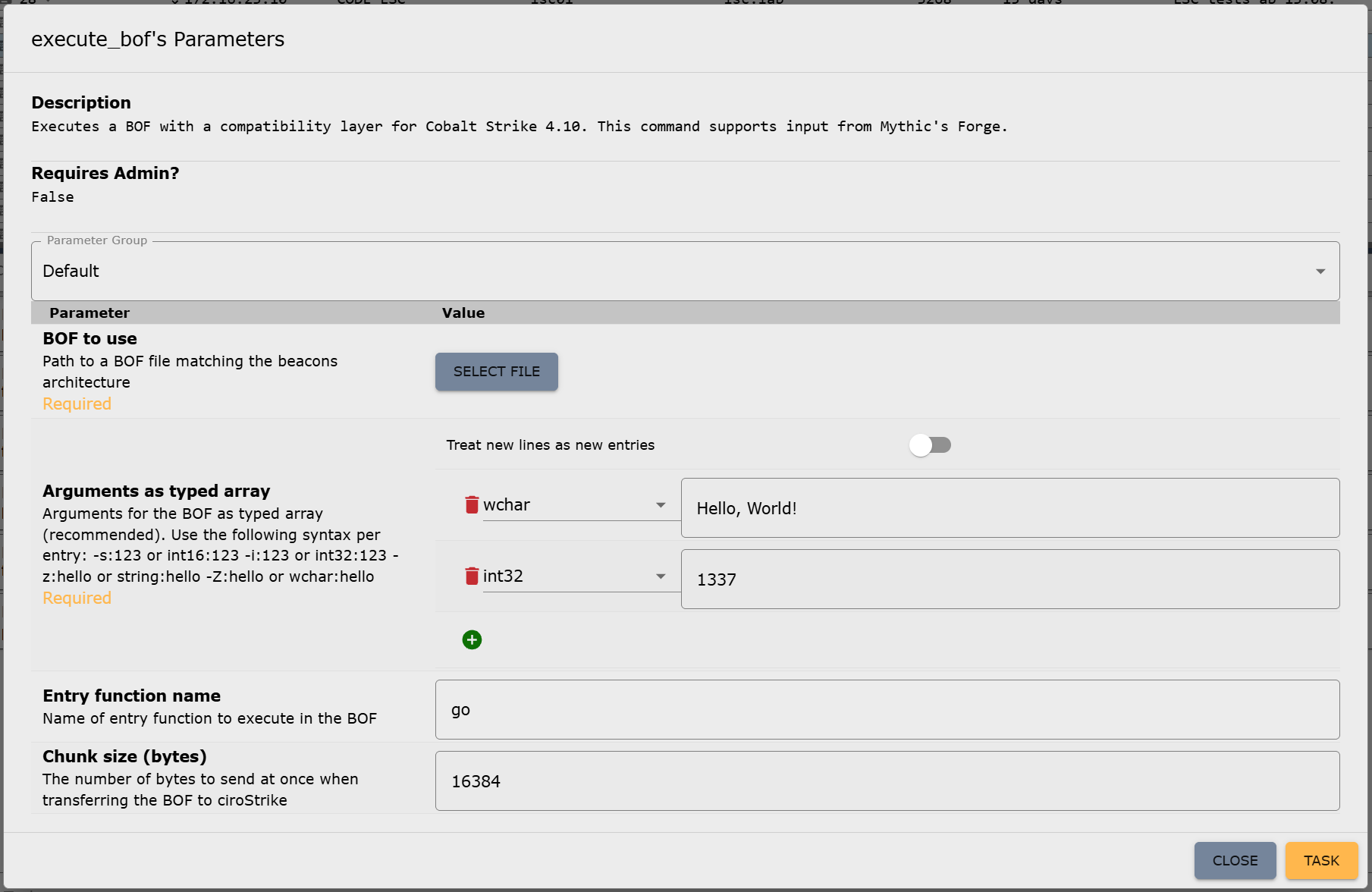
We cannot publish the server-side implementation because it is too closely linked to our beacon. However, it is not really difficult to do it yourself. To use the BOF loader in the beacon, you only need to assign a new command in the Mythic payload container, which is then used to call the loader, e.g., execute_bof. This command only requires a file parameter for the BOF itself and a parameter of type “typed array,” which is used for parameterizing the BOF. We will explain why this typed array is important in more detail shortly. Optionally, the name of the entry point function (if different from go) and a chunk size for the transfer of the BOF file can be specified as parameters for the execute_bof command. You can read more about how to add new commands in Mythic, but if you have your own beacon, you should already be familiar with this: https://docs.mythic-c2.net/customizing/payload-type-development/adding-commands/commands
Depending on the setup, the translator may need to be adjusted to support Mythic’s typed array type, as it is still quite new. But otherwise, the Mythic implementation is now complete. This is what the parameter UI for the new command in Mythic looks like:
Bonus: Achieving compatibility with Mythic’s Forge
The beacon and Mythic are now able to handle BOFs. However, there is still one thing missing, which other C2 frameworks were unable to resolve yet, preventing the use of certain BOFs: circumventing Aggressor Script.
On February 5, 2025, Cody Thomas (@its_a_feature_), the developer behind Mythic, announced a new plug-in called Forge. At first glance, it was described as a way to “standardize BOF/.NET execution within Mythic Agents.” But on closer inspection, Forge isn’t a universal runtime, really. Instead, it serves two key purposes: abstraction and library management.
Forge provides an operator interface for running BOFs and .NET assemblies. It doesn’t execute them directly but translates Mythic input into the correct invocation commands for each supported beacon (which would be execute_bof in our case). This means that each beacon must still provide its own BOF runtime, but Forge takes care of calling conventions through Mythic’s new “Command Augmentation” feature, which was introduced in version 3.3. Out of the box, Forge supports the official beacons Apollo and Athena.
Forge also integrates with tool collections like the Sliver Armory for BOFs and SharpCollection for .NET assemblies. These are indexes that provide direct download URLs to the payloads. Since we do not need .NET execution for now, we’re going to ignore the SharpCollection. Forge works perfectly fine with just BOFs.
The Sliver Armory is used as a package index for BOFs used in the Sliver C2 framework. Forge is now making it available to use for Mythic as well. For operators, this means easy access to a curated, pre-adapted BOF index. Additionally, the BOFs in this index are adjusted to remove the Aggressor Script dependency as well as possible! This means, no more hunting down scripts, patching Aggressor Script dependencies or manually compiling the BOFs. You just have a list of everything that is available and usable with Mythic, well, within Mythic:
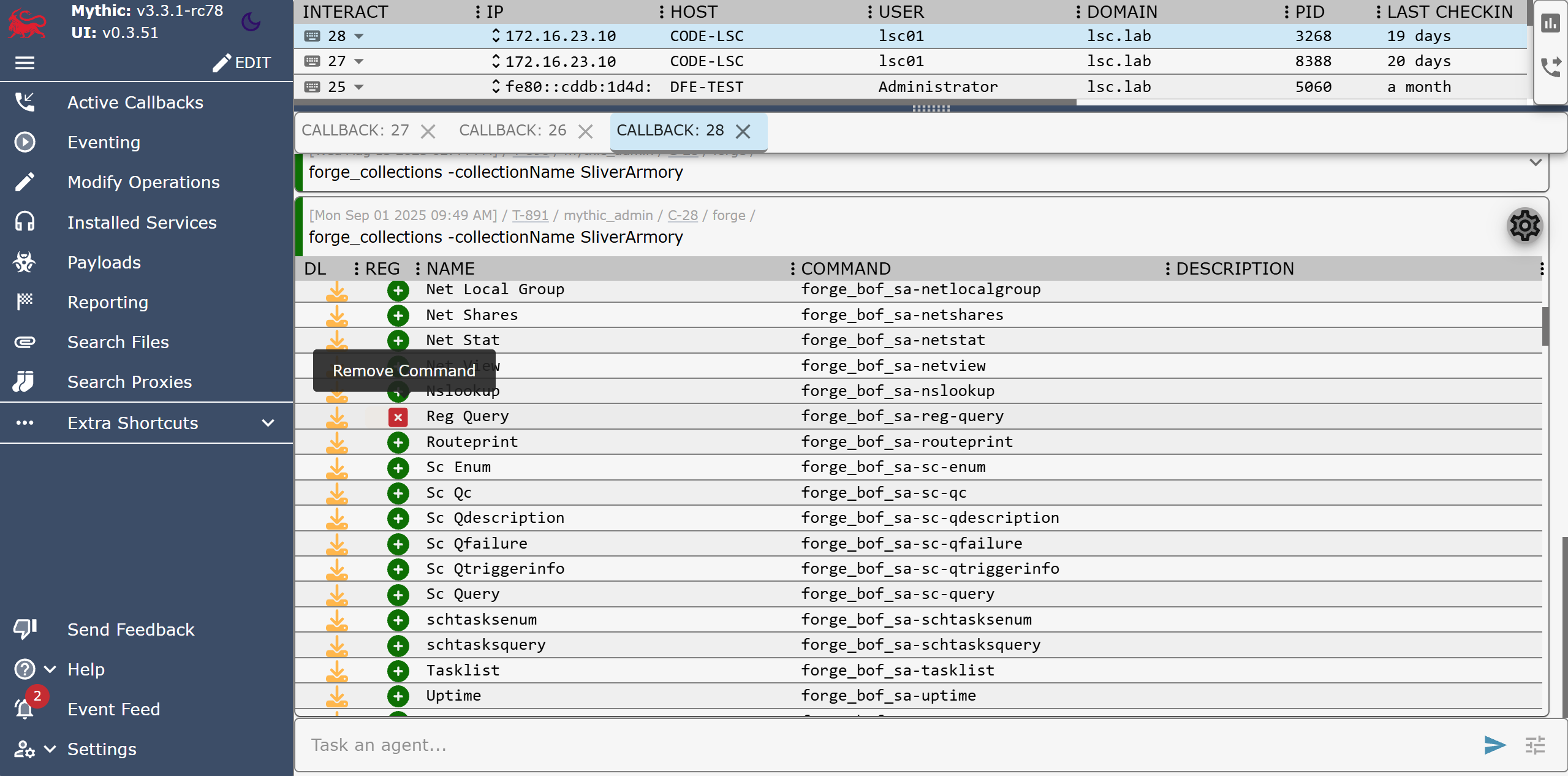
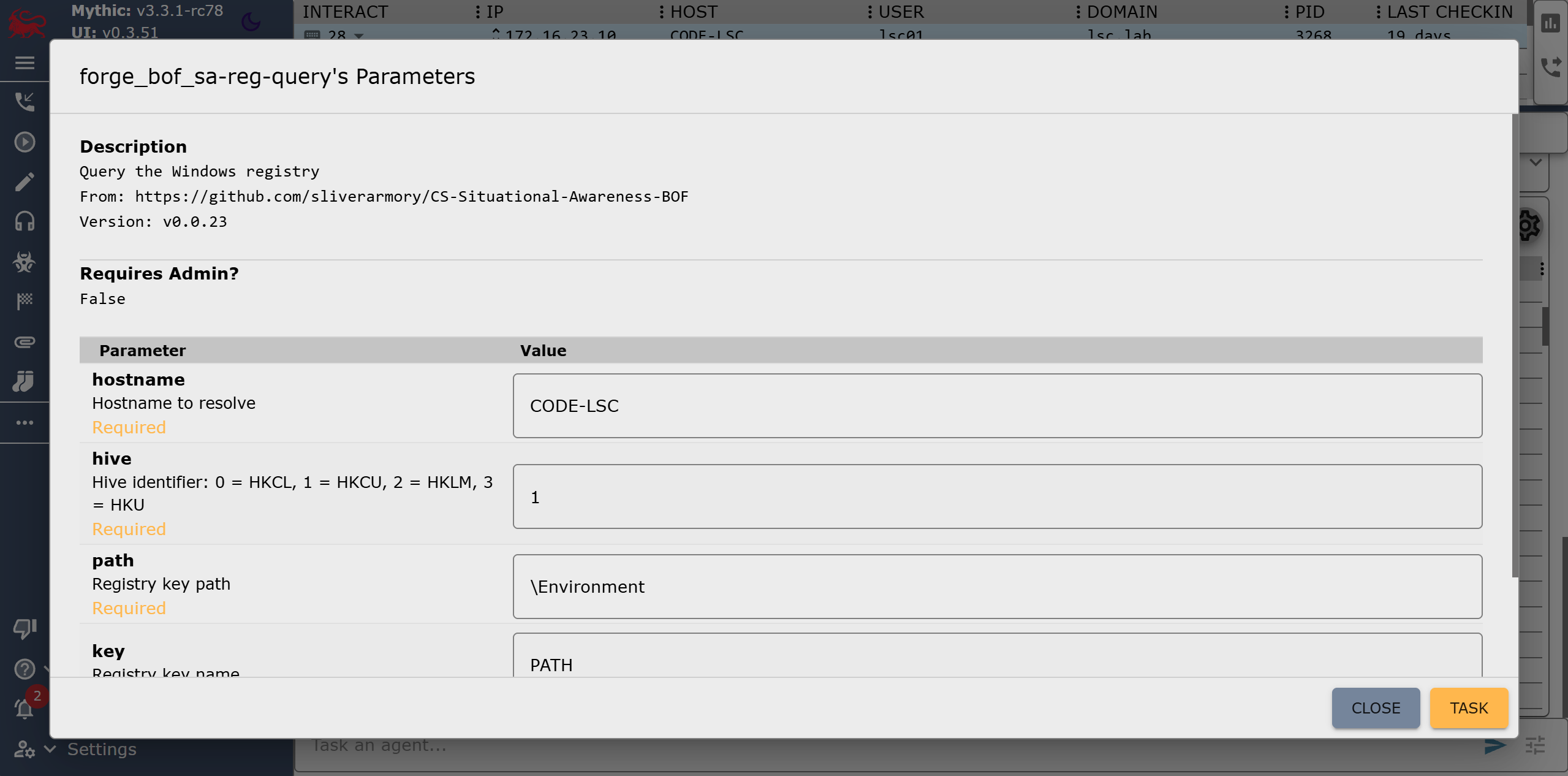
After registering a BOF in Forge, it becomes available as a new callback command, e.g. forge_bof_sa-reg-query for the Reg Query BOF from the Situational Awareness collection. Metadata is also provided for each BOF, such as which parameters the BOF requires. With manual execution, you would have to find the required parameters out and also encode them yourself. This is prone to errors: Incorrect parameter passing can lead to a crash in the implementation of the Data Parser Beacon API and thus also to a crash of the beacon.
Forge displays these BOF parameters directly in Mythic, as it does for built-in commands, within the parameter UI:
In practice, Forge eliminates a lot of steps:
- Searching external sources for (working) BOFs
- Modifying them to run without Aggressor Script
- Compiling and uploading them to the Mythic server manually
- Encoding parameters by hand
In order to make our own beacon compatible with Mythic alongside Athena and Apollo, only a single file in Forge needs to be modified: the payload_type_support.json. It contains the configuration of Forge’s abstraction layer for each payload type (aka beacon). All that needs to be done is specify the target commands for invoking the BOF loader as well as some of the parameters for it that are then populated by Forge. This includes the names of the file parameter, the entry point parameter (this is also abstracted by the BOF metadata stored in the corresponding index) and the parameter in which the BOF arguments are passed. We will leave the fields for .NET execution blank for now, as we do not want to use this feature:
[ |
All parameters must, of course, be configured so that they can accept data populated by Forge: The file parameter must be of type “file,” the entry point is passed as a “string” and the BOF arguments as a “typed array” as we have mentioned above. The parameters for the Reg Query BOF shown in Figure 7 would then be passed as follows:
[ |
Here, the five parameters “hostname”, “hive”, “path”, “key” and “recursive” are specified in order. This format is specific to Mythic and Forge, but the type constants come from Cobalt Strike. In this case, “z” stands for “string” (while a capital “Z” would mean a wide string) and “i” is a 4-byte integer. The constants can be found in the Cobalt Strike documentation and must be understood by our BOF loader command for Forge to properly work. But since we have already implemented this, we are done here!
Now that Forge knows about our beacon configuration, we need to rebuild the Forge container, and we can start registering BOFs for our beacon. Since the commands and registrations only exist on the server side, they are also globally available for all callbacks without us having to touch the already deployed beacons.
Summing up – What now?
The characteristics of BOFs makes red team operations much easier. The defending/attacked side in turn has a much harder time: Even if they have found and reverse-engineered one of our beacons, they cannot determine what it is capable of due to the BOFs not being included within it. We now have the ability to introduce arbitrary code into each and every environment in which our beacon runs at every time we want.
We are currently in the process of building our own BOF index based on Forge. This will enable us to achieve even greater runtime stability and allows our malware developers to contribute their own BOF implementations, which we can use directly in our red teaming operations. The possibilities are endless from now on. We have also fed back the changes we made to Forge upstream and hope to see further developments in this area.
Further blog articles

Loader Dev. 4 – AMSI and ETW
April 30, 2024 – In the last post, we discussed how we can get rid of any hooks placed into our process by an EDR solution. However, there are also other mechanisms provided by Windows, which could help to detect our payload. Two of these are ETW and AMSI.
Author: Kolja Grassmann

Loader Dev. 3 – Evading userspace hooks
April 10, 2024 – In this post, we will go over techniques to avoid hooks placed into memory by an EDR.
Author: Kolja Grassmann

Loader Dev. 2 – Dynamically resolving functions
March 10, 2024 – In this post, we discuss dynamically resolving functions, which help to avoid static detections based on the functions imported by our executable.
Author: Kolja Grassmann

Loader Dev. 1 – Basics
February 10, 2024 – This is the first post in a series of posts that will cover the development of a loader for evading AV and EDR solutions.
Author: Kolja Grassmann